Page 2 of 2
Re: new airQualitySensor block ( updated airQualityEcowitt )
Posted: Wed Mar 30, 2022 2:36 pm
by davidefa
Ok, I thought that it was only a question of meteobridge configuration.
If it is not possible to do it via meteobridge you can do it via this small mod of api.php ( expand it in the main directory of meteotemplate ).
I have only added line 113-115 to rename sensors pp0-pp2 to pp1-pp3 ( not tested, but it should work )
Re: new airQualitySensor block ( updated airQualityEcowitt )
Posted: Wed Mar 30, 2022 10:30 pm
by mchd17
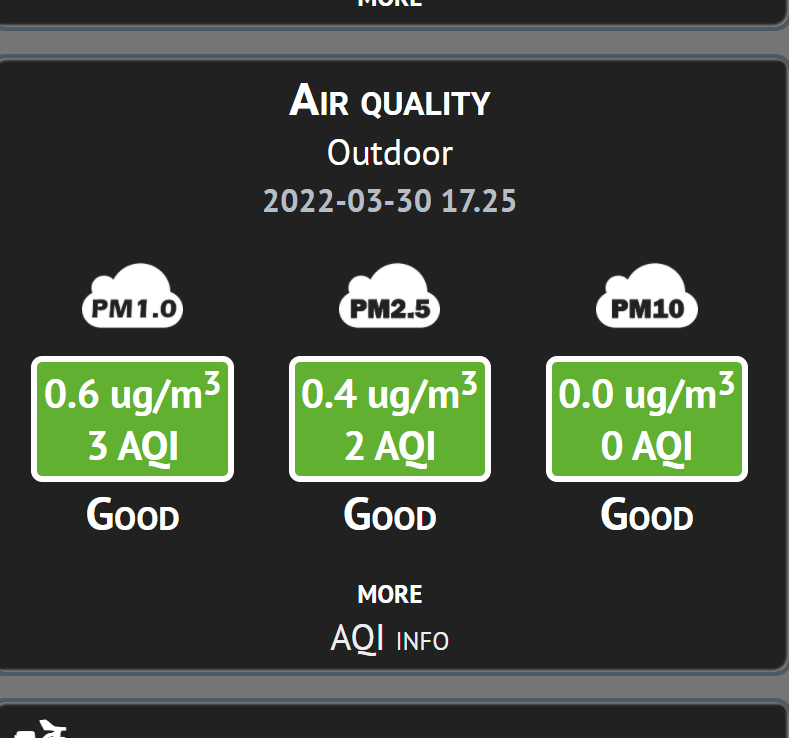
davidefa, your api.php mod seems to work well. Thanks!
- airquality.png (40.25 KiB) Viewed 68169 times
Any way to change date format for this block? into this MM/DD/YY and time format to AM/Pm. Could even be on two different lines within block.
Re: new airQualitySensor block ( updated airQualityEcowitt )
Posted: Wed Mar 30, 2022 10:31 pm
by mchd17

oh my, my images are HUGE!
Re: new airQualitySensor block ( updated airQualityEcowitt )
Posted: Thu Mar 31, 2022 9:22 am
by meteoesine
Is it possible to have a similar version also for purpleair?
Re: new airQualitySensor block ( updated airQualityEcowitt )
Posted: Thu Mar 31, 2022 9:32 am
by davidefa
meteoesine wrote: ↑Thu Mar 31, 2022 9:22 am
Is it possible to have a similar version also for purpleair?
What do you mean?
This block shows the air quality data retrieved from the meteotemplate database.
Do you mean retrieving ( and displaying ) data directly from purple air ( without passing through meteotemplate database )?
Re: new airQualitySensor block ( updated airQualityEcowitt )
Posted: Thu Mar 31, 2022 9:34 am
by davidefa
mchd17 wrote: ↑Wed Mar 30, 2022 10:31 pm
:lol: :lol: oh my, my images are HUGE!
I'd say a little bit 'intimidating'
Re: new airQualitySensor block ( updated airQualityEcowitt )
Posted: Thu Mar 31, 2022 9:42 am
by davidefa
ver 1.3
- date and time shown using dateTimeFormat defined in main setup
P.S.
If this is not ok I can add an option to specify date and time only for the block
Re: new airQualitySensor block ( updated airQualityEcowitt )
Posted: Thu Mar 31, 2022 10:53 am
by mchd17
meteoesine wrote: ↑Thu Mar 31, 2022 9:22 am
Is it possible to have a similar version also for purpleair?
I do believe there is a purple air block already available, if that's what you are looking for
Re: new airQualitySensor block ( updated airQualityEcowitt )
Posted: Thu Mar 31, 2022 11:09 am
by mchd17
davidefa wrote: ↑Thu Mar 31, 2022 9:42 am
ver 1.3
- date and time shown using dateTimeFormat defined in main setup
P.S.
If this is not ok I can add an option to specify date and time only for the block
works well, thanks
Re: new airQualitySensor block ( updated airQualityEcowitt )
Posted: Thu Mar 31, 2022 9:06 pm
by meteoesine
davidefa wrote: ↑Thu Mar 31, 2022 9:32 am
meteoesine wrote: ↑Thu Mar 31, 2022 9:22 am
Is it possible to have a similar version also for purpleair?
What do you mean?
This block shows the air quality data retrieved from the meteotemplate database.
Do you mean retrieving ( and displaying ) data directly from purple air ( without passing through meteotemplate database )?
Ciao Davide, ricevere i dati direttamente dal dispositivo purpleAir sarebbe perfetto, utilizzando il Json code, o meglio la nuova api key personale che da poco hanno introdotto (che a breve andrà a sostituire il codice json).
Utilizzo meteobridge tramite lo scatolino TL-MR3020 e non avendo il nano non riesco a prendere i dati dal purpleair.
Re: new airQualitySensor block ( updated airQualityEcowitt )
Posted: Fri Apr 01, 2022 11:55 am
by Gerrit
Good day to you,
I have just seen the file, there are now 3 sensors, only it seems that 1 and 3 have been swapped, PM 1 should show a lower value and PM 10 a higher one, it is the other way round.
Gerrit
Re: new airQualitySensor block ( updated airQualityEcowitt )
Posted: Fri Apr 01, 2022 12:00 pm
by mchd17
Gerrit wrote: ↑Fri Apr 01, 2022 11:55 am
I have just seen the file, there are now 3 sensors, only it seems that 1 and 3 have been swapped, PM 1 should show a lower value and PM 10 a higher one, it is the other way round.
You can assign PM1.0 PM2.5 PM10 0 with the air quality block settings.
I had to switch PP3 and PP1.
Re: new airQualitySensor block ( updated airQualityEcowitt )
Posted: Fri Apr 01, 2022 12:14 pm
by Gerrit
Good day,
That was not a smart move on my part
It works fine now
Re: new airQualitySensor block ( updated airQualityEcowitt )
Posted: Thu May 12, 2022 9:44 pm
by alexvanuxem
just bought 2 airlinks for outdoor and indoor.
as above I use MB, so PP3=PM1, PP2=PM2.5, PP1=PM10.
using the airsensor block 1.3, and api mod.
works fine,
But how to add the indoor air quality?
And in the combined graph, can the titels of particulate pollution be changed to PM1,2.5 and 10.
I guess in our situation it's best to change the titels ourselves?
Re: new airQualitySensor block ( updated airQualityEcowitt )
Posted: Sat May 14, 2022 10:25 pm
by mchd17
you use meteobridge?
MIght have to create your own http call, see this post
https://www.wxforum.net/index.php?topic=40447.0
Re: new airQualitySensor block ( updated airQualityEcowitt )
Posted: Sun May 15, 2022 9:10 pm
by alexvanuxem
mmm, tried to change the mapping, when i choose air2, and map it to a certain pm, it overwrites the air1.
tried to update the api.php to get more sensors in, doesn't work either...
did not try the http call, i got my mt as good as it is now, not happy to start over again...
must be way, but for now I don't know how.
Re: new airQualitySensor block ( updated airQualityEcowitt )
Posted: Sun May 15, 2022 11:09 pm
by mchd17
to get more sensors in, you will have to create the http call in meteobridge, services, new, http request, periodical, and not use the mt api from the weather networks. I do believe you'll have to create a cron job as well, not sure
example from the post i shared
http://YOUR-SITE/yourpath-to-the-templa ... api.php?U=[epoch.1:]&T=[th0temp-lastval.1:]&TMX=[th0temp-max5:]&TMN=[th0temp-min5:]&H=[th0hum-lastval.1:]&P=[thb0seapress-lastval:1]&W=[wind0avgwind-lastval=kmh:1]&G=[wind0wind-lastval=kmh:1]&B=[wind0dir-lastval:1]&R=[rain0total-daysum:--]&RR=[rain0rate-lastval:1]&S=[sol0rad-lastval:2]&UV=[uv0index-lastval:1]&TIN=[thb0temp-lastval.1:]&HIN=[thb0hum-lastval.1:]&T1=[th1temp-lastval.1:]&H1=[th1hum-lastval.1:]&SM1=[th20hum-lastval.0:]&SM2=[th21hum-lastval.0:]&SM3=[th22hum-lastval.0:]&SM4=[th23hum-lastval.0:]&SM5=[th24hum-lastval.0:]&L=[lgt0energy-lastval.0:]&PP1=[air0pm-lastval:2]&PP2=[air1pm-lastval:2]&PASS=yourpassword
That would have to be edited by you to customize to your sensors. It's within the Services tab of meteobridge. You would have to customize the db of mt. I am no professional of mb and have not tried this, but others have with success. You should go to meteobridge wiki and read up on the templates. Setup a test site mt and create you http call to go to test site. You should be able to get sensors working there, then move to main site. If i get time, i might be able to try as well.
Re: new airQualitySensor block ( updated airQualityEcowitt )
Posted: Thu Jul 14, 2022 6:27 pm
by davidefa
v1.4
- added luftdaten support ( retrieves pp data directly from luftdaten.info )
- added davis airlink support ( retrieves pp data directly from weatherlink.com )
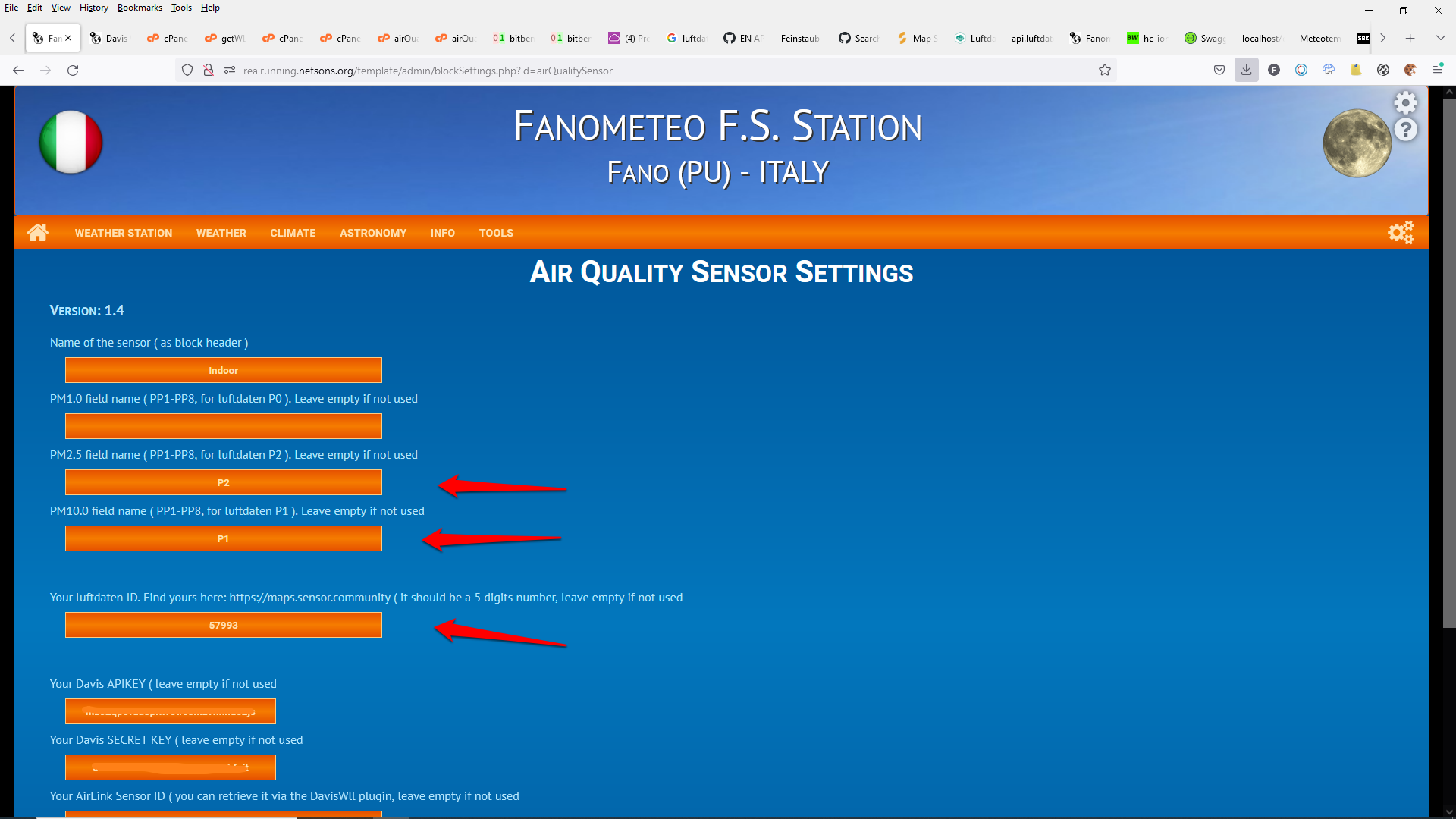
luftdaten configuration:
- add your lufdaten sensor Id
- in PM1.0 field write P0 ( if available )
- in PM2.5 field write P2 ( if available )
- in PM10.0 field write P1 ( if available )
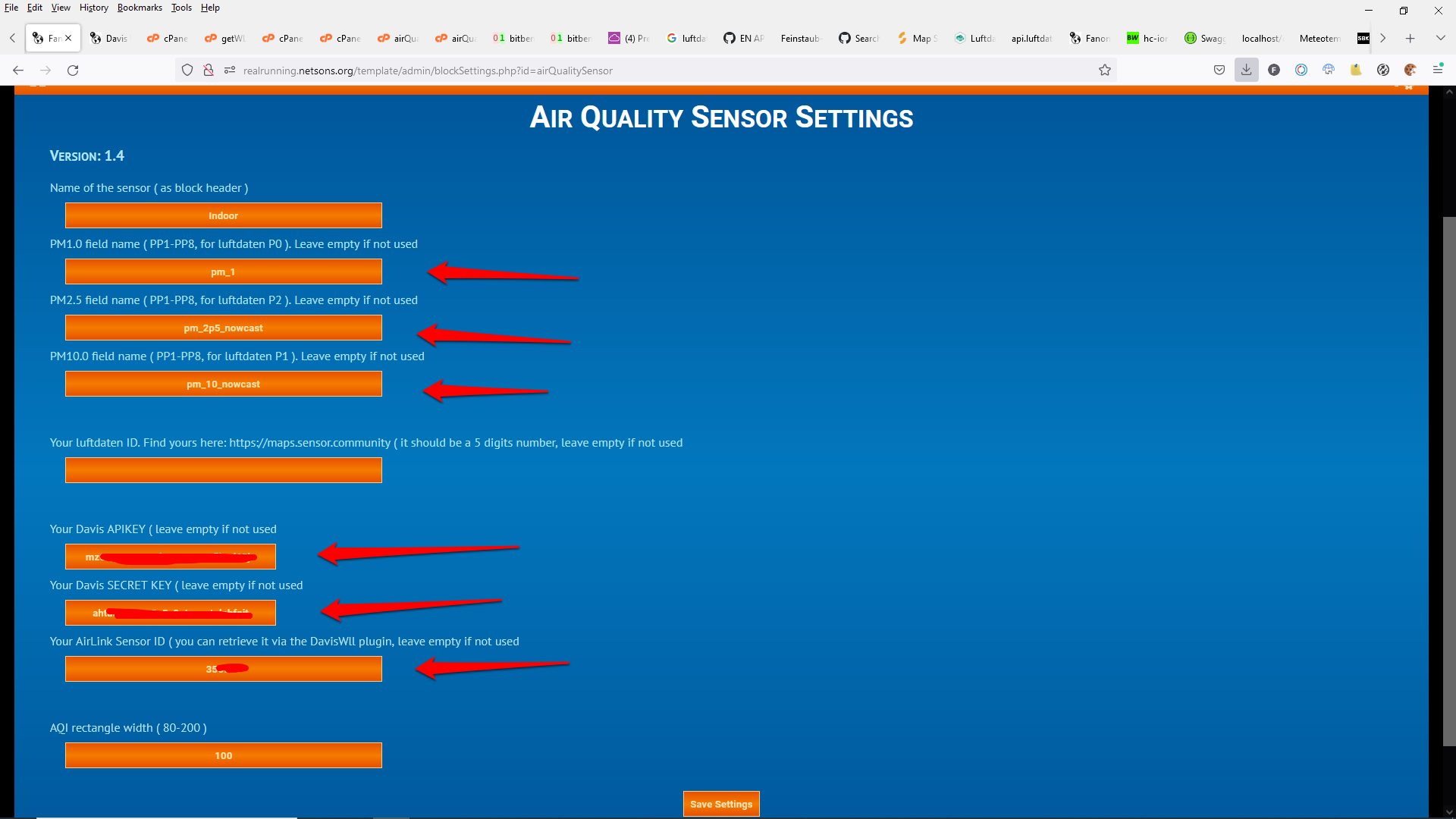
davis airlink configuration:
- add your davis api key and secret key
- add your sensor Id ( lsid you can retrieve it via the davisWLL plugin )
- in PM1.0 field write pm_1 ( if available )
- in PM2.5 field write one of the available davis field, pm_2p5_nowcast for example
- in PM10.0 field write one of the available davis field, pm_10_nowcast for example
NOTE
To retrieve data from the database simply leave lufdaten sensor Id and davis api key empty
P.S.
Purpleair support could be added as well ( but need a purple air api key to test it, as old api does not work any more )
- air_luftdaten.png (204.13 KiB) Viewed 67265 times
- air_davis.png (102.82 KiB) Viewed 67265 times
Re: new airQualitySensor block ( updated airQualityEcowitt )
Posted: Sat Jul 16, 2022 8:22 pm
by davidefa
v1.5
- added Purpleair support ( retrieves pp data directly from purpleair.com )
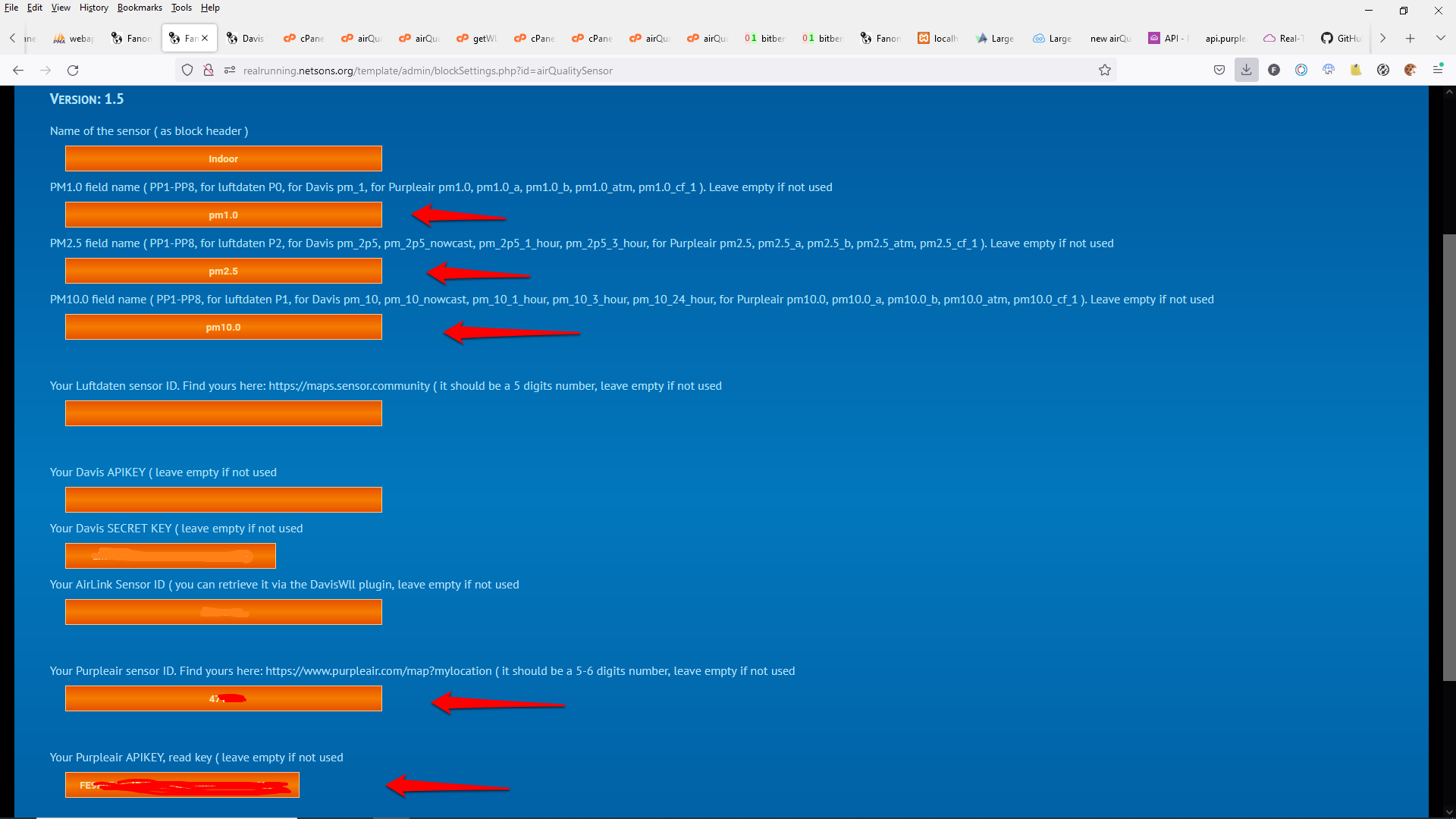
purpleair configuration:
- add your purpleair api key ( the read key )
- add your sensor Id ( you can retrieve it via the purpleair map:
https://www.purpleair.com/map?mylocation )
- in PM1.0 field write one of the available purpleair field ( pm1.0, pm1.0_a, pm1.0_b, pm1.0_atm, pm1.0_cf_1 ), pm1.0 for example
- in PM2.5 field write one of the available purpleair field ( pm2.5, pm2.5_a, pm2.5_b, pm2.5_atm, pm2.5_cf_1 ), pm2.5 for example
- in PM10.0 field write one of the available purpleair field ( pm10.0, pm10.0_a, pm10.0_b, pm10.0_atm, pm10.0_cf_1 ), pm10.0 for example
Re: new airQualitySensor block ( updated airQualityEcowitt )
Posted: Sun Jul 17, 2022 5:26 pm
by alexvanuxem
Thank you David,
I think I'm going to change from meteobridge to full DavisWLL thanks to your efforts!
It's more reliable.
Did a donation recently, entirely because of your hard work.
Many thanks
Gracie.
Re: new airQualitySensor block ( updated airQualityEcowitt )
Posted: Sat Jul 30, 2022 8:34 am
by i_fiorentino
Hi,
i've just installed this block but i don't understand how to catch data from sensor.
I've PurpleAir sensor already installed.
In settings page there is no url or IP field to catch this data.
Any help please?
Regards,
Alessandro
Re: new airQualitySensor block ( updated airQualityEcowitt )
Posted: Sat Jul 30, 2022 11:14 am
by davidefa
You have to enter your 'Sensor ID' and 'Api Key' ( [s]you can generate your api key from the control panel on the purepleair site[/s]* ).
It works by retrieving the data directly from the purpleair cloud ( as your sensor already sends data to the purpleair cloud ).
Retrieving the data directly from the sensor can be done only if the server and the sensor are on the 'same network' ( that is not your case ). It is not supported in this release, but it can be added if someone needs.
NOTE
* you have to request an api key to
contact@purpleair.com
- air_purpleair.png (97.06 KiB) Viewed 67159 times
Re: new airQualitySensor block ( updated airQualityEcowitt )
Posted: Sat Jul 30, 2022 12:41 pm
by i_fiorentino
davidefa wrote: ↑Sat Jul 30, 2022 11:14 am
You have to enter your 'Sensor ID' and 'Api Key' ( you can generate your api key from the control panel on the purepleair site ).
It works by retrieving the data directly from the purpleair cloud ( as your sensor already sends data to the purpleair cloud ).
Retrieving the data directly from the sensor can be done only if the server and the sensor are on the 'same network' ( that is not your case ). It is not supported in this release, but it can be added if someone needs.
air_purpleair.png
Thanks for reply Davide,
i don't manage to find my control panel on purpleair site and also api key generator.
Could you send me direct link?
I've red that the only way to obtain api key is to send an email to purpleair.com.
Thanks in advance,
Alessandro
Re: new airQualitySensor block ( updated airQualityEcowitt )
Posted: Sat Jul 30, 2022 1:22 pm
by davidefa
My bad, you are right ( I don't have a purpleair unit, I got confused having managed davis and ecowitt api key ).
According to
this post you have to request an api key to
contact@purpleair.com.
Re: new airQualitySensor block ( updated airQualityEcowitt )
Posted: Tue Dec 13, 2022 2:36 pm
by newswan
Ciao, ringrazio di cuore chi ha scritto l'airQaulitySensor nuovo con l'api key per i sensori... non riuscivo a uscirne

buone feste!
Hi, thank you very much to whoever wrote the new airQaulitySensor with the api key for the sensors... I couldn't do it alone
happy holidays!