Page 4 of 7
Re: Android App Brainstorming
Posted: Fri Jan 19, 2018 5:55 pm
by polbrieuc
Pavel wrote: ↑Fri Jan 19, 2018 4:53 pm
Hi, a problem with a mobile application Samsung S4 - no application can run version 0.4 or 0.4.1 version 0.3 worked, but the left menu was not displayed correctly, only site and about, otherwise all gray
Hello Pavel,
The greyed menus options on the left in version 0.3 were normal.
Can you detail what exactly happens on your Samsung S4 ? Does the application crash right away ? Did you try to delete the cache (or completely uninstall the app) before installing ?
Re: Android App Brainstorming
Posted: Fri Jan 19, 2018 7:43 pm
by Pavel
polbrieuc wrote: ↑Fri Jan 19, 2018 5:55 pm
The greyed menus options on the left in version 0.3 were normal.
Can you detail what exactly happens on your Samsung S4 ? Does the application crash right away ? Did you try to delete the cache (or completely uninstall the app) before installing ?
application froze immediately after launch, after a long time message that the application is not responding, I tried everything, erase even clean install
Re: Android App Brainstorming
Posted: Sat Jan 20, 2018 11:38 am
by nitrx
Hi polbrieuc,
I can say the the app works fine on my Galaxy S5 , I think you've done a geat job sofar. Only concerning is when other users will use the app do they really know that they've to swipe the menu from the right ... there is no indicator for this.
Keep up the good work
Re: Android App Brainstorming
Posted: Sat Jan 20, 2018 10:47 pm
by ON1GL
reworked the ip section here on the server , the old ip is gone, can you please put the url (weer.on1gl.be) back, that should (hopefully) work.
app problem:
The app had the old ip adress in it (that had gone away), it showed a blank screen at startup and locked, had to close the app, can't do anything anymore with it(always blank screen).
Luc
Re: Android App Brainstorming
Posted: Sun Jan 21, 2018 1:03 am
by polbrieuc
Version 0.4.2 of the app is released.
You can fidn the details and download it
here.
Please do not forget to
download the plugin, install/update it and save your settings (even if you do not modify anything)
<-- IMPORTANT
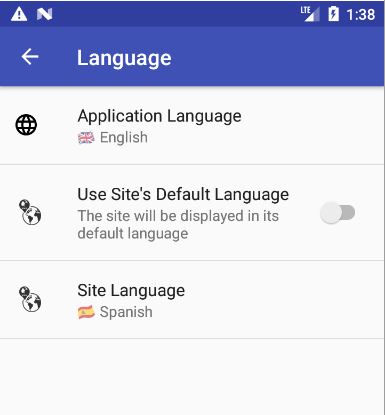
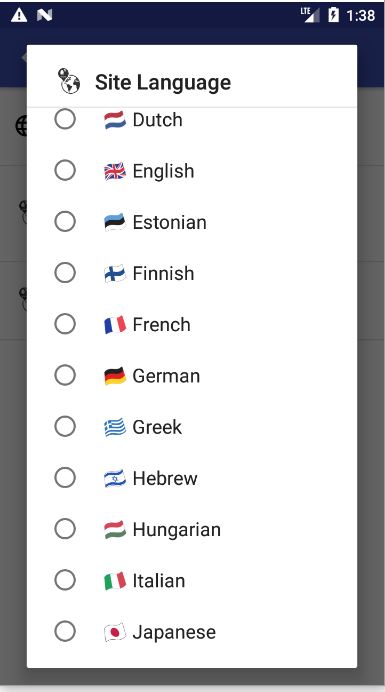
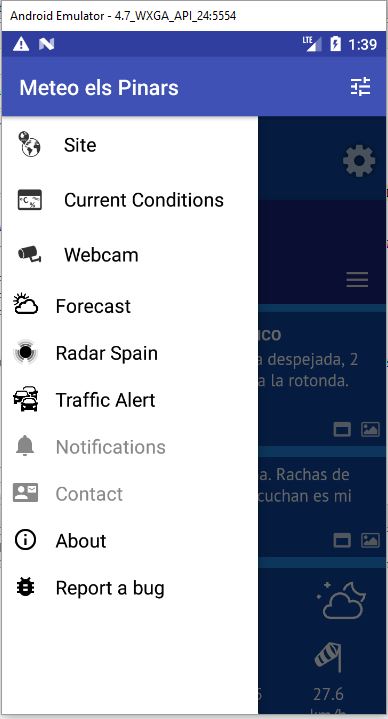
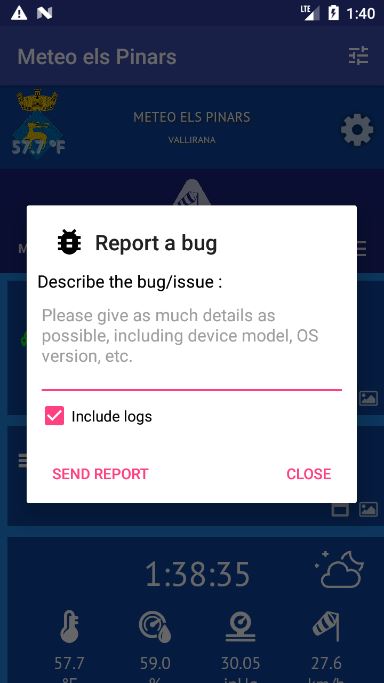
Apart from bug fixes, this release brings language selection (in settings) and bug reports (in left menu, last option)
Language selection for the app won't show you much, as the content is not yet translated. I'll still have to think about how we will approach translations. A system similar to what Jachym is using is quite appealing (but would have to be adapted to the app resource files format). anyway, translation should start when there is a stable version.
A couple of screenshots :
ON1GL wrote: ↑Sat Jan 20, 2018 10:47 pm
reworked the ip section here on the server , the old ip is gone, can you please put the url (weer.on1gl.be) back, that should (hopefully) work.
app problem:
The app had the old ip adress in it (that had gone away), it showed a blank screen at startup and locked, had to close the app, can't do anything anymore with it(always blank screen).
url modified in the site list, your site is now available.
The fact that the app froze while your site was unavailable is a bug, I'll look at it. (if it happens again, delete the cache and data from the app)
Pavel wrote: ↑Fri Jan 19, 2018 7:43 pm
application froze immediately after launch, after a long time message that the application is not responding, I tried everything, erase even clean install
I would need more info, like the OS version of your device. Also, please install version 0.4.2 and confirm if the issue is still happening.
nitrx wrote: ↑Sat Jan 20, 2018 11:38 am
Only concerning is when other users will use the app do they really know that they've to swipe the menu from the right ... there is no indicator for this.
Left Navigation menu appearing by swiping right from the left of the screen is becoming quite mainstream these days. Apps like Twitter or Google analytics are using it.
We could think of making this left menu's presence more explicit by always displaying the icons. That's an option. But it would take some space from a very limited amount (especially on mobile phones)
I am really bad at design in general so all inputs on this are welcome. what does the rest of the testers think ?
As usual, please use this forum to share your comments and feedbacks or
contact me directly.
For bug reports, you can obviously use the Bug Report functionnality within the app (and it is the preferred way as it allows me to get the logs)
Cheers,
Pol-Brieuc
Re: Android App Brainstorming
Posted: Sun Jan 21, 2018 9:58 am
by ON1GL
upgraded from 0.4.1 to 0.4.2 (app and apk), on the smartphone its runs ok (Huawei P9 lite Android 7.0), on the tablet it freeses at start up (blank or black screen -> time out then option to close the app) (Galaxy Tab A (2016) Android 6.0.1).
uninstalling, resetting etc... no joy

will keep trying
Luc
Re: Android App Brainstorming
Posted: Sun Jan 21, 2018 11:43 am
by polbrieuc
ON1GL wrote: ↑Sun Jan 21, 2018 9:58 am
upgraded from 0.4.1 to 0.4.2 (app and apk), on the smartphone its runs ok (Huawei P9 lite Android 7.0), on the tablet it freeses at start up (blank or black screen -> time out then option to close the app) (Galaxy Tab A (2016) Android 6.0.1).
uninstalling, resetting etc... no joy
I found a bug when starting the app without some preferences (settings) already configured.
I fixed it and
republished the app (same version number)
Can you please try to download and install the app again and let me know if it fixed the issue ?
@Pavel : it may also fix your issue so it would be great if you could do the same (redownload/install the app)
Re: Android App Brainstorming
Posted: Sun Jan 21, 2018 11:55 am
by ON1GL
Nice job ! its working again......
the "sort by distance" in the station selection menu is still fixed at your position....
Luc
Re: Android App Brainstorming
Posted: Sun Jan 21, 2018 11:58 am
by polbrieuc
ON1GL wrote: ↑Sun Jan 21, 2018 11:55 am
the "sort by distance" in the station selection menu is still fixed at your position....
Not sure what you mean by this. The sort by distance dialog will display a list with the current site you are visiting positionned as first element (not the nearest one). That's default behavior for settings. You have to scroll up to see the nearest site. Is it what you meant ?
Re: Android App Brainstorming
Posted: Sun Jan 21, 2018 12:04 pm
by ON1GL
polbrieuc wrote: ↑Sun Jan 21, 2018 11:58 am
ON1GL wrote: ↑Sun Jan 21, 2018 11:55 am
the "sort by distance" in the station selection menu is still fixed at your position....
Not sure what you mean by this. The sort by distance dialog will display a list with the current site you are visiting positionned as first element (not the nearest one). That's default behavior for settings. You have to scroll up to see the nearest site. Is it what you meant ?
the app asked for access to my location at startup, fine, the sort by distance gives me 'meteo els pinars' at 1.0 km and weatherstation antwerp at 1109 km
Re: Android App Brainstorming
Posted: Sun Jan 21, 2018 12:15 pm
by polbrieuc
ON1GL wrote: ↑Sun Jan 21, 2018 12:04 pm
the app asked for access to my location at startup, fine, the sort by distance gives me 'meteo els pinars' at 1.0 km and weatherstation antwerp at 1109 km
I see. The app sets a fake location when it cannot retrieve the user's location (before you give your approval). In this case, the fake location is my location.
While waiting for your permission, the app continues to load the sites and calculates the distances.
When you approve the usage of your location, the app "forgets" to update the distances. It's a bug that I will fix for the next version.
Can you confirm that the next time you open the app (after having closed it previously), the distances are updated ?
[EDIT]
Can you also send a bug report from within the app please ?
Re: Android App Brainstorming
Posted: Sun Jan 21, 2018 12:28 pm
by ON1GL
[[/quote]
Can you confirm that the next time you open the app (after having closed it previously), the distances are updated ?
[EDIT]
Can you also send a bug report from within the app please ?
[/quote]
oeps just read your edit at the last second....
1) the distance is not recalculated
2) after sending the bug report with the app, it crashes
do not know if you have recieved it ?)
Luc
Re: Android App Brainstorming
Posted: Sun Jan 21, 2018 12:31 pm
by polbrieuc
ON1GL wrote: ↑Sun Jan 21, 2018 12:28 pm
Can you confirm that the next time you open the app (after having closed it previously), the distances are updated ?
[EDIT] Can you also send a bug report from within the app please ?
oeps just read your edit at the last second....
1) the distance is not recalculated
2) after sending the bug report with the app, it crashes
do not know if you have recieved it ?)
Ok, I'll have to check these issues more in detail...
And I did not receive the bug report
Does it crash straight away when you click on the button send or a couple of seconds later ?
If anybody else can try to send me a bug report (left menu, last option), it would be very much appreciated.
[EDIT] I am receiving bug reports (I assume from you Luc, description being bug report Huawei P9 lite).
The current location is never retrieved, it seems that there is no last know location. I will work on that.
Re: Android App Brainstorming
Posted: Mon Jan 22, 2018 12:38 pm
by Pavel
polbrieuc wrote: ↑Sun Jan 21, 2018 11:43 am
I found a bug when starting the app without some preferences (settings) already configured.
I fixed it and
republished the app (same version number)
Can you please try to download and install the app again and let me know if it fixed the issue ?
@Pavel : it may also fix your issue so it would be great if you could do the same (redownload/install the app)
Hello, now the app in mobile works OK, until the left menu is still partly gray
Re: Android App Brainstorming
Posted: Mon Jan 22, 2018 12:42 pm
by Pavel
When selecting els Pinars, the left menu is OK, with me and most other gray
Re: Android App Brainstorming
Posted: Mon Jan 22, 2018 1:57 pm
by polbrieuc
Pavel wrote: ↑Mon Jan 22, 2018 12:42 pm
When selecting els Pinars, the left menu is OK, with me and most other gray
Hi Pavel,
the issue was that your url registered in the app was
http://meteo.kolarczyk.eu/ instead of
http://meteo.kolarczyk.eu/meteotemplate/
I corrected it and now your site is displaying correctly, along with the left menu options your configured in the plugin :
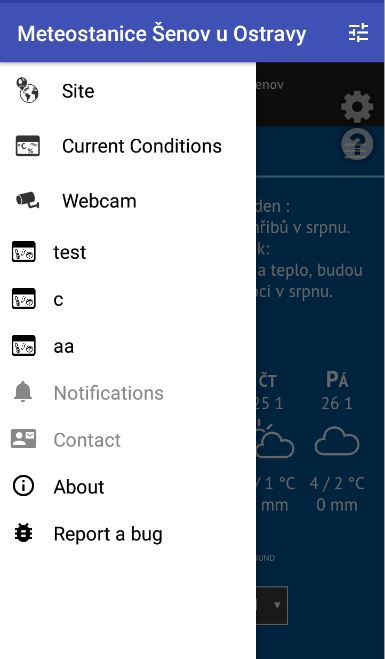
You need to restart the app to see the changes (no need to re-install).
Cheers,
Pol-Brieuc
Re: Android App Brainstorming
Posted: Mon Jan 22, 2018 2:42 pm
by Pavel
thank you very much, it's OK, nice work
Re: Android App Brainstorming
Posted: Mon Jan 22, 2018 3:27 pm
by jay_hoehn
I just tried to send a bug report and when I pressed send the app crashed. Not sure if you got the report. I was asking about location. It seems my location is not in the app. Does this get set by the plugin?
Jay
Re: Android App Brainstorming
Posted: Mon Jan 22, 2018 4:19 pm
by polbrieuc
jay_hoehn wrote: ↑Mon Jan 22, 2018 3:27 pm
I just tried to send a bug report and when I pressed send the app crashed. Not sure if you got the report. I was asking about location. It seems my location is not in the app. Does this get set by the plugin?
Jay
Hi Jay,
Are you talking about your device current location or your station location ?
Your station device location is hardcoded in the app site list that is loaded when the app starts. It is currently :
If you are referring to your device location, there maybe an issue with the location service that does not retrieve correctly your current location. In that case, a fake location is created (my place). I am looking into it.
I am also looking into why the bug report crashes...
Cheers,
Pol-Brieuc
Re: Android App Brainstorming
Posted: Mon Jan 22, 2018 4:39 pm
by nitrx
I've no bug crashes except when I push the bugs button

then the app stops Galaxy S5 android 6
Re: Android App Brainstorming
Posted: Mon Jan 22, 2018 5:05 pm
by polbrieuc
nitrx wrote: ↑Mon Jan 22, 2018 4:39 pm
I've no bug crashes except when I push the bugs button
then the app stops Galaxy S5 android 6
Yep, found a bug in the leftmenu preparation.
Just to confirm : it crashes when you click on the left menu option "Report a Bug", right ? You never get to see the actual dialog displayed ?
Re: Android App Brainstorming
Posted: Mon Jan 22, 2018 5:08 pm
by jay_hoehn
I got the dialog box but when I clicked submit it crashed.
Jay
Re: Android App Brainstorming
Posted: Mon Jan 22, 2018 5:26 pm
by polbrieuc
jay_hoehn wrote: ↑Mon Jan 22, 2018 5:08 pm
I got the dialog box but when I clicked submit it crashed.
Hum, that's a different bug then.
Can I ask you the favor to download and install the app again from
this link and try to send a bug report again ?
Re: Android App Brainstorming
Posted: Mon Jan 22, 2018 5:29 pm
by jay_hoehn
Just installed from the link and same result.
Jay
Re: Android App Brainstorming
Posted: Mon Jan 22, 2018 5:57 pm
by polbrieuc
jay_hoehn wrote: ↑Mon Jan 22, 2018 5:29 pm
Just installed from the link and same result.
No luck
Can I ask you again to download and install the app from
this link and try to send a bug report ? (Last try and if it fails, I'll have to find another way).
Thanks.