Page 1 of 2
Webcam
Posted: Thu Jun 14, 2018 4:58 pm
by Piddy
Hello everybody,
I have a problem, my server stores only 0 byte images.
Save interval elapsed.
Webcam image being saved.
INSERT INTO webcam (DateTime, T, H, P, R, RR, S, W, G, img) VALUES ('2018-06-14 18:56:53',20.5, 48.0, 1007.500, 0.000, 0.000, 0, 3.0, 9.7, '201806141856')
Loaded CRON: /var/www/luetjenburg-wetter.de/meteo/load/crons/updateWebcam.php
Webcam image not being saved because either the save interval hasn't elapsed yet, or the saving is only set to occur during night and it is night-time now.
Loaded CRON: /var/www/luetjenburg-wetter.de/meteo/load/crons/updateWebcam.php
what am I doing wrong?
Thank you
Re: Webcam
Posted: Wed Sep 19, 2018 9:34 pm
by Michael
Hi,
i have the same problem while i scheduled the cron-job with the tool from my webhoster.
Some cron-job´s need absolute path´s in the php file. In the php file from the block/plugin there are only relative paths.
Since i use cron-job.org to schedule the cron-job it works fine with relative paths too.
Michael
Re: Webcam
Posted: Wed Oct 17, 2018 6:21 pm
by Oscarmr
Did you get it fixed? The same happens to me. The copy of the photo in the image folder only has 0 bytes
Re: Webcam
Posted: Mon May 13, 2019 12:06 pm
by Meteofabro
it also happens to me, but in addition it does not store data in the "webcam" database table. Has anyone understood how to solve the problem?
Re: Webcam
Posted: Mon May 13, 2019 10:27 pm
by Dehatter
I am having this issue as well.
Began 5/7/19 and 6PM on the dot.
I have deleted the block and the plugin and reinstalled them, but still saving the name but the file is empty.
Perhaps there has been a change in PHP command for copying the image into the file?
$fp = fopen("../plugins/webcam/images/".$name.".jpg", "w");
fwrite($fp, $imageFile);
fclose($fp);
Tom
Re: Webcam
Posted: Thu May 16, 2019 8:54 pm
by Dehatter
So...
Any of you really smart people have a clue what is happening?
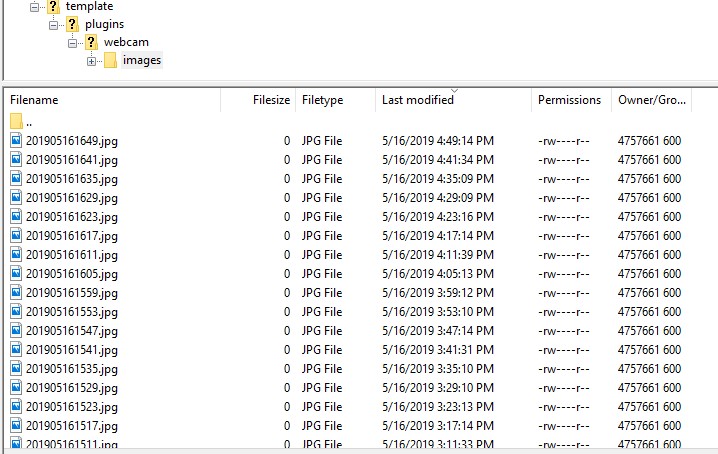
Update creates the file, but it never get filled, and since it does not contain any data, the thumbnail does not get created.
directory:
- Annotation 2019-05-16 165415.jpg (104.57 KiB) Viewed 40628 times
Any and all suggestions welcome!!
Tom
Re: Webcam
Posted: Fri May 17, 2019 2:06 pm
by Dehatter
So...
In my case, it seems I cannot use a "secure" source for the image file.
If anyone else is having this issue, try this as a solution ... make sure your image source is http:// not https://
All is working now for me.
Tom
Re: Webcam
Posted: Sun May 26, 2019 9:06 pm
by andyk1
I checked my folder for the exact times you posted Tom and I am not seeing any 0 bit files at all. went through the whole date and not seeing an issue. Not sure or even a guess since we are on the same host.
Re: Webcam
Posted: Wed May 29, 2019 8:01 pm
by Dehatter
Yeah,
I guess I accidentally changed my source in the plugin to a secure image not knowing that something in the processing (the plugin or the block or the update php via cron) for some reason can not process a secure image.
You are not using the secure image on your site either.
I am not anywhere qualified enough to know why a non secure image works and a secure image does not.
I only know that is what fixed it for me.
Tom
Re: Webcam
Posted: Wed May 29, 2019 11:09 pm
by andyk1
Tom, Strangely my replies a week ago didn't stick but I noticed none of my responses didn't do through. I don't know if it is weather related here but we've had one hell of a couple weeks. Glad you have it sorted out.
Re: Webcam
Posted: Sun Jul 26, 2020 2:02 pm
by mchd17
Having this exact issue. Anybody find a fix yet?
Re: Webcam
Posted: Tue Jul 28, 2020 10:56 pm
by mchd17
never touched anything. timelapse is working again. saving images correctly. very strange
Re: Webcam
Posted: Sun Mar 07, 2021 9:17 am
by iatros
Dehatter wrote: ↑Fri May 17, 2019 2:06 pm
So...
In my case, it seems I cannot use a "secure" source for the image file.
If anyone else is having this issue, try this as a solution ... make sure your image source is http:// not https://
All is working now for me.
Tom
Hi Tom, Hi everybody
thank you for the hint, I followed it - but I still have 0 bit files (all with the correct timestamp filename though, as in your screenshot) in my plugins/webcam/images folder.
I tried different file sizes for the original picture, with and without https, SQL-Database seems ok....
Anybody any idea?
cheers, martin
Re: Webcam
Posted: Sun Mar 07, 2021 1:59 pm
by andyk1
Have you made any recent changes? What are you feeding MT api.php with i.e. meteobridge, Davis, WU... I haven't touched my MT in so long I don't remember how I fixed it other than Tom's suggestion.
Re: Webcam
Posted: Sun Mar 07, 2021 2:53 pm
by davidefa
I had a similar problem with my local meteotemplate installation.
I updated the load/crons/updateWebcam.php script.
Only minor fixes to use absolute paths ( vs relative ones )
I tested with your settings ( imageURL =
https://www.dubler.com/abus/aktuelles-bild.jpg ) and it works
But, as Dehatter said in previous post, don't understand why this fix works.
Re: Webcam
Posted: Mon Mar 08, 2021 8:43 am
by iatros
many thanks, davidefa,
davidefa wrote: ↑Sun Mar 07, 2021 2:53 pm
I had a similar problem with my local meteotemplate installation.
I updated the load/crons/updateWebcam.php script.
Only minor fixes to use absolute paths ( vs relative ones )
unfortunately the updated script did not fix the problem, I still get 0 bit files....
could it be a permission problem on my server's side (although I checked, 644 for files and 755 for directories)?
thanks
Re: Webcam
Posted: Mon Mar 08, 2021 3:48 pm
by davidefa
I don't think is a permission problem ( as the files are generated )
You may try the attached script, it has only a few debug info added ( and password checking disabled, so it is intended only for testing ).
You should call it directly (
https://meteo.dubler.com/load/crons/updateWebcam.php ) and check/attach the output here
It should return something like this ( from my local meteotemplate )
Code: Select all
debug=1
baseURL=C:\xampp\htdocs\template/
intervalFromLastSave=41 sec
webcamSaveInterval=15 min
Webcam image being saved.
imageURL=##http://realrunning.netsons.org/cron/webcam.jpg##
Read 153686 bytes
nwritten=153686
INSERT INTO webcam (DateTime, T, H, P, R, RR, S, W, G, img) VALUES ('2021-03-08 16:29:05',2.1, 82.8, 1011.20, 0.00, 0.00, 0.0, 0.7, 3.6, '202103081629')
No images older than 2021-02-27 00:00:00
Re: Webcam
Posted: Mon Mar 08, 2021 4:12 pm
by iatros
Grazie mille!
This ist the output:
debug=1
baseURL=/home/dubler/public_html/meteo/
intervalFromLastSave=444 sec
webcamSaveInterval=9 min
Webcam image being saved.
imageURL=##
https://www.dubler.com/abus/aktuelles-bild##
Reading failed!
nwritten=0
INSERT INTO webcam (DateTime, T, H, P, R, RR, S, W, G, img) VALUES ('2021-03-08 17:07:26',5.2, 67.9, 1015.700, 0.000, 0.000, 140.3, 7.0, 10.1, '202103081707')
No images older than 2021-02-27 00:00:00
Re: Webcam
Posted: Mon Mar 08, 2021 4:53 pm
by davidefa
Ok, you have to correct the image URL in the
webcam plugin setup ( in the webcam block setup is correct ):
https://www.dubler.com/abus/aktuelles-bild.jpg
( only .jpg is lacking )
Re: Webcam
Posted: Mon Mar 08, 2021 5:54 pm
by iatros
That's correct, you are right.
It was there before, It did not work. I've added the extension again, it still does not work:
debug=1
baseURL=/home/dubler/public_html/meteo/
intervalFromLastSave=321 sec
webcamSaveInterval=9 min
Webcam image being saved.
imageURL=##
https://www.dubler.com/abus/aktuelles-bild.jpg##
Reading failed!
nwritten=0
INSERT INTO webcam (DateTime, T, H, P, R, RR, S, W, G, img) VALUES ('2021-03-08 18:52:44',2.3, 75.0, 1016.400, 0.000, 0.000, 0.0, 4.3, 8.6, '202103081852')
No images older than 2021-02-27 00:00:00
Sorry....
Re: Webcam
Posted: Mon Mar 08, 2021 8:08 pm
by davidefa
As the webcam image is hosted on your server you may try to access it via a local path.
Try setting image URL in the webcam plugin setup to: /home/dubler/public_html/abus/aktuelles-bild.jpg
( verify is the correct path to your webcam image )
Re: Webcam
Posted: Mon Mar 08, 2021 11:38 pm
by davidefa
Another thing you could do is trying the 'Check for problems' option in the control panel.
Maybe you have the option 'allow_url_fopen' not enabled in your server.
This could be the cause for the failure of the file_get_contents ( used to retrieve the image )
Re: Webcam
Posted: Tue Mar 09, 2021 5:20 am
by andyk1
Are you using meteobridge as an upload option? If you are... check to see if you made changes in MB Station/CAM section. Make sure the upload matches the webcam blocks and plugins. (Example) In MB station/Cam
https://cam.nicomaparkwx.com/webcam/webcamimage.jpg
or
http://cam.nicomaparkwx.com/webcam/webcamimage.jp
in webcam block and webcam plugin...
https://admin.meteobridge.com/cam/e5996 ... amplus.jpg
or
http://admin.meteobridge.com/cam/e5996f ... amplus.jpg
Your directories and subdomains will be different.
Also, make sure your cron jobs are set to run just after you generate a new pic and not before. I.E. 5min or 300 sec
Andy.
Re: Webcam
Posted: Tue Mar 09, 2021 11:04 am
by iatros
davidefa wrote: ↑Mon Mar 08, 2021 8:08 pm
As the webcam image is hosted on your server you may try to access it via a local path.
Try setting image URL in the webcam plugin setup to: /home/dubler/public_html/abus/aktuelles-bild.jpg
( verify is the correct path to your webcam image )
This did the trick!

I'll just have to change the path to aktuelles-bild.jpg in the webcam plugin back to the normal URL.
Thanks again for your help!
Re: Webcam
Posted: Tue Mar 09, 2021 12:08 pm
by iatros
andyk1 wrote: ↑Tue Mar 09, 2021 5:20 am
Are you using meteobridge as an upload option? If you are... check to see if you made changes in MB Station/CAM section. Make sure the upload matches the webcam blocks and plugins. (Example) In MB station/Cam
....
Andy.
Thank you, Andy, for your help
Yes, I use MB; I checked and the upload links are the same (except in webcam plugin, for an obscure reason, see the other posts here).
Best, Martin
PS:
Also, make sure your cron jobs are set to run just after you generate a new pic and not before. I.E. 5min or 300 sec
If I set the cron job for the new picture let's say every 10 min and the upload cron job every 15, they will be executed both at the same time every 30 minutes, isn't it?
I see no way to have one cron job running ALWAYS before another.....