Traffic Alert Block (v1.0)

Post Reply
User avatar
polbrieuc
Advisor
Advisor
Posts: 98
Joined: Wed Dec 06, 2017 10:58 pm
Location: Vallirana
Station model: WH1080
Software: Cumulus
Contact:

Traffic Alert Block (v1.0)

Post by polbrieuc » Mon Dec 18, 2017 1:56 pm

Hi everybody,

I live in a town where traffic can get nasty a certain time in the week. The visitors of my website www.elspinars.es often visit it in the morning as a one shop stop to get their daily dosis of meteo, but also requested to have some kind of info about the traffic.
That how I came with the trafficAlert block, which is available for download here : www.elspinars.es/dev/dev.php

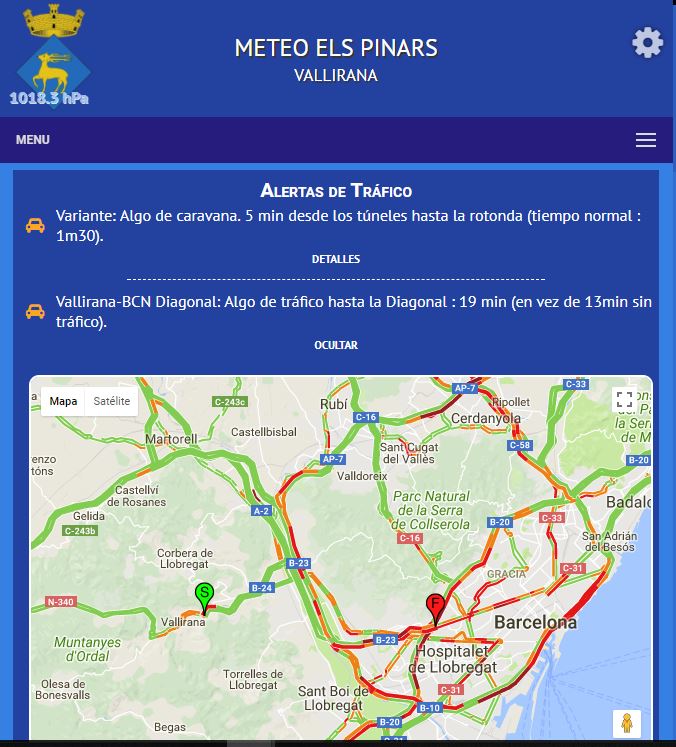
Concept is very basic : you define some routes, the block check the time it takes to drive that route and if the time is above certain thresold, it displays an alert, with the possibility to display the current traffic on a map :
Image

I tried to make the setup as user-friendly as possible (but may have failed in the attempt).

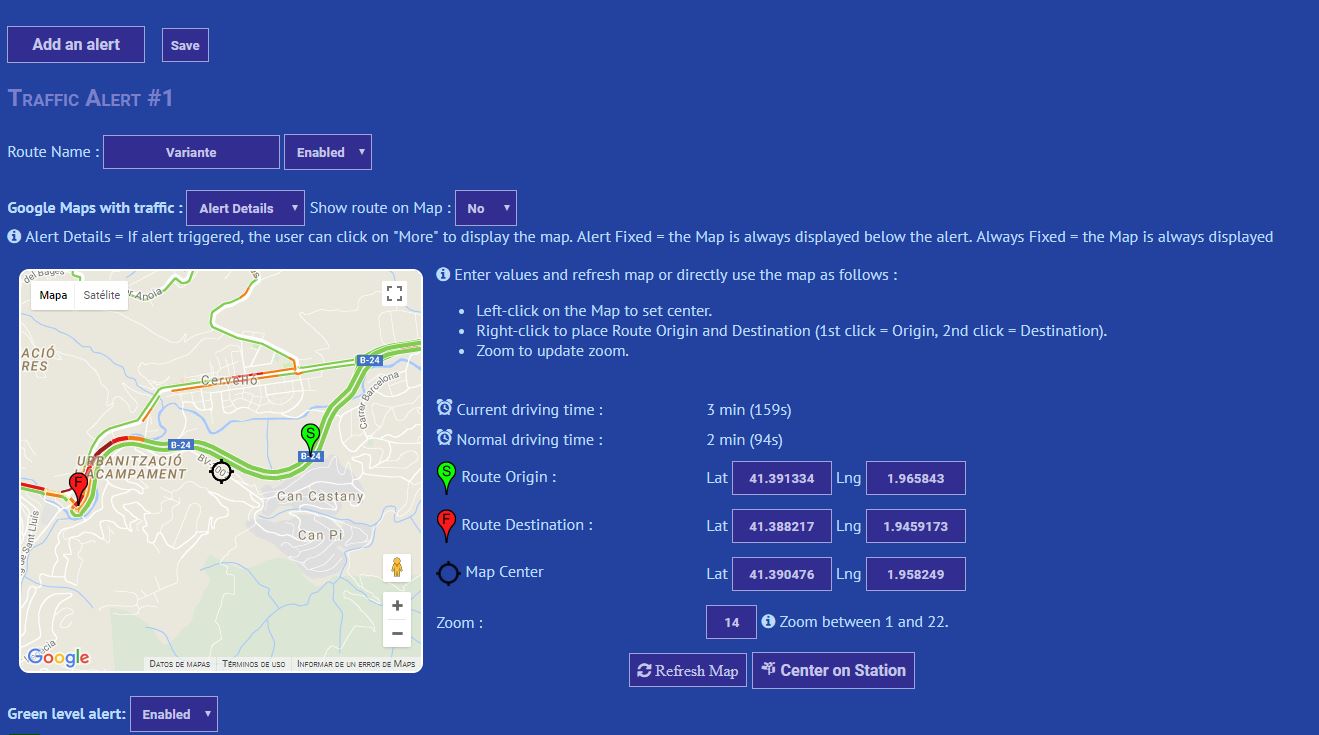
After entering an optional block heading, the first step is to add an alert :
Image
Then you define your route name and use the map to define your route.
On the map, a left-click define the center and a right click define the starting and ending point.
The page will update the route and the normal time it takes to drive it. You can then use these values to define your thresolds in the alerts.
You can alernatively enter the values manually and click on the Refresh Map button to see how it looks like.
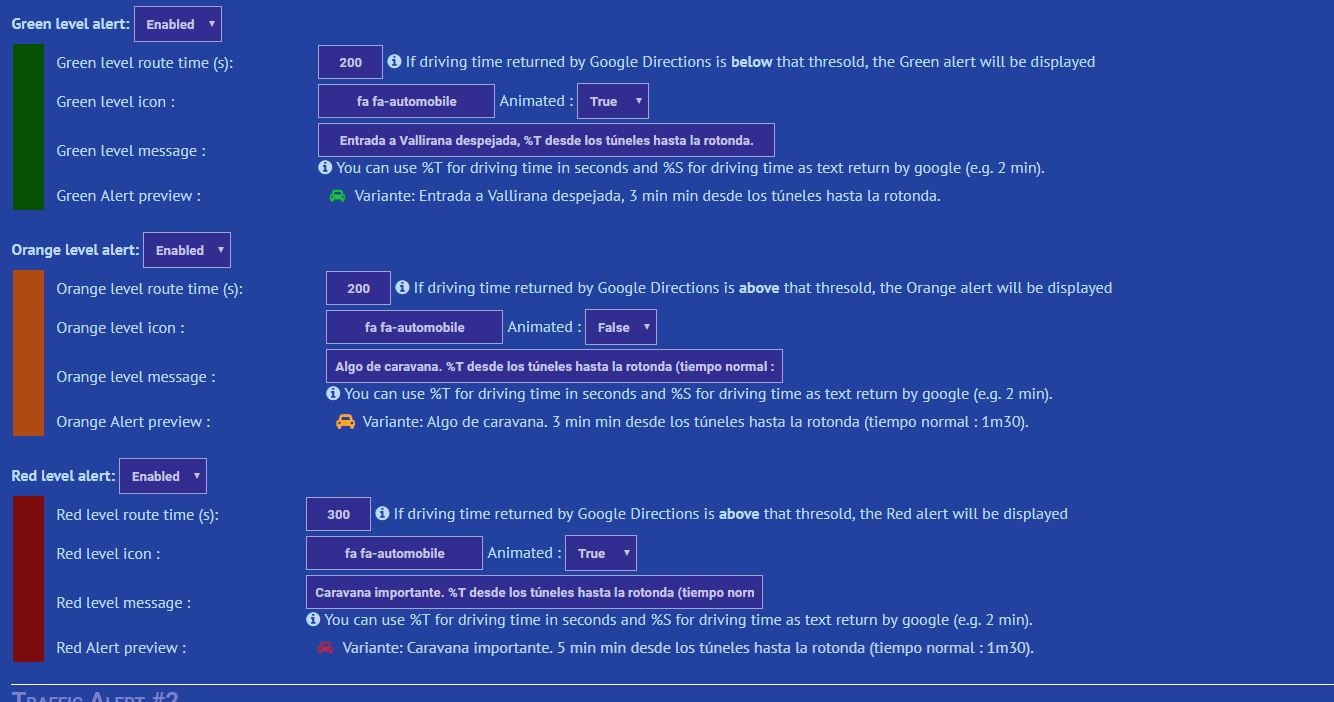
Then you define your alerts :
Image
For each alert level (Green, Orange, Red), you define the thresold and the message.
You can use tags like %T in your message to display the actual time it takes to drive the route according to Google Maps Directions.
You can also personalize the icon and animate it.
Finally, you can disable an alert level.
When done, click on save, don't forget to add your block on your homepage and you're done.

This is an early version of the block, I would appreciate if you could let me know if you find it useful, if you tried it and if you have any idea on how to improve it.
Next steps will be to allow the users to create their own routes (after registration) and to add notifications in a mobile app on which I am working (also available on my dev page)
You can either comment on this forum post or leave me a message on my contact page

Cheers,

Pol-Brieuc
Image

BlueBear
Forecaster
Forecaster
Posts: 101
Joined: Sun Aug 20, 2017 1:04 pm
Location: Sanford, Manitoba, Canada
Station model: Davis VP2
Software: WeeWx
Contact:

Re: Traffic Alert Block (v1.0)

Post by BlueBear » Mon Dec 18, 2017 4:13 pm

Interesting Block, tried it and it worked well here. I live in a rural area so not sure how accurate the traffic info is on Google!

I did have a little trouble when I went to add a second alert, mistakenly added a third which I tried to remove and the setup got all messed up. Redid from scratch and all is well.

User avatar
polbrieuc
Advisor
Advisor
Posts: 98
Joined: Wed Dec 06, 2017 10:58 pm
Location: Vallirana
Station model: WH1080
Software: Cumulus
Contact:

Re: Traffic Alert Block (v1.0)

Post by polbrieuc » Mon Dec 18, 2017 4:22 pm

Thanks for your feedback BlueBear.
Alerts are sequentials in the setup, this is why you can only remove the last one.
Recommendation is to save after each alert you create. This way, if something goes wrong, you can always refresh the page and you get back where you left.
Anyway, I'll try to replicate the issue you had and check if I can find something. As mentionned, this is all experimental :-)
As for Google Maps traffic data accuracy, it is a matter of testing in real life.
In my area, it matched quite well the reality (I measure the time in every traffic jam I get stuck in).
But I am open to consider other sources of traffic info if you know some.
Image

User avatar
Jachym
Site Admin
Site Admin
Posts: 1686
Joined: Fri Aug 18, 2017 10:12 pm
Location: Brno, Czech Republic
Station model: WH1080
Software: Meteobridge
Contact:

Re: Traffic Alert Block (v1.0)

Post by Jachym » Mon Dec 18, 2017 4:23 pm

Thanks for sharing

User avatar
polbrieuc
Advisor
Advisor
Posts: 98
Joined: Wed Dec 06, 2017 10:58 pm
Location: Vallirana
Station model: WH1080
Software: Cumulus
Contact:

Re: Traffic Alert Block (v1.0)

Post by polbrieuc » Mon Dec 18, 2017 4:25 pm

Jachym wrote: Mon Dec 18, 2017 4:23 pmThanks for sharing
Sharing is caring... ;)
Image

User avatar
polbrieuc
Advisor
Advisor
Posts: 98
Joined: Wed Dec 06, 2017 10:58 pm
Location: Vallirana
Station model: WH1080
Software: Cumulus
Contact:

Re: Traffic Alert Block (v1.0)

Post by polbrieuc » Fri Oct 26, 2018 11:49 pm

Hi everybody,

As one of you asked about the trafficAlert Block and the app notifications, I thought I should give a small update on the topic.
CACHE
First of all, those interested should download and install the latest version of the trafficAlert block : https://www.elspinars.es/dev/trafficAlert.zip (you will keep your settings)
Since the previous publication, one significant element that happened is that Google started to ask for a Billing account to provide services, even if you were using only the free services (check this post ).
As the trafficAlert block relies on the Google Directions API, I had no choice but to surrender and give Google my credit card number. But I worried about what would happen if too many visitors refresh my page to see the traffic block. Each refresh is at least one call to Google Directions (7 in my case) and so far, I have a quota of 2500 requests daily (it is not clear what happens if I go over quota. Before, it just returned an error. Now, it may digg a big hole in my bank account).
So I finally implemented a cache for this block.
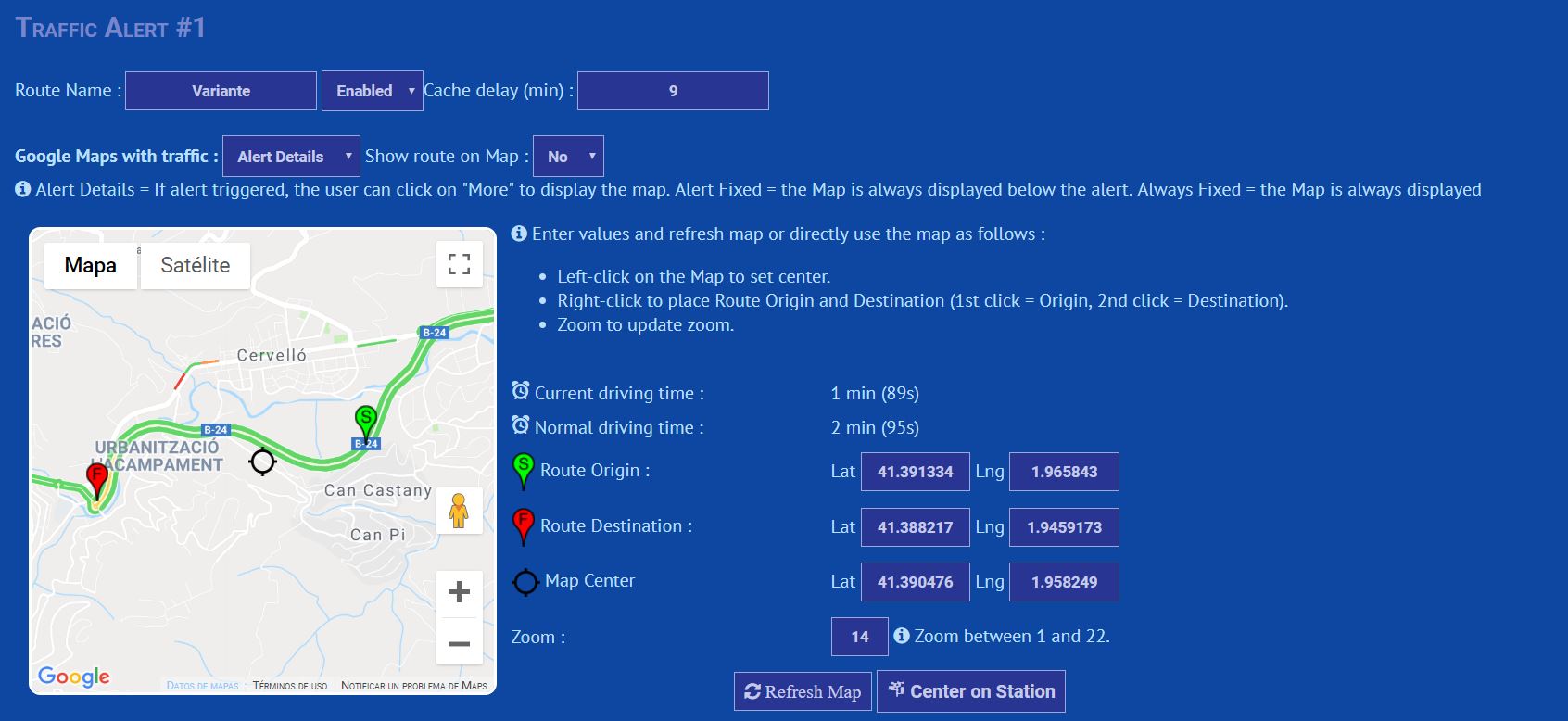
For each route you define, you can decide how long the data will be considered valid before asking again to Google for fresh data.
This is defined in the field Cache delay next to the route name :
Image
In the example above, any visitor requesting my page will be served cached data if this data was created less than 9 minutes ago.
Each route can have a different cache delay.
Note that to use the trafficAlert block, you need to have a valid Google Maps Key (referrer restricted) assigned to your site in the install folder of meteotemplate, file googleMapsKey.txt (Usually, everybody does create one whn installing MT for the first time. If you don't, go to https://console.developers.google.com and create one ).

TRIGGERS & TRAFFIC ALERT
The triggers plugin is one essential component to be able to send notifications through the Android App
The latest version is available here : https://www.elspinars.es/dev/triggers.zip
The triggers plugin will aggregate a list of variables from your site and make these variable available to create conditions, that will be tested at regular interval.
To get the variables. in addition to the common data points from meteotemplateLive file like temp, rain, etc, the triggers plugin will scan the blocks and plugins to check if they are compatible and retrieve the corresponding variables.
At that point in time, only the trafficAlert block is compatible :-)
The trafficAlert block will provide two variables per route : the duration of the route in current traffic, in seconds, and the same duration formatted in hours,min,sec.
To be able to provide this data, the block relies once again on Google Directions, with one big difference : it is now calling the service from your server and not from the visitors web browser. To allow calls from your server, Google will request that you have an IP Restricted Key (remember that the one you already created was restricted on the referrer, usually your domain name, not the IP of your server).
So for trafficAlert to work with triggers, you must once again log into Google Developer Console, create a new API Key and restrict it to your server IP address.
When you have your newly created IP Restricted key, copy paste it in a file called googleMapsIPRestrictedKey.txt and place it in the install folder of your meteotemplate site.
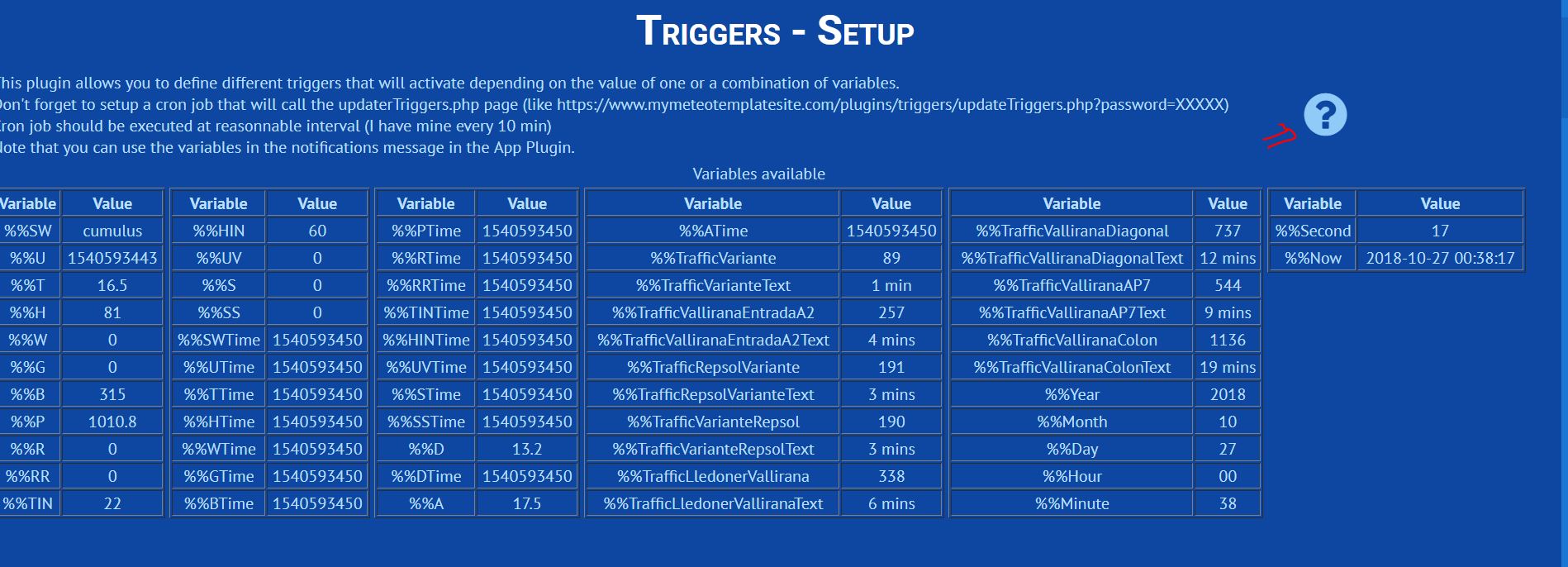
Now that you have your API key, every time the cron you have set up for triggers is executed, the variables related to trafficAlert are refreshed (except if they are still valid in the cache, see above) :
Image
For each route, you get two variables, both starting by the prefix %%Traffic followed by the route name.
%%TrafficRouteName is returning the duration of the route in seconds, %%TrafficRouteNameText is returning the same data formatted in hrs,min,sec
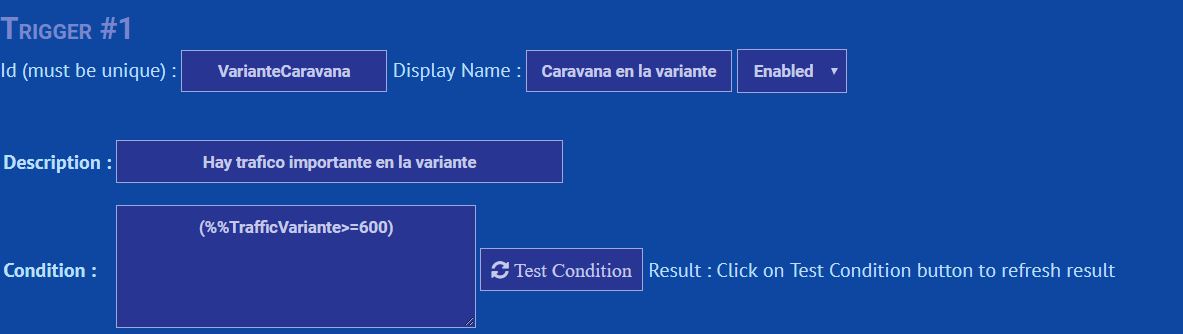
You can now use these variables to create your own triggers that you will later use to send notifications to your users through the app :
Image

APP & TRAFFIC ALERT
You have your trafficAlert block installed, your triggers are working, now you want to send alerts to your users through the app.
First, check that you have downloaded and installed the latest version of the app plugin : https://www.elspinars.es/dev/appPlugin.zip
Also contact me to add your site to the list of sites proposed in the beta version
Second : download the latest beta version of the app : https://play.google.com/apps/testing/co ... eotemplate
Third : invite your visitors to test the app by installing this simple small block on your homepage : https://www.elspinars.es/dev/appBlock.zip
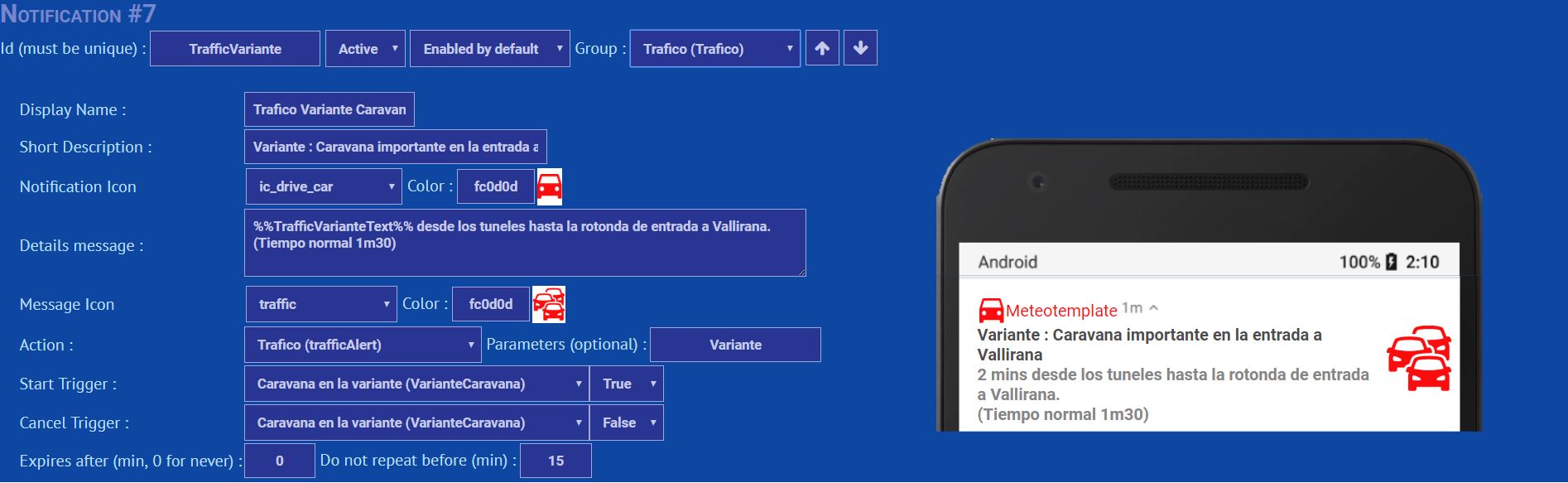
Now you can access the app plugin setup (through the Configure Plugins menu, as for any other plugin) and you can start configuring your notifications :
Image
In the message of your notification, you can include variables that are available through the trigger plugin.
Note that in the message, the variables must be enclosed by %% both at the beginning and att the end (like %%TrafficVarianteText%% in the example above. This differs from the way the variable are used in the triggers plugin (where you only prefix the variable with %%, like %%TrafficVariante )
Next to the action filed (which you will probably set to trafficAlert), there is a new field called parameters.
This allows to send parameters to the block that will be displayed in the app. (so far, only trafficAlert block isusing this :-) )
In our case, we can put the name of the route as parameters (in the example above, my route is called Variante).
This way, when the block is called with the route parameter, only this route will be displayed in the block (independently of how many routes you have configured and set visible in the trafficAlert block setup)
Note that you can use as a parameter a route that is not set to visible in the normal block.

Sorry that it is such a long post, it is the price to pay for the lack of documentation (I will try to improve in that area. I started in the triggers plugin, click on the question mark icon in the header...)

These days, most of the free time I can set apart for this hobby is dedicated to improve the beta version of the app and its corresponding plugin but if there are people interested in the trafficAlert block that want to provide feedback, please do so.

Cheers,

Pol-Brieuc
PS : Keep visiting the post on the Android App to get the latest news about this experimental side project

Image

andyk1
Professional
Professional
Posts: 432
Joined: Tue Feb 27, 2018 10:56 pm
Location: OKLAHOMA, USA
Station model: Ecowitt WS90
Software: Meteobridge/GW2000B
Contact:

Re: Traffic Alert Block (v1.0)

Post by andyk1 » Sun Nov 18, 2018 10:02 pm

Hello. I know this is in the wrong area but I attempted to download your Live Camera Feed block but says it is not available... 404 on your site. I am very much interested in that block.

Andy
Last edited by andyk1 on Wed Nov 21, 2018 4:44 pm, edited 1 time in total.
Image

User avatar
polbrieuc
Advisor
Advisor
Posts: 98
Joined: Wed Dec 06, 2017 10:58 pm
Location: Vallirana
Station model: WH1080
Software: Cumulus
Contact:

Re: Traffic Alert Block (v1.0)

Post by polbrieuc » Sun Nov 18, 2018 10:28 pm

andyk1 wrote: Sun Nov 18, 2018 10:02 pm Hello. I know this is in the wrong are but I attempted to download your Live Camera Feed block but says it is not available... 404 on your site. I am very much interested in that block.

Andy
Hi Andy,

Oops, I had removed it by mistake in an attempt to do some cleanup.
This is now corrected and the webcamLive block is available again : https://www.elspinars.es/dev/webcamLive.zip
Thanks for your interest.

Cheers,

Pol-Brieuc
Image

andyk1
Professional
Professional
Posts: 432
Joined: Tue Feb 27, 2018 10:56 pm
Location: OKLAHOMA, USA
Station model: Ecowitt WS90
Software: Meteobridge/GW2000B
Contact:

Re: Traffic Alert Block (v1.0)

Post by andyk1 » Sun Nov 18, 2018 10:30 pm

Very much appreciate it. Thank you for your efforts in meteotemplate also. Cheers.
Image

User avatar
Mauro
Advisor
Advisor
Posts: 54
Joined: Tue Oct 30, 2018 4:41 pm
Station model: Davis Vantage Pro2 Plus
Software: Meteohub

Re: Traffic Alert Block (v1.0)

Post by Mauro » Mon Nov 19, 2018 8:06 pm

Great job polbrieuc!

User avatar
wxthomson
Observer
Observer
Posts: 38
Joined: Sun Aug 20, 2017 5:21 pm
Location: Minnetonka Minnesota
Station model: Davis Pro 2
Software: Weather Display
Contact:

Re: Traffic Alert Block (v1.0)

Post by wxthomson » Tue Nov 20, 2018 2:16 am

This is very cool!

thanks for sharing.

User avatar
Meteopomezia
Observer
Observer
Posts: 22
Joined: Wed May 29, 2019 3:44 pm
Location: Pomezia/Italy
Station model: Davis Pro 2
Software: Wview
Contact:

Re: Traffic Alert Block (v1.0)

Post by Meteopomezia » Sun May 17, 2020 10:53 am

Good morning dear I installed everything you need but I can't configure the variables for the messages, it always gives me false ..
could you help me out?

Image
best cover cd

Post Reply