Page 2 of 2
Re: New plugin webcamRename ( and overlay )
Posted: Fri Aug 19, 2022 8:29 pm
by davidefa
ver 1.4
- added #BASEDIR# constant ( to use as relative path 'base directory', which represents the meteotemplate base directory, generally called template )
#tobydude
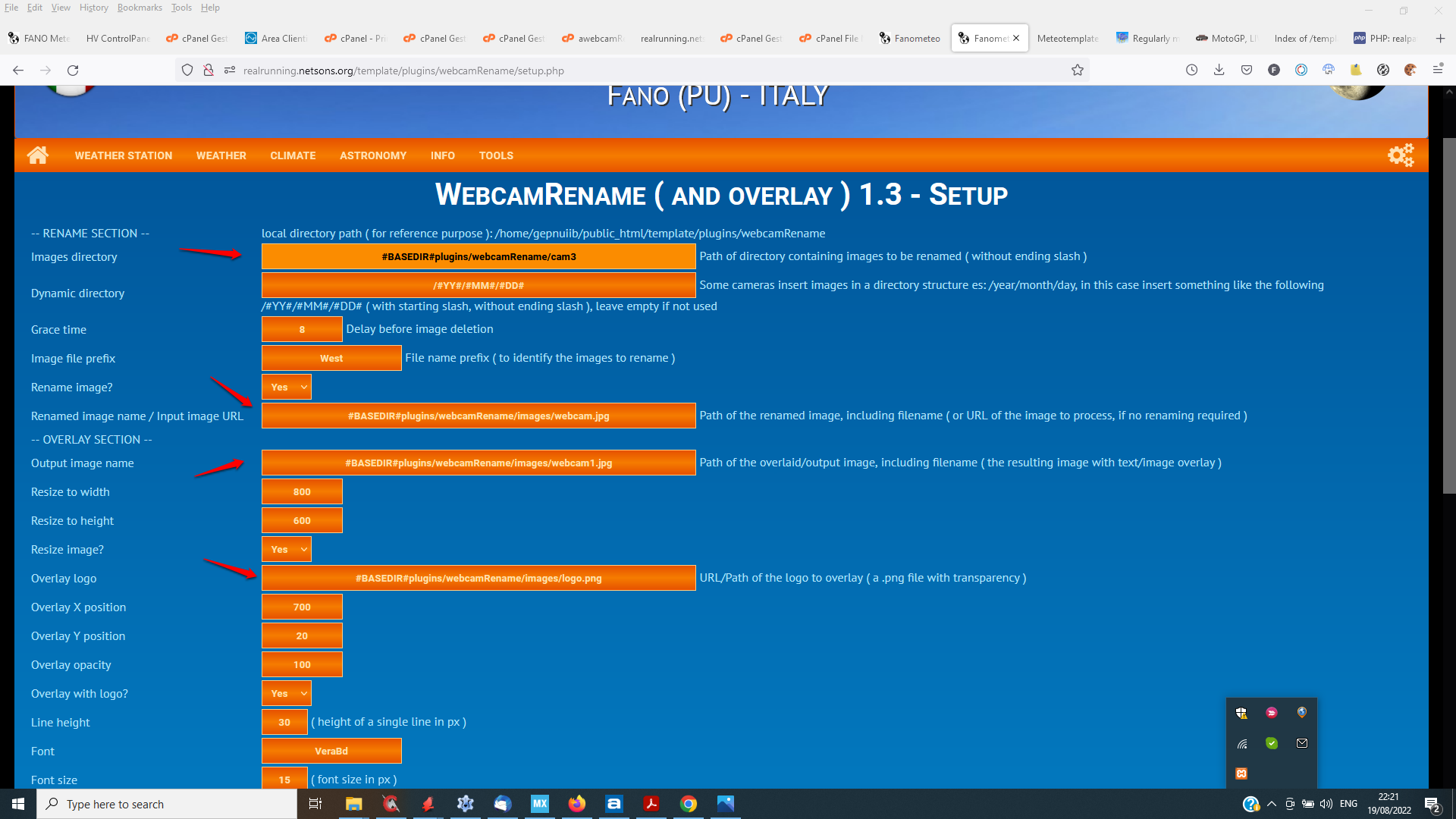
You can install this version of the plugin, and run the setup, setting the following fields:
Images directory
Code: Select all
#BASEDIR#plugins/webcamRename/cam3
Renamed image name
Code: Select all
#BASEDIR#plugins/webcamRename/images/webcam.jpg
Output image name
Code: Select all
#BASEDIR#plugins/webcamRename/images/webcam1.jpg
Overlay logo
Code: Select all
#BASEDIR#plugins/webcamRename/images/logo.png
- webRen02.png (221.52 KiB) Viewed 18864 times
Re: New plugin webcamRename ( and overlay )
Posted: Sat Aug 20, 2022 8:13 am
by tobydude
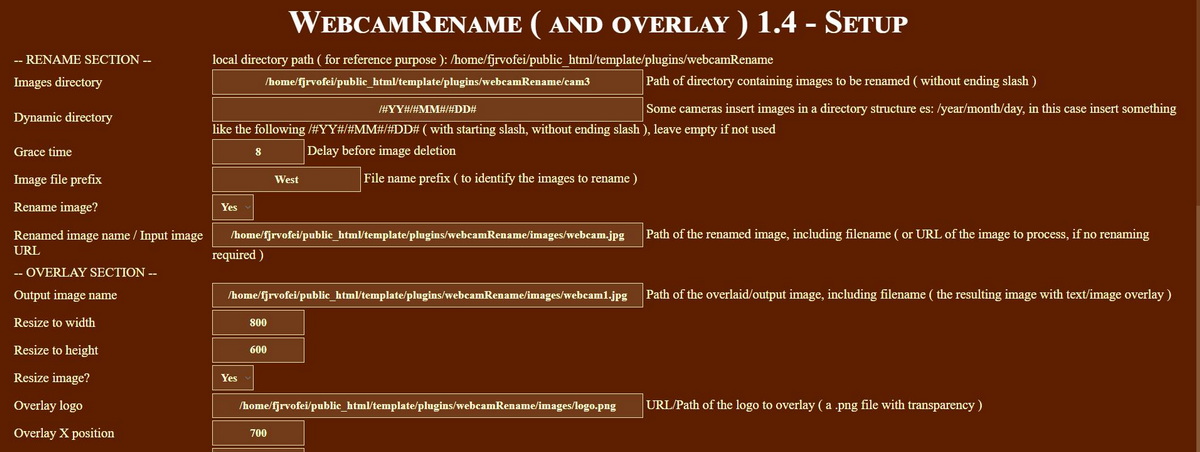
Strangest thing. The #BASEDIR# did not work for me so I tried "/home/fjrvofei/public_html/template/plugins ******" again and now the image is showing. I put the webcam in the middle of the page, to the right.
The webcam plugin is not there yet. But the webcam is up and thats what I wanted.
Thanks for helping.
The setup is now like this now:
Re: New plugin webcamRename ( and overlay )
Posted: Sat Aug 20, 2022 9:26 am
by davidefa
Copy in your load/crons directory the plugins/webcam/updateWebcam.php script ( you mistakenly copied the webcamBlock.php script, remove it )
P.S.
Another thing I noted is that some of the images are 'incomplete' ( missing the lower part ), this is a known problem of some cameras, seems like the image is transferred via ftp while the image is not completely read from the sensor ( not sure this makes sense ). You can check if there is a software update for the camera.
Re: New plugin webcamRename ( and overlay )
Posted: Sat Aug 20, 2022 10:59 am
by tobydude
davidefa wrote: ↑Sat Aug 20, 2022 9:26 am
Copy in your load/crons directory the plugins/webcam/updateWebcam.php script ( you mistakenly copied the webcamBlock.php script, remove it )
Done. Thanks.

P.S.
Another thing I noted is that some of the images are 'incomplete' ( missing the lower part ), this is a known problem of some cameras, seems like the image is transferred via ftp while the image is not completely read from the sensor ( not sure this makes sense ). You can check if there is a software update for the camera.
Yes I see some of the images are incomplete. I checked and the webcam has the latest firmware.
I put the webcam date/time top right in the image so that info is at least, visible.
I see after getting the load/crons directory right, the webcamTimelapse block startet up. (bottom left on weatherpage).
Probobly not enough images yet for the date 20. aug.
Same, when clicking "more" under the webcam block. But I se that the date today (20. aug ) is showing. So we will see after the images from the webcam starts to fill the /public_html/template/plugins/webcamRename/cam3 folder.
Thanks for helping. That was great!