Page 3 of 3
Re: Extra Sensors in Block StationData
Posted: Thu Nov 10, 2022 10:56 am
by Julius
Code: Select all
substr=load/crons
base=../
Current date/time: 2022-11-10 11:43:41
[...]
Calling api.php date/time: 2022-11-10 11:43:42

Fatal error: Cannot declare class MoonRiSet, because the name is already in use in /www/meteotpl/scripts/functions.php on line 666
OK, I removed the Moonphase block from the desktop and mobile homepages, and that seems to do the trick. Weird.
Can't even remember putting that block in, to be honest.
Also updated the api.php with that last version. All works fine now, thanks a lot Davide!
The only issue is (still) that the customGraph block in the top center only updates the correct colors after I pick a Timescale from the dropdown. Any idea how to solve that? I have it set to load 24h by default, but apparently it can't. I think the CSS conflicts with windRose or something like that..
Re: Extra Sensors in Block StationData
Posted: Sun Dec 03, 2023 9:24 pm
by Julius
Code: Select all
load/crons
Current date/time: 2023-12-03 22:19:39
sensor TIN=DeviceDash[0][Temperature][value]=18.2
sensor =DeviceDash[0][CO2][value]=598
sensor HIN=DeviceDash[0][Humidity][value]=58
sensor P3=DeviceDash[0][Pressure][value]=1012.9
sensor =DeviceDash[0][AbsolutePressure][value]=1011.7
sensor CO2_1=DeviceDash[1][CO2][value]=410
sensor =Dash[0][0][Rain][value]=0
sensor RR=Dash[0][0][sum_rain_1][value]=0
sensor R=Dash[0][0][sum_rain_24][value]=0.4
sensor =Dash[0][1][time_utc][value]=1701637798
sensor W=Dash[0][1][WindStrength][value]=5
sensor B=Dash[0][1][WindAngle][value]=334
sensor G=Dash[0][1][GustStrength][value]=7
sensor =Dash[0][1][GustAngle][value]=28
sensor =Dash[0][1][max_wind_str][value]=22
sensor =Dash[0][1][max_wind_angle][value]=125
sensor =Dash[0][1][date_max_wind_str][value]=1701622040
sensor =Dash[0][2][time_utc][value]=1701637753
sensor T3=Dash[0][2][Temperature][value]=0.4
sensor H3=Dash[0][2][Humidity][value]=95
sensor TMN3=Dash[0][2][min_temp][value]=-0.6
sensor TMX3=Dash[0][2][max_temp][value]=2
sensor =Dash[0][2][date_max_temp][value]=1701612017
sensor =Dash[0][2][date_min_temp][value]=1701588434
sensor =Dash[0][2][temp_trend][value]=stable
sensor =Dash[0][3][Temperature][value]=9.4
sensor =Dash[0][3][CO2][value]=408
sensor =Dash[0][3][Humidity][value]=61
sensor =Dash[0][3][min_temp][value]=8.3
sensor =Dash[0][3][max_temp][value]=10.6
sensor =Dash[0][3][date_max_temp][value]=1701596899
sensor =Dash[0][3][date_min_temp][value]=1701573572
sensor =Dash[0][3][temp_trend][value]=stable
Calling api.php date/time: 2023-12-03 22:19:39
using curl
writing file: cache/apiCache.txtSuccess
Exiting api.php date/time: 2023-12-03 22:19:39
Loaded CRON: /var/www/client2/web2/web/load/crons/updateNetAtmoNet.php

Fatal error: Cannot redeclare generateUpdateLog() (previously declared in /var/www/client2/web2/web/load/crons/updateNetAtmoNet.php:379) in /var/www/client2/web2/web/load/crons/updateWeatherflowNet.php on line 170
So, here's the thing: I have a meteobridge that is (probably already) causing the update script(s) to run?
But I have separate weatherflownet and netatmonet plugins active as well.
Frankly, it's unclear to me how to if at all perform a cronjob on the same server that is running the meteotemplate site.
I used to have two crons running, but they don't seem to work anymore (see error above).
Re: Extra Sensors in Block StationData
Posted: Sun Dec 03, 2023 10:26 pm
by davidefa
You can try this updated versione of the netAtmoNet plugin, it should fix the problem ( remember to copy the updateNetAtmoNet.php script in your load/crons directory ).
Your meteobridge calls directly the meteotemplate api.php script ( no cron job needed ).
The netAtmoNet and weatherFlowNet plugins need a cron job to be executed regularly, placing the respective update script in the load/crons directory both update script are run by a single cron job ( the one that runs load/cron.php script )
Re: Extra Sensors in Block StationData
Posted: Mon Dec 04, 2023 9:12 pm
by Julius
/load/cron.php?password=MYUPDATEPASS&errors gets me this for the netatmonet plugin:
Code: Select all
load/crons
Current date/time: 2023-12-04 22:05:13

Notice: Undefined index: body in /var/www/mt/load/crons/updateNetAtmoNet.php on line 300

Notice: Trying to access array offset on value of type null in /var/www/mt/load/crons/updateNetAtmoNet.php on line 300

Notice: Trying to access array offset on value of type null in /var/www/mt/load/crons/updateNetAtmoNet.php on line 300
and this for the weatheflownet plugin:
Code: Select all
substr=load/crons
base=../
Current date/time: 2023-12-04 22:07:39
device_id=214678
sensor U=[214678][0]=1701724024
sensor P=[214678][6]=1000.6
sensor T2=[214678][7]=1.7
sensor H2=[214678][8]=94
sensor LU=[214678][9]=0
sensor =[214678][13]=1
sensor =[214678][14]=0
sensor =[214678][15]=0
sensor =[214678][17]=1
sensor PT=[214678][pressure_trend]=falling
sensor =[214678][strike_count_1h]=0
sensor =[214678][strike_count_3h]=0
sensor =[214678][strike_last_dist]=31
sensor =[214678][strike_last_epoch]=1695012432
device_id=214679

Warning: file_get_contents(https://swd.weatherflow.com/swd/rest/observations/device/214679?token=928b96be-c2d0-4bcc-b5ce-e01e3e3eab43): failed to open stream: HTTP request failed! HTTP/1.1 404 Not Found in /var/www/mt/load/crons/updateWeatherflowNet.php on line 89
(when I separate the two putting them in the load crons dir one at a time..)
Both plugins are the latest versions you've posted.
Perhaps I should upgrade to php 8 first..
Re: Extra Sensors in Block StationData
Posted: Mon Dec 04, 2023 10:31 pm
by davidefa
Regarding the weterflowNet plugin you have to rerun the setup:
- enable only the sensors you need
- for each sensor enabled you have to define a name in the column MT-field
This should be a starting point:
NOTE
Not sure about the R and RR fields as the weatherflow documentation does not clarify the meaning of the rain fields.
In the old weatherflow plugin, the old field nomenclature was:
precip_accum_local_day -> R
precip_accum_last_1hr -> RR
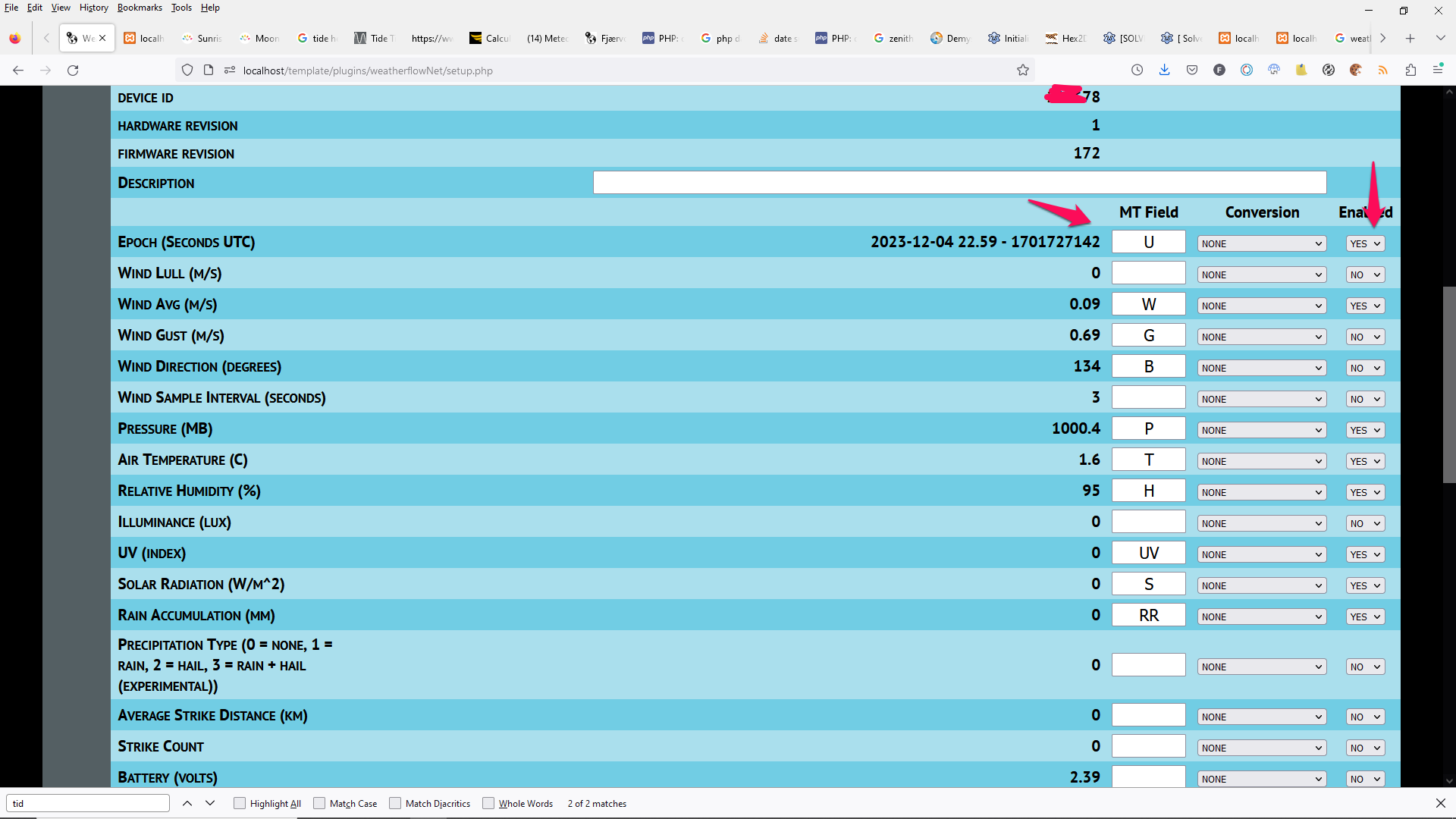
- weatherflow01.png (136.56 KiB) Viewed 31977 times
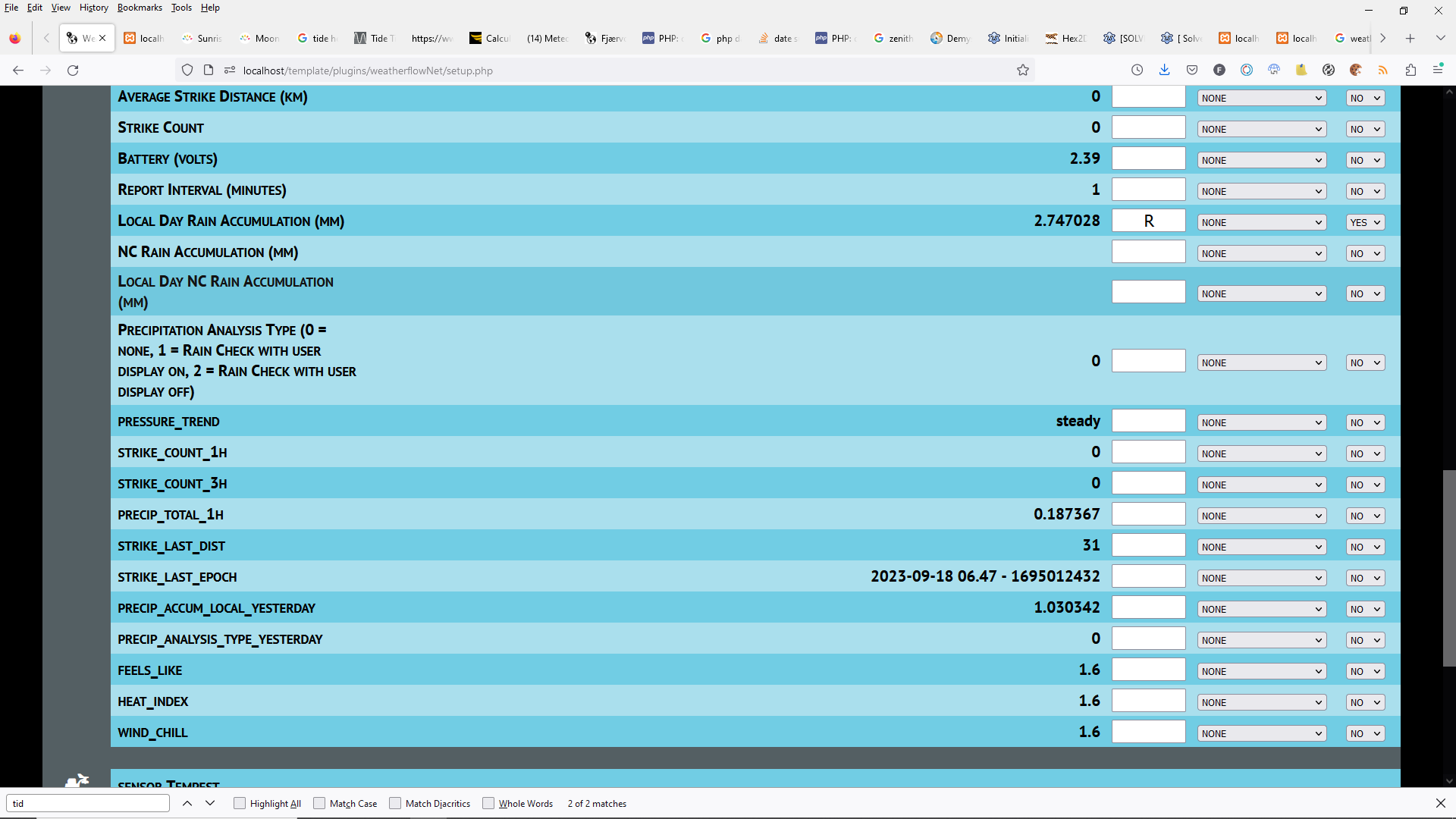
- weatherflow02.png (121.77 KiB) Viewed 31977 times
Re: Extra Sensors in Block StationData
Posted: Mon Dec 04, 2023 10:40 pm
by davidefa
Regarding the netAtmoNet plugin I obtain the same result, but the keys I have are no more valid.
Enabling an additional error report it shows:
Code: Select all
error: Array ( [code] => 2 [message] => Invalid access token )
So double check the plugin setup if the inserted credentials are still valid ( for example, if you have removed/deleted the previous configuration file... )
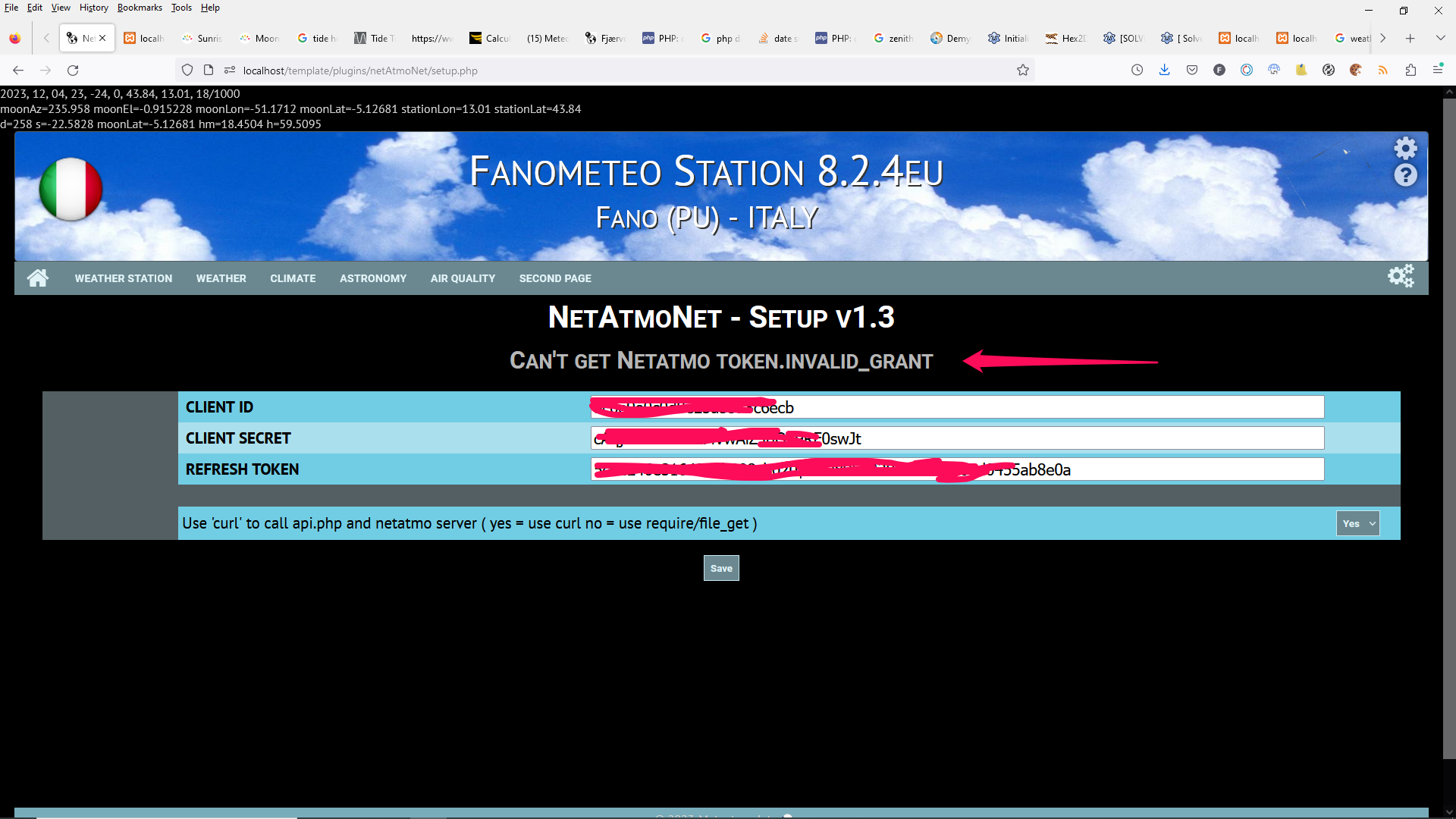
- netatmonet_conf06.png (471.93 KiB) Viewed 31977 times
Re: Extra Sensors in Block StationData
Posted: Wed Dec 06, 2023 4:22 pm
by Julius
davidefa wrote: ↑Mon Dec 04, 2023 10:40 pm
So double check the plugin setup if the inserted credentials are still valid ( for example, if you have removed/deleted the previous configuration file... )
There's something wrong with the way the netatmo creds are given/obtained. It works for a few hours, then breaks, and the token goes back to being expired:
Code: Select all
netAtmoNet
No password provided

Notice: Undefined variable: password in /var/www/client2/web2/web/plugins/netAtmoNet/updateNetAtmoNet.php on line 41

Notice: Undefined variable: password in /var/www/client2/web2/web/plugins/netAtmoNet/updateNetAtmoNet.php on line 43
This is not how it should be done, I fear. Or I should change permissions of the plugin files, or some external party is messing with it, but to what do I change the permissions of those files?
Re: Extra Sensors in Block StationData
Posted: Wed Dec 06, 2023 10:54 pm
by davidefa
The plugin caches the 'access token' and renews every 3 hours, so what you say makes sense ( and may indicate that something isn't working as expected, for example the file write permission is required ).
You may try this version of the plugin, in which I have disabled this caching ( and the access token is regenerated every time ).
If this fixes your problem I can add an option, in the plugin setup to enable/disable caching.
I've also added the logging of the errors in cache/errorsNetAtmoNetLog.txt ( in the hope to understand what's going wrong ).
In the case this does not work, you could pm me your netatmo credentials so that I can take a look directly.
Re: Extra Sensors in Block StationData
Posted: Thu Dec 07, 2023 9:04 am
by Julius
OK, I'll try that later. Sorry for not posting that after I deleted the plugin and re-installing it entirely, the access now seems to remain longer.
Another strange issue arised; There are no minimum and maximum values being shown for the netatmo and weatherflow plugin in the stationdata block, see
here.
The internal values from meteobridge do just fine, all the others do not. Why can that be?
The apilog.txt shows no errors though, mysql is not showing errors either (I already fixed/repaired tables etc.).
It would be nice to have a root shell-script that just sets all permissions correctly, like I have for wordpress sites, but then for the meteotemplate web-root.
As you can see, the customGraph is also not updating (because there's no history for those sensors?), plus, it isn't showing values under zero Celsius.
Strangely though, the values are all recorded just fine:
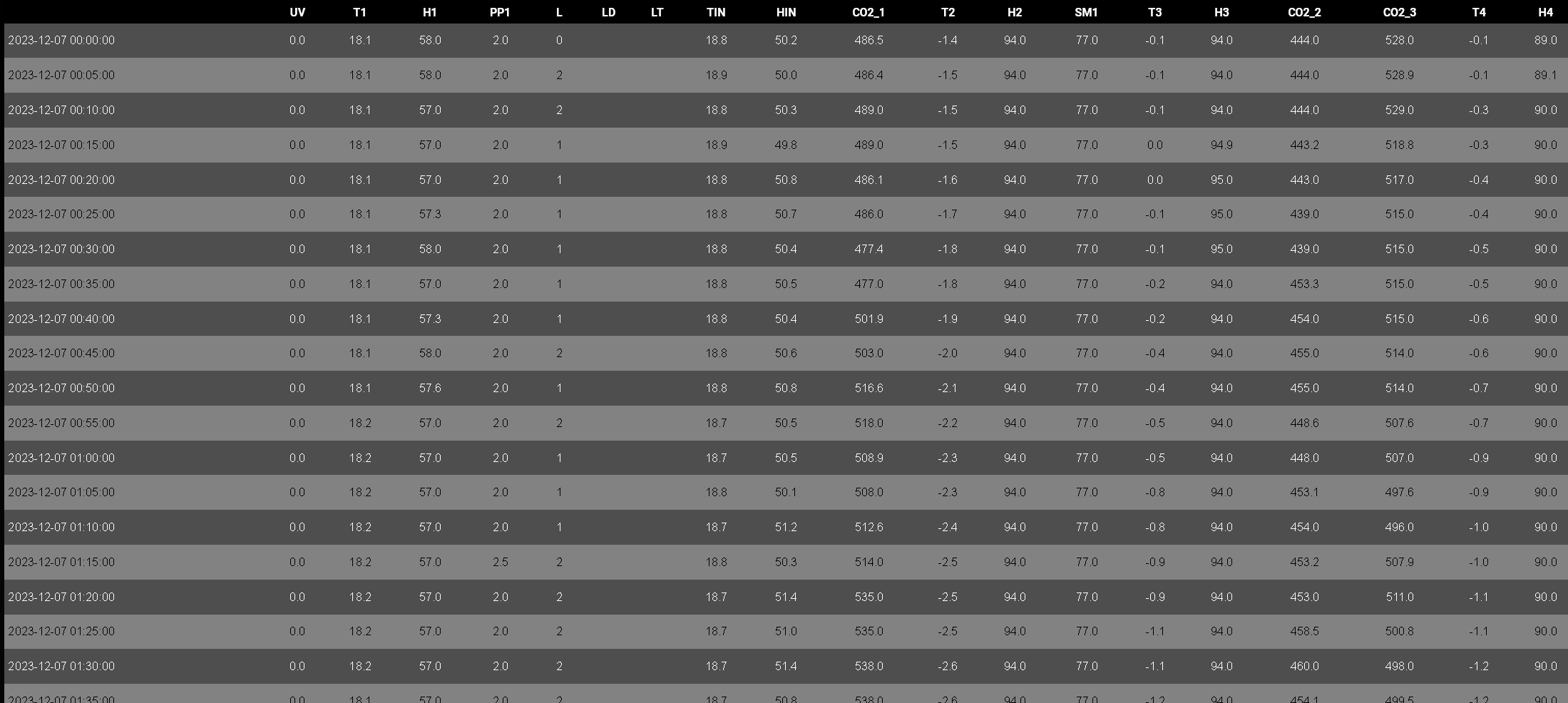
- Screenshot 2023-12-07 at 20-38-19 Broekermeer Weer.png (91.97 KiB) Viewed 31930 times
Why are min and max not showing?
I'll look deeper later, have to leave for work. For now this is where it's at. Thanks for all your help Davide!
Re: Extra Sensors in Block StationData
Posted: Thu Dec 07, 2023 11:13 pm
by davidefa
Ok, post/pm me the settings.php script of the stationData block so I can check, with your own settings.
Re: Extra Sensors in Block StationData
Posted: Fri Dec 08, 2023 7:59 am
by Julius
I seem to have fixed it. Removed the PM2.5 and PM10 entries. Something was going wrong with those in there. They were not only showing strange values, probably the micro symbol messed stuff up?
All seems to work OK now! Thanks again for all your effort. Next task: Upgrading to php 8, but I'm in no real hurry for that.