Page 1 of 1
INDOORDATA PLUGIN
Posted: Fri Apr 13, 2018 4:18 pm
by Juan Maria Vilaro
Hello good afternoon, I have the latest version of Meteotemplate "
http://www.meteobadalonaprogres.cat/template" working correctly, I use Weather Display with API, but I do not know why the Plugin "Indoordata" I can not configure it I tried it with the instructions that indicate in the Forum, but possibly for the translation to "Spanish" I do not interpret correctly the steps to follow, I would need help from some collaborator so that I can be guided in the correct configuration of the INDOORDATA plugin.
Thank you
Re: INDOORDATA PLUGIN
Posted: Sat Apr 14, 2018 11:13 am
by Dehatter
have you enabled the extra sensors data base?
Have you moved updateIndoor.php to the /load/crons/ folder?
Have you installed a cron job?
Not sure where you stand in the process, but all these things have to be done.
Tom
Re: INDOORDATA PLUGIN
Posted: Sun Apr 15, 2018 11:21 am
by Juan Maria Vilaro
Thanks, you could tell me where and how the additional sensors are activated.
I do not know where to do it.
In Weather Display, I have the Meteotemplate CRON running to work with API.
The updateindoor.php file I have put in "Load / Crons / updateindoor.php"
Re: INDOORDATA PLUGIN
Posted: Sun Apr 15, 2018 11:32 am
by Juan Maria Vilaro
Sorry, I have already been able to activate the extra sensors, but they still do not appear in the data.
Re: INDOORDATA PLUGIN
Posted: Mon Apr 16, 2018 11:28 am
by Jachym
See the plugin instructions, this plugin requires an additional cron job. It does not use the API directly - it could, it is technically possible, but the plugin was created before the API was introduced
Re: INDOORDATA PLUGIN
Posted: Mon Apr 16, 2018 2:06 pm
by Juan Maria Vilaro
Thanks Jachym, I do not quite understand this "TEMPLATE_ROOT / load / cron.php? Password = YOUR_UPDATE_PASSWORD"
Re: INDOORDATA PLUGIN
Posted: Tue Apr 17, 2018 2:44 pm
by Juan Maria Vilaro
Good afternoon, nothing, I have not managed to configure this plugin, possibly I am obfuscated, I do not know how to make the plugin work, I will appreciate that somebody can help me.
Thank you
Re: INDOORDATA PLUGIN
Posted: Wed Apr 18, 2018 12:08 am
by Dehatter
First you need to know your update password. You created it in the main setup.
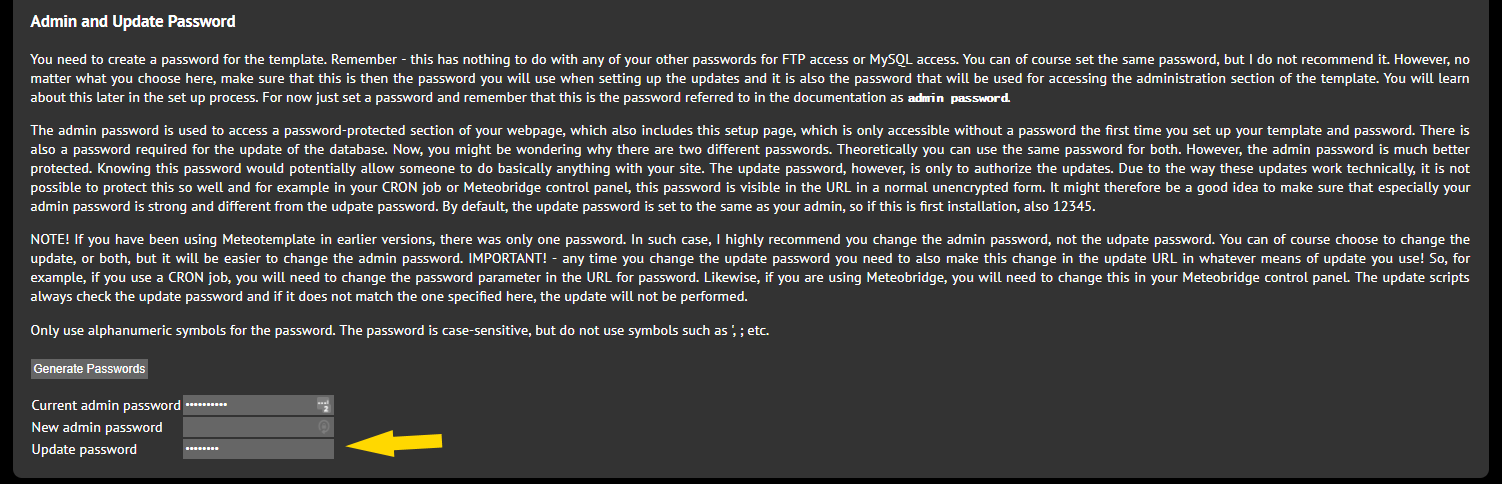
- udpw.png (69.76 KiB) Viewed 30858 times
Next activate Extra sensors. From the Admin Control Panel:
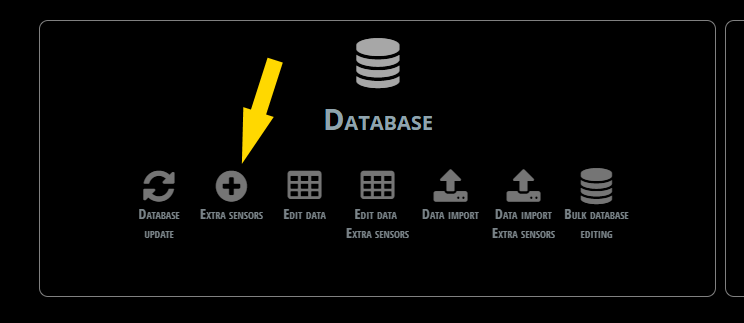
- ES.png (12.78 KiB) Viewed 30858 times
then
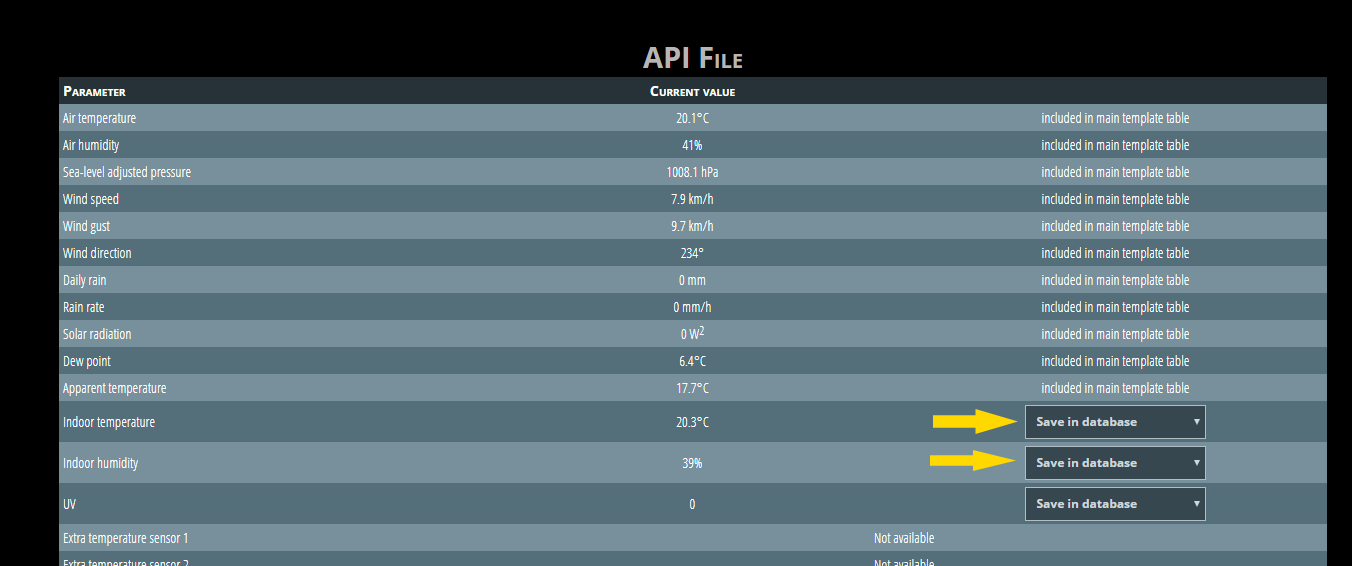
- es1.png (32.05 KiB) Viewed 30858 times
Then move indoorUpdate.php to the folder ../load/crons/
Re: INDOORDATA PLUGIN
Posted: Wed Apr 18, 2018 12:14 am
by Dehatter
goto
www.cron-job.org
Create an account.
Then create a cron job.
it should look like this:
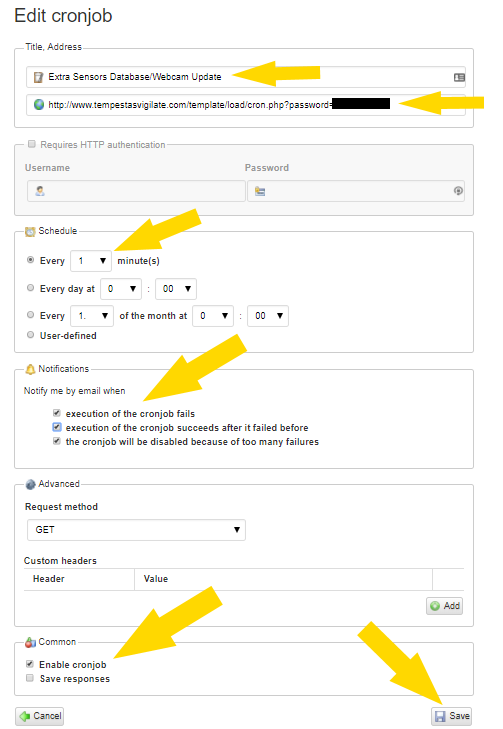
- CJ4.png (28.88 KiB) Viewed 30857 times
The blacked out area is where your update pw goes. Use your template path, not mine.
[*]
http://www.yourwebsite.com/template/loa ... urUpdatePW
It should be working now.
Tom