Page 1 of 1
Hosting Meteotemplate on a Synology NAS
Posted: Thu Jun 07, 2018 6:50 pm
by WessexWeather
I have been running MT on a remote server for a long time now, and love it!
Having recently purchased a Synology NAS, I notice a number of you host your MT website on your NAS drives, and I would like to do the same.
I have installed Web Station, MariaDB and phpMyAdmin, given the template folder write permissions, set up a MySQL database and even pointed a new url to my NAS but the setup.php file cannot connect to my database.
I am using the DDNS host name as the server and the database name as “xxxxxxx”. Should the username and password be root and password or should I set up a new username to access this database, and should anything else be added to the database name in setup?
Can anyone help me here?
Re: Hosting Meteotemplate on a Synology NAS
Posted: Fri Jun 08, 2018 8:50 am
by Asobig
The hostname should be 'localhost'.
The username, password and database name are free to choose.
Re: Hosting Meteotemplate on a Synology NAS
Posted: Fri Jun 08, 2018 12:43 pm
by WessexWeather
Thanks but I still can’t connect, it’s driving me nuts!
Do you run your site on a nas?
Appealing to any Synology users here to help me out with setup. For example do I need to give access to MariaDB in the Synology firewall settings and/or router (port 3307)? I’ve had my Wordpress database infected with malicious code before and I don’t want that to happen again by leaving myself open.
Re: Hosting Meteotemplate on a Synology NAS
Posted: Fri Jun 08, 2018 2:19 pm
by LOBWX
Ive always had to use port 3306. But, I am not using a NAS either. 2 cents worth
Re: Hosting Meteotemplate on a Synology NAS
Posted: Fri Jun 08, 2018 5:55 pm
by Asobig
I run my site from a Synology 1512+ model.
There are no rules in my firewall for MariaDB (i have the firewall disabled, i am behind a modem and router).
The packages i installed are:
Webstation
PHP 7
Maria DB 5
Apache server 2.4
MariaDB 5 runs at port 3306, MariaDB 10 runs at port 3307!
In Meteotemplate config.php i have these lines:
$dbName = 'meteotemplate';
$con = mysqli_connect('localhost','root','',$dbName);
So, no password.
Re: Hosting Meteotemplate on a Synology NAS
Posted: Fri Jun 08, 2018 7:11 pm
by WessexWeather
Hi Asobig,
I can’t seem to get setup.php to update the config.php as it can’t access my database.
Exactly what settings do you have in your Meteotemplate main setup page?
Re: Hosting Meteotemplate on a Synology NAS
Posted: Fri Jun 08, 2018 8:43 pm
by Asobig
In main setup i have these settings:
Host address: localhost
User: root
Password: <empty>
Database name: meteotemplate
In the folder 'web' on the NAS i made a subfolder with the name 'weather' (and copied all the meteotemplate files there).
So under Path i have:
Path: /weather/
Page URL: <my website address>
BTW, what shows when you hit the Server check button? I get:
Server Check
PHP version
You are using PHP version 7.0.28, which is OK.
CURL extension
CURL extension is enabled on your server.
url_fopen
The url_fopen is enabled on your server.
And the Test Connection button? If everything is oke you will get:
Success: A proper connection to MySQL was made!
Table already exists.
Re: Hosting Meteotemplate on a Synology NAS
Posted: Sat Jun 09, 2018 9:29 am
by WessexWeather
Unfortunately I am still unable to connect.
This is the message that the test button generates...
Error: Unable to connect to MySQL.
Debugging error number: 2002
Debugging error: No such file or directory
Re: Hosting Meteotemplate on a Synology NAS
Posted: Sat Jun 09, 2018 3:37 pm
by Fraggboy
I run my website off of my Synology DS916+. I am running a few errands today.
Let me re-read what is going on and see if I can help later on.
It is possible... We will get you running.
First off, everyone has access to your phpMyAdmin. You have to set it up so your local IP range has access only or people will try to brute-force your login.
Re: Hosting Meteotemplate on a Synology NAS
Posted: Sat Jun 09, 2018 9:10 pm
by WessexWeather
Thanks Fraggboy,
I look forward to your help. I certainly want my phpMyAdmin to be secure!
Re: Hosting Meteotemplate on a Synology NAS
Posted: Sun Jun 10, 2018 12:40 am
by Fraggboy
First off, you don’t need to allow anything through the firewall. You will want to delete the rule you created for php.
The template will communicate with php internally. No data is shared with the outside world (no incoming connections to your DB).
Securing php on a Synology is challenging. It’s possible, but challenging. It’s easiest to disable phpMyAdmin when you aren’t using it. Once it’s up and running, you really don’t need to get in.
Now, onto the issue. You use MariaDB to reset the root password.
Once reset, use phpMyAdmin and log in as root. Once in, create a different account (I use Bloomsky) and password. Make sure to give full permissions to the new account.
Once created, log out of root and try to log into the new account you created. If you can get in, Great!! Time to log out of phpMyAdmin and disable it. No reason for it now.
Go through the main template setup. DB hostname is “localhost”. Type in the username and password in the setup and try it out.
Re: Hosting Meteotemplate on a Synology NAS
Posted: Sun Jun 10, 2018 8:56 am
by WessexWeather
Thanks for the comprehensive instructions Fraggboy.
I went through everything carefully, withdrew access to MariaDB 10 on 3307 through my Synology firewall and router, deleted my username and database via phpMyAdmin, reset the password via MariaDB and started again as per your instructions. The only thing I wasn’t clear about was how to disable phpMyAdmin.
In the Meteotemplate settings I set the Host address as localhost, User, Password and Database name as set up previously in phpMyAdmin.
When I hit the Test Connection button I still get a new page showing: -
Error: Unable to connect to MySQL.
Debugging error number: 2002
Debugging error: No such file or directory
Re: Hosting Meteotemplate on a Synology NAS
Posted: Sun Jun 10, 2018 4:53 pm
by Fraggboy
In phpMyAdmin (when creating the user), what host did you provide? The IP address of your NAS, 128.0.0.1, or “localhost”? (I think you mentioned that in your above post. Just want to make sure). The 2002 error is either mySQL not running, or incorrect hostname provided.
In the main template setup, you want to match the hostname with what you setup in phpMyAdmin. (I personally use localhost for both)
To disable phpMyAdmin, open up Package Center, highlight “installed” on the left. Scroll down to phpMyAdmin (select it). From the drop down, select disable.
Re: Hosting Meteotemplate on a Synology NAS
Posted: Sun Jun 10, 2018 5:46 pm
by WessexWeather
Hi, I’m using localhost for both.
Re: Hosting Meteotemplate on a Synology NAS
Posted: Sun Jun 10, 2018 6:34 pm
by Fraggboy
OK, let's drill down on the PHP settings.
What do you have when you click on the Web Station?
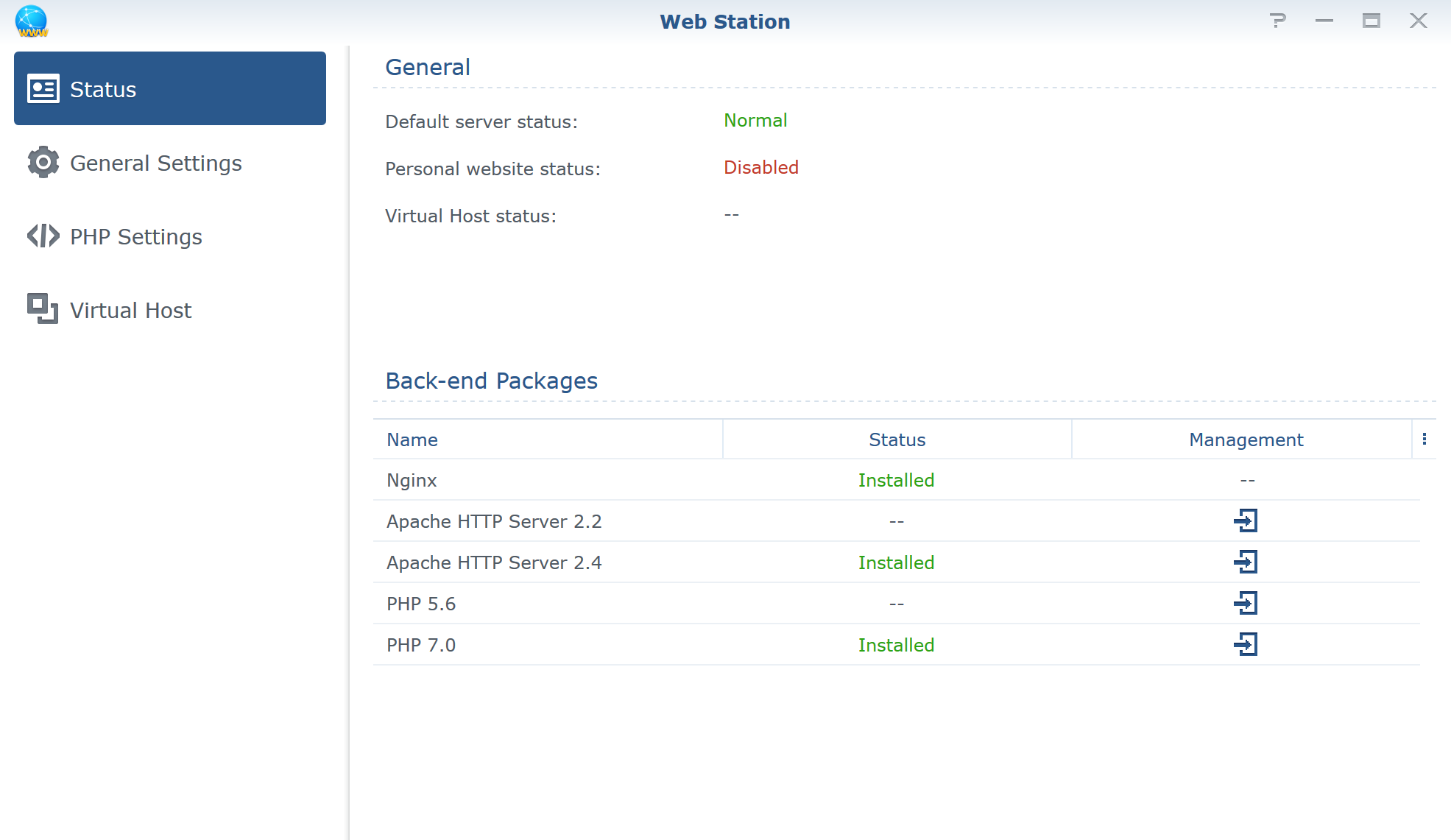
- Web_Station.png (73.35 KiB) Viewed 41170 times
Your General Settings?
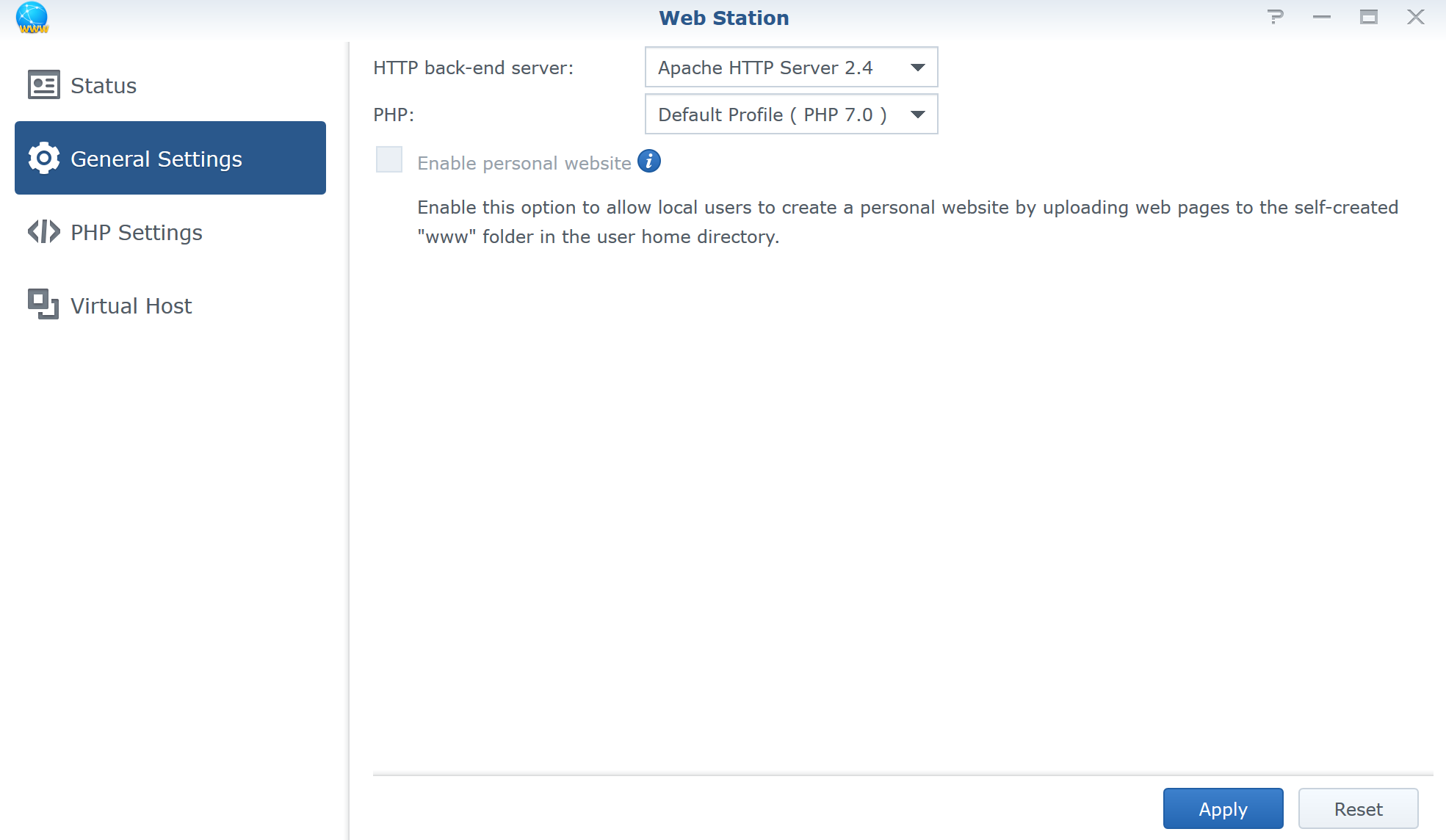
- General_Settings.png (69.8 KiB) Viewed 41170 times
And, your PHP Settings (Let me know what extensions you have checked)?
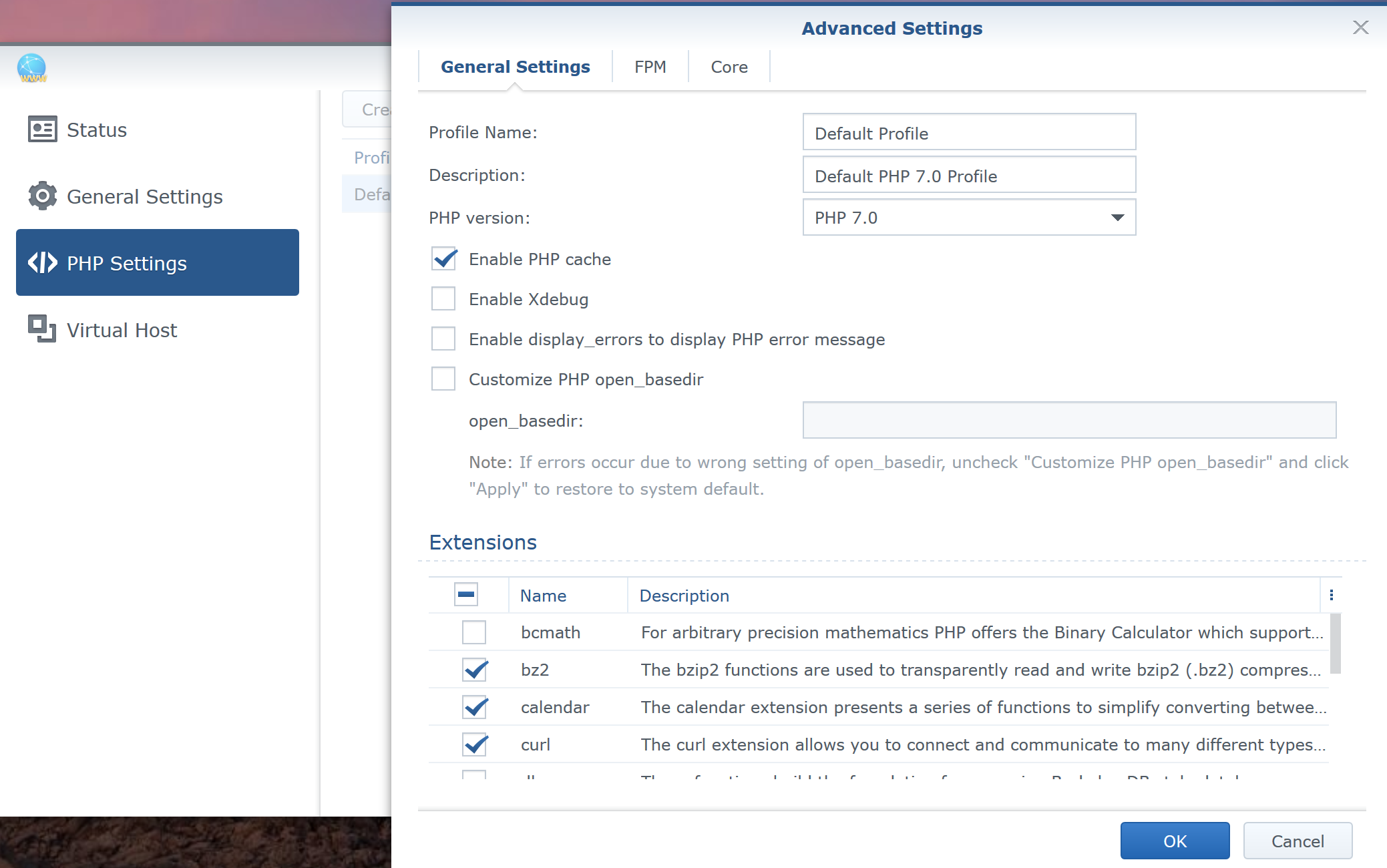
- Adcanced_Settings.png (249.51 KiB) Viewed 41170 times
Re: Hosting Meteotemplate on a Synology NAS
Posted: Sun Jun 10, 2018 6:40 pm
by Fraggboy
The database name you provided in the main setup file, did you give the username full permissions to that database?
Also, provide a password to the DB username and provide that password in the setup file (For troubleshooting)..
Re: Hosting Meteotemplate on a Synology NAS
Posted: Sun Jun 10, 2018 7:49 pm
by WessexWeather
Web Station Status is the same as yours, except that Apache 2.2 and 2.4 are installed.
Web Station General Settings also match yours.
In my php 7.0 Default profile, all extensions are ticked except for ssh2.
And my username definitely has all permissions on the database I created.
Frustrating but I appreciate your help!
Re: Hosting Meteotemplate on a Synology NAS
Posted: Sun Jun 10, 2018 8:36 pm
by Fraggboy
Hmm... I am at a loss.
Let me churn on this some more.
The error you are receiving is tied around either incorrect hostname and/or incorrect credentials to the DB.
Did you create a different username for the DB, or are you using the default root creds?
If you created different creds, you can login using those creds in phpMyAdmin and can create a table in the database?
Also, I can’t remember when you install MariaDB, does it ask to specify the port? I really don’t want to go through the setup again.

Maybe un-install phpMyAdmin, then MariaDB. Then re-install them.
Re: Hosting Meteotemplate on a Synology NAS
Posted: Sun Jun 10, 2018 9:43 pm
by WessexWeather
I created a new username then selected to create a database with the same name, with all privileges. It is this username, database name and password that I am using in setup.php, and I can log into phpMyAdmin with these details.
I uninstalled phpMyAdmin, deleting all the databases, then uninstalled MariaDB 10, reinstalling MariaDB 10 (there was no reference to port setting) then phpMyAdmin. I reset the password in MariaDB them set up the new username nand database in phpMyAdmin as described above.
Still the same error!

Re: Hosting Meteotemplate on a Synology NAS
Posted: Sun Jun 10, 2018 10:32 pm
by Fraggboy
Yay! I know why it’s not working.

Delete MariaDB 10 and install 5. 10 runs on a different port (not standard), thus it’s not “seeing” it.
Re: Hosting Meteotemplate on a Synology NAS
Posted: Mon Jun 11, 2018 12:55 am
by Fraggboy
Asobig wrote: ↑Fri Jun 08, 2018 5:55 pm
MariaDB 5 runs at port 3306, MariaDB 10 runs at port 3307!
Asobig was correct.
. It just took us a while to figure it out.
I ran into the same issue a while ago, but forgot about it.
Thank you Asobig!!
Re: Hosting Meteotemplate on a Synology NAS
Posted: Mon Jun 11, 2018 8:13 am
by WessexWeather
Thanks guys, success!
“Success: A proper connection to MySQL was made!
Table created!”
However, for anyone else doing this it wasn’t 100% straightforward. I uninstalled MariaDB 10 and phpMyAdmin, then installed MariaDB 5. However when I installed phpMyAdmin it insisted on also installing MariaDB 10, so I now have both versions of Maria DB installed. Whether I can uninstall version 10 I’m not sure...?
However, within MariaDB 5 I changed the password then logged into phpMyAdmin selecting MariaDB 5 from the Server Choice dropdown. I created a new User account and associated database with all privileges checked. I then ran Meteotemplate setup and bingo!
Finally within Package Center I selected phpMyAdmin from my installed programs and selected Stop from the dropdown, as per Fraggboy’s instructions.