Page 1 of 1
Webcam question
Posted: Fri Jul 13, 2018 2:19 pm
by AbjaterZA
Good day fellow MeteoTemplate users,
I'm rather new to MT - been using it just a week, but overwhelmingly impressed with its power and functions.
My question: Is there an easy way to integrate either the live video stream, or snapshots, from a normal HikVision IP camera into MT, either as a block or plug in?
I thought it would be as easy as opening and mapping ports on the firewall, but evidently not the case.
Would appreciate some expert opinions and suggestions.
Re: Webcam question
Posted: Fri Jul 13, 2018 7:00 pm
by scadie
Hi AbjaterZA,
I'm using a IP Camera (Amcrest) with the software BlueIris to record the video. Each 30 Second, the software send a snapshot to my web server with the new picture.
I never send a live video thru the web, take to much bandwidth.
Have a good day.
Re: Webcam question
Posted: Fri Jul 13, 2018 7:37 pm
by Dehatter
Though it is theoretically possible, the storage/capacity issues with video are tremendous.
On my page, under the webcam menu bar, I have videos of yesterday and the last 3 hours.
I used third party software to automatically create and upload these files.
Within the template, there is a webcam block that will display a near current image, and a webcam plugin that stores images over time.
Tom
Re: Webcam question
Posted: Sat Jul 14, 2018 1:36 pm
by AbjaterZA
Thanks for the pointers.
I have managed to get the "Webcam" online, via a link to the cam, it then pushes a snapshot of current view as JPG to the viewer.
Now just to figure out how to get a snapshot from the camera every 10 minutes or so, pushed to the Block folder.... That automation is winning me.
Re: Webcam question
Posted: Wed Jul 25, 2018 4:28 am
by Dehatter
Oh. Sorry I thought you were looking for a "live feed."
The block is designed to display an image located on the web. It can be anywhere. The trick is to have the same filename every time.
If your camera and ftp a snapshot at your required interval, That is the best option. I would recommend creating a /cam folder on your server and ftp them there.
If your camera add a timestamp to the filename, it get a little bit more complicated as you will have to run a script to control the filename. The good new is that the script is already written and available (either search the web, or I can send it to you - PM if needed). Once you get the file nae situation straight, it is easy to put the path to that file in the block information.
Something like http:\\www.yourdomainname.com/cam/webcamimage.jpg
Then the block will update automatically.
I hope this points you in the right direction.
Tom
Re: Webcam question
Posted: Wed Sep 19, 2018 12:35 pm
by olav
Yesterday i managed to set up a live video stream embedding my YouTube-live link into a Blank Block. Take a look at my weather site at
http://www.sotraveret.no or directly to my live stream at YouTube:
https://www.youtube.com/watch?v=n71AfDnmZYU. So now I have both a live stream and the ordinary time-laps pictures on my meteotemplate website.
Re: Webcam question
Posted: Tue Oct 02, 2018 10:15 am
by polbrieuc
olav wrote: ↑Wed Sep 19, 2018 12:35 pm
Yesterday i managed to set up a live video stream embedding my YouTube-live link into a Blank Block. Take a look at my weather site at
http://www.sotraveret.no or directly to my live stream at YouTube:
https://www.youtube.com/watch?v=n71AfDnmZYU. So now I have both a live stream and the ordinary time-laps pictures on my meteotemplate website.
Hi Olav,
I did not know that I could livestream my webcam to youtube. That's great. I used
ffmpeg to capture the rtsp stream from my webcam (only option as it is a chinese cheap webcam that does not allow other format) and send it to Youtube.
I wanted to keep the livestream as optional to my users (so it does not consume too much data) so I modified the existing webcam block to add an icon opening the livestream in a overlay window :
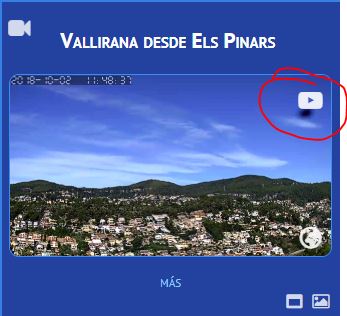
You can see it on my Meteotemplate website
https://www.elspinars.es (Live stream available on Youtube :
https://www.youtube.com/embed/live_stre ... XItgKfU9iA )
The block is available on my
dev page or directly
here.
Only difference in the settings is that you have to add the url of your live stream and choose the position of the icon :
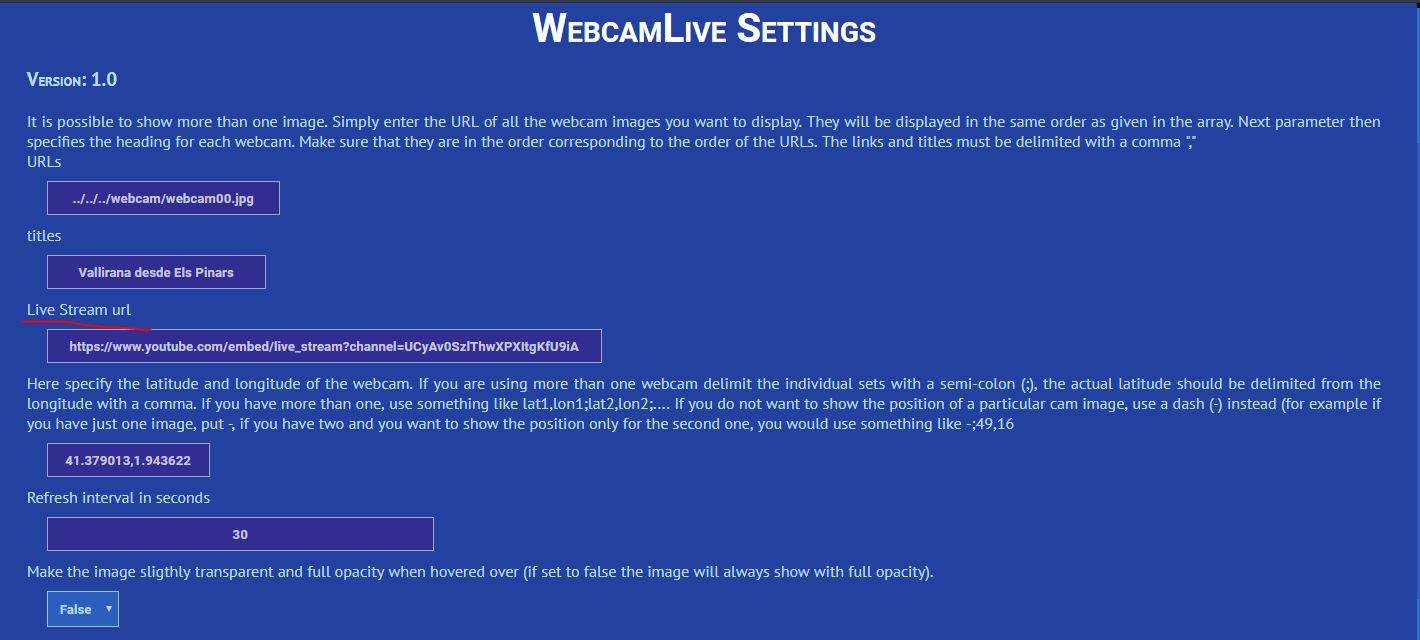
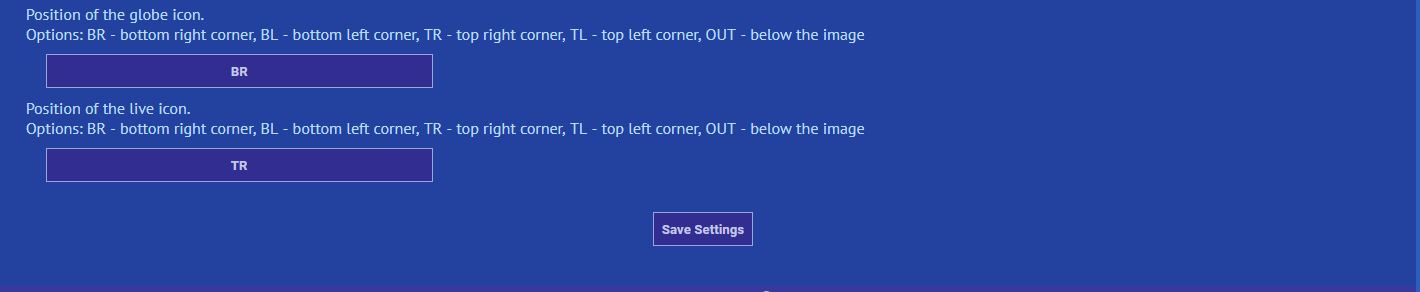
Cheers,
Pol-Brieuc
PS : If somebody else is using ffmpeg to send its webcam stream to youtube, I am willing to receive tips on which options to use.
Re: Webcam question
Posted: Wed Oct 03, 2018 3:24 am
by Ken Good
I have several of these options on my website as well. I have a live feed. I also upload the current webcam image every 2 minutes. I also have a timelapse video from the previous day. I use three different programs to do this. I use Blue Iris to manage the webcam and to be the webserver for the live image. I also use iptimelapse to capture the current image which it does every 30 seconds. At the end of the day it uses all of these pictures to make a timelapse video of that day and uploads it to my site. Finally, I use a ftpbox to upload the current image every 2 minutes to my website. I have been very happy with it so far.
On my website, I use the dynamic image block to display the current webcam image. I like it because it checks for an update as frequently as you set.
Ken
Re: Webcam question
Posted: Wed Jan 09, 2019 10:47 am
by SimonB
I know this post is a bit old, but have you (a fellow saffer nogal) come right with what you wanted to achieve?
I use IPTimelapse to:
a) FTP a static image to my page
b) Build timelapses which get uploaded to my site every hour
c) Live stream to facebook.
Re: Webcam question
Posted: Sat Jan 12, 2019 2:08 am
by Dehatter
I found a free streaming site (Angelcam.com). Yes it has ads, but I literally had nothing to do but provide my rtsp string and boom...it was there. Broadcasting is free and recording is a subscription (that I did not get).
https://icu2.click2stream.com/
I just put the public broadcasting url on my site and it works.
Tom
Re: Webcam question
Posted: Thu Nov 21, 2019 8:27 am
by Tigro11
Hi Guys, I wanted to put my foscam f9900 in live how can I do?
Thanks
Valerio
Re: Webcam question
Posted: Mon Apr 05, 2021 1:29 pm
by F1SKF
Bonjour,
Je ne suis pas arrivé à faire fonctionner le block "Webcam live" avec ma diffusion Youtube en streaming :
lien streaming :
https://www.youtube.com/embed/J7-OCDGE5xY
Quelqu'un peut-i ma'aider ?
Merci
Hello,
I couldn't get the "Live webcam" block to work with my Youtube streaming:
streaming link: [url]
https://www.youtube.com/embed/J7-OCDGE5xY
[/ url]
Can someone help me?
Thank you
Re: Webcam question
Posted: Mon Apr 05, 2021 3:27 pm
by davidefa
Corrected the url