Page 1 of 1
New Webcam Running
Posted: Wed Aug 22, 2018 4:38 pm
by Ken Good
I set up a new webcam.
The ftp seems to be working
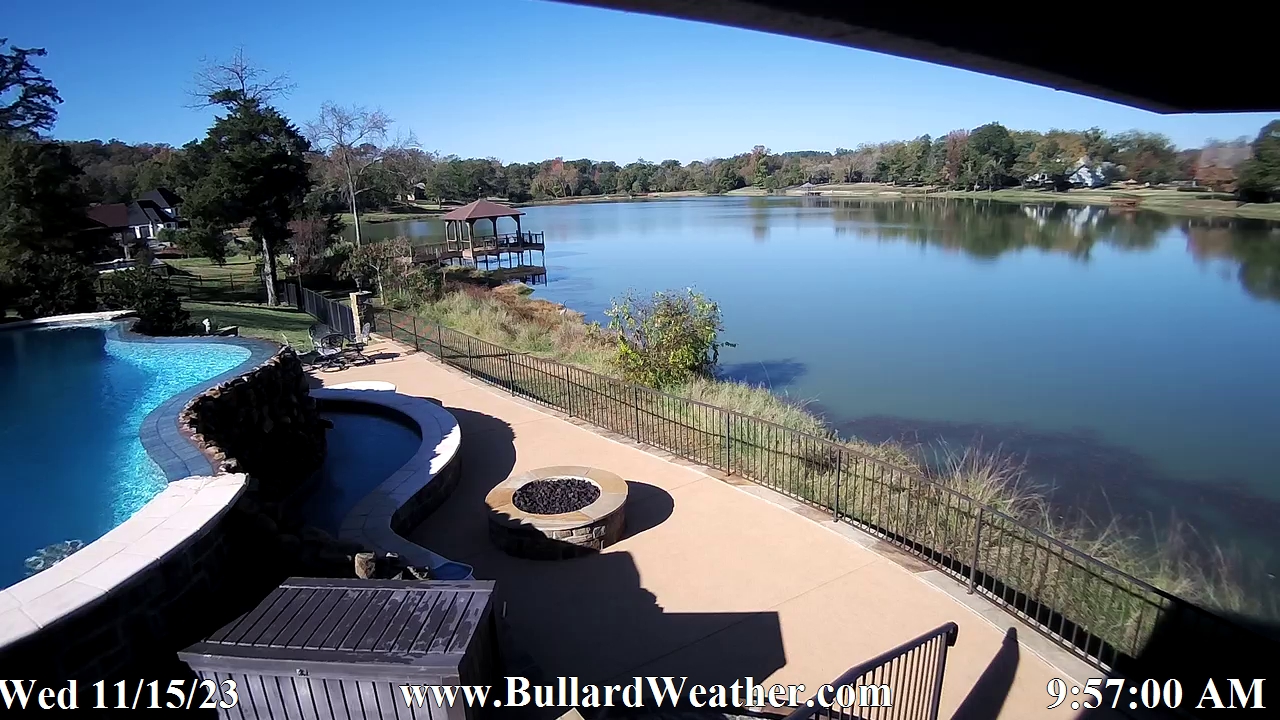
You can see it at:
http://bullardweather.com
I still have some work to do before I call this project completed. But I will wait to see if I can do what I want to do.
Ken
Re: New Webcam Running
Posted: Thu Aug 23, 2018 1:27 pm
by Ken Good
I was able to set up a web server at my home and I now have a live feed running. It may have some limitations, but so far I really like it.
You can see it at:
http://bullardweather.com/template/cust ... ve%20Video
Re: New Webcam Running
Posted: Fri Aug 24, 2018 2:16 am
by John B
That looks good, Ken. Mind you I'm looking at the page at your early evening with the infrared active. Because of our time zone difference I can't critique it more than saying that you have as many "flying critters" as do I.

Should I get the chance I shall have a look when it's daylight at your lat/long.
Cheers,
John
Re: New Webcam Running
Posted: Fri Aug 24, 2018 2:49 am
by Ken Good
Yep. I certainly have a lot of bugs at night. I hope to have the final part of this project up and running in a few days and it will involve using IPTimeLapse software to make a video from the pictures and have it uploaded onto the website nightly. If it works as planned, every night the computer will generate a timelapse video of the day before and upload it on to the site. I have a partial one up now.
http://bullardweather.com/template/cust ... se%20Video
Ken
Re: New Webcam Running
Posted: Mon Aug 27, 2018 11:39 pm
by MJW
Looks good!
Re: New Webcam Running
Posted: Thu Aug 30, 2018 5:53 am
by LOBWX
Oh man, that's so cool. You might have encouraged me to get a cam going too.
Re: New Webcam Running
Posted: Thu Aug 30, 2018 12:31 pm
by Ken Good
The webcam was pretty easy to install. I decided to use the blue iris software and IpTimeLapse software to make a daily timelapse video of the day before. The Blue Iris is complex, but I do not need it to use 50% of its capabilities. I just want it to post a picture by ftp to my website every minute. I want it to replace the same picture so that I do not build up a large library of pictures online. Also, the IPTimeLapse software then downloads a copy of each picture every minute into a separate folder. It makes a video at the end of the day and then uploads the video via ftp back to the cloud to a different folder. Then it deletes all pictures that are older than 3 days. If it seems like one big circle I think it probably is.
Everything has been going well with one exception. Every morning at 4:03 am the ftp feature on blue iris stops working. You can set your clock by it. The picture even says on it that it is 4:03 am. It has been frustrating because once I make changes and think it is working, I have to wait until the next 4:03 am to see if it is. Then of course it hangs once again. If I close the program and reopen it, the ftp starts working again. You get to the point that you want to throw the computer out the window.
I finally googled the error message and I found some reference to the situation I was having (but not with the same software). It suggested that you deselect "passive mode" and so I did that this morning and now I am waiting until 4:03 am tomorrow to see if it is fixed.
The really sad part of this is I have a pretty good internal clock. If I want to wake up at a certain time, I usually do. So I have started waking up at 3:55 am in morning. Ha! This morning I confirmed that it stopped and just went back to bed. I am not going to mess with this in the middle of the night.
Other than this little hiccup, the process of setting up the webcam and the software has been a fun project and I have been happy with the results.
Ken
Re: New Webcam Running
Posted: Fri Aug 31, 2018 5:57 am
by Dehatter
Just so you know, iptimelaspe will ftp a snapshot as well. Just means you don’t need 2 programs running at the same time. You can even rename the image to what ever you want. An interesting feature is that you can specify which image gets uploaded. For instance I save a picture to my local folder every 10 secs but only ftp on the 6th image so my ftp updates only once a minute but I have the additional 5 snapshots included in my time lapse so it runs smoother. It also can be setup to only capture during daylight and knows when sunrise and sunset is based on your setup lat and long. You can even off set from sunrise and sunset by whatever time in minutes you choose. As in start 30 minutes before sunrise and stop 45 minutes after sunset.
I got the pro version and run 6 instances for 4 cameras plus 2 thumbnails for WU (because of WU’s 150kb size limit as well as the 5 min upload limit).
https://www.wunderground.com/webcams/de ... /show.html
I have been using IPTL for awhile now so if you have any questions just ask.
Daily vid:
http://www.cam.tempestasvigilate.com/icu2.mp4
Last 3 hours:
http://www.cam.tempestasvigilate.com/Intraday_icu2.mp4
Tom
Re: New Webcam Running
Posted: Fri Aug 31, 2018 4:40 pm
by Ken Good
Tom,
I do have a question for you. I am trying to figure out what the possible causes of an issue could be. Let me tell you what the problem is and then let me tell you what I have done about it.
The issue is that with blue iris the ftp stops working at 4:03 am every morning. Also, late in the day, IPTimeLapse stops capturing images and has a capture error. No matter what I do I cannot get it to start working again. I uninstalled it and reinstalled it and it worked for a couple of days and then started the same problem. This morning it started working again.
Here is what I have done. I have changed the settings from blue iris so that it places the picture on a local folder and does not use ftp. Then I changed the settings for IPTimeLapse to capture from this folder and not the internet. Next, I set up an ftp client and created a folder to sync with the internet. This seems to be working well currently.
Any ideas what is causing this? I am thinking that it may be a firewall issue, a virus software issue or a limit from the ISP. Any thoughts?
Ken
Re: New Webcam Running
Posted: Sat Sep 01, 2018 4:26 am
by Dehatter
Have you tried using the ftp protocol in iptimelaspe?
The 4:03 am thing is catching me. Sounds a lot like a firewall issue but it shouldn’t be. I had blue iris as well at first and found it to be quite quirky. Can’t say it didn’t work but it just might have been more than I needed.
I would suggest trying to just ftp with IPTL and not running BI unless you want the alarms.
Tom
Re: New Webcam Running
Posted: Sat Sep 01, 2018 3:56 pm
by Ken Good
Thanks Tom.
I added a folder synchronizer program and switched blue iris to putting the .jpg in the folder that is synchronized. I added a simple program from ftpbox.org. Right now I have the pictures being generated every 30 sec., but the ftp sync is only taking place every 2 minutes. Yesterday was the first day that there was no problem. So today will be the first video I get from sunrise to sunset.
I thought about using just IPTimeLapse but it was having an issue as well. Around 8:00 pm it would start having a capture error and would not capture any more pictures. Also, when it gets to that state it will not create a video either. Then the next day it would start working again. So I switched it to capturing from the folder from Blue Iris and only letting it upload the video file at the end of the day and everything worked fine.
It is either a firewall issue or an ISP issue. One or the other has a limit on the number of times a port can contact or go through. Of course, that is just my guess. Ha!
Ken
Re: New Webcam Running
Posted: Mon Sep 10, 2018 12:28 am
by Ken Good
Everything continues to work well. Here is the timelapse video. It updates every night around 8:30 pm GMT -5 (I believe).
http://bullardweather.com/template/cust ... se%20Video
Ken