Page 1 of 1
Block Current error box uv
Posted: Sat Nov 23, 2019 2:34 pm
by Tigro11
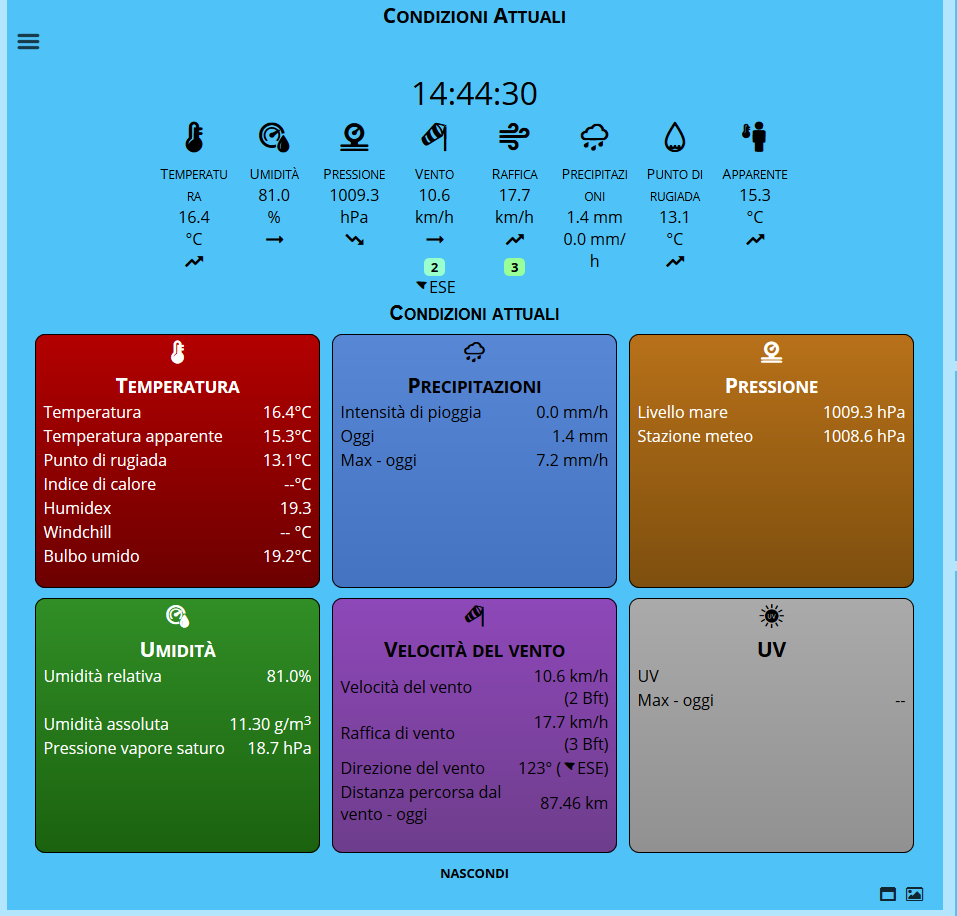
- errore uv.png (100.29 KiB) Viewed 7801 times
I disabled the UV sensor, but on the panel I continue to view.
How do I do to disable it?
Thanks
Valerio
Re: Block Current error box uv
Posted: Wed Nov 27, 2019 2:24 am
by MonyMony
I believe the block is detecting UV data coming from your API upload file from whatever software you might be using. That would likely be the easiest fix if you can prevent any data for UV from getting uploaded to your site.
If you cannot stop the UV data, you might need to edit the currentBlock.php code (if someone else knows better please correct me) to remove this section.
Re: Block Current error box uv
Posted: Mon Dec 02, 2019 6:22 pm
by Tigro11
I load the data from the realtime.txt file of the wifilogger davis.
I try to see if there are any saved data, but I don't think so.
Thanks for the info
Valerio
Re: Block Current error box uv
Posted: Thu Dec 05, 2019 6:11 pm
by Tigro11
the database contains no data (null)
the panel continues to see, some solution?
Re: Block Current error box uv
Posted: Thu Dec 12, 2019 5:38 pm
by Tigro11
nessuno ha idea del problema?
Re: Block Current error box uv
Posted: Tue Dec 17, 2019 2:38 am
by MonyMony
Based off of what you are seeing, you might need to just manually remove this from your currentBlock.php code. I have not tested this but I think you need to look at the section that starts with:
if(!$solarSensor && isset($apiData['UV'])){
This should be around line 726. From my understanding, your page thinks UV data exists but Solar Data does not so this should be the section. Following that logic, look around line 961 within this section for this:
Code: Select all
<div style="height:10px"></div>
<div id="currentDetailsDivUV" class="currentDetailsDivClass">
	<div class="currentDetailsDivInner">
		<span class="mticon-uv currentDetailsHeadingIcon"></span><br>
		<span class="currentDetailsHeading">UV</span>
		<table style="width:98%;margin:0 auto">
			<tr>
				<td class="currentDetailsParameter">
					UV
				</td>
				<td class="currentDetailsValue">
					<span id="currentDetailsValueUV"></span>
				</td>
			</tr>
			<tr>
				<td class="currentDetailsParameter">
					<?php echo lang('maximumAbbr','c')." - ".lang('today','l')?>
				</td>
				<td class="currentDetailsValue">
					<span id="currentDetailsValueUVMax"></span>
				</td>
			</tr>
		</table>
	</div>
</div>
This should the code that displays the UV box you want to make go away. Again I have not tested this but I think you can just remove all of the lines I show above from line 961 thru 985. Of course make sure to have a good backup file in case things go badly. Hope this is helpful and good luck!
Re: Block Current error box uv
Posted: Fri Dec 20, 2019 5:43 pm
by Tigro11
perfect, it works great
