Page 1 of 2
New plugin webcamRename ( and overlay )
Posted: Fri Mar 12, 2021 7:38 pm
by davidefa
I'm 'fighting' with my ip camera to use as a weather cam. First problem is renaming the images, second add overlay image and text.
This plugin is my minimalistic approach ( no need for other hardware/software running 24h ):
- image rename
- image resize ( don't know why I added )
- logo overlay
- 2 lines of text ( with configurable format and colors )
NOTES
Text colors use R,G,B
Background colors use R,G,B,A ( with transparency )
R,G,B value from 0 to 255
A value from 0 to 127, note 0=opaque, 127=transparent
Fonts included in directory ttf: Calibri, CalibriB, Vera, VeraBd, VeraBI, VeraIt, VeraMoBd, VeraMoBI, VeraMoIt, VeraMono, VeraSe, VeraSeBd
Text may include following variables:
#dte# date extracted from image file
#dtf# date extracted from exif data ( if present )
#T# temperature ( last value in database )
#H# humidity
#P# pressure
INSTALLATION
After plugin installation the file awebcamRename.php have to be copied to directory /load/crons
If you have a cron job that calls /load/cron.php everything is ok
If not add a cron job ( see documentation of webcam plugin )

- wr1.png (224.54 KiB) Viewed 64750 times

- wr2.png (128.89 KiB) Viewed 64750 times

- wr3.jpg (868.93 KiB) Viewed 64750 times
Re: New plugin webcamRename ( and overlay )
Posted: Fri Mar 12, 2021 7:39 pm
by davidefa
This is the plugin
Re: New plugin webcamRename ( and overlay )
Posted: Fri Mar 12, 2021 11:42 pm
by LOBWX
Looks Awesome. Thank You.
Re: New plugin webcamRename ( and overlay )
Posted: Fri Apr 23, 2021 10:29 pm
by davidefa
ver 1.2
Added option 'Dynamic Directory' to deal with cameras ( es Reolink ) that insert images in a directory structure year/month/day
The subsequent option 'Grace Time' is a small delay before deleting previous days directories
Re: New plugin webcamRename ( and overlay )
Posted: Tue May 18, 2021 6:53 am
by Jolumarali
Thanks Davide
For the pressure, could you format me Text for display on the banner please?
And thank you again
José Luis
Re: New plugin webcamRename ( and overlay )
Posted: Tue May 18, 2021 11:33 am
by davidefa
You should provide an example line.
If you set:
Code: Select all
First line left text = #T#,#H#,#P#,#W#,#S#
First line left text format = Temp %0.1f - Hum %d%% - Pres %0.1f - Wind %0.1f - Sun %d
you should get something similar to:
Temp 22.0 - Hum 32% - Pres 1001.2 - Wind 3.2 - Sun 450
Re: New plugin webcamRename ( and overlay )
Posted: Tue May 18, 2021 2:51 pm
by Jolumarali
Modification made,
Thank you very much Davide
José Luis
Re: New plugin webcamRename ( and overlay )
Posted: Sat Aug 06, 2022 1:29 pm
by amonphi
Hi Davidefa,
I finally installed the ipcamera to be used as Weathercam (a reolink) and I saw that your plugin solves the problem of tree folders and rename the images but, I was unable to make it work. Can you tell me where I'm wrong please?
1) I send the images via IPCam FTP every 5min, directly on the template server in a folder that I called "WeatherCam" URL/Path:/Template/WeatherCam. In Images Directory of your plugin I indicated that path.
2) In Image Prefix files I gave the name "PWS".
3) The remaining options of the plugin I have not changed them.
4) Lastly, I copied the awebcamRename.php to directory /load/crons file, where the dailyNotificationsCron.php and uploadWU.php were already present. In theory so I should already have at Cron Job that calls /load/cron.php right? Or do I have to create another chron job?
The images have a size of 100 KB, 2560x1920 pixels, 96 dpi, 24 bits, with 0664 permits. The resolution is too large and do I have to activate the Resize Image option on your plugin?
It is certainly nonsense.
For now good weekend

UPDATE
Reading the instructions of the Jachym webcam plugin, I noticed that I had the programmed execution for Cron.php at 30 min, now I tried to put it at 1 minute (hoping that you do not create problems) and I see if the problem is that, even if It seems not to work the same.
Re: New plugin webcamRename ( and overlay )
Posted: Sat Aug 06, 2022 11:09 pm
by davidefa
Try executing the load/cron.php script with the browser (
http://meteopaparano.altervista.org/tem ... TEPASSWORD ) and take a screenshot of the result
Re: New plugin webcamRename ( and overlay )
Posted: Sun Aug 07, 2022 3:42 pm
by amonphi
Hello,
I don't know what happened but from this morning nothing works anymore, not even the update of the data, yesterday I have to have compromised something but, I do not come to the head. I also reinstalled ecowitt v2.10a plugin, and ecowittModules v1.5 but, nothing.

- Immagine.jpg (34.93 KiB) Viewed 62889 times

- Immagine_2.jpg (36.33 KiB) Viewed 62889 times
UPDATE
I did some adjustments and now the result is this but, it also continues not to update the data from the weather station.
Re: New plugin webcamRename ( and overlay )
Posted: Sun Aug 07, 2022 7:16 pm
by davidefa
There is something happening I don't understand. Could you pm me the credentials of your altervista control panel so I can take a look( you can change them after everithing is ok )?
Re: New plugin webcamRename ( and overlay )
Posted: Wed Aug 17, 2022 11:30 am
by tobydude
davidefa wrote: ↑Fri Mar 12, 2021 7:39 pm
This is the plugin
Hi.
I have a Reolink cam and have installed webcamRename_1.2.
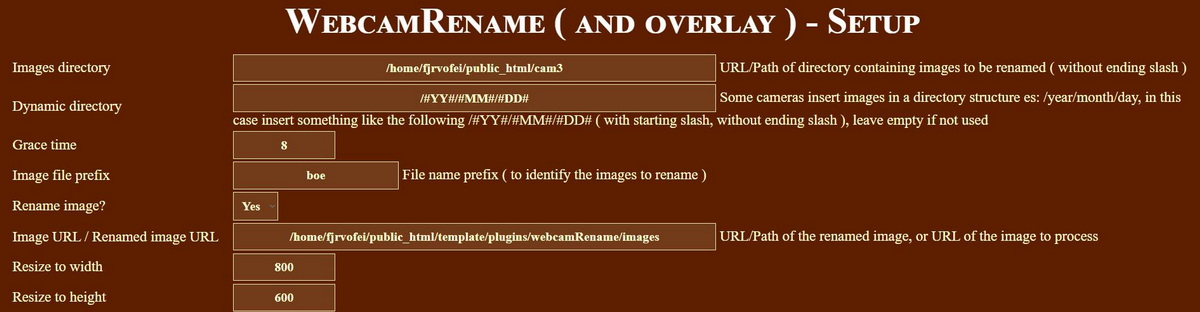
Is this the right way to write the pats to the images?
The Meteotemplate is on the same server but in a different folder.
Re: New plugin webcamRename ( and overlay )
Posted: Wed Aug 17, 2022 2:23 pm
by davidefa
You can try this updated version:
ver 1.3
- duplicated output files: renamed only file in addition to renamed and overlaid file.
- added local directory path ( as an help to define images path )
Main configuration:
1) IMAGES DIRECTORY: insert the path to directory containing images ( take as a reference the local directory path written above )
2) RENAMED IMAGE NAME: insert the filename of the renamed image ( path + file name + extension )
3) OUTPUT IMAGE NAME: insert the filename of the renamed image ( path + file name + extension )
4) DYNAMIC DIRECTORY: insert /#YY#/#MM#/#DD# if your camera create a directory structure like /year/month/day
5) RENAME IMAGE: set to yes

- webRen01.png (188.61 KiB) Viewed 62780 times
Re: New plugin webcamRename ( and overlay )
Posted: Wed Aug 17, 2022 6:16 pm
by tobydude
Thanks for answering and your efford to help. This is a bit difficult.
I have installed both the webcam-block and the webcamTimelapse-block but nothing works.
Have also installed webcam-plugin and webcamRename-plugin. My webcam puts the images in the /public_html/template/plugins/webcamRename/cam3 folder in a year/month/day strukture.
There is no images going to the s/webcamRename/images folder.
I guess I must give up this webcam efford if some magic doesnt happen.

Thx
Re: New plugin webcamRename ( and overlay )
Posted: Wed Aug 17, 2022 8:11 pm
by davidefa
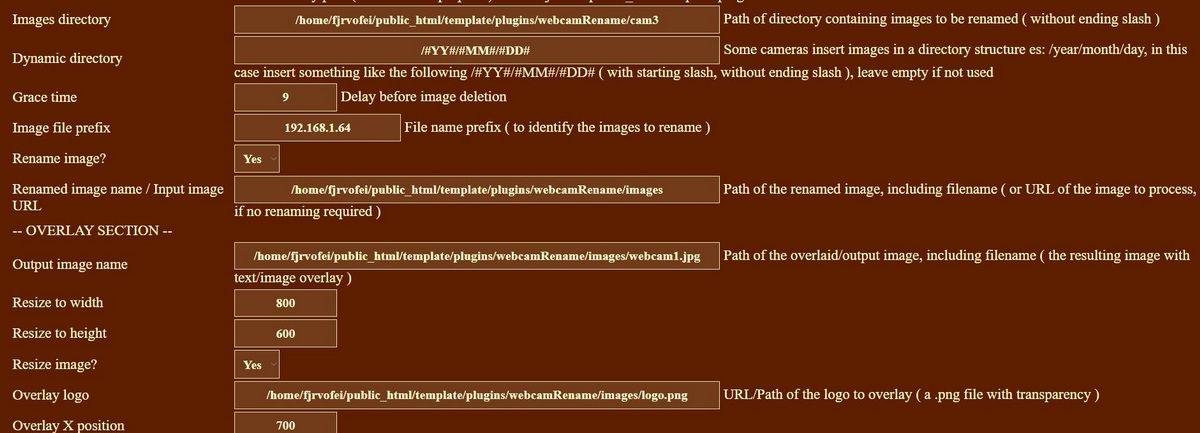
In the plugin setup:
IMAGES DIRECTORY is ok ( /home/fjrvofei/public_html/template/plugins/webcamRename/cam3 )
DYNAMIC DIRECTORY is ok ( /#YY#/#MM#/#DD# )
IMAGE FILE PREFIX insert: "West" ( without quotes )
RENAMED IMAGE NAME insert: /home/fjrvofei/public_html/template/plugins/webcamRename/images/webcam.jpg
OUTPUT IMAGE NAME is ok ( /home/fjrvofei/public_html/template/plugins/webcamRename/images/webcam1.jpg )
Remember to copy the script awebcamRename.php in the load/crons folder ( and set a cron job to execute load/cron.php )
You should be able to access the images at the following urls:
a)
https://fjaervollan.no/template/plugins ... webcam.jpg ( renamed image, without overlay )
b)
https://fjaervollan.no/template/plugins ... ebcam1.jpg ( image with overlay )
If the above urls do not contain an image you can test what's going wrong executing the script ( in your browser )
https://fjaervollan.no/template/load/cr ... ORD&errors
Substitute your password and post the result.
P.S.
Paths and urls ( I have written ) are not 'super correct', amend as required.
P.P.S.
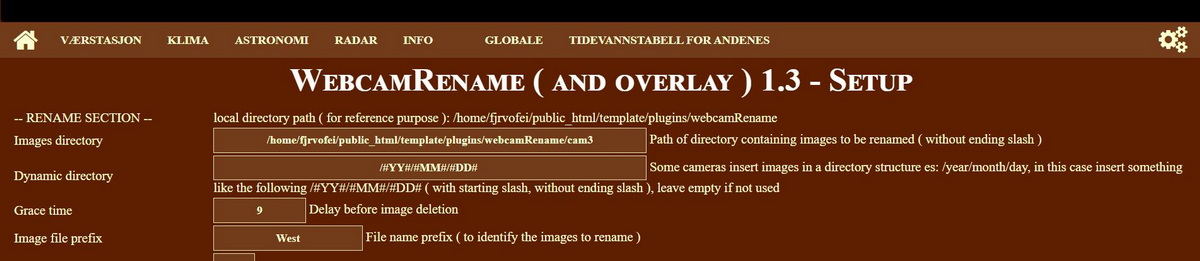
What does the first line ( which is not shown in your image ) LOCAL DIRECTORY PATH contain?
( is it /home/fjrvofei/public_html/template/plugins/webcamRename ?)
Re: New plugin webcamRename ( and overlay )
Posted: Wed Aug 17, 2022 8:38 pm
by tobydude
Thank you. I´m getting closer.
My cronjob at cron-job.org failed, but now I have something to work with.
Thanks.
First line:
Re: New plugin webcamRename ( and overlay )
Posted: Wed Aug 17, 2022 9:11 pm
by davidefa
This is how I've setup mine:

- cronjob2.png (44.92 KiB) Viewed 62756 times
Re: New plugin webcamRename ( and overlay )
Posted: Thu Aug 18, 2022 5:44 pm
by tobydude
I set up mine too. But it do not work.

---

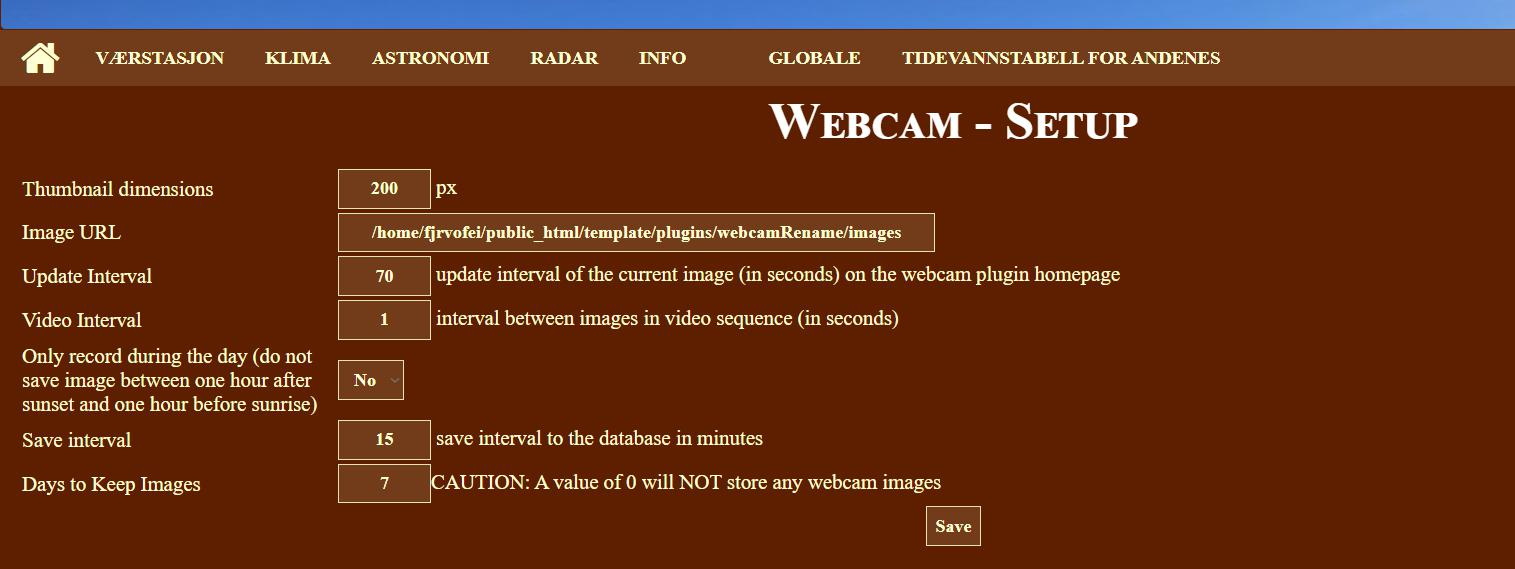
This is the setup for the webcam plugin:
Re: New plugin webcamRename ( and overlay )
Posted: Thu Aug 18, 2022 7:37 pm
by davidefa
As the error reported is 301, try using the 'final url' ( i think is:
https://www.fjærvollan.no/template/load ... URPASSWORD )
Also try executing the script ( in your browser )
https://www.fjaervollan.no/template/loa ... ORD&errors
Substitute your password and post the result.
P.S.
The webcam plugin is a second step ( after webcamRename is working )
Re: New plugin webcamRename ( and overlay )
Posted: Thu Aug 18, 2022 9:07 pm
by tobydude
davidefa wrote: ↑Thu Aug 18, 2022 7:37 pm
As the error reported is 301, try using the 'final url' ( i think is:
https://www.fjærvollan.no/template/load ... URPASSWORD )
It looks like it loaded when using HTTPS:

Also try executing the script ( in your browser )
https://www.fjaervollan.no/template/loa ... ORD&errors
The images are in the /webcamRename/cam3/2022/08/17 but crontab do not find it:
load/crons
including /home/fjrvofei/public_html/template/plugins/webcamRename/settings.php
font=/home/fjrvofei/public_html/template/plugins/webcamRename/ttf/VeraBd.ttf
delYearDir:
delMonthDir:
delDayDir:1
2022 08 17
22 8 17
directory:/home/fjrvofei/public_html/template/plugins/webcamRename/cam3/2022/08/17 does not exists
delYearDir:
delMonthDir:
delDayDir:
2022 08 18
22 8 18
directory:/home/fjrvofei/public_html/template/plugins/webcamRename/cam3/2022/08/18 does not exists
ERROR: file: /home/fjrvofei/public_html/template/plugins/webcamRename/images/webcam.jpg does not exists.Loaded CRON: /home/fjrvofei/public_html/template/load/crons/awebcamRename.php
P.S.
The webcam plugin is a second step ( after webcamRename is working )
Re: New plugin webcamRename ( and overlay )
Posted: Fri Aug 19, 2022 6:47 am
by davidefa
Not sure why it does not find the directory ( maybe some 'unicode chars'?! ).
To overcome this we can use 'relative paths', I'll add a #BASEDIR# constant to handle this easier ( and a couple of test buttons to check directories )
Re: New plugin webcamRename ( and overlay )
Posted: Fri Aug 19, 2022 12:43 pm
by tobydude
I put one of the webcam images manually into the folder /public_html/template/plugins/webcamRename/images and renamed the image to webcam.jpg.
Soon after a new image was saved (not by me) in the same folder: webcam1.jpg.
This image is not updatet but the dates and time are updated. Of course because the script can´t find the folder with the year/mont/day folder.
So, muybe it is that part of the script (year/month/day) that is the reson....
https://fjærvollan.no/template/plugins/ ... ebcam1.jpg
Re: New plugin webcamRename ( and overlay )
Posted: Fri Aug 19, 2022 1:51 pm
by davidefa
Thanks, I'll double check it.
Can you please post your settings.php configuration file ( inside the plugins/webcamRename folder ), so I can check with your own settings.
P.S.
Meanwhile I verified that the function I use for directory reading is 'unicode sensitive' so you may try to change this setting:
IMAGES DIRECTORY set to
Re: New plugin webcamRename ( and overlay )
Posted: Fri Aug 19, 2022 3:39 pm
by tobydude
davidefa wrote: ↑Fri Aug 19, 2022 1:51 pm
Thanks, I'll double check it.
Can you please post your settings.php configuration file ( inside the plugins/webcamRename folder ), so I can check with your own settings.
<?php
// setup file
$imageInURL = '/home/fjrvofei/public_html/template/plugins/webcamRename/cam3';
$dynamicDirectory = '/#YY#/#MM#/#DD# ';
$graceTime = 8;
$imagePrefix = 'West';
$renameImages = true;
$image_name = '/home/fjrvofei/public_html/template/plugins/webcamRename/images/webcam.jpg';
$output_image_name = '/home/fjrvofei/public_html/template/plugins/webcamRename/images/webcam1.jpg';
$resizedWidth = 800;
$resizedHeight = 600;
$resizeImages = true;
$imageFileOverlay = '/home/fjrvofei/public_html/template/plugins/webcamRename/images/logo.png';
$overlayXPos = 700;
$overlayYPos = 20;
$overlayAlpha = 100;
$overlayImages = true;
$bar_height = 30;
$font = 'VeraBd';
$text_size = 15;
$first_line_vposition = 'bottom';
$first_line_right = '#dtf#';
$first_line_right_format = '%s';
$flrfc = '255, 255, 255';
$first_line_left = '#T#,#H#,#W#,#S#';
$first_line_left_format = 'Temp %0.1f - Hum %d%% - Wind %0.1f - Sun %d';
$fllfc = '255, 0, 0';
$second_line = '';
$second_line_format = '%s';
$slfc = '255, 255, 255';
$flbgc = '1, 0, 128, 0';
$slbgc = '1, 0, 170, 0';
?>
P.S.
Meanwhile I verified that the function I use for directory reading is 'unicode sensitive' so you may try to change this setting:
IMAGES DIRECTORY set to
Re: New plugin webcamRename ( and overlay )
Posted: Fri Aug 19, 2022 5:45 pm
by tobydude
Not sure what you mean by this:
P.S.
Meanwhile I verified that the function I use for directory reading is 'unicode sensitive' so you may try to change this setting:
IMAGES DIRECTORY set to
[/quote]


