Page 1 of 1
Stickers
Posted: Mon Oct 18, 2021 2:11 pm
by spd2612
I can not get stickers to display any info
Im on IIS 10
php 7.4
GD is enabled
Im using these links to test
https://hurricanepub.com/plugins/sticke ... 2=dark_red
https://hurricanepub.com/plugins/sticke ... age=random
https://hurricanepub.com/plugins/sticke ... ype=random
GD Test
https://hurricanepub.com/plugins/stickers/gdtest.php
There are no errors in the error log
Also there is no save button in the configure for stickers is that normal ?
Re: Stickers
Posted: Mon Oct 18, 2021 4:23 pm
by spd2612
Ok I created a simple PHP file and tested it from the stickers directory and it creates and prints
https://hurricanepub.com/plugins/stickers/test.php
this is the code I used
Code: Select all
<?php
// Create a blank image and add some text
$im = imagecreatetruecolor(120, 20);
$text_color = imagecolorallocate($im, 233, 14, 91);
imagestring($im, 1, 5, 5,  'A Simple Text String', $text_color);

// Set the content type header - in this case image/jpeg
header('Content-Type: image/jpeg');

// Output the image
imagejpeg($im);

// Free up memory
imagedestroy($im);
?>
Meteotemplatelive.txt is on the server and updating, but still no print out on my stickers
Anyone have a Idea as to what is happening here ??
Re: Stickers
Posted: Tue Oct 19, 2021 6:38 pm
by Daali
Sorry sir,
I still have not fixed my dev environment with v7.4.24 or v8. But I can tell you v7.4.24 works with your link on my site.
https://www.jeffersonweather.com/plugin ... age=random
Re: Stickers
Posted: Tue Oct 19, 2021 8:53 pm
by spd2612
I have my PHP on 7.4.13 and it does not work
There has to be a way to diagnose this I am getting no errors

Re: Stickers
Posted: Tue Oct 19, 2021 10:13 pm
by spd2612
I Finally forced a error out of this
How can I fix these errors
PHP Deprecated: Array and string offset access syntax with curly braces is deprecated in E:\hurricanepub\plugins\stickers\stickerInteractiveAnim.php on line 1057
there are multiple lines with that issue
Spoke to soon none of them errors for stickersinteractive.php
they are just in stickerInteractiveAnim.php which i find strange
Re: Stickers
Posted: Wed Oct 20, 2021 11:36 am
by Daali
Try phpstorm trial version for debugging. If your website is locally networked, you should be able to debug directly.
Re: Stickers
Posted: Wed Oct 20, 2021 3:02 pm
by davidefa
You can try this modified script, I only modified line 200 and 203 ( from "fonts" to "./fonts" )
Maybe you only have a font path problem ( I had the same problem with a few old scripts of mine )
P.S.
In the stickers plugin settings there is no save button
Re: Stickers
Posted: Thu Oct 21, 2021 12:08 pm
by spd2612
davidefa wrote: ↑Wed Oct 20, 2021 3:02 pm
You can try this modified script, I only modified line 200 and 203 ( from "fonts" to "./fonts" )
Maybe you only have a font path problem ( I had the same problem with a few old scripts of mine )
P.S.
In the stickers plugin settings there is no save button
That does not work either
when i refresh stickerinteractive with all logging on i get this error
stickerInteractive.php
[21-Oct-2021 08:15:46 America/New_York] PHP Deprecated: Directive 'allow_url_include' is deprecated in Unknown on line 0
That is just a warning though
Is any write permissions needed
Posted: Fri Oct 29, 2021 8:52 pm
by spd2612
Still trying to find the stickers issue here
Is there any folder that needs write permissions
I have looked everywhere I know of to find a error here
The sticker wont even print the hello world
No other problems with my site
EXT that are enabed
[WebPIChanges]
error_log = "C:\Windows\temp\PHP74x64_errors.log"
upload_tmp_dir = C:\Windows\temp
session.save_path = C:\Windows\temp
cgi.force_redirect = 0
cgi.fix_pathinfo = 1
fastcgi.impersonate = 1
fastcgi.logging = 0
max_execution_time = 300
date.timezone = America/New_York
extension_dir = "C:\Program Files\PHP\v7.4\ext\"
[ExtensionList]
extension=php_mysqli.dll
extension=php_mbstring.dll
extension=php_gd2.dll
extension=php_gettext.dll
extension=php_curl.dll
extension=php_exif.dll
extension=php_xmlrpc.dll
extension=php_openssl.dll
extension=php_soap.dll
extension=php_pdo_mysql.dll
extension=php_pdo_sqlite.dll
extension=php_imap.dll
extension=php_tidy.dll
[PHP_IMAGICK]
extension=php_imagick.dll
[PHP_WINCACHE]
extension=php_wincache.dll
This should not be this big of a issue
Re: Stickers
Posted: Fri Oct 29, 2021 9:17 pm
by davidefa
Can you provide a copy of your virtual machine ( in a format compatible with vmware player )?
Re: Stickers
Posted: Fri Oct 29, 2021 10:04 pm
by spd2612
Do you mean of that whole server
My servers are all virtual running on esxi7.0
Re: Stickers
Posted: Sat Oct 30, 2021 9:56 am
by davidefa
spd2612 wrote: ↑Fri Oct 29, 2021 10:04 pm
Do you mean of that whole server
My servers are all virtual running on esxi7.0
Sorry, not familiar with 'that thing'.
I think you should pinpoint the problem with a simple script like the attached one (
it works on my server ).
It should create a 400x200 red image with a white "Hello world"
If the writing is not shown the only culprit should be the 'imagettftext' in line 12 and the only reason for this should be that php does not find the font ( so you need to modify the font definition in line 4, using a relative/absolute path, specifying a 'system' font... )
Clearly not sure about that.
P.S.
You could try in line 4:
Code: Select all
$font = realpath("./Roboto-Bold.ttf"); // font ( need to specify font with path )
or something like that
P.P.S.
Another thing to check ( don't remember if already checked ) is freetype support in php:
P.P.P.S.
As a last resort you could use the imagestring function ( you already found working correctly ):
use imageloadfont to load a bitmap font ( you need one font for each size used ) and write it with imagestring.
This is without antialiasing so the look could be a little 'pixelated'
Re: Stickers
Posted: Sat Oct 30, 2021 1:15 pm
by spd2612
well no text displayes on hello.php
I changed the relitive path on 4 no change
The URL to that font is
https://hurricanepub.com/plugins/sticke ... o-Bold.ttf
it wil try to download it
GD looks good
What can I be missing
https://hurricanepub.com/plugins/stickers/hello.php
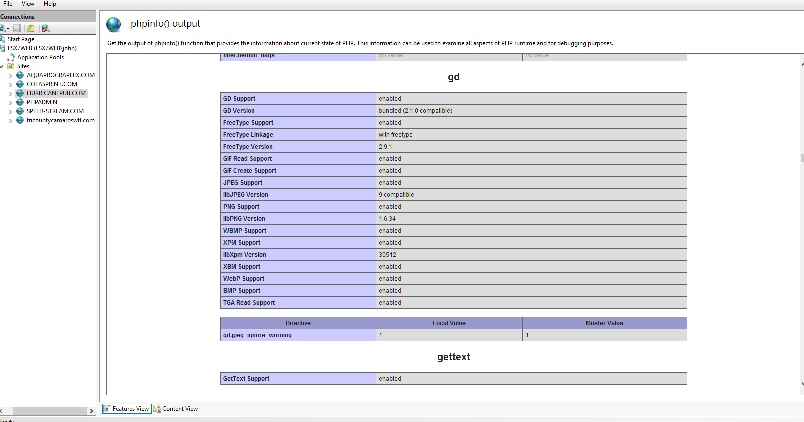
- gd.jpg (73.74 KiB) Viewed 23052 times
davidefa wrote: ↑Sat Oct 30, 2021 9:56 am
spd2612 wrote: ↑Fri Oct 29, 2021 10:04 pm
Do you mean of that whole server
My servers are all virtual running on esxi7.0
Sorry, not familiar with 'that thing'.
I think you should pinpoint the problem with a simple script like the attached one (
it works on my server ).
It should create a 400x200 red image with a white "Hello world"
If the writing is not shown the only culprit should be the 'imagettftext' in line 12 and the only reason for this should be that php does not find the font ( so you need to modify the font definition in line 4, using a relative/absolute path, specifying a 'system' font... )
Clearly not sure about that.
P.S.
You could try in line 4:
Code: Select all
$font = realpath("./Roboto-Bold.ttf"); // font ( need to specify font with path )
or something like that
P.P.S.
Another thing to check ( don't remember if already checked ) is freetype support in php:
P.P.P.S.
As a last resort you could use the imagestring function ( you already found working correctly ):
use imageloadfont to load a bitmap font ( you need one font for each size used ) and write it with imagestring.
This is without antialiasing so the look could be a little 'pixelated'
hello.zip
Re: Stickers
Posted: Sat Oct 30, 2021 1:49 pm
by davidefa
We need an error showing what's going wrong.
Try adding this at the top of the script:
Code: Select all
ini_set('display_errors', 1);
ini_set('display_startup_errors', 1);
error_reporting(E_ALL);
Or try adding some error logging via php.ini/.htaccess ( see
this or
similar links )
Re: Stickers
Posted: Sat Oct 30, 2021 2:47 pm
by spd2612
I have tried that
unable to get errors
with the below code in hello.php nothing displays
I can not get a error out of this
check the link and you will see how the code kills it
http://hurricanepub.com/plugins/stickers/hello.php
Code: Select all
<?php
ini_set('display_errors', 1);
ini_set('display_startup_errors', 1);
error_reporting(E_ALL);

$w = 400;
$h = 200;
$font = "../fonts/Roboto-Bold.ttf";        // font ( need to specify font with path )
$size = 24;							// text size

$img = imagecreatetruecolor($w, $h);
$bgColor = imagecolorallocate($img, 255, 0, 0);				// background color ( RGB format ) -> red
$fontColor = imagecolorallocate($img, 255, 255, 255);		// text color ( RGB format ) -> white
imagefilledrectangle($img, 0, 0, $w, $h, $bgColor);

imagettftext($img, $size, 0, 40, 80, $fontColor, $font, "Hello world");

header("Content-type: image/png");
imagepng($img);
imagedestroy($img);
?>
davidefa wrote: ↑Sat Oct 30, 2021 1:49 pm
We need an error showing what's going wrong.
Try adding this at the top of the script:
Code: Select all
ini_set('display_errors', 1);
ini_set('display_startup_errors', 1);
error_reporting(E_ALL);
Or try adding some error logging via php.ini/.htaccess ( see
this or
similar links )
Re: Stickers
Posted: Sat Oct 30, 2021 3:05 pm
by spd2612
I have error reporting turned on and if i open the hello.php in firefox i get a error message saying it can not be displayed because it contains errors
stickerinteractive.php will still open no print of course
Re: Stickers
Posted: Sat Oct 30, 2021 3:13 pm
by davidefa
Ok, comment the last 3 lines and you should be able to see the 'underlying error'
Code: Select all
//header("Content-type: image/png");
//imagepng($img);
//imagedestroy($img);
Re: Stickers
Posted: Sat Oct 30, 2021 3:49 pm
by spd2612
Damn
getting somewhere here is error
Warning: imagettftext(): Could not find/open font in E:\hurricanepub\plugins\stickers\hello.php on line 15
This is line 15
imagettftext($img, $size, 0, 40, 80, $fontColor, $font, "Hello world");
Re: Stickers
Posted: Sat Oct 30, 2021 4:02 pm
by davidefa
Try to set the absolute path to your font ( in line 8 ), this should be ok:
Code: Select all
$font = "E:/hurricanepub/plugins/stickers/Roboto-Bold.ttf"; // font ( need to specify font with path )
Not sure if you need to use backslash, in this case use:
Code: Select all
$font = "E:\\hurricanepub\\plugins\\stickers\\Roboto-Bold.ttf"; // font ( need to specify font with path )
Re: Stickers
Posted: Sat Oct 30, 2021 4:06 pm
by davidefa
Ok, it seems working now
Re: Stickers
Posted: Sat Oct 30, 2021 4:07 pm
by spd2612
I got it to remove the error by using
e:/hurricanepub/plugins/stickers/fonts/Roboto-Bold.ttf
then i uncomented the last three lines and Hellow world is there
Now what to do to fix stickers
Re: Stickers
Posted: Sat Oct 30, 2021 4:12 pm
by davidefa
If you want to use stickerInteractive.php change lines from 199 to 204 to:
Code: Select all
	if(isset($_GET['font'])){
		$fontFace = "e:/hurricanepub/plugins/stickers/fonts/".$_GET['font'].".ttf";
	}
	else{
		$fontFace = "e:/hurricanepub/plugins/stickers/fonts/Ubuntu-Regular.ttf";
	}
Re: Stickers
Posted: Sat Oct 30, 2021 4:22 pm
by spd2612
looks great
I would imagine i would have to do the same to stickerInteractiveAnim.php
Tget that to work
Re: Stickers
Posted: Sat Oct 30, 2021 4:29 pm
by spd2612
Thanks a lot this has been driveing me nuts
I changed stickersinteractiveanim.php and it seems a little messed up

Re: Stickers
Posted: Sat Oct 30, 2021 4:32 pm
by spd2612
This Works