Page 1 of 1
new customGraph block
Posted: Sun Feb 27, 2022 12:16 am
by davidefa
v0.4
It is a customizable graph block derived from interactiveGraph block.
Highly configurable, shows any number of sensors on max 4 axes.
P.S.
It is still a preview ( not fully tested/completed ), but quite functional
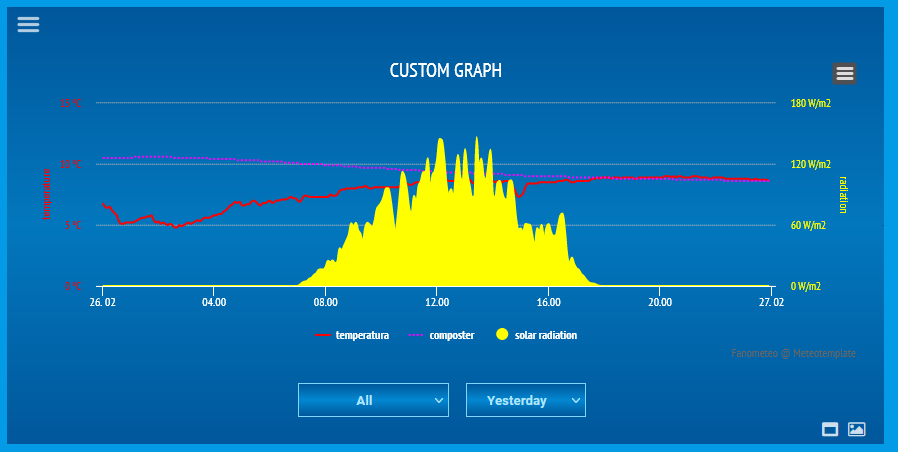
- custom_graph.png (30.01 KiB) Viewed 41394 times
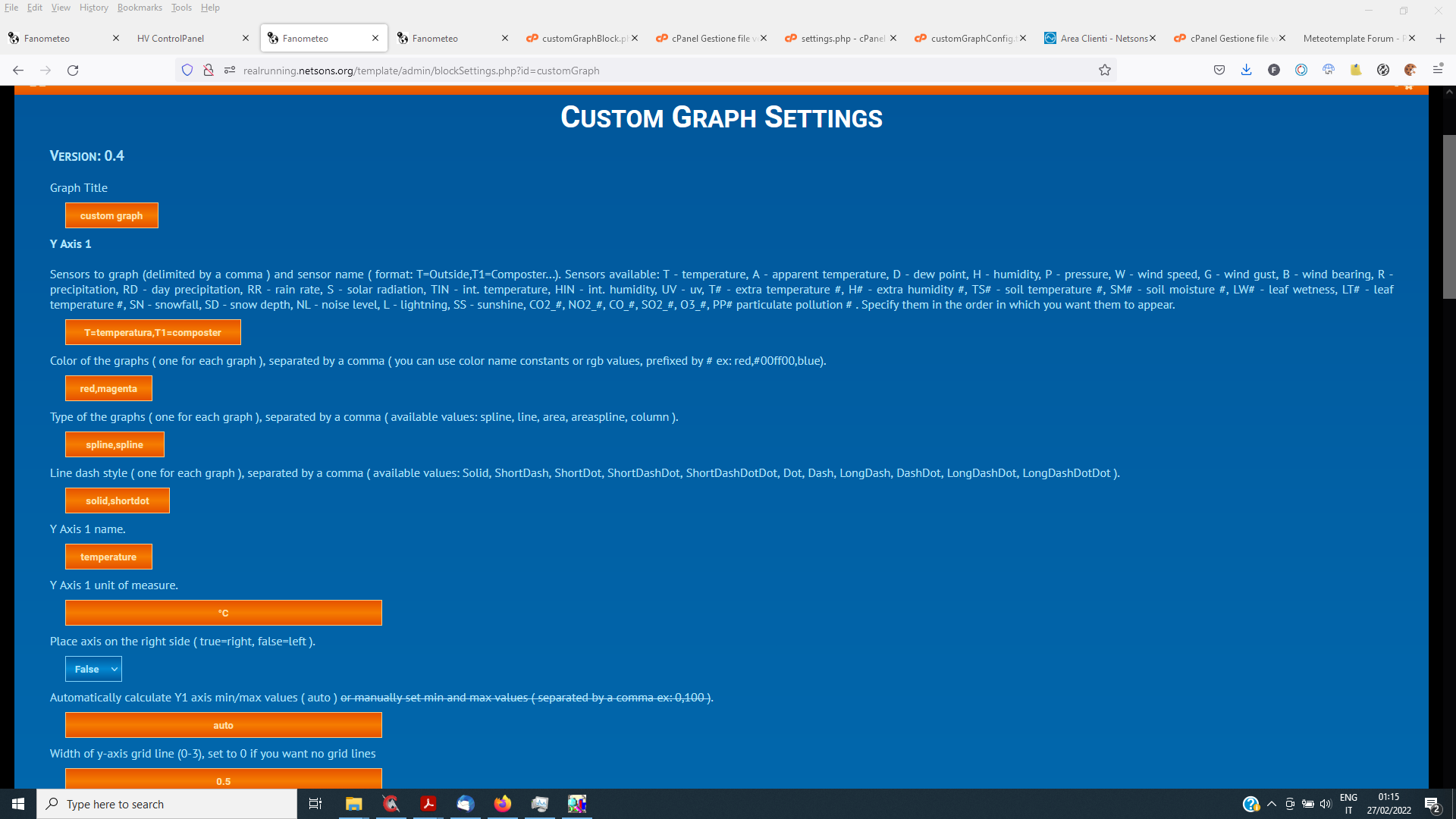
- custom_graph1.png (137.31 KiB) Viewed 41394 times
Re: new customGraph block
Posted: Sun Feb 27, 2022 12:18 am
by davidefa
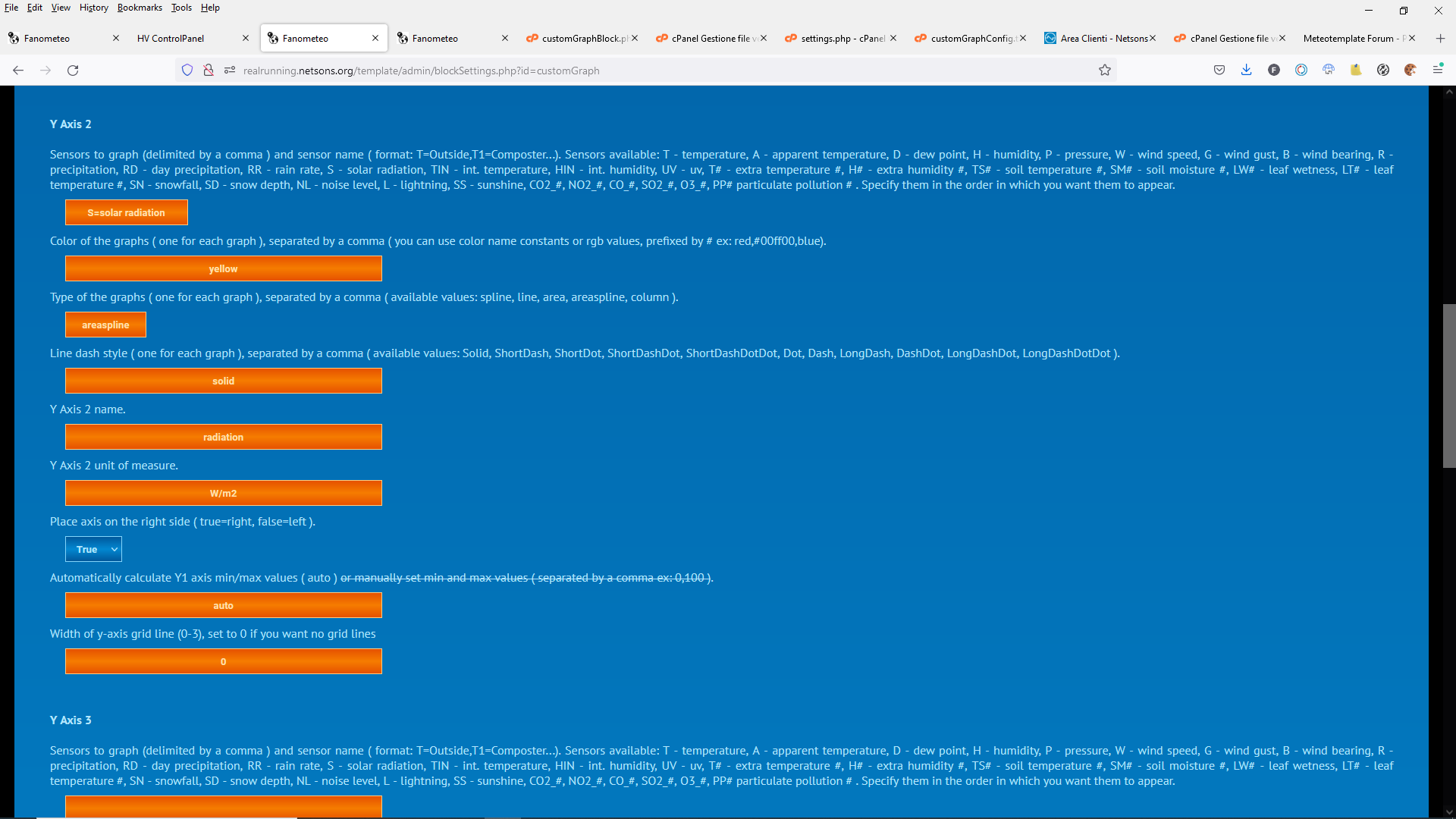
- custom_graph2.png (112.54 KiB) Viewed 41391 times
Re: new customGraph block
Posted: Sun Feb 27, 2022 4:17 pm
by alexvanuxem
cool! nice
I was looking for a graph that calculates the amount of bright sun shining hours, I think the criteria is everything above 100 W/m², but not sure.
Maybe a idea for you? the SS parameter doesn't work for me.
thx
Re: new customGraph block
Posted: Sun Feb 27, 2022 8:06 pm
by davidefa
Are you looking for a software calculated sunshine hours ( to be saved in the db or simply in file meteotemplateLive.txt )?
Yes, it can be done as CumulusMX does ( don't know if weewx does it too ), in my opinion confidence on this data is quite low, but it can be done.
Re: new customGraph block
Posted: Sun Feb 27, 2022 8:35 pm
by davidefa
ver0.5
- added Y Axis manual min/max definition
- unit measure visualization fixes
ver0.6
corrected Yaxis grid width
P.S.
If you use the interactiveGraph block you have to update it to the
last version ( to remove some nasty side effects between the two blocks )
Re: new customGraph block
Posted: Mon Feb 28, 2022 4:53 pm
by alexvanuxem
Hi,
yes, cumulus mx way is more accurate.
I use a lot of software packages: wl, meteobridge, weather display (sucks in my opinion), the old weatherlink software, cumulus mx, pwsWD web, and meteotemplate
It would a nice to have ultimately in the db too.
i'm aware it's not very accurate, just a nice to have,
thx
Re: new customGraph block
Posted: Mon Feb 28, 2022 4:54 pm
by alexvanuxem
and cumulus mx doesn't store it, at least i dont know where,
the last month is visible in graphs
cheers
alex
Re: new customGraph block
Posted: Wed Dec 06, 2023 10:33 pm
by Julius
As a user loving the customgraph block, I want to point out that it does not show negative temperatures.
Re: new customGraph block
Posted: Wed Dec 06, 2023 11:06 pm
by davidefa
Could you post/pm me you settings.php file ( from the homepage/blocks/customGraph directory ) so I can check.
Re: new customGraph block
Posted: Sat Dec 09, 2023 2:01 pm
by Julius
homepage/blocks/customGraph/settings.php :
Code: Select all
$cGraphTitle = 'temperature / height';
$cGraphDefaultInterval = '24h';
$cGraphHeight = '400';
$cGraphDrawingSpeed = '200';
$xAxisGrid = '0';
$cGraphToInclude1 = 'T=Mast,T3=Stevenson,T1=Grass';
$cGraphColor1 = '#0066FF,#CCCCCC,#66ff00';
$cGraphType1 = 'line,line,line';
$cGraphDashStyle1 = 'shortdot,solid,shortdot';
$cGraphYAxisName1 = 'Celsius';
$cGraphYAxisUnit1 = '';
$cGraphYAxisRight1 = true;
$cGraphYAxisAutomatic1 = 'auto';
$cGraphYAxisGrid1 = '0';
$cGraphToInclude2 = 'S=solar-radiation';
$cGraphColor2 = '#DDDB00';
$cGraphType2 = 'areaspline';
$cGraphDashStyle2 = 'shortdot';
$cGraphYAxisName2 = 'radiation';
$cGraphYAxisUnit2 = 'W/m2';
$cGraphYAxisRight2 = false;
$cGraphYAxisAutomatic2 = 'auto';
$cGraphYAxisGrid2 = '0';
$cGraphToInclude3 = '';
$cGraphColor3 = '';
$cGraphType3 = '';
$cGraphDashStyle3 = 'solid';
$cGraphYAxisName3 = 'y axis 3';
$cGraphYAxisUnit3 = '';
$cGraphYAxisRight3 = false;
$cGraphYAxisAutomatic3 = 'auto';
$cGraphYAxisGrid3 = '0';
$cGraphToInclude4 = '';
$cGraphColor4 = '';
$cGraphType4 = 'spline';
$cGraphDashStyle4 = 'solid';
$cGraphYAxisName4 = 'y axis 4';
$cGraphYAxisUnit4 = '';
$cGraphYAxisRight4 = false;
$cGraphYAxisAutomatic4 = 'auto';
$cGraphYAxisGrid4 = '0';
Currently there are a few issues with this on
https://broekermeer.nl
- the graph shows % instead of degrees Celsius and W/m2, and it does not show T values below zero..
- Plus, at first loading of the site, the graph does not pick anything for time-scale, keeps showing a turning/loading symbol, until you change the Time-scale value. It should default to [24h] but it does not.
Any idea, davide?
Re: new customGraph block
Posted: Fri Jan 05, 2024 8:57 pm
by Julius
Watch out for the frost coming Monday-Tuesday-Wednesday, so you'll see how the graph fails to show below zero temps.. (and its still shows % instead of degrees C and W/m2..)
Re: new customGraph block
Posted: Fri Jan 05, 2024 10:18 pm
by davidefa
I checked your settings and are correct ( if you show the block
fullscreen it is displayed correctly ).
The problem seems to be an unwanted interaction with block windRose, I modified both blocks and it seem working ( at least on my sites ).
customGraph ver 0.7 ( 2024-01-05 )
- initialized Y axis min/max value to null if autoscale selected
windRose ver 1.6 ( 2024-01-05 )
- fixes to remove interaction with other highcharts graph
Re: new customGraph block
Posted: Sat Jan 06, 2024 11:33 am
by Julius
davidefa wrote: ↑Fri Jan 05, 2024 10:18 pm
I checked your settings and are correct ( if you show the block
fullscreen it is displayed correctly ).
The problem seems to be an unwanted interaction with block windRose, I modified both blocks and it seem working ( at least on my sites ).
customGraph ver 0.7 ( 2024-01-05 )
- initialized Y axis min/max value to null if autoscale selected
windRose ver 1.6 ( 2024-01-05 )
- fixes to remove interaction with other highcharts graph
Wow Davide, you're becoming my meteo hero here. Do you have a paypal or some donation option for your work?
I think another block is having the same below zero Celsius display issue; the
updated gfs block
Thanks for all your splendid troubleshooting and fixes!
Re: new customGraph block
Posted: Wed Jan 10, 2024 10:21 am
by Julius
davidefa wrote: ↑Fri Jan 05, 2024 10:18 pm
I checked your settings and are correct ( if you show the block
fullscreen it is displayed correctly ).
The weirdest thing, all of a sudden, the graph stopped showing the unit values left and right from it.
I really have no idea what causes that. It's not cache, it's not a change in css, truly strange. It was fine yesterday.
The OS has not done updates without me knowing either. I've just checked.
Maybe some other block with external code is forcing a style change on me? But shouldn't it then be OK when loading just that one block?