Page 1 of 1
API File not found..
Posted: Thu Sep 28, 2017 2:42 am
by Fraggboy
Hello.. Everything went pretty smooth installing the template. I just can't find how to fix this issue.
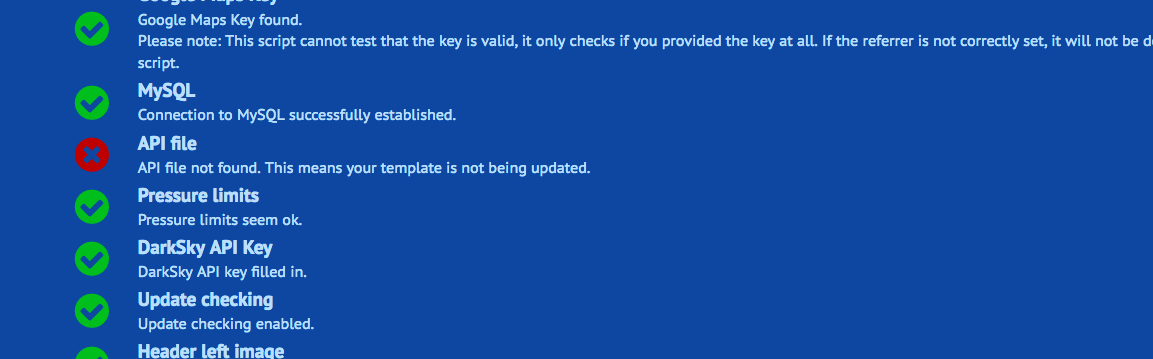
- Screen Shot 2017-09-27 at 7.37.46 PM.png (75.87 KiB) Viewed 7750 times
Re: API File not found..
Posted: Thu Sep 28, 2017 9:42 am
by Jachym
Hi,
this means that you did not set up the template updates. Nothing is triggering the update script periodically. Which data source do you want to use to feed the template with data? Weather Display? Cumulus? WU? Meteobridge?
Re: API File not found..
Posted: Thu Sep 28, 2017 3:47 pm
by Fraggboy
I configured Forecast Settings to use wu as the provider and provided my wu API key. I made sure to select "false" to the other providers.
Re: API File not found..
Posted: Thu Sep 28, 2017 4:03 pm
by Jachym
Not sure what you mean now, this is unrelated to the API
Re: API File not found..
Posted: Thu Sep 28, 2017 6:00 pm
by Fraggboy
Oh, it's not? I'm not sure. How can I fix this then? I would like to use wu.
Re: API File not found..
Posted: Thu Sep 28, 2017 6:44 pm
by Jachym
OK, I think you are totally confused. You need to set up the BloomSky plugin to be able to use your station data, you need a CRON job as instructed on the BloomSky plugin setup page. Then you can deal with homepage blocks, but those are totally unrelated to your template updates.
Re: API File not found..
Posted: Thu Sep 28, 2017 6:46 pm
by Fraggboy
I agree that I'm confused/lost/etc..

Since this error "No API file" doesn't have any bearing on what I'm wanting to achieve, I think it's best to stop updating this (dead) thread.
It was created due to my confusion. ;( I'm sorry.