Page 1 of 1
Collapsing mobile menu
Posted: Tue Oct 03, 2017 10:59 pm
by wx_jon
Perhaps others have already noticed, but the mobile menu has a problem where touch scrolling causes it to collapse. This is mostly a problem when browsing the "weather station" tab, since the contents of that drop-down are larger than most phones' screens. Has anyone also had a problem with this, or even better, fixed it?
Re: Collapsing mobile menu
Posted: Wed Oct 04, 2017 1:14 am
by Fraggboy
I too exhibit the same issue on an iPhone 7+.
I click on the weather icon. It expands. When I try to scroll down it collapses also.
Re: Collapsing mobile menu
Posted: Wed Oct 04, 2017 2:13 am
by dmgould
I don't use the menu on my mobile version. MT is a pretty sophisticated program to try and run it all on a phone. I just set my mobile version up as a single column with basic blocks on the mobile home page, and just don't mess with trying to move around with the menus.
Re: Collapsing mobile menu
Posted: Wed Oct 04, 2017 9:18 am
by Jachym
Hi,
thats what you need to do. It really is impossible to display some of the graphs and tables nicely in portrait mode.
If you have some higher end phone I would use the Desktop version in landscape mode.
And for the mobile use 1 column of blocks only.
Re: Collapsing mobile menu
Posted: Wed Oct 04, 2017 6:50 pm
by wx_jon
Sure, it's all well and good for us, since we know how to get the best from our webpages. But it's not ideal for our visitors, who would probably like to see more than just the homepage, but don't know how to get the best from our site. It's a similar reason to why I would like to see a mobile version of the blog plugin, so that visitors who click on links on Twitter (almost certainly from a mobile phone) see the most optimized view.
Re: Collapsing mobile menu
Posted: Mon Jan 08, 2018 2:54 pm
by azchrisf
I've encountered this too, and my users have been complaining about it, so I hope this is on the list to fix...
Re: Collapsing mobile menu
Posted: Mon Jan 08, 2018 8:06 pm
by Johnny
You could always give the new mobile interface a try (version 17 - Nectarine). Go to 'Main Setup' scroll down to 'Desktop and Mobile homepage' and under 'Mobile Homepage' select 'Responsive Fixed Bootstrap' from the drop-down.
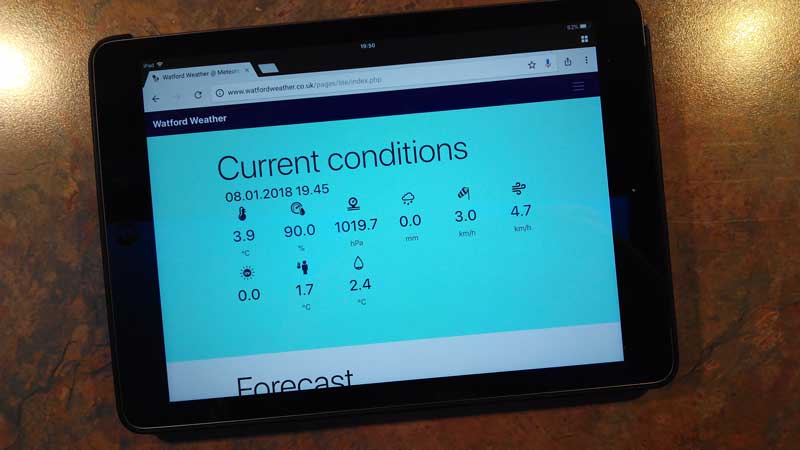
- Mobile-Page.jpg (32.85 KiB) Viewed 27612 times
Re: Collapsing mobile menu
Posted: Mon Jan 15, 2018 9:03 am
by azchrisf
Nah...
It's certainly fixable - how else do the millions of websites with dynamic menus work fine on phones?
Re: Collapsing mobile menu
Posted: Mon Jan 15, 2018 1:08 pm
by Jachym
Thats why I created the new page which works fine.
Re: Collapsing mobile menu
Posted: Mon Jan 15, 2018 1:13 pm
by Jachym
azchrisf wrote: ↑Mon Jan 15, 2018 9:03 am
Nah...
It's certainly fixable - how else do the millions of websites with dynamic menus work fine on phones?
Probably, but if you dont have the device which causes the issue the only way to solve it is if someone who does found a solution and sent it to me...
Re: Collapsing mobile menu
Posted: Mon Jan 15, 2018 8:55 pm
by azchrisf
Jachym wrote: ↑Mon Jan 15, 2018 1:13 pm
azchrisf wrote: ↑Mon Jan 15, 2018 9:03 am
Nah...
It's certainly fixable - how else do the millions of websites with dynamic menus work fine on phones?
Probably, but if you dont have the device which causes the issue the only way to solve it is if someone who does found a solution and sent it to me...
Google has an Android emulator that runs on the PC, and there is Bluestacks App player, plus another program that allowed running Android apps on the PC - so you can install the browser with the issue and see it without having to purchase 2000000 different phones
Re: Collapsing mobile menu
Posted: Tue Jan 16, 2018 5:18 am
by Jachym
Emulators are not reliable, I tried those, not to mention that 99% of them are for windows.
Use the responsive mobile site, that one looks nice, I do not recommend using the other one, I created this new one, which in my opinion is better, works well on any device and I only left the other one there because some people might prefer it.
Re: Collapsing mobile menu
Posted: Wed Jan 17, 2018 6:18 pm
by azchrisf
Well, it's still something that can be fixed again considering the millions of websites that use menus on phones just fine. It's just a matter of taking the time to do it. I just hope sometime you will look at fixing the menu.
I use the blocks and don't care for the static bootloader page.
Re: Collapsing mobile menu
Posted: Wed Jan 17, 2018 6:56 pm
by Jachym
Unless I physically have the device to test it I will not look into it any further. Its not about time.
But anyone is welcome to give it a try, in the end it is a community project and if someone sends me a solution Im more than happy to implement it.
Re: Collapsing mobile menu
Posted: Tue Feb 20, 2018 8:10 am
by azchrisf
In case anyone is interested, since I had to fix this myself, removing the resizeFix function in mobile/menu.js fixed the problem. Whether this breaks something I don't know but my menu now displays and works without closing itself.
Re: Collapsing mobile menu
Posted: Tue Feb 20, 2018 8:37 pm
by wx_jon
Having been otherwise busy lately, I'm just now getting to test the new mobile page. First impression is that the font is quite small on my 5-inch phone screen.
azchrisf wrote: ↑Tue Feb 20, 2018 8:10 am
In case anyone is interested, since I had to fix this myself, removing the resizeFix function in mobile/menu.js fixed the problem. Whether this breaks something I don't know but my menu now displays and works without closing itself.
This appears to work for me too. No issues encountered yet.
Re: Collapsing mobile menu
Posted: Wed Feb 21, 2018 3:59 am
by Dehatter
I'm staying out of this discussion. lol.
Tom
Re: Collapsing mobile menu
Posted: Wed Feb 21, 2018 7:33 am
by Jachym
OK, if this turns out to be working for all I will implement it, but given I do not have any Apple device to test it I will rely on your feedback
Re: Collapsing mobile menu
Posted: Tue Apr 03, 2018 12:40 am
by mchd17
by removing resizeFix function in mobile/menu.js did not work for me on android.
would this be a css thing?
mchd17