Page 1 of 1
Rain gauge not updatetd in a sub-menu
Posted: Fri Nov 03, 2017 9:36 am
by adelrosso
In menu
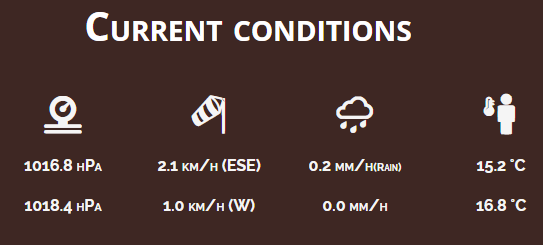
weather -> outlook -> current conditions the precipitation value is never updated and always 0. Is this just my problem? (i use Netatmo plugin). In all other parts of the template, the value is updated correctly. In the screenshot below, first row is METAR station, second raw is mine.
- Clipboard01.png (17.91 KiB) Viewed 11106 times
Re: Rain gauge not updatetd in a sub-menu
Posted: Fri Nov 03, 2017 9:52 am
by Jachym
This is rain rate, not precipitation and I know that NetAtmo not always reports this correctly
Re: Rain gauge not updatetd in a sub-menu
Posted: Fri Nov 03, 2017 10:57 am
by adelrosso
English label icon is "precipitation"

Therefore, the strange thing is that this value is reported correctly in home page and in other statistics...
Jachym wrote: ↑Fri Nov 03, 2017 9:52 am
This is rain rate, not precipitation and I know that NetAtmo not always reports this correctly
Re: Rain gauge not updatetd in a sub-menu
Posted: Fri Nov 03, 2017 11:01 am
by Jachym
When you see mm/h or in/h it is always rain rate
Re: Rain gauge not updatetd in a sub-menu
Posted: Fri Nov 03, 2017 11:52 am
by adelrosso
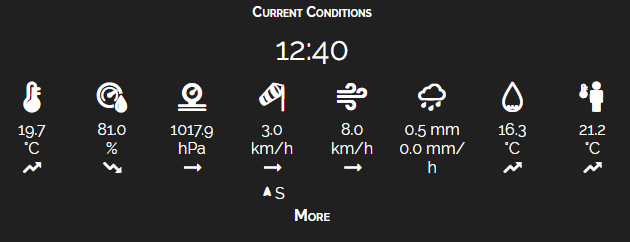
Another remark. In the "current conditions" block, also when this is displayed at 100% width, the rain rate "mm/h" appear wrapped ("h" slip to the bottom line). Can you do something? I think would be really good if it looks good at least up to two full digits.
- Clipboard01.png (18.17 KiB) Viewed 11086 times
Re: Rain gauge not updatetd in a sub-menu
Posted: Fri Nov 03, 2017 4:50 pm
by Reinhard
adelrosso wrote: ↑Fri Nov 03, 2017 11:52 am
Another remark. In the "current conditions" block, also when this is displayed at 100% width, the rain rate "mm/h" appear wrapped ("h" slip to the bottom line). Can you do something? I think would be really good if it looks good at least up to two full digits.
The workaround: Open currentBlock.php in a text editor, go to line 302 and edit this string to the font size you want (for me it suits 0.6em):
Code: Select all
<span style="font-size:0.6em"> <?php echo $displayRainUnits."/".lang('hAbbr','l')?></span>
Be aware if the block gets an update - all your changes are gone.
Re: Rain gauge not updatetd in a sub-menu
Posted: Fri Nov 03, 2017 5:02 pm
by Jachym
adelrosso wrote: ↑Fri Nov 03, 2017 11:52 am
Another remark. In the "current conditions" block, also when this is displayed at 100% width, the rain rate "mm/h" appear wrapped ("h" slip to the bottom line). Can you do something? I think would be really good if it looks good at least up to two full digits.
Clipboard01.png
The block does not have a fixed width, it will wrap to a new line depending on how wide your column is. If you want all on one line you need to make the column wider.
Re: Rain gauge not updatetd in a sub-menu
Posted: Fri Nov 03, 2017 7:47 pm
by adelrosso
Thanks Reinhard, I'll try this trick
Reinhard wrote: ↑Fri Nov 03, 2017 4:50 pm
adelrosso wrote: ↑Fri Nov 03, 2017 11:52 am
Another remark. In the "current conditions" block, also when this is displayed at 100% width, the rain rate "mm/h" appear wrapped ("h" slip to the bottom line). Can you do something? I think would be really good if it looks good at least up to two full digits.
The workaround: Open currentBlock.php in a text editor, go to line 302 and edit this string to the font size you want (for me it suits 0.6em):
Code: Select all
<span style="font-size:0.6em"> <?php echo $displayRainUnits."/".lang('hAbbr','l')?></span>
Be aware if the block gets an update - all your changes are gone.
Re: Rain gauge not updatetd in a sub-menu
Posted: Fri Nov 03, 2017 7:50 pm
by adelrosso
Ok, but this block is in my header, so it would spans to the full width of the page... Instead it does not even fill the entire width of the column (my page width is 1920px and central column is set to 50%).
Jachym wrote: ↑Fri Nov 03, 2017 5:02 pm
adelrosso wrote: ↑Fri Nov 03, 2017 11:52 am
Another remark. In the "current conditions" block, also when this is displayed at 100% width, the rain rate "mm/h" appear wrapped ("h" slip to the bottom line). Can you do something? I think would be really good if it looks good at least up to two full digits.
Clipboard01.png
The block does not have a fixed width, it will wrap to a new line depending on how wide your column is. If you want all on one line you need to make the column wider.