Page 1 of 1
Bloomsky plugin is not working
Posted: Wed Nov 15, 2017 10:09 pm
by Fraggboy
I need assistance.. My Bloomsky plugin is not working correctly. I had some inaccurate data I wanted to remove, and I needed to start over from scratch. I removed all of the databases/caches and everything seemed OK.. Except that when I check my page, and select a date, nothing is shown. There are no video files downloaded when the update pages are run as well as no images are stored under the template sub-folder. Images are being downloaded.
https://www.fraggboy.com/template/plugins/bloomSky/
I also noticed that the data is not being populated to the database. I have removed the bloomSky database, in which the php page creates it. It's just not writing to it.
I have bsAPI.php, update.php, and bsUpdate.php run every minute via CRON. When I run them manually, they are successfully running.
I double/triple checked the permissions on the folders, as well as the database. It's not permission-related since it can create the database and download the actual images. It's not converting them to the thumbnail size and adding them to the folder, as well as writing the data to the database..
Help please.
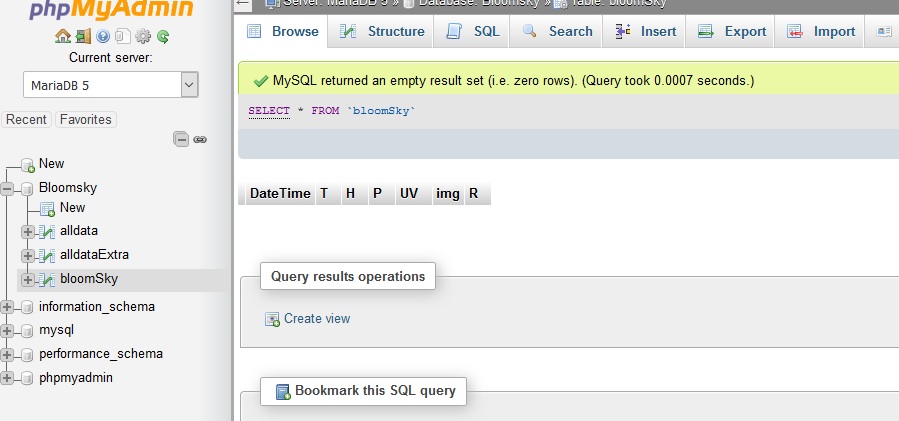
- Data Missing.jpg (82.38 KiB) Viewed 44089 times
Re: Bloomsky plugin is not working
Posted: Thu Nov 16, 2017 9:05 am
by Johnny
Hi Christopher, something similar happened to me when I updated the Bloomsky plugin once, all the small 5 minute images stopped and even yesterday's video stopped loading. In the end I removed everything (although it sounds as though you've already done that) and started afresh, then it all started working again.
You're more technically savvy than me so forgive me if I'm teaching you to suck eggs here, double check you have the latest Bloomsky plugin (3.0 presently), is your Bloomsky API key correct, also log into your Bloomsky data portal and double check that data is loading there as well. I'm sure you've done most of this already, let us know how you get on.
Re: Bloomsky plugin is not working
Posted: Thu Nov 16, 2017 6:09 pm
by Fraggboy
Johnny,
I appreciate any help.. Most of the times it's something very simple/easy. It's just still evading my eyes, ROFL!
The plugin is current (3.0). I already started the whole site over again (New database). The API is correct since when I manually type in the .php link with my password, I'm retrieving information (My temp/data is downloading/updating correctly, granted it's in a different database).
The blookSky database creds are correct. It was created correctly and I double-triple checked the permissions.
Again, please never think that your thoughts/ideas don't count, or is warranted. I'm sure it's something very simple that I have just overlooked.
Thank you! I just have to wait for Jachym to have a free moment when he gets back so I can pick his brain..

Re: Bloomsky plugin is not working
Posted: Thu Nov 16, 2017 7:36 pm
by Johnny
Yip, I think you'll have to wait for some input from Jachym on this problem. By the way the help link on your site is wicked - it has a touch of GLaDOS about it

Re: Bloomsky plugin is not working
Posted: Sun Nov 19, 2017 2:42 pm
by Jachym
Hi,
so if I understand this correctly, it works perfectly fine when you do it manually, but not by the CRON job?
Re: Bloomsky plugin is not working
Posted: Mon Nov 20, 2017 3:04 pm
by Fraggboy
Hello Jachym.
The only thing that works is when I remove the database and when the script runs, it creates the database/fields, as well as it does grab the json data. It's just not writing to the database, or creating the thumbnails. If it was a permission error, it wouldn't be able to create the database.
Re: Bloomsky plugin is not working
Posted: Mon Nov 20, 2017 8:37 pm
by Jachym
Just checking - you have the CRON job set to bsUpdate.php?
Can you post content of caceh/apiCache.txt and cache/apiLog.txt
Re: Bloomsky plugin is not working
Posted: Tue Nov 21, 2017 4:03 pm
by Fraggboy
Correct. bsUpdate.php is setup. I have all 3 running every minute via a cronJOB (bsAPI.php, update.php, and bsUpdate.php). When I manually run them, it's grabbing the data (temp, humidity, etc), as well as the pictures. What the file is not doing is inserting the data into the bloomSky database, not creating the thombnail, and not downloading the videos.
apiCache.txt
Code: Select all
{"timestamp":[1511279737,1511279737,1511279737],"date":["2017-11-21 07:55:37","2017-11-21 07:55:37","2017-11-21 07:55:37"],"T":[48.38,48.38,48.38],"H":["50","50","50"],"P":[30.2905246349,30.27824016322,30.27824016322],"W":[0.621371,0.4970968,0.3106855],"G":[1.242742,1.242742,1.242742],"B":["135","135","135"],"R":[0,0,0],"RR":[0,0,0],"D":[30.38,30.38,30.38],"A":[44.24,44.24,44.42],"UV":["1.0","1.0","1.0"]}
apiLog.txt
Code: Select all
Handling data from bloomSky

update 'T' = 9.1
update 'H' = 50
update 'UGP' = 871
update 'B' = 135
update 'W' = 0.5
update 'G' = 2
update 'R' = 0
update 'RR' = 0
update 'UV' = 1
update 'U' = 1511279737 (2017-11-21 07:55:37)
update 'SW' = bloomSky

Begin of common part of api script
Start handling live data
Checking if extra sensors should be logged
Extra sensors data to save in db: UV
convert UGP: 871
elevationM: 1347.8256
liveInput['T']: 9.1
more accurate convertedP: 1025.338617523
calculated P: 1025.339
add live data: D: -0.9
add live data: A: 6.8
calculated D: -0.9
calculated A: 6.9

Save meteotemplateLive.txt: {"T":9.1,"H":50,"UGP":871,"B":135,"W":0.5,"G":2,"R":0,"RR":0,"UV":1,"U":1511279737,"SW":"bloomSky","TTime":1511279943,"HTime":1511279943,"UGPTime":1511279943,"BTime":1511279943,"WTime":1511279943,"GTime":1511279943,"RTime":1511279943,"RRTime":1511279943,"UVTime":1511279943,"UTime":1511279943,"SWTime":1511279943,"P":1025.339,"PTime":1511279943,"D":-0.9,"DTime":1511279943,"A":6.9,"ATime":1511279943}

Start data parsing

Parsing date; Server time: 2017-11-21 07:59:03
Validating date: 1511279737 (2017-11-21 07:55:37)
Date is valid; difference with server time is -206 s
Parsing temperature
Temperature: 9.1 C
Database units: F
Temperature converted to: 48.38 F
Checking temperature is between limits specified in template Main settings.
Minimum temperature limit: -100 F
Maximum temperature limit: 100 F
Temperature is OK and within the allowed limits
Parsing maximum temperature
Parsing minimum temperature
Parsing humidity
Humidity: 50 percent
Checking humidity is between limits specified in template Main settings.
Minimum humidity limit: 0 %
Maximum humidity limit: 100 %
Humidity is OK and within the allowed limits
Parsing wind speed
Wind speed: 0.5 kmh
Database wind speed units: mph
Wind speed  converted to: 0.3106855 mph
Checking wind speed is between limits specified in template Main settings.
Minimum wind speed limit: 0 mph
Maximum wind speed limit: 200 mph
Wind speed is OK and within the allowed limits
Parsing wind gust
Wind gust: 2 kmh
Database wind units: mph
Wind gust  converted to: 1.242742 mph
Checking wind gust is between limits specified in template Main settings.
Minimum wind gust limit: 0 mph
Maximum wind gust limit: 200 mph
Wind gust is OK and within the allowed limits
Parsing wind direction
Wind direction: 135 degrees
Wind direction is OK and within the allowed limits
Parsing daily cumulative precipitation
Precipitation: 0 mm
Database precipitation units: in
Precipitation  converted to: 0 in
Checking precipitation is between limits specified in template Main settings.
Minimum precipitation limit: 0 in
Maximum precipitation limit: 200 in
Precipitation is OK and within the allowed limits
Parsing rain rate
Rain rate: 0 mm/h
Database rain units: in/h
Rain rate  converted to: 0 in/h
Checking rain rate is between limits specified in template Main settings.
Minimum rain rate limit: 0 in/h
Maximum rain rate limit: 500 in/h
Rain rate is OK and within the allowed limits
Solar radiation sensor disabled in Main settings - skipping.
Now parsing extra sensors.
Sensor UV raw value: 1
Limits for this sensor: 0 to 20
Sensor data within acceptable limits.
Cached data loaded from cache/apiCache.txt.
Parsing pressure
Pressure: 1025.339 hpa
Database pressure units: inhg
Pressure  converted to: 30.27824016322 inhg
Checking pressure is between limits specified in template Main settings.
Minimum pressure limit: 26 inhg
Maximum pressure limit: 33 inhg
Pressure is OK and within the allowed limits
Pressure is valid.
Calculated dew point: 30.38 F
Dew point ok.
Calculated apparent temperature: 44.42 F
Apparent temperature ok.
End time for database update based on timestamp of first cache data: 2017-11-21 07:55:37
Rounded end time for database update: 2017-11-21 08:00:00
Not yet time to update the db, saving new data to cache/apiCache.txt
Generating log file cache/apiLog.txt


ERRORS:

No max temperature data provided.
No min temperature data provided.
Re: Bloomsky plugin is not working
Posted: Tue Nov 21, 2017 9:27 pm
by Jachym
Hi,
ok, so you have updates working but no images being saved right?
Re: Bloomsky plugin is not working
Posted: Tue Nov 21, 2017 10:20 pm
by Fraggboy
Updates are working as the data is being populated in the alldata database. It's not inserting the data into the bloomSky database. It's also not creating the thumbnails, and the videos aren't being downloaded.
I also noticed that the nwsForecast block isn't updating. It's showing last week. The settings are default (Set to 'station').
Re: Bloomsky plugin is not working
Posted: Wed Nov 22, 2017 12:19 am
by Jachym
Strange, this would suggest a permission error (no images allowed to save, cache file unable to refresh), do you have problems with any other blocks that use caching? Does your server support GD extension (necessary for PHP to be able to handle images in general)
Re: Bloomsky plugin is not working
Posted: Wed Nov 22, 2017 7:28 pm
by Fraggboy
My environment does have the GD extension enabled. So, this is the kicker. The .php page downloads the data and images from BS (located in the images folder).
The thumbnails folder is blank (The .php page converts them as well as inserts the data into the bloomSky database).
Re: Bloomsky plugin is not working
Posted: Wed Nov 22, 2017 7:47 pm
by Jachym
This would all suggest a permission issue
Re: Bloomsky plugin is not working
Posted: Thu Dec 07, 2017 7:38 pm
by Fraggboy
Issue was caused by not having a php extension enabled (Unknown at this time). I enabled quite a few of them circled around SQL..