Page 1 of 1
Home Button link change
Posted: Tue Dec 19, 2017 4:49 pm
by sv1jst
Hello all
I would like to change the home button link.
www.mydomain.com/wp/meteoteplate
to
www.mydomain.com/wp/
could anyone tell me which php file i have to edit?

Thank you
Re: Home Button link change
Posted: Tue Dec 19, 2017 5:12 pm
by polbrieuc
For the Mobile page, it would be in mobile/menu.php, around line 435 :
Code: Select all
<img src='<?php echo $pageURL.$path?>icons/home.png' onclick="window.location='<?php echo $pageURL.$path?>indexMobile.php'" alt="" id="mobileHomeIcon">
For the desktop page, it would be in the file menu.php around the line 479 :
Code: Select all
<span id="homeIcon" class="<?php echo $special?> homeIcon tooltip" style="padding-top:0.2em!important;padding-bottom:0.1em!important;padding-left:0.5em!important;padding-right:0.5em!important;font-size:2em" onclick="window.location='<?php echo $pageURL.$path?>index.php'" title="<?php echo lang("home","c")?>">
The best way would still be to update your general config in the path section :
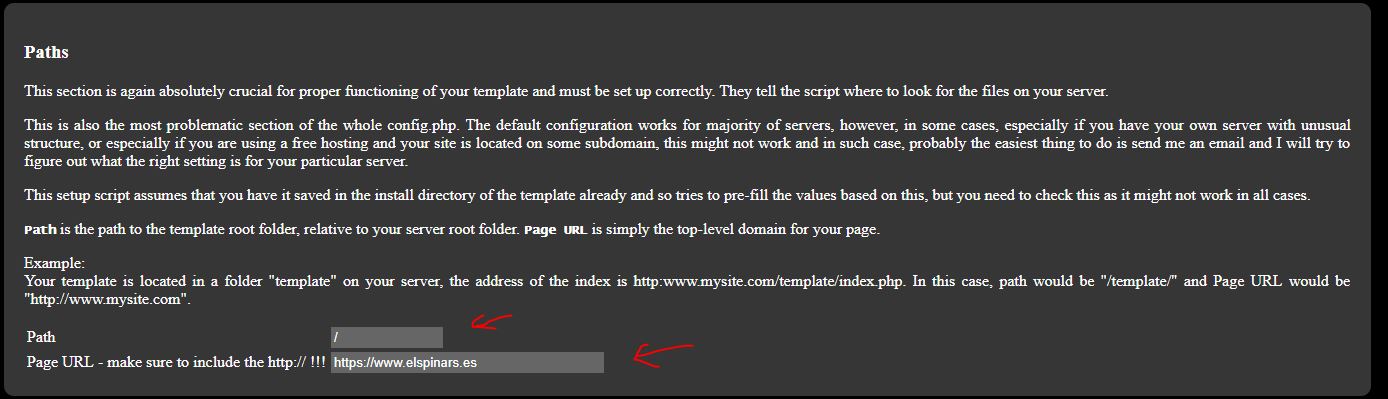
My two cents...
Re: Home Button link change
Posted: Tue Dec 19, 2017 5:33 pm
by sv1jst
Thanks for your response.
I tried your third suggestion, unfortunately it didn't work.
When i will have more time i will try to edit the files you mentioned and retry the third one again.
Re: Home Button link change
Posted: Tue Dec 19, 2017 10:04 pm
by Jachym
Dont forget you must never update the menu though, if you update the menu it will reset all your customizations