new netAtmoNetModule ( netAtmoNet plugin companion )

Post Reply
davidefa
Expert
Expert
Posts: 905
Joined: Tue Jan 12, 2021 8:03 am
Location: Italy
Station model: WH2650
Software: WH2650 (direct upload)
Contact:

new netAtmoNetModule ( netAtmoNet plugin companion )

Post by davidefa » Mon Oct 23, 2023 7:30 pm

This block is to be used in cpnjunction of the netAtmoNet plugin.
Shows the module's status.

ver 1.0
- initial release ( based on netAtmoModules ver 1.0 )

blocknetatmonet01.png
blocknetatmonet01.png (44.4 KiB) Viewed 56625 times
Attachments
netAtmoNetModules_1.0.zip
(2.86 KiB) Downloaded 1095 times
Image

User avatar
tobydude
Forecaster
Forecaster
Posts: 206
Joined: Sun Jan 07, 2018 6:43 pm
Location: Norway
Station model: Netatmo
Software: Weatherdiaplay
Contact:

Re: new netAtmoNetModule ( netAtmoNet plugin companion )

Post by tobydude » Fri Nov 03, 2023 9:07 am

Have installed netAtmoModules ver 1.0.
When I click on "Edit settings" on the block netAtmoNetModules I em sendt to the "Moon phases Settings".
Same with the block "norwayAlerts". When I click on theese two blocks settins, I em semdt to the "Moon phases Settings".
So it is difficult to get to the settings of the block netAtmoModules.

Image

davidefa
Expert
Expert
Posts: 905
Joined: Tue Jan 12, 2021 8:03 am
Location: Italy
Station model: WH2650
Software: WH2650 (direct upload)
Contact:

Re: new netAtmoNetModule ( netAtmoNet plugin companion )

Post by davidefa » Fri Nov 03, 2023 10:31 am

It is a small bug of meteotemplate 19.0, that shows ( in some cases ) the 'edit settings' even for blocks that do not have a settings ( as the norwayAlerts and netAtmoNetModules ).
Extract the following script in the admin directory, it will ( hopefully ; - ) solve the issue.
Attachments
blockSetup_19.0a.zip
(2.15 KiB) Downloaded 1267 times
Image

User avatar
tobydude
Forecaster
Forecaster
Posts: 206
Joined: Sun Jan 07, 2018 6:43 pm
Location: Norway
Station model: Netatmo
Software: Weatherdiaplay
Contact:

Re: new netAtmoNetModule ( netAtmoNet plugin companion )

Post by tobydude » Fri Nov 03, 2023 12:50 pm

Hate to bother you with minor details, but after installing blockSetup_19.0a in the admin directory, the "Edit settings" disappeared for netAtmoNetModules and norwayAlerts.

Image

davidefa
Expert
Expert
Posts: 905
Joined: Tue Jan 12, 2021 8:03 am
Location: Italy
Station model: WH2650
Software: WH2650 (direct upload)
Contact:

Re: new netAtmoNetModule ( netAtmoNet plugin companion )

Post by davidefa » Fri Nov 03, 2023 1:11 pm

Yes, that's correct, both modules don't have any configurable option.
Image

User avatar
tobydude
Forecaster
Forecaster
Posts: 206
Joined: Sun Jan 07, 2018 6:43 pm
Location: Norway
Station model: Netatmo
Software: Weatherdiaplay
Contact:

Re: new netAtmoNetModule ( netAtmoNet plugin companion )

Post by tobydude » Fri Nov 03, 2023 2:04 pm

Problem solved, then. Thank you.
:)

El_Viejo
Forecaster
Forecaster
Posts: 105
Joined: Wed Sep 11, 2019 3:56 pm
Location: Derio - Bizkaia - Spain
Station model: Ecowitt - Netatmo

Re: new netAtmoNetModule ( netAtmoNet plugin companion )

Post by El_Viejo » Thu Dec 07, 2023 3:28 pm

This is the error message that appears.
However the plugin works correctly and the data is updated.
Initially, I thought that the cause was the removal of the block and plugin primitives ("netAtmo" and "netAtmoModules") to avoid errors.
But I think the cause is something else and I am not able to find it.
Attachments
netAtmoNetModules.png
netAtmoNetModules.png (14.8 KiB) Viewed 56501 times

User avatar
tobydude
Forecaster
Forecaster
Posts: 206
Joined: Sun Jan 07, 2018 6:43 pm
Location: Norway
Station model: Netatmo
Software: Weatherdiaplay
Contact:

Re: new netAtmoNetModule ( netAtmoNet plugin companion )

Post by tobydude » Thu Dec 07, 2023 3:47 pm

El_Viejo wrote: Thu Dec 07, 2023 3:28 pm This is the error message that appears.
I got the same error.

davidefa
Expert
Expert
Posts: 905
Joined: Tue Jan 12, 2021 8:03 am
Location: Italy
Station model: WH2650
Software: WH2650 (direct upload)
Contact:

Re: new netAtmoNetModule ( netAtmoNet plugin companion )

Post by davidefa » Thu Dec 07, 2023 10:22 pm

That message appears when the plugins/netAtmoNet/netAtmoLive.txt file does not exists, but in the case of tobydude I can see the file exists and is updated, and opening the block maximized ( https://fjærvollan.no/template/indexFul ... NetModules ) works.
My guess is that the php function that check the file ( file_exists ) fails for some reason.
In this modified block I removed this check ( which is also unnecessary ).

P.S.
Sometimes something strange happens, for example on my notebook I have 3 different meteotemplate test sites running on php 8.2.4 on 3 different directories ( template, template1 and template2 ), same server, but on template2 I have the nasty message that the cache directory is not writable, even if it writable and files are created regularly.
Can't understand why...
Wondering why both of you have this problem in the same time ( the netatmo rebellion : - )?
Attachments
netAtmoNetModules_1.1.zip
(2.89 KiB) Downloaded 1059 times
Image

El_Viejo
Forecaster
Forecaster
Posts: 105
Joined: Wed Sep 11, 2019 3:56 pm
Location: Derio - Bizkaia - Spain
Station model: Ecowitt - Netatmo

Re: new netAtmoNetModule ( netAtmoNet plugin companion )

Post by El_Viejo » Fri Dec 08, 2023 10:55 am

Installed V1.1. Now a different message appears.

"Datos actualmente no disponibles" = "Data not currently available"

davidefa, that's a lot of lines of code to review.
Don't dismiss the Netatmo rebellion either. The first plugin suddenly stopped working, with no apparent cause. Now I'm having small problems with the plugin page refresh, something that didn't happen before.

Thank you very much for your interest.
Attachments
Modules_01.png
Modules_01.png (7.19 KiB) Viewed 56470 times

User avatar
tobydude
Forecaster
Forecaster
Posts: 206
Joined: Sun Jan 07, 2018 6:43 pm
Location: Norway
Station model: Netatmo
Software: Weatherdiaplay
Contact:

Re: new netAtmoNetModule ( netAtmoNet plugin companion )

Post by tobydude » Fri Dec 08, 2023 11:36 am

I got it to work. Not sure what I did. :roll:
Checked all (client id and client secrets)
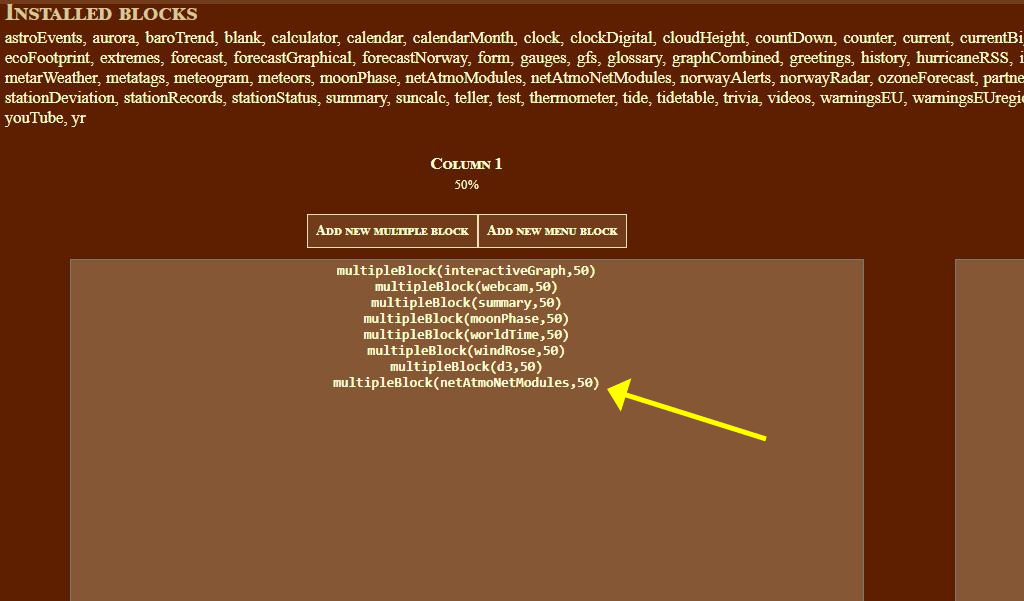
Changed the block to "multipleBlock(netAtmoModules,50)" , saved, and then back to "multipleBlock(netAtmoNetModules,50)".
Sounds corny but than it worked.

Image

Bottom left at https://fjærvollan.no/template/indexDesktop.php

El_Viejo
Forecaster
Forecaster
Posts: 105
Joined: Wed Sep 11, 2019 3:56 pm
Location: Derio - Bizkaia - Spain
Station model: Ecowitt - Netatmo

Re: new netAtmoNetModule ( netAtmoNet plugin companion )

Post by El_Viejo » Fri Dec 08, 2023 3:59 pm

In my case, the trick has not worked.

davidefa
Expert
Expert
Posts: 905
Joined: Tue Jan 12, 2021 8:03 am
Location: Italy
Station model: WH2650
Software: WH2650 (direct upload)
Contact:

Re: new netAtmoNetModule ( netAtmoNet plugin companion )

Post by davidefa » Fri Dec 08, 2023 5:05 pm

- If you point your browser to the block maximized does it show correctly?

Code: Select all

http://ip_of_the_raspberry/template/indexFull.php?block=netAtmoNetModules
- does the file template/plugins/netAtmoNet/netAtmoLive.txt exist?
you can reach it with your browser too at the following url:

Code: Select all

http://ip_of_the_raspberry/template/plugins/netAtmoNet/netAtmoLive.txt
Image

El_Viejo
Forecaster
Forecaster
Posts: 105
Joined: Wed Sep 11, 2019 3:56 pm
Location: Derio - Bizkaia - Spain
Station model: Ecowitt - Netatmo

Re: new netAtmoNetModule ( netAtmoNet plugin companion )

Post by El_Viejo » Fri Dec 08, 2023 7:17 pm

In the first IP, the text "Data currently not available" appears at the top of the full screen.

On the second IP the message "Not Found" appears.

On my server, the file "indexFull.php", is dated 08/06/19 06:33 and 130 lines.

The "netAtmoNet" folder has 7 PHP files and only one TXT file. It is the one that registers version 1.4.

Again, thanks for your patience.

User avatar
tobydude
Forecaster
Forecaster
Posts: 206
Joined: Sun Jan 07, 2018 6:43 pm
Location: Norway
Station model: Netatmo
Software: Weatherdiaplay
Contact:

Re: new netAtmoNetModule ( netAtmoNet plugin companion )

Post by tobydude » Fri Dec 08, 2023 8:49 pm

Have you tried to set your PHP version on your template server to version 7.4?

davidefa
Expert
Expert
Posts: 905
Joined: Tue Jan 12, 2021 8:03 am
Location: Italy
Station model: WH2650
Software: WH2650 (direct upload)
Contact:

Re: new netAtmoNetModule ( netAtmoNet plugin companion )

Post by davidefa » Fri Dec 08, 2023 9:01 pm

Also verify that your plugins/netAtmoNet folder has the 'right permissions', so that it is writeable by php.
The question is: what is the right permissions?
It depends 'on the server', on a server of mine the right permission is 0755 for folders and 0644 for files ( on another is 0755 for both folders and files )

P.S.
In the case of tobydude the file ( netAtmoLive.txt ) was there, but not recognized somehow, in your case the file is missing.
Last edited by davidefa on Fri Dec 08, 2023 9:04 pm, edited 2 times in total.
Image

El_Viejo
Forecaster
Forecaster
Posts: 105
Joined: Wed Sep 11, 2019 3:56 pm
Location: Derio - Bizkaia - Spain
Station model: Ecowitt - Netatmo

Re: new netAtmoNetModule ( netAtmoNet plugin companion )

Post by El_Viejo » Fri Dec 08, 2023 9:02 pm

I am using PHP 7.4.28

El_Viejo
Forecaster
Forecaster
Posts: 105
Joined: Wed Sep 11, 2019 3:56 pm
Location: Derio - Bizkaia - Spain
Station model: Ecowitt - Netatmo

Re: new netAtmoNetModule ( netAtmoNet plugin companion )

Post by El_Viejo » Fri Dec 08, 2023 9:07 pm

I have used these Debian commands on my Raspberry Pi 4

sudo chmod -R ugo+rwx /var/www/html
sudo chmod -R 777 /var/www/html

User avatar
tobydude
Forecaster
Forecaster
Posts: 206
Joined: Sun Jan 07, 2018 6:43 pm
Location: Norway
Station model: Netatmo
Software: Weatherdiaplay
Contact:

Re: new netAtmoNetModule ( netAtmoNet plugin companion )

Post by tobydude » Fri Dec 08, 2023 9:12 pm

Also check that your crontab is ok.
The "updateNetAtmoNet.php" should be in the "/public_html/template/load/crons" folder.

El_Viejo
Forecaster
Forecaster
Posts: 105
Joined: Wed Sep 11, 2019 3:56 pm
Location: Derio - Bizkaia - Spain
Station model: Ecowitt - Netatmo

Re: new netAtmoNetModule ( netAtmoNet plugin companion )

Post by El_Viejo » Fri Dec 08, 2023 9:15 pm

At this moment I just became aware.
I have not used these commands when uploading the new blocks and plugins to the template.
Now I do it.

El_Viejo
Forecaster
Forecaster
Posts: 105
Joined: Wed Sep 11, 2019 3:56 pm
Location: Derio - Bizkaia - Spain
Station model: Ecowitt - Netatmo

Re: new netAtmoNetModule ( netAtmoNet plugin companion )

Post by El_Viejo » Fri Dec 08, 2023 9:16 pm

It works.
My apologies for this oversight.
Thank you for your patience.

davidefa
Expert
Expert
Posts: 905
Joined: Tue Jan 12, 2021 8:03 am
Location: Italy
Station model: WH2650
Software: WH2650 (direct upload)
Contact:

Re: new netAtmoNetModule ( netAtmoNet plugin companion )

Post by davidefa » Fri Dec 08, 2023 11:21 pm

Good, the fact is that zip archives contain also files flags.
For some reason ( which I don't understand ) sometimes when unzipping achives the files extracted are marked read only ( this happens not only on linux machines, but on windows too ).
I found this 'the hard way' : - (
Image

Post Reply