Hint for an Outlook Block

Post Reply
User avatar
meteocaldas
Language Admin
Language Admin
Posts: 111
Joined: Fri Aug 25, 2017 7:56 pm
Location: Caldas da Rainha, Portugal
Station model: OS WMR-88A
Software: Cumulus
Contact:

Hint for an Outlook Block

Post by meteocaldas » Thu Dec 07, 2017 11:16 pm

Hi there!

One of the blocks that I am really missing in MT is what we could call the "outlook block".
As an outlook, it would show the weather forecast for the next hours, hour by hour.

Since MT is my main hobby :D (I do mean it!), I played around for a while and after many failed attemps I finnally came out with something that already looks like an outlook block. ;)
It uses Darksky outlook text and icon, followed by WU hourly forecast and icons, so it is a highly "experimental nonsense"!
It has been designed to work well in Mobile (vertical) and in desktop (25% window block).

Image

Image

It uses information already stored in MT (darksky and wu json) and I tested both, for some time, to verify which one is more suitable for this purpose.

Both are perfect for this purpose, the main differences beeing:
1. Darksky has already all icons in MT library. Outlook text is perfect in english (may be erroneous in other languages like it is in Portuguese). It has a unique feature that shows average current values in the area (obtained from the nearest metars). It is possible to parse any of the following values (shown here in metric, but could be requested in imperial) :

Code: Select all

"hourly":{"summary":"Mostly cloudy throughout the day.","icon":"partly-cloudy-day","data":[{"time":1512684000,"summary":"Partly Cloudy","icon":"partly-cloudy-night","precipIntensity":0,"precipProbability":0,"temperature":10.89,"apparentTemperature":10.89,"dewPoint":7.94,"humidity":0.82,"pressure":1031.51,"windSpeed":1.38,"windGust":1.97,"windBearing":188,"cloudCover":0.52,"uvIndex":0,"ozone":236.76}
Personnaly, the only thing that I feel like missing is the hourly rainfall (qpf). Except for this, Darksky is perfect.

2. WU has no outlook text, just an hourly text. Icons need to be downloaded or converted to MT icons. It is possible to parse any of the following values:

Code: Select all

"hourly_forecast": [
		{
		"FCTTIME": {
		"hour": "23","hour_padded": "23","min": "00","min_unpadded": "0","sec": "0","year": "2017","mon": "12","mon_padded": "12","mon_abbrev": "Dec","mday": "7","mday_padded": "07","yday": "340","isdst": "0","epoch": "1512687600","pretty": "11:00 PM WET on December 07, 2017","civil": "11:00 PM","month_name": "December","month_name_abbrev": "Dec","weekday_name": "Thursday","weekday_name_night": "Thursday Night","weekday_name_abbrev": "Thu","weekday_name_unlang": "Thursday","weekday_name_night_unlang": "Thursday Night","ampm": "PM","tz": "","age": "","UTCDATE": ""
		},
		"temp": {"english": "52", "metric": "11"},
		"dewpoint": {"english": "45", "metric": "7"},
		"condition": "Mostly Cloudy",
		"icon": "nt_mostlycloudy",
		"icon_url":"http://icons.wxug.com/i/c/k/nt_mostlycloudy.gif",
		"fctcode": "3",
		"sky": "67",
		"wspd": {"english": "3", "metric": "5"},
		"wdir": {"dir": "SSW", "degrees": "197"},
		"wx": "Mostly Cloudy",
		"uvi": "0",
		"humidity": "78",
		"windchill": {"english": "-9999", "metric": "-9999"},
		"heatindex": {"english": "-9999", "metric": "-9999"},
		"feelslike": {"english": "52", "metric": "11"},
		"qpf": {"english": "0.0", "metric": "0"},
		"snow": {"english": "0.0", "metric": "0"},
		"pop": "0",
		"mslp": {"english": "30.45", "metric": "1031"}
		}
While darksky values seem to follow an average of the nearest metars, WU seems to make an average of the nearest WU stations.
Testing both, Wu hourly forecast was always closer to my station values, but the differences between both are not significant.
Overall, except for the fact of not having the QPF value, Darksky seems to be the easiest and better way to make the outlook block.

So... the last question is...

DearJachym, what do you think about this idea? Would you create an outlook block for us, the lovers of outlook forecasts :?: Pleaseeeee ...

Meanwhile... and once again, thanks for this masterpiece called Meteotemplate!

Image
http://www.meteocaldas.com/mtp
Last edited by meteocaldas on Thu Dec 07, 2017 11:24 pm, edited 2 times in total.

User avatar
Fraggboy
Forecaster
Forecaster
Posts: 193
Joined: Wed Sep 27, 2017 2:45 pm
Location: Sunny California
Station model: Bloomsky II + Storm
Software: Bloomsky
Contact:

Re: Hint for an Outlook Block

Post by Fraggboy » Thu Dec 07, 2017 11:21 pm

I think it would be a highly used block.. I for one would make room on my page.. :)
Thumbs up.jpg
Thumbs up.jpg (115.81 KiB) Viewed 33634 times
Image

User avatar
Jachym
Site Admin
Site Admin
Posts: 1686
Joined: Fri Aug 18, 2017 10:12 pm
Location: Brno, Czech Republic
Station model: WH1080
Software: Meteobridge
Contact:

Re: Hint for an Outlook Block

Post by Jachym » Fri Dec 08, 2017 12:57 am

Hi Paulo,

nice :-) Just thinking, since you already posted the code, people are free to use it and you are the author. At least it gives advantage to those reading the forum :)

User avatar
meteocaldas
Language Admin
Language Admin
Posts: 111
Joined: Fri Aug 25, 2017 7:56 pm
Location: Caldas da Rainha, Portugal
Station model: OS WMR-88A
Software: Cumulus
Contact:

Re: Hint for an Outlook Block

Post by meteocaldas » Fri Dec 08, 2017 2:08 am

Jachym wrote: Fri Dec 08, 2017 12:57 am Hi Paulo,
nice :-) Just thinking, since you already posted the code, people are free to use it and you are the author. At least it gives advantage to those reading the forum :)
Hi Jachym,
your words were my Christmas gift in advance, and I do mean it! Thanks for you kindness.
However, I have to decline the invitation to post the code here, cause as I said, it is just an "experimental nonsense"! ;)

To be a perfect MT block, it needs some config (where the user can choose how many days of outlook he wants to display, etc) and it also needs all the work to match template colors, etc). The block was intended for Mobile single column display or for desktop 25% column width, so you may also find that it should be diferent to suit MT philosophy..

I think that the best thing to do is to send you the Darksky version (it is cleaner than the WU messy version shown in the pics), and please work on it, to create "the" perfect outlook block".

To be honest, I will feel "more than rewarded" if in the final script you just put a quoted line saying someting like:
"based on an idea from Paulo A. @ www.meteocaldas.com/mtp".

About the idea of having a special area for the creative work of the forum members, not accessibe to non members, seems to be a great idea to implement! Wondering if the new MT outlook block could be the first post... :twisted:

And... here am I, sitting and waiting for the new MT outlook block to be ready for download :D

Image

gand
Observer
Observer
Posts: 14
Joined: Mon Sep 25, 2017 4:52 am
Station model: Davis Vantage Pro2
Software: Meteobridge

Re: Hint for an Outlook Block

Post by gand » Fri Dec 08, 2017 12:26 pm

Hi

It's a good idea, but do not use WU as the basis for the block. I've only had trouble with WU and am happy to be independent of them now.

Gert

User avatar
BobW55
Forecaster
Forecaster
Posts: 115
Joined: Thu Sep 28, 2017 11:43 pm
Location: Michigan USA
Station model: Davis Pro2
Software: Cumulus
Contact:

Re: Hint for an Outlook Block

Post by BobW55 » Sat Dec 16, 2017 1:02 am

I like it......I would add it.
http://melvinweather.com/template/indexDesktop.php
Davis Vantage Pro2 wired
Solar/UV sensors
Sky Cam
Ham radio K8pos

User avatar
meteocaldas
Language Admin
Language Admin
Posts: 111
Joined: Fri Aug 25, 2017 7:56 pm
Location: Caldas da Rainha, Portugal
Station model: OS WMR-88A
Software: Cumulus
Contact:

Re: Hint for an Outlook Block

Post by meteocaldas » Sat Dec 16, 2017 4:04 am

BobW55 wrote: Sat Dec 16, 2017 1:02 am I like it......I would add it.
Jachym has just released version 1 of this OUTLOOK block (thanks Jachym!)
You can download and install it from the blocks page (http://meteotemplate.com/web/blocks.php)

Image

http://www.meteocaldas.com/mtp

User avatar
Semtex
Observer
Observer
Posts: 30
Joined: Sun Aug 20, 2017 5:38 pm
Location: Udine Italy
Station model: Davis Vantage Pro Plus 2
Software: Meteobridge
Contact:

Re: Hint for an Outlook Block

Post by Semtex » Sat Dec 16, 2017 1:51 pm

Hi
I have a problem with the icons
do not update
it's just my problem
sorry for my English

THANKS
Attachments
screenshot-darksky.net-2017-12-16-14-42-19.png
screenshot-darksky.net-2017-12-16-14-42-19.png (14.99 KiB) Viewed 33520 times
screenshot-meteobasaldella.it-2017-12-16-14-41-32.png
screenshot-meteobasaldella.it-2017-12-16-14-41-32.png (6.6 KiB) Viewed 33520 times
Davis Vantage Pro Plus 2

Image

User avatar
meteocaldas
Language Admin
Language Admin
Posts: 111
Joined: Fri Aug 25, 2017 7:56 pm
Location: Caldas da Rainha, Portugal
Station model: OS WMR-88A
Software: Cumulus
Contact:

Re: Hint for an Outlook Block

Post by meteocaldas » Sat Dec 16, 2017 2:35 pm

Semtex wrote: Sat Dec 16, 2017 1:51 pm I have a problem with the icons
do not update
I have not yet noticed that problem, but I am going to check it and will let you know the results :-)
Meanwhile, open your server's /forecast/cache/current.txt and check if there the summary and the icon are referring to the same thing, like in this example (my station, now). Summary is "Clear" and icon is "clear-day" what matches perfectly.

{"latitude":39.407734,"longitude":-9.134686,"timezone":"Europe/Lisbon","currently":{"time":1513434010,"summary":"Clear","icon":"clear-day","precipIntensity":0.0025,"precipProbability":0.01," ... etc

It is also possible that when it is still night time but Darksky is showing the forecast for the next hours (daylight), the icone remains as a night icon untill sunrise, what is logical. This already happened to me. :-)
In your case, it is already night, so the icon is a night iccon, but the text is correct because it says "partly cloudy" during (the rest) of the day (up to midnight when the day ends), so it seems OK to me.
One other thing to take into account, is that the darksky text is perfect in english, but translations are still very bad. It is quite possible that you are facing a translation error where the word "day" meaning "24hours" was confused with the word "day" meaning "daylight" in latin languages.

-- Italian --
Non ho ancora notato questo problema, ma lo controllerò e ti farà sapere i risultati :-)
Nel frattempo, apri il tuo server /forecast/cache/current.txt e controlla se il sommario e l'icona si riferiscono alla stessa cosa, come questo esempio (la mia stazione, ora). Il sommario è "sereno" e l'icona è clear-day ("chiara") in cui ciò che corrisponde perfettamente.
È anche possibile che quando è ancora notte ma Darksky mostri la previsione per le prossime ore (luce diurna), le icone rimangano come un'icona notturna fino all'alba, ciò che è logico. Questo è già successo a me. :-)
Nel tuo caso, è già notte, e quindi l'icona è un'icona di notte, ma il testo è corretto perché dice "poco nuvoloso" durante il (resto del) giorno, così sembra OK per me.
Una delle cose che devo prendere in considerazione è che il testo darksky è perfetto in inglese, ma le traduzioni sono ancora pessime. È possibile che tu stia affrontando un errore di traduzione in cui la parola "giorno" che significa "24 ore" è stata confusa con la parola "giorno" che significa "luce diurna" nelle lingue latine.


Image

http://www.meteocaldas.com/mtp
User avatar
meteocaldas
Language Admin
Language Admin
Posts: 111
Joined: Fri Aug 25, 2017 7:56 pm
Location: Caldas da Rainha, Portugal
Station model: OS WMR-88A
Software: Cumulus
Contact:

Re: Hint for an Outlook Block

Post by meteocaldas » Sat Dec 16, 2017 9:23 pm

After checking the evolution of outlook text and icon, I finally discovered an explanation for sunny icons during night hours, or moon icons during daylight. This may lead us to think that icons don't change or are the wrong icons, but everything is correct.
Both text and icon are referred to the forecast, not the current time.
Example: now, 21H00 (night time),
1 - the outlook text (forecast) says: Clear throughout the day (forecast is for the day of tomorrow)
2 - the icon is "clear-day", the sun icon.
Conclusion: current time is night but the forecast is for next day, so the icon is not a night icon but a daylight icon.
At a first glance we may think that the icon should be a night icon because it´s night, but the mistake is ours, because the outlook text is quite clear.

That's it! :D

--- italian ---
Dopo aver controllato l'evoluzione del testo e dell'icona di Outlook per alcune ore, ho finalmente scoperto una spiegazione per le icone del sole durante la notte e le icone della luna durante la luce del giorno.
Sia il testo che l'icona si riferiscono alla previsione, non all'ora corrente.
Esempio: ora, 21:00 (notte),
1 - il testo di outlook (previsione) dice: Cancella tutto il giorno (la previsione è per il giorno di domani)
2 - l'icona è "clear-day", l'icona del sole.
Conclusione: l'ora corrente è notte, ma la previsione è per il giorno successivo.
Ad una prima occhiata potremmo pensare che l'icona dovrebbe essere un'icona notturna perché è notte, ma l'errore è nostro, perché il testo delle prospettive è abbastanza chiaro.

Image

User avatar
MrData
Observer
Observer
Posts: 39
Joined: Tue Oct 31, 2017 3:02 pm
Location: Southeast Wisconsin, USA
Station model: Davis Vantage Pro II
Software: Meteobridge
Contact:

Re: Hint for an Outlook Block

Post by MrData » Sun Dec 17, 2017 5:14 am

Alright -- I'm confused. I have a Darksky API key, installed the Outlook block and it comes up with no icon at all, just a place marker for where the icon should be. The icon it's looking for shows up as:
http://{mysite}/homepage/blocks/outlook/icons/dark/.png
When I click on 'more info', I see:
06:00 pm 32.0 0 % 0.00inHg 0.0mph º
06:00 pm 32.0 0 % 0.00 inHg 0.0 mph °
Obviously no data.
In an earlier posting, Meteocaldas mentioned: open your server's /forecast/cache/current.txt .....
I don't have a /forecast folder, I have a /pages/forecast/cache folder but it only contains stationCache.txt.
I went to darksky.net and reset my api key and added it to the main setup, confirmed that it is in config.php.
Why am I not getting any data for Outlook to deal with?
HEALTH WARNING: Caution...these posts may contain traces of nut.
Image
My Meteotemplate Weather Station

User avatar
Jachym
Site Admin
Site Admin
Posts: 1686
Joined: Fri Aug 18, 2017 10:12 pm
Location: Brno, Czech Republic
Station model: WH1080
Software: Meteobridge
Contact:

Re: Hint for an Outlook Block

Post by Jachym » Sun Dec 17, 2017 10:33 am

Hi,
this looks like it is not saving the cache file. It is unlikely a permission issue since you have another file there. The cache file is not saved when no data is received from Darsky.
What about other blocks/pages which use DarkSky? Do they work? (forecast block, main template forecast page etc.)

User avatar
meteocaldas
Language Admin
Language Admin
Posts: 111
Joined: Fri Aug 25, 2017 7:56 pm
Location: Caldas da Rainha, Portugal
Station model: OS WMR-88A
Software: Cumulus
Contact:

Re: Hint for an Outlook Block

Post by meteocaldas » Sun Dec 17, 2017 12:17 pm

MrData wrote: Sun Dec 17, 2017 5:14 am In an earlier posting, Meteocaldas mentioned: open your server's /forecast/cache/current.txt .....
I don't have a /forecast folder, I have a /pages/forecast/cache folder but it only contains stationCache.txt.
I went to darksky.net and reset my api key and added it to the main setup, confirmed that it is in config.php.
Why am I not getting any data for Outlook to deal with?
Hi
Please accept my apologies, when i wrote the link to current.txt I shortened it, giving you an extra trouble to find it. Sorry!
I think I discovered where the problem is.
MT path to darksky forecast site, where all MT data will be collected from is:

Code: Select all

https://api.darksky.net/forecast/".$fIOKey."/".$stationLat.",".$stationLon."?units=si&lang=".$fIOLanguage;
where
".$fIOKey." it is replaced by your api key, that you used in MT setup. example: abcdefghjklmn
".$stationLat.",".$stationLon." it is replaced by your latutude and longitude that you used in MT setup. Example: 43.11167, -88.49927
&lang=".$fIOLanguage; is replaced by the language you set for MT

A full functional url to get darksky API data for your location coordinates, would look like this: (the correct url would need your API key replacing this abcdefg.....12345 exemple key)

Code: Select all

https://api.darksky.net/forecast/abcdefghijklmnopqrstuvwxyz12345/43.11167,-88.49927?units=si&lang=en
If you use this url in a browser you will get the Darksky info that will be collected to MT's current.txt and that will be used by outlook block

I tried this url for your location with my API and one amazing thing happens!!!!

the first 21 hours of the forecast are at zeros. Only after the 22nd hour the result is ok

Checking further, (you may try this url with other latitudes and longitudes) what happens is:
Latitudes above 38,9999 or longitudes further than -70,9999 will give this same error!

But if you try for instance, lat 38,7584 and long -70,1234 everything will be fine.

Try it yourself, with different values.

So it seems to be a Darksky issue that for sure will be solved soon after many complaints :-)
It has nothing to do with MT.

Image

http://www.meteocaldas.com/mtp
User avatar
MrData
Observer
Observer
Posts: 39
Joined: Tue Oct 31, 2017 3:02 pm
Location: Southeast Wisconsin, USA
Station model: Davis Vantage Pro II
Software: Meteobridge
Contact:

Re: Hint for an Outlook Block

Post by MrData » Sun Dec 17, 2017 8:54 pm

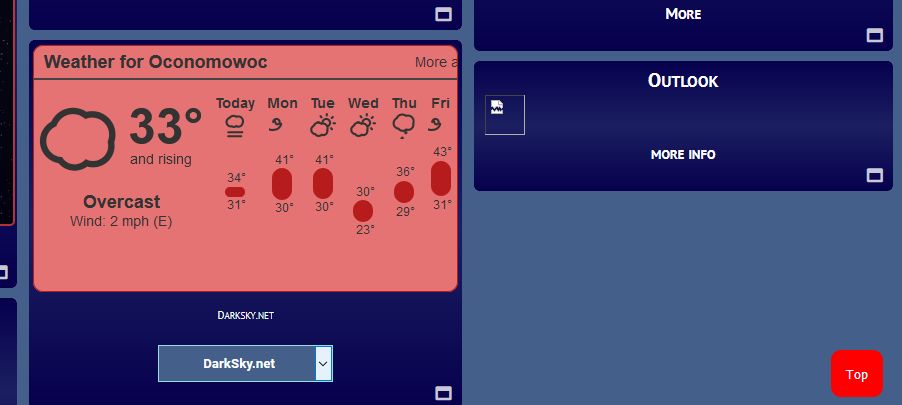
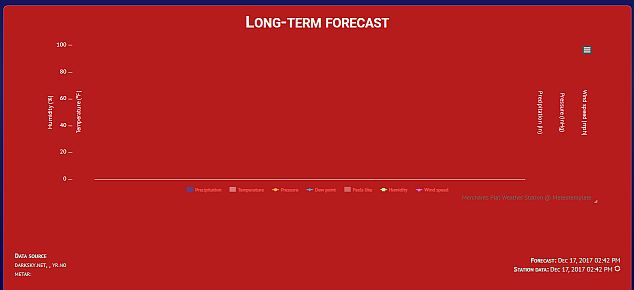
Forecast block seems to work.......
Image
but the forecast from the menu comes up blank...
Image
HEALTH WARNING: Caution...these posts may contain traces of nut.
Image
My Meteotemplate Weather Station

User avatar
MrData
Observer
Observer
Posts: 39
Joined: Tue Oct 31, 2017 3:02 pm
Location: Southeast Wisconsin, USA
Station model: Davis Vantage Pro II
Software: Meteobridge
Contact:

Re: Hint for an Outlook Block

Post by MrData » Sun Dec 17, 2017 9:20 pm

Meteocaldas
I ran the url:
https://api.darksky.net/forecast/{my-ap ... si&lang=en
in the browser and it returned a mountain of data, all apparently valid.
I also searched the server for any instance of 'current.txt' and found nothing.
Am I supposed to be running this url from meteobridge periodically to create the 'current.txt' file?
HEALTH WARNING: Caution...these posts may contain traces of nut.
Image
My Meteotemplate Weather Station

User avatar
meteocaldas
Language Admin
Language Admin
Posts: 111
Joined: Fri Aug 25, 2017 7:56 pm
Location: Caldas da Rainha, Portugal
Station model: OS WMR-88A
Software: Cumulus
Contact:

Re: Hint for an Outlook Block

Post by meteocaldas » Sun Dec 17, 2017 10:21 pm

Forecast Block uses an iframe that is generated inside darksky site, (without any interference of MT), in a proccess that is totally different and tottally independent from the process of generating the darksky APi text, where MT gets the darksky data.

What MT does is to read the output of Darksky API text (produced by the url) and copy it to the current.txt, using this file for all the blocks and plugins that will need darksky data.

I checked again and your url is perfect now.
These are the 2 first hourly lines that the outlook Block would display (if there was a current.txt file):

"hourly":{"summary":"Foggy starting tonight, continuing until tomorrow morning.","icon":"fog","data":[{"time":1513544400,"summary":"Overcast","icon":"cloudy","precipIntensity":0.0051,"precipProbability":0.03,"precipAccumulation":0,"precipType":"snow","temperature":0.05,"apparentTemperature":0.05,"dewPoint":-1.19,"humidity":0.91,"pressure":1017.01,"windSpeed":0.54,"windGust":1.09,"windBearing":72,"cloudCover":1,"uvIndex":0,"visibility":7.29,"ozone":301.45},{"time":1513548000,"summary":"Overcast","icon":"cloudy","precipIntensity":0.0102,"precipProbability":0.03,"precipAccumulation":0,"precipType":"snow","temperature":-0.23,"apparentTemperature":-0.23,"dewPoint":-1.16,"humidity":0.93,"pressure":1016.89,"windSpeed":0.4,"windGust":0.83,"windBearing":120,"cloudCover":1,"uvIndex":0,"visibility":8.26,"ozone":302.58},

Since this is ok now, the only question that remains is: why is not MT creating the current.txt, if current.txt is just a copy of this url result?
I don't have an answer for this :-)

User avatar
MrData
Observer
Observer
Posts: 39
Joined: Tue Oct 31, 2017 3:02 pm
Location: Southeast Wisconsin, USA
Station model: Davis Vantage Pro II
Software: Meteobridge
Contact:

Re: Hint for an Outlook Block

Post by MrData » Mon Dec 18, 2017 1:55 am

ok, thanx. I'll keep looking for my 'current.txt.
Just to be clear, I would expect to see 'current.txt' in my /pages/forecast/cache folder.
Right now I have a file named stationCache.txt at that location. It appears to have a weeks worth of data in it but no textual forecasts or descriptions like 'Foggy all morning'.
Is stationCache.txt supposed to be there or is this maybe part of the problem.
HEALTH WARNING: Caution...these posts may contain traces of nut.
Image
My Meteotemplate Weather Station

User avatar
meteocaldas
Language Admin
Language Admin
Posts: 111
Joined: Fri Aug 25, 2017 7:56 pm
Location: Caldas da Rainha, Portugal
Station model: OS WMR-88A
Software: Cumulus
Contact:

Re: Hint for an Outlook Block

Post by meteocaldas » Mon Dec 18, 2017 12:17 pm

MrData wrote: Mon Dec 18, 2017 1:55 am Just to be clear, I would expect to see 'current.txt' in my /pages/forecast/cache folder.
Right now I have a file named stationCache.txt at that location. It appears to have a weeks worth of data in it but no textual forecasts or descriptions like 'Foggy all morning'.
Is stationCache.txt supposed to be there or is this maybe part of the problem.
Yes, stationCache.txt is supposed to be in /pages/forecast/cache folder, along with current.txt as shown here:
Image
When no current.txt is there, MT is not able to display any info from Darksky including outlookBlock and the menu weather outlook (that has no data yet) as shown here:
Image
As far as my knowledge goes, one of the reasons why MT is not saving current.txt can be related to writing permissions in the cache folder. However, since your stationCache.txt is already there, it excludes permission issues. Anyway, I would take a look, just to be sure permissions are ok. My permissions are 755:
Image

To clear any doubts, I made several tests, and presuming that latitude and longitude have no typing errors, the only time that MT was unable to create the current.txt file, was when I introduced a wrong API key. A single space at the end of the key (which is a common error during copy/paste), will make it useless.
If I was you, I would try to retype the API key in MT's main setup and check the result.

Other than this, I don't have any more ideas, but... I would bet that your outlook block issue, is just a mistyped API key in the MT setup ;)

Image
http://www.meteocaldas.com/mtp

User avatar
MrData
Observer
Observer
Posts: 39
Joined: Tue Oct 31, 2017 3:02 pm
Location: Southeast Wisconsin, USA
Station model: Davis Vantage Pro II
Software: Meteobridge
Contact:

Re: Hint for an Outlook Block

Post by MrData » Tue Dec 19, 2017 8:24 pm

I've set the permissions for every folder on my site so that even the most inept Russian hacker could influence my weather data.
Went to Darksky and obtained a new key making extra sure there were no extra spaces.
Rebooted Meteobridge and updated the software. Still no 'current.txt' in my cache folder.
I assume that MB goes to Darksky and requests data. All that Darksky knows about me is my login email address. Don't think there's any more set-up I can do on the Darksky site.
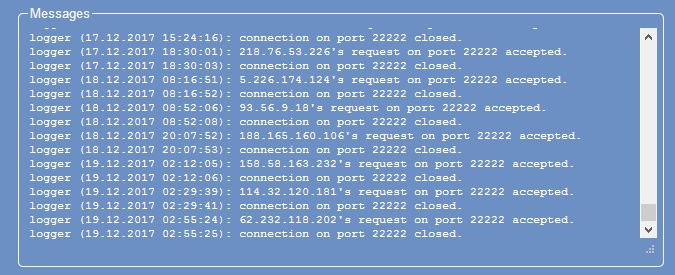
Does this possibly have anything to do with the series if IP addresses that are contacting Meteobridge on port 22222?
Image
HEALTH WARNING: Caution...these posts may contain traces of nut.
Image
My Meteotemplate Weather Station

User avatar
meteocaldas
Language Admin
Language Admin
Posts: 111
Joined: Fri Aug 25, 2017 7:56 pm
Location: Caldas da Rainha, Portugal
Station model: OS WMR-88A
Software: Cumulus
Contact:

Re: Hint for an Outlook Block

Post by meteocaldas » Tue Dec 19, 2017 9:14 pm

MrData wrote: Tue Dec 19, 2017 8:24 pm ... Don't think there's any more set-up I can do on the Darksky site.
Does this possibly have anything to do with the series if IP addresses that are contacting Meteobridge on port 22222?
I agree with you! You´ve tried it all already with MT and darksky, so now there's only MB left :)
I can't answer your questions about MB because I am not familiar with it.
Jachym, pleaseeeeee help!!!

Image
http://www.meteocaldas.com/mtp

User avatar
Jachym
Site Admin
Site Admin
Posts: 1686
Joined: Fri Aug 18, 2017 10:12 pm
Location: Brno, Czech Republic
Station model: WH1080
Software: Meteobridge
Contact:

Re: Hint for an Outlook Block

Post by Jachym » Tue Dec 19, 2017 10:00 pm

I am not sure I understand what you are trying to do - the cnoditions should be loaded by MT, so what does MB have to do with it?

User avatar
meteocaldas
Language Admin
Language Admin
Posts: 111
Joined: Fri Aug 25, 2017 7:56 pm
Location: Caldas da Rainha, Portugal
Station model: OS WMR-88A
Software: Cumulus
Contact:

Re: Hint for an Outlook Block

Post by meteocaldas » Tue Dec 19, 2017 11:38 pm

Hi Jachym
the questin is: If it is not a MB issue, why is MrData's MT not creating a current.txt, if his darksky parameters (API, long, lat, and folder permissions) have all been verified and seem to be ok?
Thanks.

Image

User avatar
MrData
Observer
Observer
Posts: 39
Joined: Tue Oct 31, 2017 3:02 pm
Location: Southeast Wisconsin, USA
Station model: Davis Vantage Pro II
Software: Meteobridge
Contact:

Re: Hint for an Outlook Block

Post by MrData » Wed Dec 20, 2017 6:15 am

I pulled the line $fIOURL from the file forecastPDF.php.....
populated the variables with the entries in config.php....
ran the url in my browser and it returned all the data I expected.
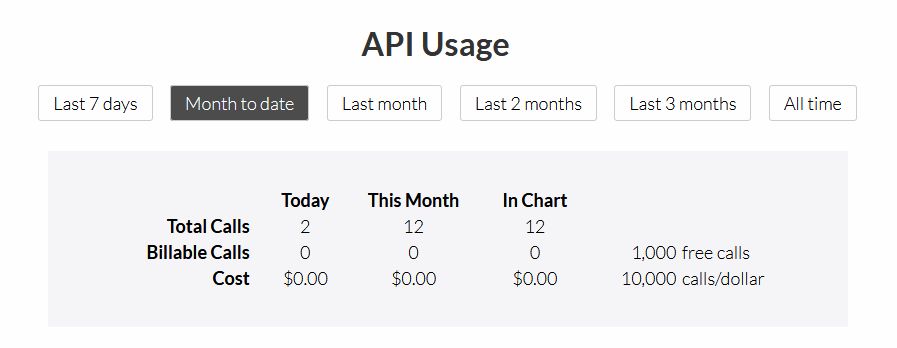
When I went to the DarkSky dashboard it showed that I had only made one call today.
Ran the URL again and it showed 2 calls.
Is this indicating that MT is not requesting data from DarkSky? Getting blocked somehow?
Image
HEALTH WARNING: Caution...these posts may contain traces of nut.
Image
My Meteotemplate Weather Station

User avatar
BobW55
Forecaster
Forecaster
Posts: 115
Joined: Thu Sep 28, 2017 11:43 pm
Location: Michigan USA
Station model: Davis Pro2
Software: Cumulus
Contact:

Re: Hint for an Outlook Block

Post by BobW55 » Sat Dec 23, 2017 3:13 am

I have the outlook block installed on my site, and all appears to be properly running.
If I could change one thing would be to add a header block (icons would be fine) to indicate what each column is when you hit the more button.

Excellent work.
http://melvinweather.com/template/indexDesktop.php
Davis Vantage Pro2 wired
Solar/UV sensors
Sky Cam
Ham radio K8pos

User avatar
Jachym
Site Admin
Site Admin
Posts: 1686
Joined: Fri Aug 18, 2017 10:12 pm
Location: Brno, Czech Republic
Station model: WH1080
Software: Meteobridge
Contact:

Re: Hint for an Outlook Block

Post by Jachym » Sat Dec 23, 2017 12:17 pm

I was thinking about this, but I came to a conclusion this would be redundant. With blocks it is always about trying to save space too. There are five parameters and they all use different units, units which quite clearly indicate what parameter it is - eg. °C, %, hPa, mm, km/h

Post Reply