Off Line Notification

SwissWetter.ch
Newbie
Newbie
Posts: 9
Joined: Tue Sep 19, 2017 2:06 pm
Location: Lueterkofen, Switzerland
Station model: Davis VP2, Lufft WS600
Software: meteobridge
Contact:

Re: Off Line Notification

Post by SwissWetter.ch » Tue Dec 19, 2017 5:51 am

Hi Jachym, hi folks

It's up to the user, where he starts the cron , I think.
99.9999999% of all will start the cron on the same server.

Why? Because we want to be emailed, when the template receives no data from the source (meteobridge or something else). It's like nineback said: we don't want to check the template, we want to check, that the data-Source runs properly.

Idea for the plugin-name: WatchDog ;-)

Addition:
For checking the functionality of the server, there are other Tools like uptime robot: https://uptimerobot.com/
But today, this is not a problem. A good Service Provider has 99.999999999999999% uptime
My provider for examle, has 1 or 2 downtimes per Year for 1 to 5 Minutes. Thats nothing.

Best regards andhave agood day

Markus

Check out the shop: https://meteo.shop

Demostation:
http://lueterkofen.meteotemplate.net
Lufft WS600 and Davis VP2 Station

User avatar
Jachym
Site Admin
Site Admin
Posts: 1686
Joined: Fri Aug 18, 2017 10:12 pm
Location: Brno, Czech Republic
Station model: WH1080
Software: Meteobridge
Contact:

Re: Off Line Notification

Post by Jachym » Tue Dec 19, 2017 11:28 am

I will have to think about this, I get your point, but in the meantime Im not very happy about how this would work(not work)

SwissWetter.ch
Newbie
Newbie
Posts: 9
Joined: Tue Sep 19, 2017 2:06 pm
Location: Lueterkofen, Switzerland
Station model: Davis VP2, Lufft WS600
Software: meteobridge
Contact:

Re: Off Line Notification

Post by SwissWetter.ch » Tue Dec 19, 2017 12:39 pm

Hi Jachym, Hi users

I have an Idea: What about "paid plugins" ?

For all of us its clear: To program code is a hard work. And we all are happy, if someone do this with enthusiasm and good ideas like Jachym :-)

So: I am willing, to pay for plugins or blocks I use. In this case: For the WatchDog plugin 10 or 12 € for all of us they use this.

Why not? Jachym has some earnings, we are all happy.

How to do this (like for other Plugins at Joomla or WordPress): A small Version or a Testperiod of 20 days, after this, a Plugin has to be payed.

Or other way: Crowdfunding to program new Plugins. But the first way I think, is the better way.

What think the others?

Best regards

Markus
Check out the shop: https://meteo.shop

Demostation:
http://lueterkofen.meteotemplate.net
Lufft WS600 and Davis VP2 Station

User avatar
Jachym
Site Admin
Site Admin
Posts: 1686
Joined: Fri Aug 18, 2017 10:12 pm
Location: Brno, Czech Republic
Station model: WH1080
Software: Meteobridge
Contact:

Re: Off Line Notification

Post by Jachym » Tue Dec 19, 2017 2:07 pm

Hi Markus,

crowdfunding - no, Im not a fan of this. Lot of time from my perspective and not the way I want this to work.

paid blocks/plugins - there is no way to protect them anyway, so people could re-send them to each other etc. It is all about trust anyway.

It does say clearly on the page that you are free to try it and if you like it to remember it is donationware. As much as I would like to do it for free I simply cant. I simply would not have the time to even offer support not to mention develop things.

Of course you will have people who ignore this, but then these are not people who would use paid blocks/plugins anyway so there is no point.

Thanks for your suggestion though, I think the way it works now is the best it can work

User avatar
polbrieuc
Advisor
Advisor
Posts: 98
Joined: Wed Dec 06, 2017 10:58 pm
Location: Vallirana
Station model: WH1080
Software: Cumulus
Contact:

Re: Off Line Notification

Post by polbrieuc » Tue Dec 19, 2017 3:46 pm

Wow, I arrive after Markus propose to pay for this plugin... That's nice...
So here it goes : I tried to develop the plugin as I understood it from this thread. I even named it after Markus' idea : WatchDog.
Its is available on my dev page : www.elspinars.es/dev/dev.php (second line, after Traffic Alert)
I took parts of Jachym notification plugin, part of stationStatus block and mixed it together.
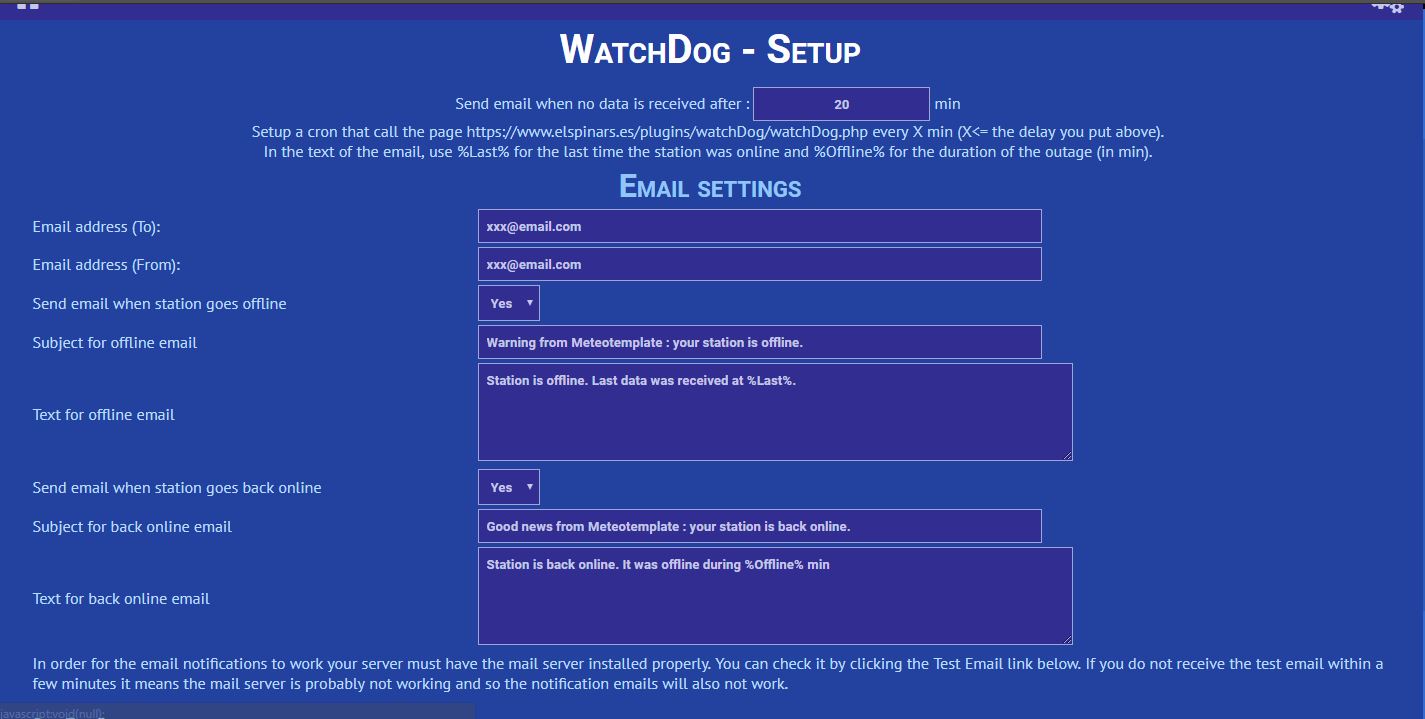
Here is a screenshot of the setup page :
Image
You can setup two emails alerts : one for when the station is offline for more than X minutes and one for when it comes back online. Both are optional.
You still need to set up a cron to run the script at the interval you define (I use https://cron-job.org). No password needed as it is not an update script per se.
I cannot guarantee that I'll provide support but try it and let me know any issue you find and I'll do my best to fix them.

And as for the 10-12 euros Markus was willing to pay, give them directly to Jachym. (I'll do my donation in 2018, Christmas killed my budget this year).

Enjoy !

Pol-Brieuc
Image

User avatar
Jachym
Site Admin
Site Admin
Posts: 1686
Joined: Fri Aug 18, 2017 10:12 pm
Location: Brno, Czech Republic
Station model: WH1080
Software: Meteobridge
Contact:

Re: Off Line Notification

Post by Jachym » Tue Dec 19, 2017 3:49 pm

OK, I will add it to version 17, lets not talk about donations, Im tired of it ;)

SwissWetter.ch
Newbie
Newbie
Posts: 9
Joined: Tue Sep 19, 2017 2:06 pm
Location: Lueterkofen, Switzerland
Station model: Davis VP2, Lufft WS600
Software: meteobridge
Contact:

Re: Off Line Notification

Post by SwissWetter.ch » Tue Dec 19, 2017 3:54 pm

polbrieuc wrote: Tue Dec 19, 2017 3:46 pm
Wow, I arrive after Markus propose to pay for this plugin... That's nice...
So here it goes : I tried to develop the plugin as I understood it from this thread. I even named it after Markus' idea : WatchDog.
Its is available on my dev page : www.elspinars.es/dev/dev.php (second line, after Traffic Alert)
I took parts of Jachym notification plugin, part of stationStatus block and mixed it together.

You can setup two emails alerts : one for when the station is offline for more than X minutes and one for when it comes back online. Both are optional.
You still need to set up a cron to run the script at the interval you define (I use https://cron-job.org). No password needed as it is not an update script per se.
I cannot guarantee that I'll provide support but try it and let me know any issue you find and I'll do my best to fix them.

And as for the 10-12 euros Markus was willing to pay, give them directly to Jachym. (I'll do my donation in 2018, Christmas killed my budget this year).

Enjoy !

Pol-Brieuc
WOW !

polbrieuc and Jachym, You are HEROES !

Of course, I will donate this!

Best regards and best wishes to all

Markus
Check out the shop: https://meteo.shop

Demostation:
http://lueterkofen.meteotemplate.net
Lufft WS600 and Davis VP2 Station

User avatar
polbrieuc
Advisor
Advisor
Posts: 98
Joined: Wed Dec 06, 2017 10:58 pm
Location: Vallirana
Station model: WH1080
Software: Cumulus
Contact:

Re: Off Line Notification

Post by polbrieuc » Tue Dec 19, 2017 3:59 pm

SwissWetter.ch wrote: Tue Dec 19, 2017 3:54 pm
Of course, I will donate this!
You may want to test first... :-)
Image

nineback
Advisor
Advisor
Posts: 73
Joined: Thu Aug 24, 2017 11:12 am
Location: Alabama
Station model: Davis Pro2
Software: WeeWX
Contact:

Re: Off Line Notification

Post by nineback » Tue Dec 19, 2017 6:07 pm

Thanks!. I have it installed and running. I did a couple of tests and it appears to work as designed but will keep monitoring.

Tom

nineback
Advisor
Advisor
Posts: 73
Joined: Thu Aug 24, 2017 11:12 am
Location: Alabama
Station model: Davis Pro2
Software: WeeWX
Contact:

Re: Off Line Notification

Post by nineback » Tue Dec 19, 2017 8:08 pm

I'm not sure it is working correctly. I am getting many notifications that the station is offline. When I go check it is online. I have the plugin set for 5 minutes and the cron set for 4 minutes. I'll get a notification 4 minutes later saying the station was back online. Below are the last messages. I know the system was not down for 24 minutes.

I received this message at 1400:

Station is offline. Last data was received at 2017-12-19 13:55:00.

I received this message at 1404:

Station is back online. It was offline during 24min 2s

User avatar
polbrieuc
Advisor
Advisor
Posts: 98
Joined: Wed Dec 06, 2017 10:58 pm
Location: Vallirana
Station model: WH1080
Software: Cumulus
Contact:

Re: Off Line Notification

Post by polbrieuc » Tue Dec 19, 2017 11:38 pm

Hello Nineback,

Thank you for taking the time to install and test the plugin.
As the database interval is 5min, to which you should add the interval of the cron you use to update your data, it is safer to set a higher value in the setup page to avoid false positive (station detected offline when it is online).
In my case, the cron that update my station data in the database is run every minute. Count some additional seconds for execution, I have up to 6min30s between the last database entry and the current time :
Image
When the cron to update the data is called, the actual date entry in the database is correctly set to a 5min interval though :
Image
Not sure that I explain myself clearly but anyway, just remember that the delay you define in the setup page should be higher than 5min + update cron interval + 1min for safety.

That being said, the plugin should not have detected an offline time of 24min.
This is probably because it wrongly logged the last online date-time only if the status had changed. Let's call it a bug.
I fixed it and published version 1.1 of the plugin, still on my dev page www.elspinars.es/dev/dev.php

If you have time, I would appreciate if you could download it again and retest (and report any issue as you kindly did).

Cheers,

Pol-Brieuc
Image

nineback
Advisor
Advisor
Posts: 73
Joined: Thu Aug 24, 2017 11:12 am
Location: Alabama
Station model: Davis Pro2
Software: WeeWX
Contact:

Re: Off Line Notification

Post by nineback » Wed Dec 20, 2017 12:11 am

Thanks again for the help. I am using the API and have my Weather Program (Weather Display) set to upload every minute so I assume the database is updated every minute like yours. So I set the plugin to 7 mins. 5min +1+1 = 7.


Correct?

User avatar
polbrieuc
Advisor
Advisor
Posts: 98
Joined: Wed Dec 06, 2017 10:58 pm
Location: Vallirana
Station model: WH1080
Software: Cumulus
Contact:

Re: Off Line Notification

Post by polbrieuc » Wed Dec 20, 2017 12:16 am

nineback wrote: Wed Dec 20, 2017 12:11 am Thanks again for the help. My page is updated every minute like yours. So I set the plugin to 7 mins. 5min +1+1 = 7.

Correct?
Correct, although I would leave some additional buffer for execution time.
9 min should be ok.
Image
Image

nineback
Advisor
Advisor
Posts: 73
Joined: Thu Aug 24, 2017 11:12 am
Location: Alabama
Station model: Davis Pro2
Software: WeeWX
Contact:

Re: Off Line Notification

Post by nineback » Wed Dec 20, 2017 12:30 am

I changed it to 9. We will see how it works. I really appreciate your writing this plugin.

Tom

User avatar
EveshamWeather
Observer
Observer
Posts: 20
Joined: Sat Sep 02, 2017 11:11 am
Location: Evesham, UK
Station model: Davis Vantage Vue
Software: Weewx
Contact:

Re: Off Line Notification

Post by EveshamWeather » Wed Dec 20, 2017 9:10 pm

I have setup some free site monitoring using Rapidspike where I have a content check. After installing the StationStatus block on my homepage, it looks for the word online in the block and alerts me if it is not found. I have the test interval set to 10 minutes, so if my site does not get an update in that time, I get an email alert. The time interval can be set from 5 minutes to 60 minutes on free accounts and shorter on paid accounts.

I also use them to monitor for general site uptime using a simple http response check, again every 10 minutes - useful for monitoring for a flaky webhost.
Vince

Image

User avatar
Luc
Developer
Developer
Posts: 168
Joined: Mon Aug 21, 2017 6:40 am
Location: Paramaribo, Suriname
Station model: Davis Pro 2 (2x)
Software: WeeWX
Contact:

Re: Off Line Notification

Post by Luc » Thu Dec 21, 2017 11:28 am

Hi,
Most of it is already said in this topic. Here are my two cents.
In the case my weather station went down due to my paid webserver went down I could do nothing to fix this. I simply had to wait until they were finished with their maintenance.

In 99% of the cases I had either a power cut at home which among others stopped my internet (router and modem no power) or a problem with my weather station software which could be solved by a restart of my weather computer (Raspberry PI).

So setting up a cron job for a MT warning script would be a good solution for me, but I agree with Jachym setting up a first cron job could be very difficult ( in fact it cost me several hours and I'm a programmer!) and Jachym is not waiting for numerous mails for assistance to setup this particular script.

Luc
Image

User avatar
Jachym
Site Admin
Site Admin
Posts: 1686
Joined: Fri Aug 18, 2017 10:12 pm
Location: Brno, Czech Republic
Station model: WH1080
Software: Meteobridge
Contact:

Re: Off Line Notification

Post by Jachym » Thu Dec 21, 2017 5:49 pm

just dealing with one.... 5 emails already only in the last 2h... everything working, except for CRON

nineback
Advisor
Advisor
Posts: 73
Joined: Thu Aug 24, 2017 11:12 am
Location: Alabama
Station model: Davis Pro2
Software: WeeWX
Contact:

Re: Off Line Notification

Post by nineback » Thu Dec 21, 2017 5:54 pm

So far so good. I replaced a UPS yesterday and did some other work which took me offline. Very soon after shutting down my system I received an email warning. 40 minutes later I brought the system back online and received a email saying the system is back online after 40 minutes.

Tom

User avatar
polbrieuc
Advisor
Advisor
Posts: 98
Joined: Wed Dec 06, 2017 10:58 pm
Location: Vallirana
Station model: WH1080
Software: Cumulus
Contact:

Re: Off Line Notification

Post by polbrieuc » Fri Dec 22, 2017 8:31 am

nineback wrote: Thu Dec 21, 2017 5:54 pm So far so good. I replaced a UPS yesterday and did some other work which took me offline. Very soon after shutting down my system I received an email warning. 40 minutes later I brought the system back online and received a email saying the system is back online after 40 minutes.

Tom
Glad to see it works. Thanks for being the guinea pig in this case.
I am not sure I understand why everybody is saying that setting up a Cron is a difficult job. It litterally takes 3min on http://cron-job.org/ and works like a charm. Maybe I missed something.
Image

User avatar
Jachym
Site Admin
Site Admin
Posts: 1686
Joined: Fri Aug 18, 2017 10:12 pm
Location: Brno, Czech Republic
Station model: WH1080
Software: Meteobridge
Contact:

Re: Off Line Notification

Post by Jachym » Fri Dec 22, 2017 11:32 am

Yes and no. There have been issues with cron-job.org in the past, it is not 100% reliable and you rely on an external service which is offered as is. If that webpage went down or became paid, half of users would have no updates...

nineback
Advisor
Advisor
Posts: 73
Joined: Thu Aug 24, 2017 11:12 am
Location: Alabama
Station model: Davis Pro2
Software: WeeWX
Contact:

Re: Off Line Notification

Post by nineback » Fri Dec 22, 2017 12:38 pm

The only "problem" I had with the cron was setting the path. I had to use the local path and could not use the WWW path.

Tom

User avatar
Jachym
Site Admin
Site Admin
Posts: 1686
Joined: Fri Aug 18, 2017 10:12 pm
Location: Brno, Czech Republic
Station model: WH1080
Software: Meteobridge
Contact:

Re: Off Line Notification

Post by Jachym » Tue Dec 26, 2017 9:05 pm

OK, this function has been added to v17

User avatar
BobW55
Forecaster
Forecaster
Posts: 114
Joined: Thu Sep 28, 2017 11:43 pm
Location: Michigan USA
Station model: Davis Pro2
Software: Cumulus
Contact:

Re: Off Line Notification

Post by BobW55 » Tue Dec 26, 2017 10:14 pm

I like this idea, but will offer a time where it will not work.
I run a Cabled Davis Vantage Pro II, last night at about 11:00 PM it went flat line. No Data being updated. Data was still being sent via Cumulus to my web server, just the same data over and over.
temp.png
temp.png (22.13 KiB) Viewed 24697 times
Found out today when I had a chance to check, ice had severed the data cable. I was able to pull the cable inside the house and repair it ( now 4 feet shorter).

My point is you need to also look to see if the data is changing as well as just being sent. Had I not looked at my web page, I would have never known.

Keep up the good work, I will install the watchdog block soon.

Bob
http://melvinweather.com/template/indexDesktop.php
Davis Vantage Pro2 wired
Solar/UV sensors
Sky Cam
Ham radio K8pos

User avatar
Jachym
Site Admin
Site Admin
Posts: 1686
Joined: Fri Aug 18, 2017 10:12 pm
Location: Brno, Czech Republic
Station model: WH1080
Software: Meteobridge
Contact:

Re: Off Line Notification

Post by Jachym » Tue Dec 26, 2017 10:23 pm

Not sure how the WatchDog plugin works, the function I implemented into v17 checks the date/time in the current conditions file and compares that. If Cumulus was sending the same data it would send you an email.

User avatar
polbrieuc
Advisor
Advisor
Posts: 98
Joined: Wed Dec 06, 2017 10:58 pm
Location: Vallirana
Station model: WH1080
Software: Cumulus
Contact:

Re: Off Line Notification

Post by polbrieuc » Tue Dec 26, 2017 11:27 pm

The WatchDog plugin checks the date/time of the last entry in the database. If it is older than the time you defined in the setup page, the email is triggerred.
So if Cumulus is sending the same data over and over, but with a different timestamp, the plugin will not detect that your station is offline.
An additional check to see if the data has changed would be an improvement. I'll add it to my To-Do list... But if this will be included in v17, I would just wait for it to be released...
Image

Post Reply