webcounter
-
Jachym

- Site Admin

- Posts: 1686
- Joined: Fri Aug 18, 2017 10:12 pm
- Location: Brno, Czech Republic
- Station model: WH1080
- Software: Meteobridge
- Contact:
Re: webcounter
Webcounter? Counter of what, you mean visitors?
There is Google Analytics integrated, just enter your GA code in the Main settings
There is Google Analytics integrated, just enter your GA code in the Main settings
-
tobydude

- Forecaster

- Posts: 206
- Joined: Sun Jan 07, 2018 6:43 pm
- Location: Norway
- Station model: Netatmo
- Software: Weatherdiaplay
- Contact:
Re: webcounter
I´v got the code and enterd it in the settings.
But where can I wiew traffic on my website?
http://fjærvollan.no/template/indexDesktop.php
But where can I wiew traffic on my website?
http://fjærvollan.no/template/indexDesktop.php
-
Jachym
- Site Admin
- Posts: 1686
- Joined: Fri Aug 18, 2017 10:12 pm
- Location: Brno, Czech Republic
- Station model: WH1080
- Software: Meteobridge
- Contact:
Re: webcounter
In your Google Analytics panel, there is detailed stats broken down by dates, browsers, OS, location etc etc....
analytics.google.com
analytics.google.com
-
ON1GL
- Observer

- Posts: 34
- Joined: Mon Nov 06, 2017 10:37 am
- Location: Antwerp
- Station model: Davis Vantage Pro 2
- Software: Meteotemplate/MeteoBridge
- Contact:
Re: webcounter
Have the same problem, normally the webserver should give you an accesslog, but on my Synology NAS the nginx webserver is a custom version and at this moment I'm not able to let it produce access logs . Therefore I'm testing this code (found on the net) that I added to the 'index.php' file, it gives some idea who's accessing the site.tobydude wrote: ↑Sun Jan 21, 2018 5:46 pm But where can I wiew traffic on my website?
http://fjærvollan.no/template/indexDesktop.php
code:
<?php
//ASSIGN VARIABLES TO USER INFO
$time = date("j/M/Y G:i:s");
$ip = getenv('REMOTE_ADDR');
$userAgent = getenv('HTTP_USER_AGENT');
$referrer = getenv('HTTP_REFERER');
$query = getenv('QUERY_STRING');
//COMBINE VARS INTO OUR LOG ENTRY
$msg = $ip ." - " . $time . " REFERRER: " . $referrer . " SEARCHSTRING: " . $query . " USERAGENT: " . $userAgent ;
//CALL OUR LOG FUNCTION
writeToLogFile($msg);
function writeToLogFile($msg) {
$today = date("Y_m_d");
$logfile = $today."_log.txt";
$dir = 'logs';
$saveLocation=$dir . '/' . $logfile;
if (!$handle = @fopen($saveLocation, "a")) {
exit;
}
else {
if (@fwrite($handle,"$msg\r\n") === FALSE) {
exit;
}
@fclose($handle);
}
}
?>
-
Jachym
- Site Admin
- Posts: 1686
- Joined: Fri Aug 18, 2017 10:12 pm
- Location: Brno, Czech Republic
- Station model: WH1080
- Software: Meteobridge
- Contact:
Re: webcounter
Yes, but I think this is not very practical, you will end up with large textfiles which are hard to analyze. Google Analytics will automatically aggregate data, show you graphs, number of visits, sessions, page views etc.
Looking at IPs only makes sense if you have problems with server speed and suspect someone is overloading it, but using access log for visitor counts is not very practical
Looking at IPs only makes sense if you have problems with server speed and suspect someone is overloading it, but using access log for visitor counts is not very practical
-
ON1GL
- Observer
- Posts: 34
- Joined: Mon Nov 06, 2017 10:37 am
- Location: Antwerp
- Station model: Davis Vantage Pro 2
- Software: Meteotemplate/MeteoBridge
- Contact:
Re: webcounter
I know we are not on the same page here.... most of us will not have a very large traffic load, so logfiles would be 'relatively' small.
I'm trying to put it into a block with some whois information and write it to a file, so it can be easely inserted into a webpage, but will have to buy a book and start learning php....
I'm trying to put it into a block with some whois information and write it to a file, so it can be easely inserted into a webpage, but will have to buy a book and start learning php....
-
Jachym
- Site Admin
- Posts: 1686
- Joined: Fri Aug 18, 2017 10:12 pm
- Location: Brno, Czech Republic
- Station model: WH1080
- Software: Meteobridge
- Contact:
Re: webcounter
Thats fine, although keep in mind you should not show this info on your webpage. Showing users´ details including IP on a page is not something you should do. This info is for you - the webmaster. Total counts ok, but not personal details
-
ON1GL
- Observer
- Posts: 34
- Joined: Mon Nov 06, 2017 10:37 am
- Location: Antwerp
- Station model: Davis Vantage Pro 2
- Software: Meteotemplate/MeteoBridge
- Contact:
Re: webcounter
indeed you should put it in the 'admin' blocks section so only the administrator can see it if it contains info from other users. (but still very far away from that  )
)
)-
Dehatter

- Professional

- Posts: 350
- Joined: Sun Jan 07, 2018 5:11 am
- Location: Matthews, NC, USA
- Station model: Ecowitt WH80
- Software: Ecowitt GW1000
- Contact:
Re: webcounter
OK...So I stole this idea from another user as well...
You might be interested in https://flagcounter.com
It is VERY basic, but it is free and so easy it's scary. There are quite a few options and will display a total count if you choose.
The idea is to show what country your visitors are from. In the US on the details page it will identify what state the visitor came from. I opted to only show percentages, but it is simple enough to click it and get a few additional details.
After you set your options, it provides a line of code that you just copy into the "blank" block (and you can rename the block if you want). This line also identifies your account. You don't even have to register. You can also use different codes for other pages to get individual page counts.
There are also some additional options you can add by an easy code modification.
It sounds like you are looking for more extensive information, but if you want simple and basic with nothing to manage, it could be worth a look. It is on my page in the bottom of the right column if you want to see it.
Click in the box to goto your counter and see some very basic detail.
Tom
You might be interested in https://flagcounter.com
It is VERY basic, but it is free and so easy it's scary. There are quite a few options and will display a total count if you choose.
The idea is to show what country your visitors are from. In the US on the details page it will identify what state the visitor came from. I opted to only show percentages, but it is simple enough to click it and get a few additional details.
After you set your options, it provides a line of code that you just copy into the "blank" block (and you can rename the block if you want). This line also identifies your account. You don't even have to register. You can also use different codes for other pages to get individual page counts.
There are also some additional options you can add by an easy code modification.
It sounds like you are looking for more extensive information, but if you want simple and basic with nothing to manage, it could be worth a look. It is on my page in the bottom of the right column if you want to see it.
Click in the box to goto your counter and see some very basic detail.
Tom
-
Jachym
- Site Admin
- Posts: 1686
- Joined: Fri Aug 18, 2017 10:12 pm
- Location: Brno, Czech Republic
- Station model: WH1080
- Software: Meteobridge
- Contact:
Re: webcounter
OK, but I have doubts about how accurately this script is able to filter out bots and spam. If I didnt turn this on in Google Analytics, 90% of "users" would be from Russia, China, India etc. Google has very sophisticated and extensive lists and filters it out, if you only base it on IP it is not going to be representative
-
Jachym
- Site Admin
- Posts: 1686
- Joined: Fri Aug 18, 2017 10:12 pm
- Location: Brno, Czech Republic
- Station model: WH1080
- Software: Meteobridge
- Contact:
Re: webcounter
Thats not to say you cant use it, just that I personally am not a fan of these counters and in case of showing number of visitors I think it is not a good idea at all, some time ago I explained this in detail in one Newsletter.
-
Dehatter
- Professional
- Posts: 350
- Joined: Sun Jan 07, 2018 5:11 am
- Location: Matthews, NC, USA
- Station model: Ecowitt WH80
- Software: Ecowitt GW1000
- Contact:
Re: webcounter
I read that actually in an old post and I personally agree. That is why I went with percentages (though you can get to the numbers in the detail if you try just a little). No Russians or Chinese yet but I am sure they will come.
Tom
Tom
-
tobydude
- Forecaster
- Posts: 206
- Joined: Sun Jan 07, 2018 6:43 pm
- Location: Norway
- Station model: Netatmo
- Software: Weatherdiaplay
- Contact:
Re: webcounter
Hi .Dehatter wrote: ↑Mon Jan 22, 2018 2:52 pm OK...So I stole this idea from another user as well...
You might be interested in https://flagcounter.com
It is VERY basic, but it is free and so easy it's scary. There are quite a few options and will display a total count if you choose.
Tom
Thanks for the suggestions.
I will try the counter you mentioned.
How will I put it at the bottom on my website?
In the wiki, it say´s:
"1.2 Custom Pages
Next step is adding custom pages. This of course is optional, but it is very easy to add your own custom pages to the template. Simply go to your control panel and click the "Custom pages" link in the top right Administration section."
And so?
Isn´t this explanation a bit short?

The generated code for the counter looks like:
"asrc="http//s05.flagcounter.com/count2/8gir/bg_blabla/txt_000000/border_CCCCCC/columns_2/maxflags_5/viewers_0/labels_1/pageviews_1/flags_0/percent_0/" alt="Flag Counter" border="0
I would have the counter at the bottom on my page.
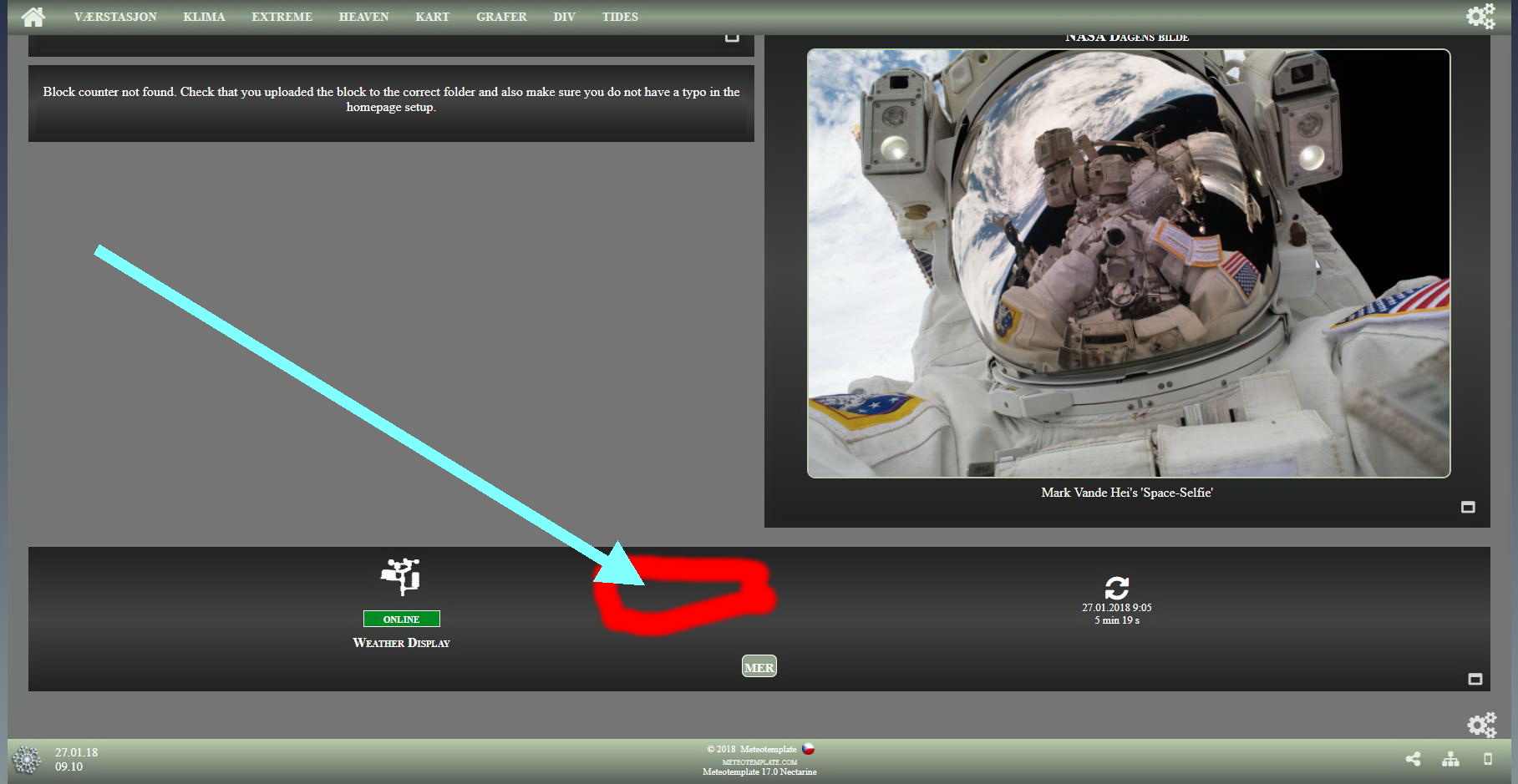
http://fjærvollan.no/template/indexDesktop.php
-
Jachym
- Site Admin
- Posts: 1686
- Joined: Fri Aug 18, 2017 10:12 pm
- Location: Brno, Czech Republic
- Station model: WH1080
- Software: Meteobridge
- Contact:
Re: webcounter
Hi,
custom pages do not support Javascript and PHP for security reasons. If you want to do this you would have to create the page from scratch. If you want to insert it where you have the arrow it would have to be a block, most likely a multipleBlock.
custom pages do not support Javascript and PHP for security reasons. If you want to do this you would have to create the page from scratch. If you want to insert it where you have the arrow it would have to be a block, most likely a multipleBlock.
-
tobydude
- Forecaster
- Posts: 206
- Joined: Sun Jan 07, 2018 6:43 pm
- Location: Norway
- Station model: Netatmo
- Software: Weatherdiaplay
- Contact:
Re: webcounter
I made a HTML (with the counter-code) in coffecup editor, and uploaded the file (counter.html) to /template/homepage/blocks/counter/.
The block (counter) doesnt need to be exact at the bottom , as shown in the picture above.
It can be used as a regular multipleBlock.
But if you see at the bottom left block, It say´s "Block counter not found. Check that you uploaded the block to the correct folder and also make sure you do not have a typo in the homepage setup."
What do I do wrong?
http://fjærvollan.no/template/indexDesktop.php
The html file:
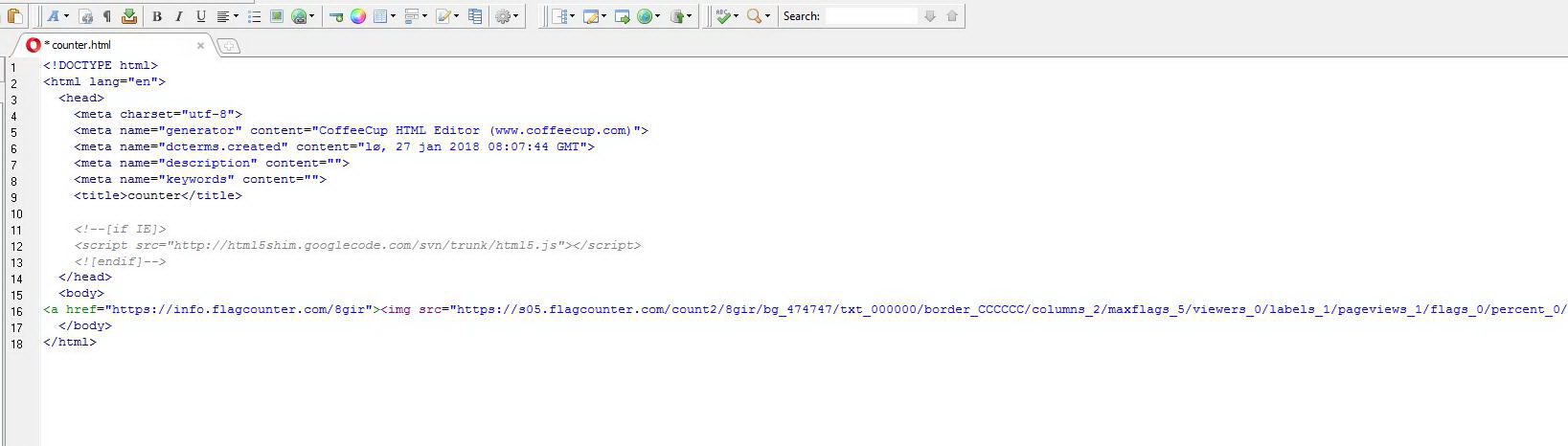
The block (counter) doesnt need to be exact at the bottom , as shown in the picture above.
It can be used as a regular multipleBlock.
But if you see at the bottom left block, It say´s "Block counter not found. Check that you uploaded the block to the correct folder and also make sure you do not have a typo in the homepage setup."
What do I do wrong?
http://fjærvollan.no/template/indexDesktop.php
The html file:
-
Jachym
- Site Admin
- Posts: 1686
- Joined: Fri Aug 18, 2017 10:12 pm
- Location: Brno, Czech Republic
- Station model: WH1080
- Software: Meteobridge
- Contact:
Re: webcounter
Hi,
this is not as easy, you cannot simply create "any" page and use it as a block. Blocks have a specific format and libraries that need to be loaded. It is fine to try to customize things, but you have to know a bit of programming and how the scripts work. You could look at other blocks and see if that helps, also be careful with naming things and using javascript, you always have to make sure it does not clash with the other scripts. I can only guarantee this will not happen with the blocks available on my page for download. So if you want to make your own it is your task to make sure it all works together.
A block is not a normal HTML page, that definitely will not work, it is a special format loaded by AJAX by the homepage
this is not as easy, you cannot simply create "any" page and use it as a block. Blocks have a specific format and libraries that need to be loaded. It is fine to try to customize things, but you have to know a bit of programming and how the scripts work. You could look at other blocks and see if that helps, also be careful with naming things and using javascript, you always have to make sure it does not clash with the other scripts. I can only guarantee this will not happen with the blocks available on my page for download. So if you want to make your own it is your task to make sure it all works together.
A block is not a normal HTML page, that definitely will not work, it is a special format loaded by AJAX by the homepage
-
tobydude
- Forecaster
- Posts: 206
- Joined: Sun Jan 07, 2018 6:43 pm
- Location: Norway
- Station model: Netatmo
- Software: Weatherdiaplay
- Contact:
Re: webcounter
Thanks.
I got a bit further now.
The counter shows, but probobly need som more "work".
http://fjærvollan.no/template/indexDesktop.php
-
Jachym
- Site Admin
- Posts: 1686
- Joined: Fri Aug 18, 2017 10:12 pm
- Location: Brno, Czech Republic
- Station model: WH1080
- Software: Meteobridge
- Contact:
Re: webcounter
Yes 
I told you my opinion, which is purely subjective, but also shared by practically all developers - any kind of webcounter - direct numbers, flags etc. is a sign of highly amateur website and is redundant Just look on any major website and you will see none of them use it, all websites use tracking, but that information is for you - webmaster, not for your users.
That said, if you really want to, you can of course use it, but I will definitely not be including any sort of block/plugin like this in meteotemplate officially.
I told you my opinion, which is purely subjective, but also shared by practically all developers - any kind of webcounter - direct numbers, flags etc. is a sign of highly amateur website and is redundant Just look on any major website and you will see none of them use it, all websites use tracking, but that information is for you - webmaster, not for your users.
That said, if you really want to, you can of course use it, but I will definitely not be including any sort of block/plugin like this in meteotemplate officially.
-
tobydude
- Forecaster
- Posts: 206
- Joined: Sun Jan 07, 2018 6:43 pm
- Location: Norway
- Station model: Netatmo
- Software: Weatherdiaplay
- Contact:
Re: webcounter
Ok. Thanks
I got the counter up.
Last question:
Can I have two blocs in the footer?
http://fjærvollan.no/template/indexDesktop.php
I got the counter up.
Last question:
Can I have two blocs in the footer?
http://fjærvollan.no/template/indexDesktop.php
-
Jachym
- Site Admin
- Posts: 1686
- Joined: Fri Aug 18, 2017 10:12 pm
- Location: Brno, Czech Republic
- Station model: WH1080
- Software: Meteobridge
- Contact:
Re: webcounter
Depends what you mean by footer. Footer has no blocks. If you mean footer blocks, then yes, in a footer position can be more than one.
-
tobydude
- Forecaster
- Posts: 206
- Joined: Sun Jan 07, 2018 6:43 pm
- Location: Norway
- Station model: Netatmo
- Software: Weatherdiaplay
- Contact:
Re: webcounter
Placed the counter in the footer block.
Guess it wount go in the lowest footer.
http://fjærvollan.no/template/indexDesktop.php
Guess it wount go in the lowest footer.
http://fjærvollan.no/template/indexDesktop.php
-
Jachym
- Site Admin
- Posts: 1686
- Joined: Fri Aug 18, 2017 10:12 pm
- Location: Brno, Czech Republic
- Station model: WH1080
- Software: Meteobridge
- Contact:
Re: webcounter
Correct, this is as low as you can place it.
-
Dehatter
- Professional
- Posts: 350
- Joined: Sun Jan 07, 2018 5:11 am
- Location: Matthews, NC, USA
- Station model: Ecowitt WH80
- Software: Ecowitt GW1000
- Contact:
Re: webcounter
Sorry, I guess i didn't notice your question a while ago.
I just used blankBlock and inserted the 1 line:
<!-- BLOCK CONTENT -->
<a href="https://info.flagcounter.com/xxxx/size]"><img src="https://s01.flagcounter.com/countxl/xxx ... percent_1/" alt="Flag Counter" border="0"></a>
<!-- example of how to include an icon based on the selected theme
xxxx is your own personal 4 digit code.
Tom
I just used blankBlock and inserted the 1 line:
<!-- BLOCK CONTENT -->
<a href="https://info.flagcounter.com/xxxx/size]"><img src="https://s01.flagcounter.com/countxl/xxx ... percent_1/" alt="Flag Counter" border="0"></a>
<!-- example of how to include an icon based on the selected theme
xxxx is your own personal 4 digit code.
Tom