Icon Issues?

Post Reply
marciealana
Newbie
Newbie
Posts: 4
Joined: Sun Feb 04, 2018 10:16 pm
Location: Boulder Creek, California
Station model: Davis Vantage Vue
Software: meteobridge & WU
Contact:

Icon Issues?

Post by marciealana » Sun Feb 18, 2018 5:09 pm

I've almost got my page completely set up, but sometimes icons are showing up as garbage. This is close to guaranteed if I am coming to the page from a link or a redirect, and clicking on home (which is just a box until the reload) will reload and everything's just fine.

For example: on first load, this is what current conditions are likely to look like:
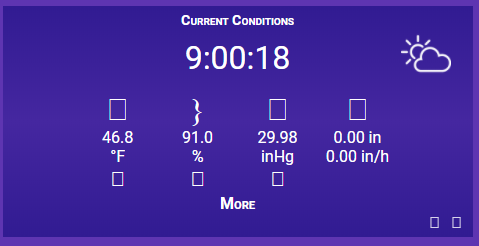
Image

But after clicking on the home icon, it turns into:
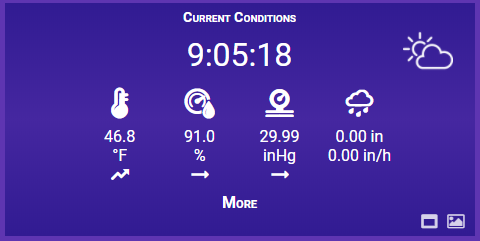
Image

The whole page can be found at http://redwoodserenity.com/weather

Any ideas why this is happening?

Thanks

User avatar
Fraggboy
Forecaster
Forecaster
Posts: 193
Joined: Wed Sep 27, 2017 2:45 pm
Location: Sunny California
Station model: Bloomsky II + Storm
Software: Bloomsky
Contact:

Re: Icon Issues?

Post by Fraggboy » Tue Feb 20, 2018 3:00 pm

I've seen this before when I first setup my page.

Your answer is in the WIki, specifically on this page: http://meteotemplate.com/web/wiki/wiki3GB.php

Click on the "NOTE FOR LINUX APACHE SERVERS!!!".
Image

User avatar
Jachym
Site Admin
Site Admin
Posts: 1686
Joined: Fri Aug 18, 2017 10:12 pm
Location: Brno, Czech Republic
Station model: WH1080
Software: Meteobridge
Contact:

Re: Icon Issues?

Post by Jachym » Tue Feb 20, 2018 5:51 pm


User avatar
Dehatter
Professional
Professional
Posts: 350
Joined: Sun Jan 07, 2018 5:11 am
Location: Matthews, NC, USA
Station model: Ecowitt WH80
Software: Ecowitt GW1000
Contact:

Re: Icon Issues?

Post by Dehatter » Wed Feb 21, 2018 4:16 am

Not sure if it is related, but if I goto tempestasvililate.com (without the www.) I have problems. If I use the full address, www.tempestasvigilate.com, I do not.

Not an expert on this, but just saying what happens.

Edit: It must be related, because after I added the 3 lines of code it works without the www now.

Tom
Image

User avatar
Jachym
Site Admin
Site Admin
Posts: 1686
Joined: Fri Aug 18, 2017 10:12 pm
Location: Brno, Czech Republic
Station model: WH1080
Software: Meteobridge
Contact:

Re: Icon Issues?

Post by Jachym » Wed Feb 21, 2018 7:36 am

the problem is in your htaccess file and this could also be causing the no/yes www thing

marciealana
Newbie
Newbie
Posts: 4
Joined: Sun Feb 04, 2018 10:16 pm
Location: Boulder Creek, California
Station model: Davis Vantage Vue
Software: meteobridge & WU
Contact:

Re: Icon Issues?

Post by marciealana » Wed Feb 21, 2018 1:34 pm

Fraggboy wrote: Tue Feb 20, 2018 3:00 pm Your answer is in the WIki, specifically on this page: http://meteotemplate.com/web/wiki/wiki3GB.php

Click on the "NOTE FOR LINUX APACHE SERVERS!!!".
Hmmm. I'm not at server root though -- I'm one level down from there (at html/weather/template). I'm also using the sort of redirect script that's recommended (sitting at http://redwoodserenity.com/weather/index.html).

marciealana
Newbie
Newbie
Posts: 4
Joined: Sun Feb 04, 2018 10:16 pm
Location: Boulder Creek, California
Station model: Davis Vantage Vue
Software: meteobridge & WU
Contact:

Re: Icon Issues?

Post by marciealana » Wed Feb 21, 2018 1:37 pm

Jachym wrote: Tue Feb 20, 2018 5:51 pm Please see

http://meteotemplate.com/blog/?p=1614
Bingo! This solved my problems. Thank you! i hadn't thought of scanning through the blog for solutions, I'd read the wiki and the FAQ, and was scratching my head :-/

marciealana
Newbie
Newbie
Posts: 4
Joined: Sun Feb 04, 2018 10:16 pm
Location: Boulder Creek, California
Station model: Davis Vantage Vue
Software: meteobridge & WU
Contact:

Re: Icon Issues?

Post by marciealana » Wed Feb 21, 2018 1:39 pm

Jachym wrote: Wed Feb 21, 2018 7:36 am the problem is in your htaccess file and this could also be causing the no/yes www thing
The problem was my .htaccess file. I'd tried every combination of with and without www, but that did not seem to help.

Post Reply




