Page 2 of 2
Re: MySQL Configuration
Posted: Thu Oct 10, 2019 4:42 pm
by El_Viejo
I'm sorry I'm still stuck.
I can't find the "Privileges" tab in my phpMyAdmin.
To access I use:
Code: Select all
user name = phpmyadmin
password = yomismo
In the different installations I've done (no less than four) using the command sudo
and, I only chose Apache2, I said yes to dbconfig-common and set the password to "yomismo". It didn't give me the option to choose a username.
Perhaps I could run this command
Code: Select all
GRANT ALL PRIVILEGES ON php-myadmin.* TO 'javier'@localhost IDENTIFIED BY 'viva';
But where is the tab for granting privileges?
Re: MySQL Configuration
Posted: Thu Oct 10, 2019 4:55 pm
by LOBWX
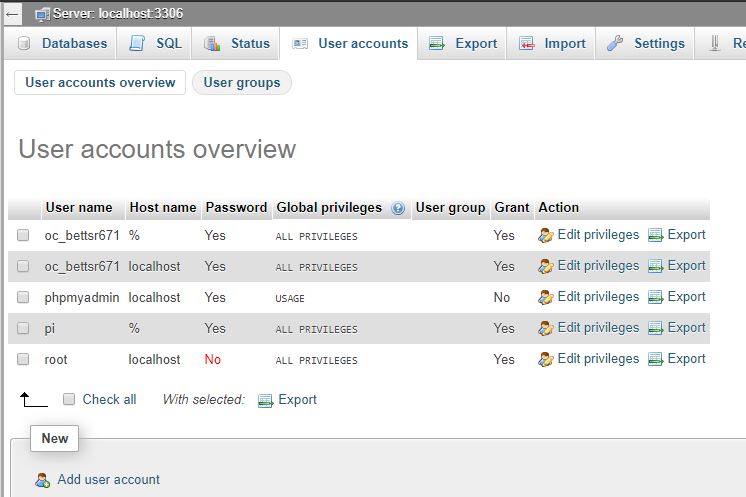
User Accounts >> Edit Privilege's >> Select All >> Go Button to save. it's at the bottom right side you may have to scroll to see it.
Re: MySQL Configuration
Posted: Thu Oct 10, 2019 5:23 pm
by El_Viejo
I must be blind, but I am not able to see "User accounts". Would it be possible to use the MariaDB terminal?
The biblical character Job was an apprentice compared to his patience.
Thank you very much.
Re: MySQL Configuration
Posted: Fri Oct 11, 2019 4:13 pm
by LOBWX
You should see it here. If not, that user account you login with does not have enough privileges probably.
- myphpadmin.JPG (56.67 KiB) Viewed 12227 times
Re: MySQL Configuration
Posted: Fri Oct 11, 2019 5:50 pm
by El_Viejo
I think I made it.
From the MariaDB terminal I have executed these commands
Code: Select all
grant all privileges on *.* to 'javier'@'localhost' with grant option;
flush privileges;
Now, miraculously, I get the Users tab and the ability to edit privileges.
I'm so happy that I haven't made the necessary checks yet.


I will inform you of the results when I do all the checks rigorously.
Thank you very much.
Re: MySQL Configuration
Posted: Fri Oct 11, 2019 6:13 pm
by El_Viejo
Here's the proof.
Tomorrow I will check that in the MySQL section of the template the check is correct.
It is wonderful to find people like you, willing to dedicate their time to help inexperienced people like me.
My knowledge of Linux, web servers and MySQL is very limited. In addition, due to my age (78 years) I have lost mental agility.
Re: MySQL Configuration
Posted: Sat Oct 12, 2019 9:45 am
by El_Viejo
As they say in Spanish "my joy at a well" (mi gozo en un pozo).
When checking MySQL in the main configuration, again, an error appears.
"Error: Unable to connect to MySQL.
Debugging error number: 2002.
Debugging error: php-network-getaddresses: getaddrinfo failed: Name or service not know".
I'll try again doing a clean installation in another RPi.
Thanks.
Re: MySQL Configuration
Posted: Sun Oct 13, 2019 1:11 am
by staze
slight tangent, but you want to make sure database ends up MyISAM and not InnoDB. Meteotemplate uses non-numbers for the primary key, and InnoDB hates it... inserts take multiple tens of seconds vs MyISAM which doesn't seem to care, and does normal insert speeds (less than a second).
Re: MySQL Configuration
Posted: Thu Oct 17, 2019 7:42 pm
by El_Viejo
I finally made it.
The error was to write, Host address = /localhost/
The correct spelling is, Host address = localhost
In this way the message has been: "Success: A proper connection to MySQL ..."
Many thanks.
