Page 2 of 3
Re: updated meteogram block
Posted: Sat Aug 21, 2021 3:48 pm
by tobydude
Hi.
Great block.
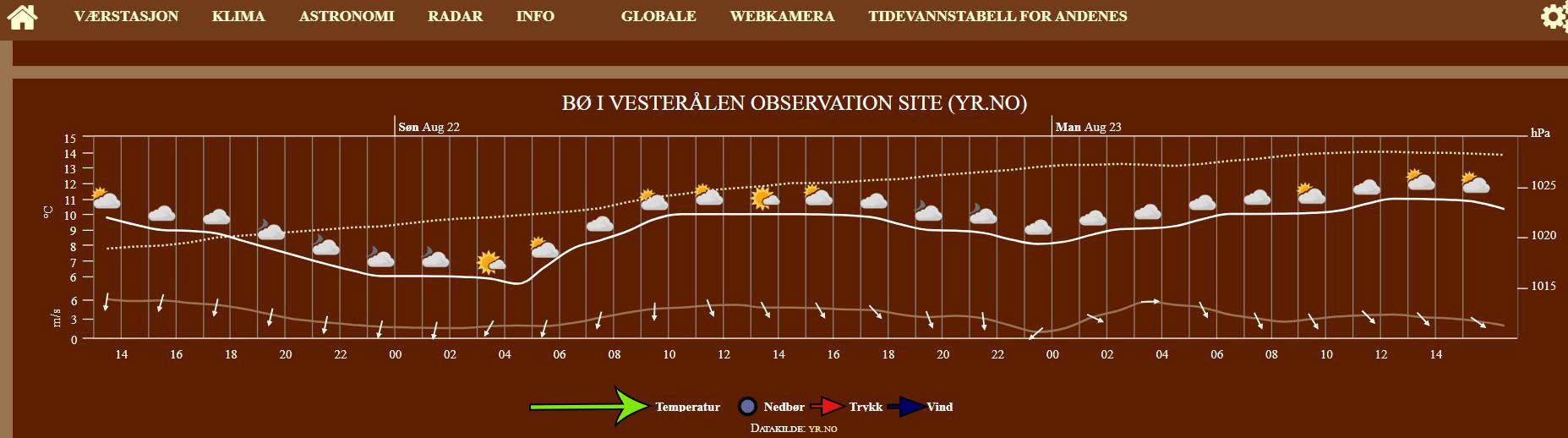
Could there have been added colors of choice in "wind-line", "pressure- line", "temperature-line" and "precipitation -line"?
And the wind arrows?

Re: updated meteogram block
Posted: Sat Aug 28, 2021 10:45 am
by davidefa
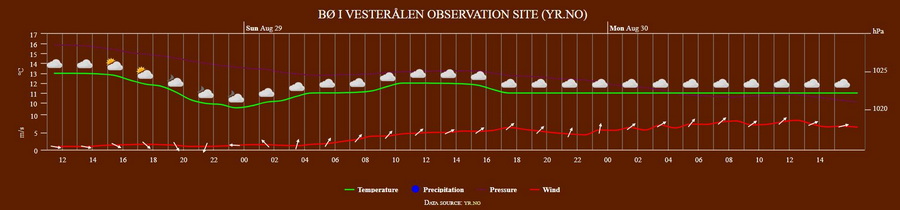
ver 3.3d
- added corrections of daali and meteopomezia
- added options to define color of line series
Re: updated meteogram block
Posted: Sat Aug 28, 2021 11:41 am
by tobydude
That´s fantastic!
Thanks so much.

Re: updated meteogram block
Posted: Sat Aug 28, 2021 4:18 pm
by Daali
perfect! Thank you davidefa!
Re: updated meteogram block
Posted: Sat Sep 04, 2021 4:30 am
by LOBWX
Awesome, thanks for sharing your work.
Re: updated meteogram block
Posted: Mon Jan 24, 2022 5:06 pm
by Sarrow
I love meteograms and have been trying (and trying) to install the block on my site. I, too, keep getting the error "failed to load data from external source" in spite of loading each of the updated versions listed here in the Forum. I am not a coder, and I am not able to do the debugging suggested below. Any hope for us mere mortal users? I am amazed at the expertise represented here.
Thanks!
Steve
Re: updated meteogram block
Posted: Mon Jan 24, 2022 5:35 pm
by davidefa
Hi Steve, please share the url of your site ( and the first parameter in the setting of the block ).
This is, for example, my setting:
Code: Select all
Fano-Italy,lat=43.84&lon=13.01&altitude=12
Re: updated meteogram block
Posted: Mon Jan 24, 2022 6:18 pm
by Sarrow
David:
Thank you for the quick response!
My site:
https://sarrowweather.com/template/indexDesktop.php
Block setting:
Grafton-Vermont, lat=43.17174&lon=-72.6062&altitude=256
Re: updated meteogram block
Posted: Mon Jan 24, 2022 10:14 pm
by davidefa
Try installing this version ( after installing, or after editing settings, always delete block cache via meteotemplate control panel, settings are ok )
ver 3.4
- corrected rain/pressure rounding ( imperial units )
- derived from ver 3.3d1
Re: updated meteogram block
Posted: Tue Jan 25, 2022 2:48 am
by Sarrow
Brilliant! That worked!
I thought that I had tried v3.4, but this time it worked.
Thank you so much for your patience!
Steve
Re: updated meteogram block
Posted: Tue Jan 25, 2022 8:21 am
by tobydude
is it with colors?
Re: updated meteogram block
Posted: Tue Jan 25, 2022 9:07 am
by davidefa
Sorry for not explaining, yes is it with colors, is derived from ver 3.3d1, it is only relevant for those using imperial units ( or for visitors selecting imperial units )
Re: updated meteogram block
Posted: Wed Jan 26, 2022 8:29 am
by tobydude
I´m using v. 3.3 that was postet earlier. Works fine with colors in metric. (European units)
Added some colors to the cloudes, too.
Re: updated meteogram block
Posted: Thu Feb 24, 2022 6:34 am
by riteoh
It's nice to see an updated meteogram block available. My site has not had this data for months, and I didn't know there was a solution.
I have replaced all the files in my current Meteogram folder with the ones in the Meteogram 3.3c zip file. I have updated the settings to reflect my location - details I have saved in the block settings are
Wantirna,lat=-37.860722&lon=145.238586&altitude=125
I have also cleared the cache.
However no data is being uploaded. Previously I was at least getting the place name of Wantirna.. with a Failed loading data, please try again later message - but now I am not even getting the place name to come up.
My site is
www.eyesontheweather.com.au. Can anybody give me tips on what the issue might be?
Re: updated meteogram block
Posted: Thu Feb 24, 2022 8:07 am
by davidefa
I see you reverted to the original block. Please try
ver3.4:
- copy the compressed archive in homepage/blocks
- unzip the compressed archive ( it will overwrite the files already present )
- don't rename the folder ( I mean the final folder name should be homepage/blocks/meteogram )
- rerun setup ( and clear the cache )
If it still does not work you may take a look at the 'console' ( in firefox tools -> browser tools -> web developer tool -> console ) to see if there is any useful error/warning ( or at least when the block is installed I can take a look for you )
Re: updated meteogram block
Posted: Thu Feb 24, 2022 9:31 am
by riteoh
Hi David,
Thanks for the prompt reply. Not sure if I have done things correctly - but here is what I did.
I unzipped V3.4 and then using FTP uploaded the directory contents. Block setup now shows the new version number and instructions, so looks like I am getting somewhere. From the file, I copied the following details for my location..
lat=-37.85&lon=145.21667&altitude=91
It seems like the block is now just 'thinking' about getting the data, but not getting it, as the wheel is just spinning next to Loading Data from external source before finally saying it cannot load the data.
I use chrome (I can't seem to gain admin access using Firefox....) and looked at console. It came up with a few errors which I have no idea what they mean.
If you can point me (or firmly direct me) in the right direction, it would be appreciated.
Thanks,
Elton
Re: updated meteogram block
Posted: Thu Feb 24, 2022 9:46 am
by davidefa
Your configuration seems correct.
The cached data ( homepage/blocks/meteogram/cache/yrNo0.txt ) says:
Code: Select all
400 Bad Request
Mandatory parameters 'lat', 'lon' missing in call to Metno::WeatherAPI::Controller::Product::try {...}
Try deleting the cache again or if this does not help attach the content of the homepage/blocks/meteogram/settings.php script
Re: updated meteogram block
Posted: Thu Feb 24, 2022 10:56 am
by davidefa
Only a small update, your setup should look like ( starting with a location name and a ',' after it ):
Code: Select all
Melbourne,lat=-37.85&lon=145.21667&altitude=91
Re: updated meteogram block
Posted: Thu Feb 24, 2022 9:43 pm
by riteoh
WOW!! I am now super happy - working as required. Thanks so much for your help. It's great to have a community of people out there who can assist those of us who don't know what we are doing!!
On a side note - I also use the summary block, but the forecast 'tab' doesn't seem to give me a forecast any more. Any ideas about this one?
Re: updated meteogram block
Posted: Thu Feb 24, 2022 10:48 pm
by davidefa
The summary blocks get the forecast from yr.no. So it needs to be updated to the new api 2.0.
Added to my todo list.
Re: updated meteogram block
Posted: Thu Mar 03, 2022 3:41 am
by riteoh
I've just noticed that there was an update to V 4.0 of this block. Once updated, the new version seems to have white see though panels on both sides of the graph (refer image link below).
Has anybody else experienced this?
https://ibb.co/mvG9R90
Re: updated meteogram block
Posted: Thu Mar 03, 2022 7:38 am
by davidefa
Where did you download ver 4.0?
Re: updated meteogram block
Posted: Thu Mar 03, 2022 10:24 am
by lemimi
Hello,
We can do this automatically via Blocks setup.
I had tested and reverted to the saved version 3.4

To the pleasure... Michel
Re: updated meteogram block
Posted: Thu Mar 03, 2022 11:25 am
by davidefa
Ok, didn't noticed that, it has been updated by Jachym
Re: updated meteogram block
Posted: Thu Mar 03, 2022 2:16 pm
by tobydude
I´v used this version a long time and it works fine. With colors .
https://fjærvollan.no/template/indexDesktop.php