Page 1 of 1
New plugin weatherflow
Posted: Sat Aug 28, 2021 5:06 pm
by davidefa
Added a plugin to receive data from the weatherflow weather station ( via their online service )
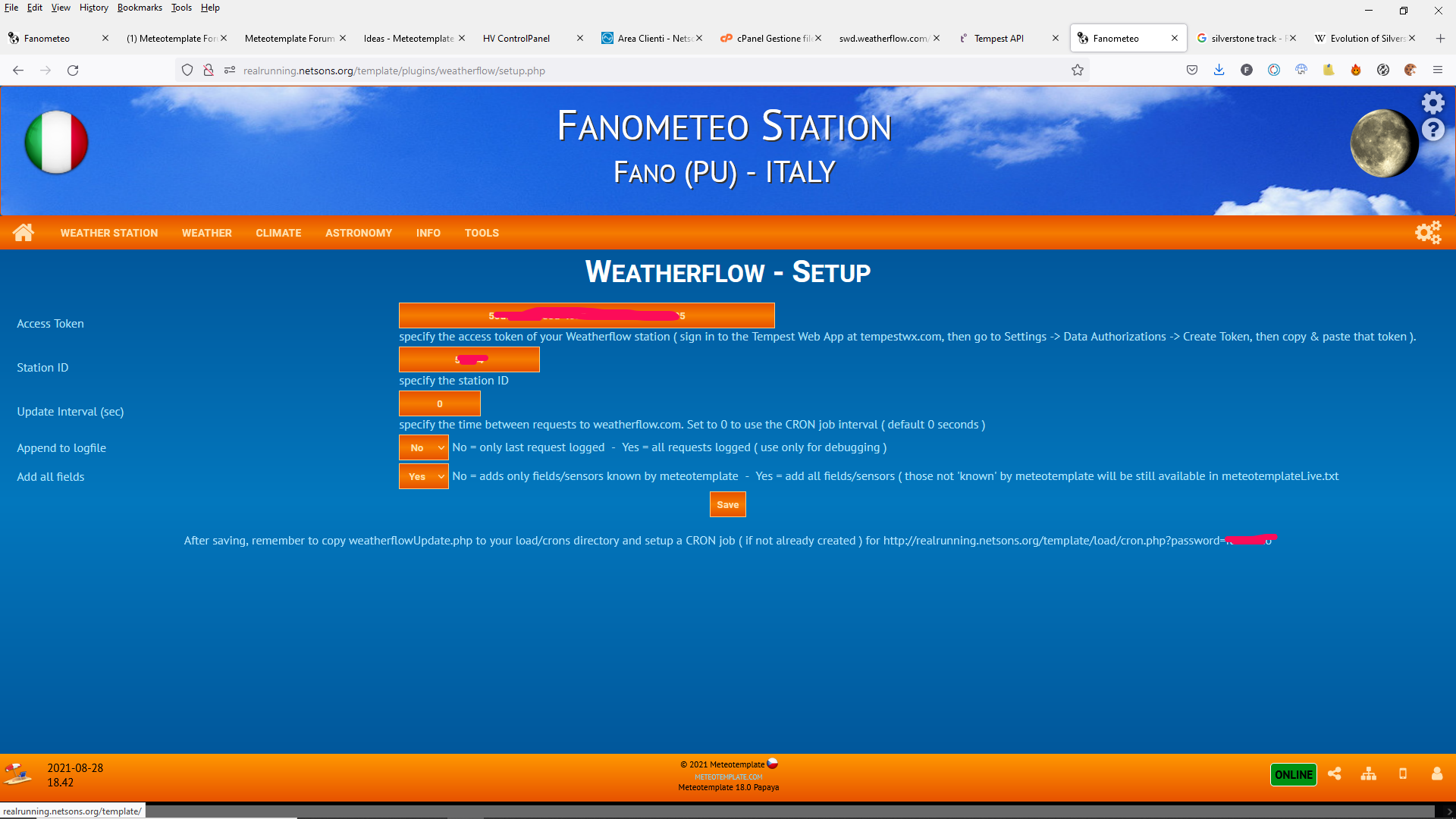
- configure the plugin inserting 'access token' and 'station id' ( available via tempestwx.com )
- copy the script weatherflowUpdate.php to load/crons and setup a CRON job ( if not already created ) to execute load/cron.php?password=xxx ( I think 1 minute is ok for the cron job )
only the following fields are converted in the corresponding meteotemplate filed:
Code: Select all
["timestamp"]                      ["U"]
["air_temperature"]                ["T"]
["sea_level_pressure"]             ["P"]
["relative_humidity"]              ["H"]
["precip_accum_local_day"]         ["R"]
["precip_accum_last_1hr"]          ["RR"]
["wind_avg"]                       ["W"]
["wind_direction"]                 ["B"]
["wind_gust"]                      ["G"]
["solar_radiation"]                ["S"]
["uv"]                             ["UV"]
["lightning_strike_last_epoch"]    ["LT"]
["lightning_strike_last_distance"] ["LD"]
["lightning_strike_count"]         ["L"]
If the last option 'Add All Fields' is set to yes all watherflow fields will be added to the meteotemplateLive.txt ( even those that have no corresponding field in meteotemplate ), to be used by blocks that retrieve the 'current condition' from meteotemplateLive.txt.
- weatherflow3.png (366.86 KiB) Viewed 50649 times
Re: New plugin weatherflow
Posted: Sat Aug 28, 2021 7:13 pm
by Daali
Great Work davidefa!
Re: New plugin weatherflow
Posted: Mon Aug 30, 2021 6:25 am
by snow
Excelent work davidefa, thank you very much!
Re: New plugin weatherflow
Posted: Mon Oct 04, 2021 12:30 pm
by Julius
Wow, this makes the entire flow with the meteobridge I have at home obsolete, for tempest data at least.
I will now have to consider putting the meteotemplate site on the remote server I own, instead of proxying to my LAN server.
Perhaps a Lightning data Block would be possible from this? Since that data is actually NOT obtained from the WF Tempest or its hub alone, but requires post-processing by weatherflow's servers, so as long as that is the source, the data is already there.
This also makes it interesting to merge/add this data as secondary or third sensors. I currently have T, RH, Pressure, Solar and wind from barani devices, but I would like to add all the tempest data as secondaries or thirds. There's also a homemade sensor-suite for T and H I want to add. And, my girlfriend has a netatmo weather station suite I would like to add as a source, so I could actually graph 3 or 4 together and compare. Anyway, lots of ideas. Thanks Davide!
Re: New plugin weatherflow
Posted: Sat Oct 09, 2021 8:49 pm
by davidefa
Julius wrote: ↑Mon Oct 04, 2021 12:30 pm
Perhaps a Lightning data Block would be possible from this? Since that data is actually NOT obtained from the WF Tempest or its hub alone, but requires post-processing by weatherflow's servers, so as long as that is the source, the data is already there.
Sorry, not sure to understand correctly what you say.
All data are retrieved from the weatherflow server via their api ( not from the hub directly ).
And yes, several of these data are processed by their servers ( at least temperature, rain, lightning ).
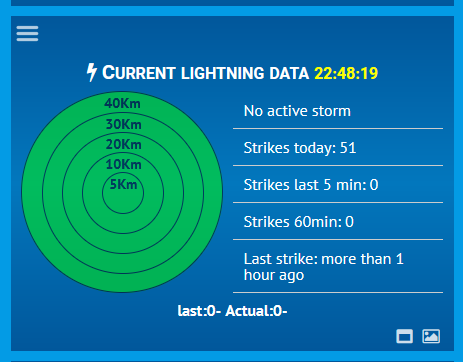
Lightning data is already available and is converted to LT,LD, and L meteotemplate fields.
Raffaello Di Martino wrote
a block to show lightning data.
- lightning.png (27.35 KiB) Viewed 50535 times
Re: New plugin weatherflow
Posted: Sun Oct 10, 2021 10:38 pm
by Julius
davidefa wrote: ↑Sat Aug 28, 2021 5:06 pm
- copy the script weatherflowUpdate.php to load/crons and setup a CRON job ( if not already created ) to execute load/cron.php?password=xxx ( I think i minute is ok for the cron job )
This is new to me, and I can't see anything about it in the wiki. So does your plugin require mtwebroot/load/cron.php to be run? And if so, where do I set that password you've entered here?
Re: New plugin weatherflow
Posted: Mon Oct 11, 2021 10:38 am
by davidefa
Yes the plugin require a cron job.
1) copy the script weatherflowUpdate.php to load/crons
2) create a cron job to execute load/cron.php?password=xxx ( insert your update password )
When you create a cron job you have to specify the complete command to execute.
For example something like this ( but this depends on your system ):
wget
http://www.yoursite.com/template/load/c ... ssword=xxx
NOTE
In the meteotemplate 'philosophy' you only need 1 cron job. This cron job will execute all scripts present in load/crons directory ( even other scripts you'll add later, for example to manage your webcam )
P.S:
For your cron job you can use even online services like this one:
https://cron-job.org/en/
The free plan ( 5 minutes min ) can be used for testing, super simple to setup ( not super accurate timinig )
A 'local' cron job is preferred.
Re: New plugin weatherflow
Posted: Mon Oct 11, 2021 12:14 pm
by Julius
Thanks, I know about cron, but I wasn't sure about the password. So it is the "update" password set under Meteotemplate Settings.
For me that would be this in crontab;
Code: Select all
*/2 * * * * root /usr/bin/php -f /var/www/html/mt/load/cron.php?password=myMTupdatepass
Re: New plugin weatherflow
Posted: Mon Oct 11, 2021 1:55 pm
by davidefa
Ok
Re: New plugin weatherflow
Posted: Tue Oct 12, 2021 10:03 am
by Julius
davidefa wrote: ↑Sat Oct 09, 2021 8:49 pm
Lightning data is already available and is converted to LT,LD, and L meteotemplate fields.
Strangely, my meteotemplate live file does not have L, LT or LD entries, while both my meteobridge pro and your plugin should add those, right?
The README file included there says:
Code: Select all
The Meteotemplate doesn't have the L, LD, LT, fields in the database and in the api.php so
there are more files to update.
You find them in the Meteotemplate directory of my github:

"api.php" and all the "update/" directory.
The files inside the update directory must be in the directory of Meteotemplate
with the same name "update"

https://github.com/iz0qwm/ecowitt_http_gateway/tree/master/Meteotemplate

NOT the "plugins/ecowitt", you don't need it if you don't use the Ecowitt plugin.

I don't know if Meteobridge sends the lightning data to meteotemplate so please check this
before installing this plugin if you have such hardware.
So, this requires quite a bit of updating of core MeteoTemplate files (
which are hard to even download by the way), this should not be needed, Jachym does not recommend doing it like this;
"from my understanding, if it works the same way as my other plugins written for some specific station models, then api.php should not be replaced. The way "my" plugins work is that they receive data, convert it to a format acceptable for the universal api.php script and send the data to the api.php, which does the rest of the processing.
So no, I would not replace api.php, i would install this as a regular plugin. It is just the CRON job URL which is then not the api.php, but the plugin URL."
Re: New plugin weatherflow
Posted: Tue Oct 12, 2021 11:51 am
by davidefa
Please add a link to your site ( need to check the cache directory ).
- are you updating the meteotemplate database via meteobridge and the weatherflow plugin ( at the same time )? This should be done with caution ( it has some side effect )
- I think meteobridge does not automatically send lightning data, but you have to configure it to do so ( there is a thread on
wxforum )
If you only want to use the lightning block you don't need any api.php or update/apiSetup.php change ( as the block uses the meteotemplateLive.txt data ).
These changes are only needed to save lightning data in the database ( currently there is no block/plugin that uses the lightning data saved in the db... but this may change ; - )
If you need this database mod you can find it included in this '
extension' ( simply extract in the root directory )
Re: New plugin weatherflow
Posted: Tue Oct 19, 2021 1:57 pm
by Julius
davidefa wrote: ↑Tue Oct 12, 2021 11:51 am
Please add a link to your site ( need to check the cache directory ).
It's currently in a testing-stage, which is why I'm not posting it (yet). So please don't publish
this link.
- are you updating the meteotemplate database via meteobridge and the weatherflow plugin ( at the same time )? This should be done with caution ( it has some side effect )
- I think meteobridge does not automatically send lightning data, but you have to configure it to do so ( there is a thread on
wxforum )
Phew, yes, it seems like I would have to customize the meteobridge output. Frankly, at this stage I'm not sure I really have a need for the meteobridge anymore. Unless I suddenly come in possession of Davis equipment, but I'm not expecting that anytime soon...
If you only want to use the lightning block you don't need any api.php or update/apiSetup.php change ( as the block uses the meteotemplateLive.txt data ).
These changes are only needed to save lightning data in the database ( currently there is no block/plugin that uses the lightning data saved in the db... but this may change ; - )
If you need this database mod you can find it included in this '
extension' ( simply extract in the root directory )
I'm surprised all this (still) isn't just done by a few clicks in meteotemplate config. Why would you not allow all possible existing station outputs in your db and in your api.php ? It's not like that's a lot of heavy data, we're talking a few strings of text, which can always be compressed down to 1% of its size later on.
Re: New plugin weatherflow
Posted: Wed Oct 20, 2021 8:30 pm
by davidefa
Julius wrote: ↑Tue Oct 19, 2021 1:57 pm
I'm surprised all this (still) isn't just done by a few clicks in meteotemplate config. Why would you not allow all possible existing station outputs in your db and in your api.php ? It's not like that's a lot of heavy data, we're talking a few strings of text, which can always be compressed down to 1% of its size later on.
Regarding api.php you can pass any 'field' to it. All these will be reflected in meteotemplateLive.txt ( which is generally used by blocks that use instantaneous values ).
Regarding the database you can save only 'well known' sensors to it ( the complete list is available in the
wiki ). If you want to extend the database with other sensors ( not included in the previous list) you have to extend a few scripts ( like I did ). But this is generally not required, but it can be done.
NOTE
The author of meteotemplate is
Jachyim ( kudos to him ), I'm only a regular user of meteotemplate
P.S.
What I like more in meteotemplate is that if I miss something... then it is not that difficult to add it ( at least I can try ; - ).
Re: New plugin weatherflow
Posted: Fri Aug 12, 2022 9:09 pm
by Julius
Ola Davide,
By now I have the netatmo plugin and the tempest plugin from this thread running with cron, but the tempest data does not seem to get through into the api. When I check the apiViewer (over
here) I don't see any of the tempest sensors getting through. Any idea why? The cron works, as it does for netatmo as well.
Note that I have 2 tempest devices using 1 Station-ID, check
here.
For now I only want the tempest/weatherflow sensors to add UV/solar and rain data to get into MeteoTemplate db, actually. Is there an easy way to do that? Can I just comment out the sensors I don't want to see in /w/mt/load/crons/weatherflowUpdate.php ?
Also, what makes this a strange setup is that I have 2 tempest devices under 1 Station ID at weatherflow, but from one tempest, the pressure sensor is broken, and from the other the wind/anemo and rain sensors need to be disabled. I have not found a way to disable them as such at weatherflow. And also haven't been able to do this using the MeteoBridge Pro. It keeps adding back all sensors and mappings.
And another thing, one of the tempest T and RH sensors shows Grass Temp/Humidity values, the other one shows 'normal' T and RH, but I can't find a way to map them as such.
So sorry I didn't go for
ecowitt! So much better in their design and usability..
Re: New plugin weatherflow
Posted: Fri Aug 12, 2022 10:52 pm
by davidefa
I developed the plugin ( modified an existing one ) having access to a 'standard' tempest weather station.
In your case this is not enough, but I could extend the plugin ( as I already have done for DavisWLL and ecowittNet plugins ) letting the user select the sensor to import and the mapping to the meteotemplate 'database fields' ( in this way the plugin can support more complex installation, as is your case, and also weather stations/sensors that will be introduced in the next future).
To do this I need your credentials ( access token and station id, once everything is ok you can regenerate a new token from the control panel, if I'm not wrong )
Re: New plugin weatherflow
Posted: Sat Aug 13, 2022 1:12 am
by Julius
davidefa wrote: ↑Fri Aug 12, 2022 10:52 pm
I developed the plugin ( modified an existing one ) having access to a 'standard' tempest weather station.
In your case this is not enough, but I could extend the plugin ( as I already have done for DavisWLL and ecowittNet plugins ) letting the user select the sensor to import and the mapping to the meteotemplate 'database fields' ( in this way the plugin can support more complex installation, as is your case, and also weather stations/sensors that will be introduced in the next future).
To do this I need your credentials ( access token and station id, once everything is ok you can regenerate a new token from the control panel, if I'm not wrong )
That would be an amazing feature for all weatherflow owners I guess! I will send you an access token and station ID a.s.a.p. via Private message, OK? And I will be able to test out the result onsite whenever you ask me to.
Re: New plugin weatherflow
Posted: Mon Aug 15, 2022 9:15 pm
by davidefa
Preliminary release of an 'extended version' of the plugin: weatherflowNet
- it supports multiple weatherflow stations of different type ( tempest, air and sky )
- let you define which sensors to import ( and the mapping to the meteotemplate fields )
Installation:
- extract the compressed archive in the plugin folder
- copy the updateWeatherflowNet.php script in the load/crons folder ( and set a cron job, if not already set, to execute the load/cron.php script as described in the
wiki )
- execute the plugin setup via the meteotemplate control panel
Setup:
1) first time you execute the setup insert your access token, click the 'save' button and reload the page
2) you have now access to all your 'stations' and relative 'sensors'
3) now you have to set the 3 parameters:
- MT Field ( field name as used by meteotemplate T,H,P,W,G,B... see meteotemplate wiki, you can use also other field names, all will be imported in the meteotemplatreLive.txt file )
- Conversion ( unit of measure conversion from the weatherflow format to the format used in the meteotemplate api see the
wiki )
- Enabled ( enable all sensor you want to pass to meteotemplate )
NOTE
Those having only 1 tempest weather station may also use the previous version of the plugin ( weatherflow v0.3 ) which have a simplified setup.
Re: New plugin weatherflow
Posted: Mon Aug 15, 2022 9:17 pm
by davidefa
Re: New plugin weatherflow
Posted: Fri Aug 26, 2022 3:19 pm
by Julius
Wow, you are my hero Davide!
Looks amazing.
I want to try and get the 3 T and 3 RH values below each other, at the top of the stationData plugin, just tinkering the php order should work, but the extra sensors are an extra there, of course.