Page 1 of 1
Cronjob Update fails and offline status
Posted: Sat Sep 25, 2021 8:23 am
by amonphi
Hi guys, I have the v.18 of meteotemplate and yesterday after updating some blocks and plugins, now "Cronjob Update" fails with this error: Failed (Output Too Large) and the status of the station is "offline".
The blocks I updated are these:
-Interactivgraph_11.4g
-meteogram_3.3d1
-Moon Images
-GFS_2.4
-MateEmplate_Block_Lightningew_2.0
-ecowitmodules_1.4b
The plugin is "Ecowitt Meteotemplate plugin" ( updated by davidefa ):
-ecowitt_2.8a
-File "apisetup" and "saveapisettings" in the "update" folder
-File "api" in the template root
For the problem that the cronjob fails can depend on the size of the moon images? +/- 10MB more (but I don't think).
For the "offline" status, the problem is certainly in some settings of the same plugin that I have wrong, with the v2.6 no problem.
Now neither the .json file nor the .csv file.
Thanks in advance
Re: Cronjob Update fails and offline status
Posted: Sat Sep 25, 2021 10:01 am
by amonphi
Update
In the meantime I made trials from the plugin settings by varying the fields to be inserted as follows:
-Input data format = ecowitt
-Enable authentication = I tried "no", "password", "passkey"
(with value "no", in the passkey field I did not enter anything, and I set my ecowit gateway gw1000 to send data to: path: /template/plugins/ecowitt/report/).
(With "Password" value, I set my Ecowitt Gateway GW1000 to Send Data to: Path: /template/plugins/ecowitt/report/index.php?pass=xxx Changing XXX with Update Password).
(with "passkey" value, I entered in the passkey field, the alphanumeric string taken from the previous .json file and / or .csv and I set my ecowit gateway gw1000 to send data to: path: /template/plugins/ecowitt/report/).
-Meteotemplate server url = metoparano.altervista.org/template/api.php (if I open it in the browser, redirect me to the github iz0qwm page / ecowitt_http_gateway)
-Record data in CSV Format = Yes
-Record data in JSON Format = Yes
The remaining fields for now I didn't touch them.
The station communicates perfectly and I see the live data from both WSVIEW Plus, and from Ecowitt.net, and from Wu.
I can't understand where the catch is!
Re: Cronjob Update fails and offline status
Posted: Sat Sep 25, 2021 10:38 am
by davidefa
I see you are up and running: what was the problem?
P.S.
By the way I like your 'apogee' ( followed the
thread on meteonetwork )
Re: Cronjob Update fails and offline status
Posted: Sat Sep 25, 2021 11:01 am
by amonphi
Hi davidefa, I have just solved it, I have put to control every single file that I have updated and in the end the problem was in the api.php file that was completely a different code (I don't know how I could copy a file like that) however, human error (as in the magior part of the cases) and my fault.
As for Ecowittmodules (v1.4), it is possible that the batteries values always indicate the same%?
Finally, if I wanted to rename the names of the sensors I see in Ecowitt Module, I have to do it through the Ecowitt Plugin (v2.8)?
Assuming that WH31_1 corresponds to WH31 associated with CH1, use "Rename Sensors - Meteotemplate Format (Format: Meteotemplate_Field_New = Meteotemplate_Field_old; ... Ex: PP2 = PP1; T = T1) The 'Old_field' is deleted" right?
For Apogee, I'm glad you followed the Thread on meteonetwork, a nice satisfaction and ask if you have questions!
Re: Cronjob Update fails and offline status
Posted: Sun Sep 26, 2021 8:24 pm
by davidefa
amonphi wrote: ↑Sat Sep 25, 2021 11:01 am
As for Ecowittmodules (v1.4), it is possible that the batteries values always indicate the same%?
What sensor are you referring to?
I found that the ws65 ( the osprey 7-in-1 sensor ) reports the 'solar panel + battery' status, so you won't receive a notification that the batteries are low untill the supercap is discharged too
amonphi wrote: ↑Sat Sep 25, 2021 11:01 am
Finally, if I wanted to rename the names of the sensors I see in Ecowitt Module, I have to do it through the Ecowitt Plugin (v2.8)?
Assuming that WH31_1 corresponds to WH31 associated with CH1, use "Rename Sensors - Meteotemplate Format (Format: Meteotemplate_Field_New = Meteotemplate_Field_old; ... Ex: PP2 = PP1; T = T1) The 'Old_field' is deleted" right?
Yes, if you want to rename a sensor you can do with the module ( you can rename the field_name T1 )
The rename sensor will delete the old_field name.
If you find useful changing the sensor's name ( WH31_1 ) this could be added in the block settings
Re: Cronjob Update fails and offline status
Posted: Mon Sep 27, 2021 5:40 pm
by amonphi
davidefa wrote: ↑Sun Sep 26, 2021 8:24 pm
amonphi wrote: ↑Sat Sep 25, 2021 11:01 am
As for Ecowittmodules (v1.4), it is possible that the batteries values always indicate the same%?
What sensor are you referring to?
I found that the ws65 ( the osprey 7-in-1 sensor ) reports the 'solar panel + battery' status, so you won't receive a notification that the batteries are low untill the supercap is discharged too
amonphi wrote: ↑Sat Sep 25, 2021 11:01 am
Finally, if I wanted to rename the names of the sensors I see in Ecowitt Module, I have to do it through the Ecowitt Plugin (v2.8)?
Assuming that WH31_1 corresponds to WH31 associated with CH1, use "Rename Sensors - Meteotemplate Format (Format: Meteotemplate_Field_New = Meteotemplate_Field_old; ... Ex: PP2 = PP1; T = T1) The 'Old_field' is deleted" right?
Yes, if you want to rename a sensor you can do with the module ( you can rename the field_name T1 )
The rename sensor will delete the old_field name.
If you find useful changing the sensor's name ( WH31_1 ) this could be added in the block settings
Hi davidefa,
for % of the batteries I refer some of the sensors, the WS80 is from december 2020 / january 2021 which is active and always marks 101.68%, the WH32 (to which I did the mod to connect the SHT35) is not in list, the WH31 (2 indoor and 1 outdoor with SHT35) same now, the WH57 from late april beginning of may which is 95%.
To rename the sensors instead, now I am removing the batteries one to one to have the certainty that are the right ones, to prevent them from renaming the wrong ones.
UPDATE
I identified the sensors I want to rename but, bringing the changes remain with the same name. Maybe I misinterpreted the instructions.
I wrote like this:
WH31_S1=WH31_1;WH31_P1=WH31_2;WH31_EP_APOGEE=WH31_3
In the "Rename Sensors - Meteotemplate Format field (Format: MeteoTemplate_Field_New = Meteotemplate_Field_old; ... Ex: PP2 = PP1; T = T1) The 'Old_field' is deleted" of the Ecowitt V2.8 plugins.
UPDATE AGAIN
I went to the "ecowitModulesBlock.php" file and changed the fields there, now I see everything correct.
I just understand the % of the batteries and I'm ok!
Re: Cronjob Update fails and offline status
Posted: Thu Sep 30, 2021 3:21 pm
by amonphi
davidefa wrote: ↑Sun Sep 26, 2021 8:24 pm
amonphi wrote: ↑Sat Sep 25, 2021 11:01 am
As for Ecowittmodules (v1.4), it is possible that the batteries values always indicate the same%?
What sensor are you referring to?
I found that the ws65 ( the osprey 7-in-1 sensor ) reports the 'solar panel + battery' status, so you won't receive a notification that the batteries are low untill the supercap is discharged too
Hi Davidefa,
For the battery level, is there no solution?
Thanks
Re: Cronjob Update fails and offline status
Posted: Sat Oct 09, 2021 9:30 pm
by davidefa
For the sensors with solar panel ( at least ws65 ) I think the low battery indication is quite useless.
Re: Cronjob Update fails and offline status
Posted: Sun Oct 10, 2021 12:33 pm
by amonphi
davidefa wrote: ↑Sat Oct 09, 2021 9:30 pm
For the sensors with solar panel ( at least ws65 ) I think the low battery indication is quite useless.
In fact, in the Battery state of the WS80 I give up (for the capacitor as you explained to me) but, for the WH31 and WH57 sensors that always indicate the same % for months it is strange.
Re: Cronjob Update fails and offline status
Posted: Sun Oct 10, 2021 9:07 pm
by davidefa
WH57 signals battery level in with a value from 0 to 5:
3.00V -> 5
2.90V -> 4
2.70V -> 3
2.50V -> 2
2.30V -> 0 ( still continued working normally )
With battery at 2.5V
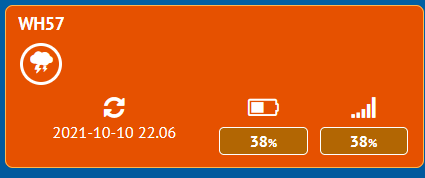
- wh57batt.png (7.09 KiB) Viewed 12996 times
WH31 signals battery level with a value from 0 to 1
3.0V -> 0
2.7V -> 0
2.5V -> 0
2.3V -> 0
2.2V -> 1
2.1V -> 1
With battery at 2.2V
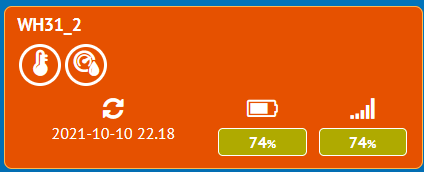
- wh31batt.png (8.38 KiB) Viewed 12996 times
( should have shown 25% battery )
Re: Cronjob Update fails and offline status
Posted: Mon Oct 11, 2021 5:06 pm
by amonphi
davidefa wrote: ↑Sun Oct 10, 2021 9:07 pm
WH57 signals battery level in with a value from 0 to 5:
3.00V -> 5
2.90V -> 4
2.70V -> 3
2.50V -> 2
2.30V -> 0 ( still continued working normally )
With battery at 2.5V
wh57batt.png
WH31 signals battery level with a value from 0 to 1
3.0V -> 0
2.7V -> 0
2.5V -> 0
2.3V -> 0
2.2V -> 1
2.1V -> 1
With battery at 2.2V
wh31batt.png
( should have shown 25% battery )
Hi, damn,
for the WH57 let's say that it can almost go to the calculation but, for the WH31 if the reference between 3.0V and 2.3V is always 0 and when the battery drops to 2.2V still scores 74% .... unfortunately I find it quite useless for the purpose even if, perhaps at the level of hardware and programming (which in the latter I am a beginner), other cannot be done.
Thanks for the clarification
Re: Cronjob Update fails and offline status
Posted: Mon Oct 11, 2021 10:21 pm
by davidefa
I have updated the ecowitt block ( now it shows a more correct 24% as battery low indication for wn30/wh31/wh65 sensors ) )
Re: Cronjob Update fails and offline status
Posted: Wed Oct 13, 2021 10:24 am
by amonphi
davidefa wrote: ↑Mon Oct 11, 2021 10:21 pm
I have updated the ecowitt block ( now it shows a more correct 24% as battery low indication for wn30/wh31/wh65 sensors ) )
Hi,
really great support you provide to users, you are great.
I just tried the block you updated, now a new sensor has appeared to me called WH26 ... since I have the WH32 replacing the one from the WsS80, I wanted to confirm that it was that because otherwise I have no idea what it is (the WH31 sensors I have already renamed).
Re: Cronjob Update fails and offline status
Posted: Wed Oct 13, 2021 11:09 am
by davidefa
Yes wh32b reports as wh25 ( in ecowitt protocol )
wh32 reports as wh26 ( in ecowitt protocol )
Re: Cronjob Update fails and offline status
Posted: Wed Oct 13, 2021 11:36 am
by amonphi
davidefa wrote: ↑Wed Oct 13, 2021 11:09 am
Yes wh32b reports as wh25 ( in ecowitt protocol )
wh32 reports as wh26 ( in ecowitt protocol )
I imagined it, thanks for confirming!