Page 1 of 1
Move Meteotemplate
Posted: Sun Oct 10, 2021 12:11 pm
by spd2612
I am going to do a fresh install of server 2019
What is the best way to move Meteotemplate and retain all settings
Re: Move Meteotemplate
Posted: Sun Oct 10, 2021 9:54 pm
by davidefa
- zip the original meteotemplate directory ( on the old server )
- copy the zip file to the new server and decompress
- edit the config.php file:
you only need to redefine db parameters ( dbName, dbServer, dbUser and dbPassword ), the path variable ( only if you install in a different directory ) and the pageURL variable
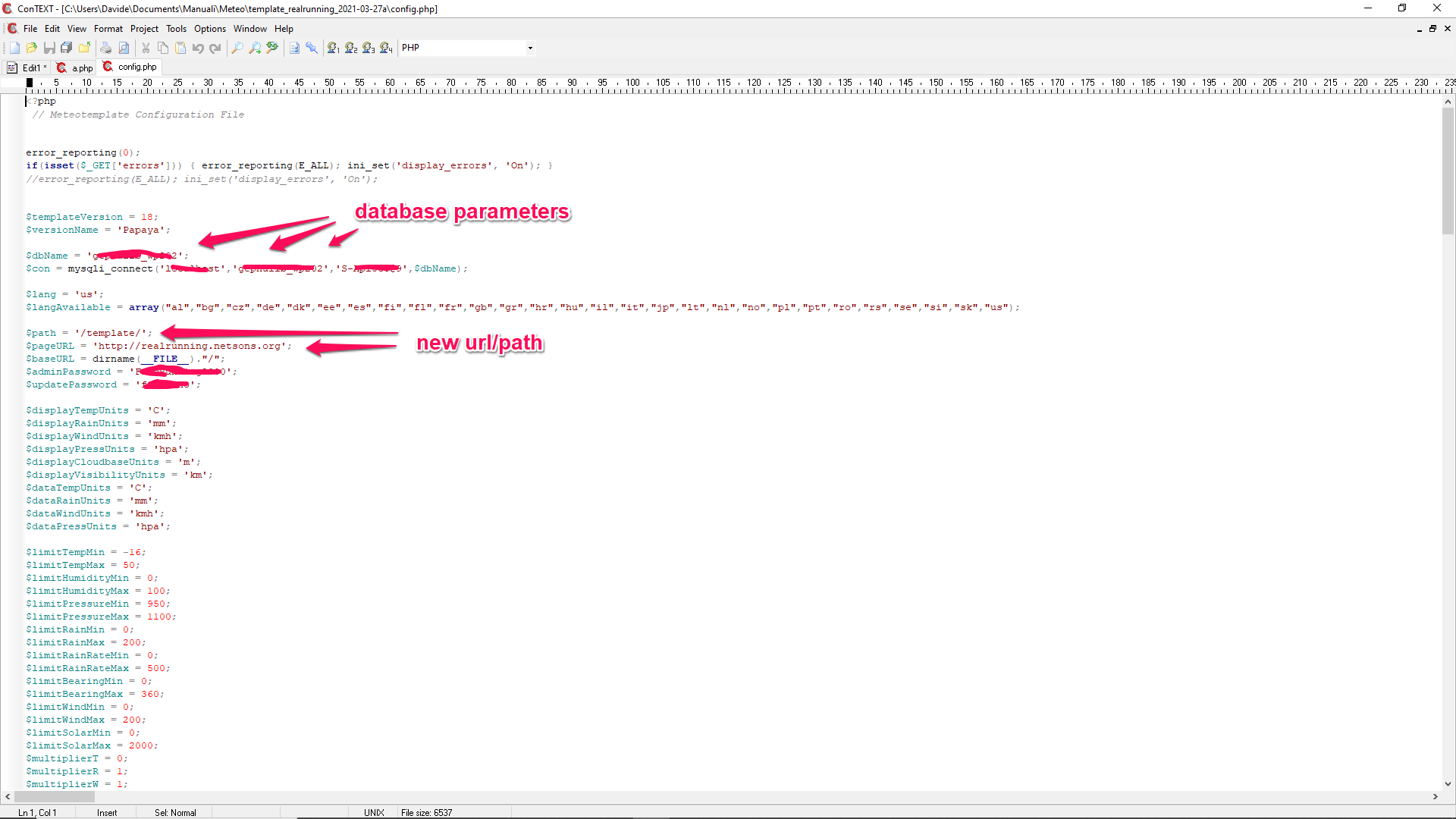
- migration.png (116.07 KiB) Viewed 23293 times
Re: Move Meteotemplate
Posted: Tue Oct 12, 2021 11:25 pm
by spd2612
Moving it is turning into a disaster
can I just do a fresh install, copy over the blocks, plugins and custom pages
then is there a way to back up the meteotemplate settings such as menu and links and then import them into the new install?
If I have to manually configue all of this its going to be a chore
Re: Move Meteotemplate
Posted: Tue Oct 12, 2021 11:50 pm
by Daali
You can copy off everything(blocks/plugins/custom pages), copy to new site. if you keep the url and pathing trees/branches the same you should be ok!
However, you'll have to do something with the databases. The easiest for me was to backup/restore, but you could just setup, dump old, import to new.
Re: Move Meteotemplate
Posted: Wed Oct 13, 2021 12:44 am
by spd2612
Im not concerned about the database
I still have that im just wanting my design and links
I can move the database in tact
Re: Move Meteotemplate
Posted: Wed Oct 13, 2021 9:53 am
by davidefa
Sorry, forgot to mention to backup the database ( I generally prefer using phpmyadmin )
Please post the link to the new site so we can take a look ( a simple slash, in the config, can make the difference )
P.S.
Also check if files and folders have the correct permissions ( as these may vary for the new server )
Re: Move Meteotemplate
Posted: Wed Oct 13, 2021 11:22 am
by spd2612
My site is not changing Im just building a fresh vm
The other server has been running for 7 years with updates after update
Just time to clean up