Page 1 of 1
How to edit rain data block
Posted: Sun Aug 28, 2022 9:08 am
by i_fiorentino
Hi to all,
is it possible to edit rain data on rain block?
If yes, how to?
Thanks in advance.
Regards,
Alessandro
Re: How to edit rain data block
Posted: Sun Aug 28, 2022 2:41 pm
by davidefa
Not sure to understand your question, but values shown in the rain block are calculated from the records stored in the database.
So altering the database you can modify these values ( for example using the database -> edit data from the meteotemplate control panel, but it could be a quite long task ).
What are you trying to do?
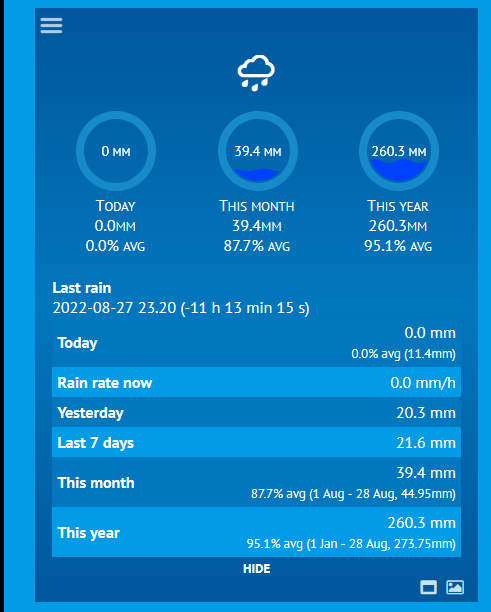
- rain07.png (30.65 KiB) Viewed 4821 times
Re: How to edit rain data block
Posted: Sun Aug 28, 2022 6:48 pm
by i_fiorentino
Hi Davide,
thanks for reply.
I would edit month (and year) rain because that data is wrong.
It shown much more rain than real because a bird (tortora) nested on main rain gauge all summer

I've tried to edit last line of db but without success.
Would i use phpmyadmin?
Regards,
Alessandro
Re: How to edit rain data block
Posted: Mon Aug 29, 2022 1:09 pm
by davidefa
In these cases phpmyadmin is your friend.
You may try something like this ( substitute the appropriate starting and ending dates ):
Code: Select all
UPDATE alldata SET RR=0,R=0 WHERE DateTime >= '2022-08-08 00:00:00' AND DateTime <= '2022-08-08 23:55:00'
P.S.
It is always a good idea to make a backup copy of the database
You may also try the 'Simulate query' button ( before the 'Go button ) to verify that results are reasonable (i.e. you should have roughly 288 results/day )