Page 1 of 1
Climate map won’t show up
Posted: Sun Dec 17, 2017 6:34 am
by bthoven
I believe I got the google map api and put its key in the main setup.
When I click the Climate Map menu, the map show up briefly and gave error.
Please give me some clue how I should fix it....thanks.

- 4E89ED7D-7936-4589-9189-C250F13F71BE.jpeg (242.75 KiB) Viewed 10004 times
Re: Climate map won’t show up
Posted: Sun Dec 17, 2017 10:31 am
by Jachym
Hi,
this is a Google Maps error. If you are using Chrome or Firefox, click F12 and in the console you should see the error.
Or post a link here so that I can have a look myself
Re: Climate map won’t show up
Posted: Sun Dec 17, 2017 11:02 pm
by bthoven
My link is here
bthoven.dyndns.biz:802/template/pages/climate/map.php
Re: Climate map won’t show up
Posted: Mon Dec 18, 2017 12:12 am
by Jachym
The current URL loading the Google Maps JavaScript API has not been added to the list of allowed referrers. Please check the referrer settings of your API key on the Google API Console.
Re: Climate map won’t show up
Posted: Mon Dec 18, 2017 1:34 am
by bthoven
Hi Jachym,
Thanks, it is working now. I have to add to referer the exact full url of climate url, instead of the wildcard url.
Re: Climate map won’t show up
Posted: Wed Apr 20, 2022 3:45 pm
by El_Viejo
I also have this same error.
My authorized sites are the ones in the image.

What am I doing wrong, should I change the syntax of the authorized page?
It is necessary to clarify that my "template" is hosted on a Raspberry Pi 4 and is only accessible by computers placed on my local area network (LAN). It is not accessible via the Internet (WAN).
Thank you very much for your help.
Re: Climate map won’t show up
Posted: Wed Apr 20, 2022 8:38 pm
by davidefa
Not sure you specified correctly the restriction.
You may try specifying the ip address of your raspberry ( 3rd option )
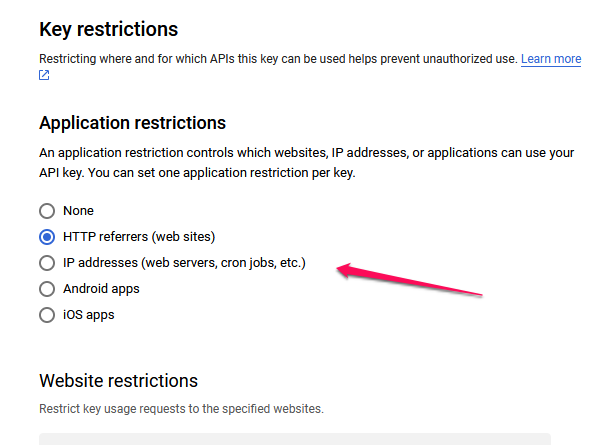
- apikey.png (31.08 KiB) Viewed 8468 times
Re: Climate map won’t show up
Posted: Thu Apr 21, 2022 1:59 pm
by El_Viejo
Thank you very much for your interest.
If I enable "IP address ..." I get an error "Invalid cidr addressblock", when I type
http://192.168.150/ or http://*.192.168.1.150/*.
I think the correct option is "HTTP referrers", but my mistake is in the syntax.
I'm typing http://*.netatmo/template/pages/climate/map.php/*
How should I use the (*) and the (.)?
Re: Climate map won’t show up
Posted: Fri Apr 22, 2022 2:11 pm
by El_Viejo
Solved.
I activate "HTTP referres" and change the syntax as you can see in the image.
The example suggested by Google is confusing.
My compliments to Jachyn's excellent work.
Best regards.