Android App Brainstorming

Would you be interested in an Android application ?

Yes, why not...
11
13%
Yes, and I would participate to the testing phase.
50
61%
No, I don't see the point.
3
4%
I'm an Apple fan, I would prefer an iOS application.
18
22%
 
Total votes: 82

User avatar
polbrieuc
Advisor
Advisor
Posts: 98
Joined: Wed Dec 06, 2017 10:58 pm
Location: Vallirana
Station model: WH1080
Software: Cumulus
Contact:

Re: Android App Brainstorming

Post by polbrieuc » Sat Jan 13, 2018 11:24 am

i_fiorentino wrote: Fri Jan 12, 2018 11:49 pm I want to be included in the testings page ;)
My site is www.meteopistoia.it - Italy.
Hi Alessandro,

Your site has been included in the list and is now available through the app.
Please also download the plugin from the app page and install it as a normal plugin (don't forget to go to your manage plugin page and save the settings). The plugin is needed for units conversion and for the current conditions and webcam dialog.

Enjoy and please report any bug.
Cheers,

Pol-Brieuc
Image

User avatar
i_fiorentino
Language Admin
Language Admin
Posts: 82
Joined: Sun Aug 27, 2017 11:31 pm
Location: Pistoia, Tuscany, IT
Station model: Davis Vantage Vue
Software: Weather Display
Contact:

Re: Android App Brainstorming

Post by i_fiorentino » Sat Jan 13, 2018 8:54 pm

polbrieuc wrote: Sat Jan 13, 2018 11:24 am
i_fiorentino wrote: Fri Jan 12, 2018 11:49 pm I want to be included in the testings page ;)
My site is www.meteopistoia.it - Italy.
Hi Alessandro,

Your site has been included in the list and is now available through the app.
Please also download the plugin from the app page and install it as a normal plugin (don't forget to go to your manage plugin page and save the settings). The plugin is needed for units conversion and for the current conditions and webcam dialog.

Enjoy and please report any bug.
Cheers,

Pol-Brieuc
Thank you so much Pol!
I'll let you know how it goes on my tablet and smartphone android.
Regards,


Alessandro

User avatar
polbrieuc
Advisor
Advisor
Posts: 98
Joined: Wed Dec 06, 2017 10:58 pm
Location: Vallirana
Station model: WH1080
Software: Cumulus
Contact:

Re: Android App Brainstorming

Post by polbrieuc » Sun Jan 14, 2018 1:49 am

Hello all,

Version 0.3 is available for download
Apart from bug fixing, it brings two new dialogs :
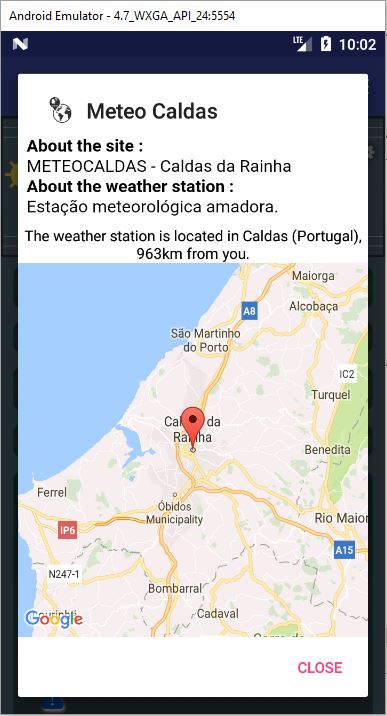
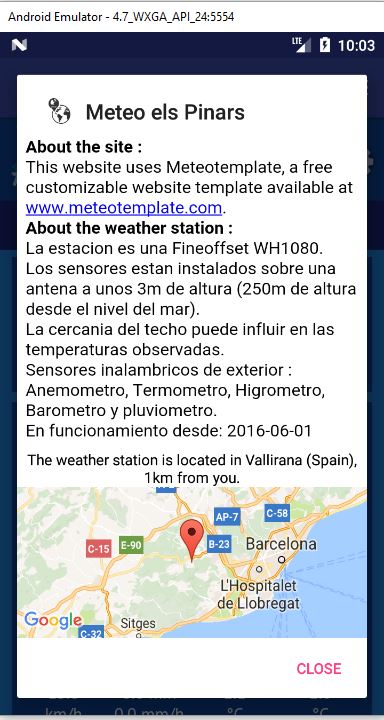
  • The site info dialog (first option from the menu on the left) which displays a simple description of your site, of station and a map with its location.
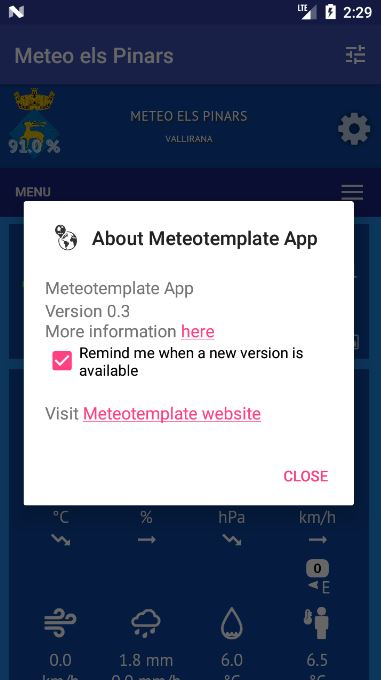
  • The about Dialog, which main purpose is to show if a new version of the app is available
A third dialog will also appear to upgrade your app if your version is lower than the current one (you can deactivate this feature in the About dialog or in the Settings/General).
For those who have their site included in the list of available sites for testing, please download and install the plugin and modify the settongs accroding to your site content (description, webcam, etc)
For more info, check the app page or contact me

As usual, please send your bug reports and feedbacks.
Cheers,

Pol-Brieuc

PS : I have been asked if the app is private. It is totally free and public as long as the Meteotemplate T&Cs are respected. The app is under development so anybody who downloads it should know that bugs may (will) occur. The idea is to release the first stable version to Google Play store and make it available to the public in general. We are still quite far from this milestone though. Be patient...
PPS : Some new screenshots :
ImageImage
Image

User avatar
gillesroszak
Forecaster
Forecaster
Posts: 100
Joined: Sun Aug 20, 2017 1:03 pm
Location: Kerbach
Station model: Aercus Weather ranger
Software: WeeWx on Rpi 0W
Contact:

Re: Android App Brainstorming

Post by gillesroszak » Sun Jan 14, 2018 12:56 pm

HI,

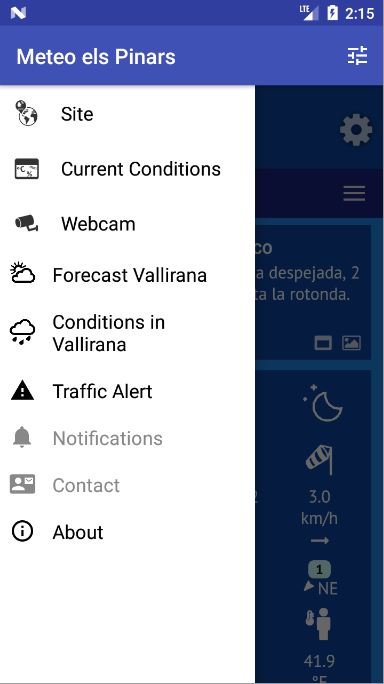
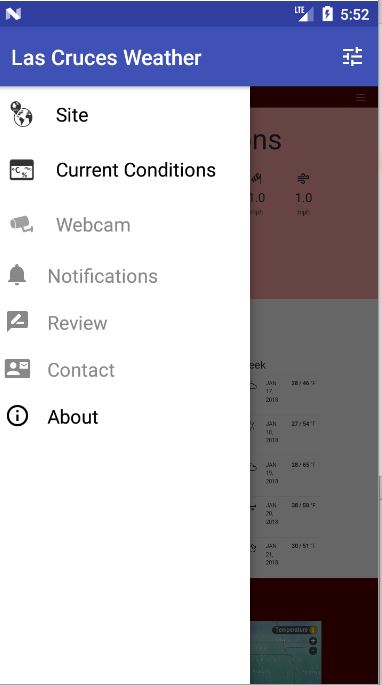
I have a problem with the side menu in 0,3 version. The choices notification, review and contact are grayed out and innaccesible
Somebody to help me please.

Thanks
Gilles


http://www.meteokerbach.fr
Aercus Weather Ranger And WeeWx

Image

User avatar
Johnny
Developer
Developer
Posts: 313
Joined: Sat Aug 19, 2017 10:16 pm
Location: Watford, Hertfordshire, England
Station model: Davis Vantage Pro2 Plus
Software: Meteobridge
Contact:

Re: Android App Brainstorming

Post by Johnny » Sun Jan 14, 2018 1:08 pm

polbrieuc wrote: Sun Jan 14, 2018 1:49 am As usual, please send your bug reports and feedback.
Hi Pol-Brieuc,

I updated to version 0.3 earlier this morning and it all works great - thank you.

Johnny
Image
Davis Vantage Pro2 Plus: http://www.watfordweather.uk

User avatar
polbrieuc
Advisor
Advisor
Posts: 98
Joined: Wed Dec 06, 2017 10:58 pm
Location: Vallirana
Station model: WH1080
Software: Cumulus
Contact:

Re: Android App Brainstorming

Post by polbrieuc » Sun Jan 14, 2018 3:15 pm

gillesroszak wrote: Sun Jan 14, 2018 12:56 pm HI,

I have a problem with the side menu in 0,3 version. The choices notification, review and contact are grayed out and innaccesible
Somebody to help me please.

Thanks
Hi Gilles,
This is not an issue, this is the expected behavior.
The section notifications, reviews and contact are not implemented yet so nothing wrong with your version of the app, it is what it should be.
Potentially, the review section may disappear and a forecast section may be added.
But that will be after the currently needed bug fixing and the notification part which will take time.

Cheers,

Pol-Brieuc
Image

User avatar
Jeffm5690
Advisor
Advisor
Posts: 80
Joined: Sun Aug 20, 2017 1:30 pm
Location: New York USA
Station model: Davis Pro 2
Software: Weather Display
Contact:

Re: Android App Brainstorming

Post by Jeffm5690 » Sun Jan 14, 2018 3:18 pm

This looks great. This is one good think about android.... too bad I’m an iOS user.

User avatar
gillesroszak
Forecaster
Forecaster
Posts: 100
Joined: Sun Aug 20, 2017 1:03 pm
Location: Kerbach
Station model: Aercus Weather ranger
Software: WeeWx on Rpi 0W
Contact:

Re: Android App Brainstorming

Post by gillesroszak » Sun Jan 14, 2018 4:25 pm

polbrieuc wrote: Sun Jan 14, 2018 3:15 pm Hi Gilles,
This is not an issue, this is the expected behavior.
The section notifications, reviews and contact are not implemented yet so nothing wrong with your version of the app, it is what it should be.

OK thanks a lot Pol-Brieux
Gilles


http://www.meteokerbach.fr
Aercus Weather Ranger And WeeWx

Image

User avatar
meteocaldas
Language Admin
Language Admin
Posts: 111
Joined: Fri Aug 25, 2017 7:56 pm
Location: Caldas da Rainha, Portugal
Station model: OS WMR-88A
Software: Cumulus
Contact:

Re: Android App Brainstorming

Post by meteocaldas » Mon Jan 15, 2018 12:31 am

Hi Pol-Brieuc
Thank you so much for your fantastic work with this app and for allways replying to my PM's :-)
I have just installed v0.3 and everything is perfect.
I loved the site info/map new feature :-)
However, I noticed that my station info has a very narrow info bar and a huge map area, compared to what your pic shows.
Is this correct or am I doing something wrong?
Thanks

Image Image

Image

User avatar
iatros
Language Admin
Language Admin
Posts: 147
Joined: Mon Aug 21, 2017 5:56 am
Location: Flims Waldhaus Switzerland
Station model: Davis Pro 2 6163
Software: Meteobridge
Contact:

Re: Android App Brainstorming

Post by iatros » Mon Jan 15, 2018 7:40 am

Pol-Brieuc replied to me, enter more text, and you will see more text as the map is getting smaller .
He will take care of that issue in one of the next versions!
Cheers, Martin
Image

Language Admin für Deutsch

User avatar
polbrieuc
Advisor
Advisor
Posts: 98
Joined: Wed Dec 06, 2017 10:58 pm
Location: Vallirana
Station model: WH1080
Software: Cumulus
Contact:

Re: Android App Brainstorming

Post by polbrieuc » Mon Jan 15, 2018 9:10 am

meteocaldas wrote: Mon Jan 15, 2018 12:31 am
However, I noticed that my station info has a very narrow info bar and a huge map area, compared to what your pic shows.
Is this correct or am I doing something wrong?
There was a bug in version 0.3 that reduced the size of the info to leave more space to the map.
I tried to correct it and published version 0.3.1 :
ImageImage
If you downloaded version 0.3, a popup should appear next time you open the app to propose to upgrade to version 0.3.1 (upgrade = download the app again)
As usual, for those whose site is included in the app, do not forget to download and install the plugin from the app page (and leave the webcam url blank if you don't have a webcam).

Cheers,

Pol-Brieuc
Image

User avatar
meteocaldas
Language Admin
Language Admin
Posts: 111
Joined: Fri Aug 25, 2017 7:56 pm
Location: Caldas da Rainha, Portugal
Station model: OS WMR-88A
Software: Cumulus
Contact:

Re: Android App Brainstorming

Post by meteocaldas » Mon Jan 15, 2018 10:50 am

polbrieuc wrote: Mon Jan 15, 2018 9:10 am There was a bug in version 0.3 that reduced the size of the info to leave more space to the map.
I tried to correct it and published version 0.3.1
Thanks Pol-Brieuc.
V0.3.1 working like a a charm. ;)

Image

User avatar
iatros
Language Admin
Language Admin
Posts: 147
Joined: Mon Aug 21, 2017 5:56 am
Location: Flims Waldhaus Switzerland
Station model: Davis Pro 2 6163
Software: Meteobridge
Contact:

Re: Android App Brainstorming

Post by iatros » Mon Jan 15, 2018 11:31 am

for me too; astounding update procedure!
Thanks, Pol-Brieu
Image

Language Admin für Deutsch

User avatar
jay_hoehn
Language Admin
Language Admin
Posts: 135
Joined: Sun Aug 20, 2017 1:45 pm
Location: Las Cruces, NM USA
Station model: Vantage Pro 2 Plus
Software: WeeWx
Contact:

Re: Android App Brainstorming

Post by jay_hoehn » Mon Jan 15, 2018 4:21 pm

Pol-Brieuc,

Can you post a picture of where the menu is for the station information. I don't see a menu on the left. The only menu is on the right and if I chose station it gives me the option to choose a station. Maybe I'm just not understanding

Thanks,

Jay

User avatar
polbrieuc
Advisor
Advisor
Posts: 98
Joined: Wed Dec 06, 2017 10:58 pm
Location: Vallirana
Station model: WH1080
Software: Cumulus
Contact:

Re: Android App Brainstorming

Post by polbrieuc » Mon Jan 15, 2018 4:53 pm

jay_hoehn wrote: Mon Jan 15, 2018 4:21 pm Can you post a picture of where the menu is for the station information. I don't see a menu on the left. The only menu is on the right and if I chose station it gives me the option to choose a station. Maybe I'm just not understanding
Hi Jay,

You have to swipe your finger from the left edge of the screen toward the right to see the menu.
Image
Image

User avatar
jay_hoehn
Language Admin
Language Admin
Posts: 135
Joined: Sun Aug 20, 2017 1:45 pm
Location: Las Cruces, NM USA
Station model: Vantage Pro 2 Plus
Software: WeeWx
Contact:

Re: Android App Brainstorming

Post by jay_hoehn » Mon Jan 15, 2018 7:59 pm

You have to swipe your finger from the left edge of the screen toward the right to see the menu.
Thanks. That was the ticket.

Jay

User avatar
polbrieuc
Advisor
Advisor
Posts: 98
Joined: Wed Dec 06, 2017 10:58 pm
Location: Vallirana
Station model: WH1080
Software: Cumulus
Contact:

Re: Android App Brainstorming

Post by polbrieuc » Tue Jan 16, 2018 1:56 am

Version 0.4 is here !
You can download it from the app page
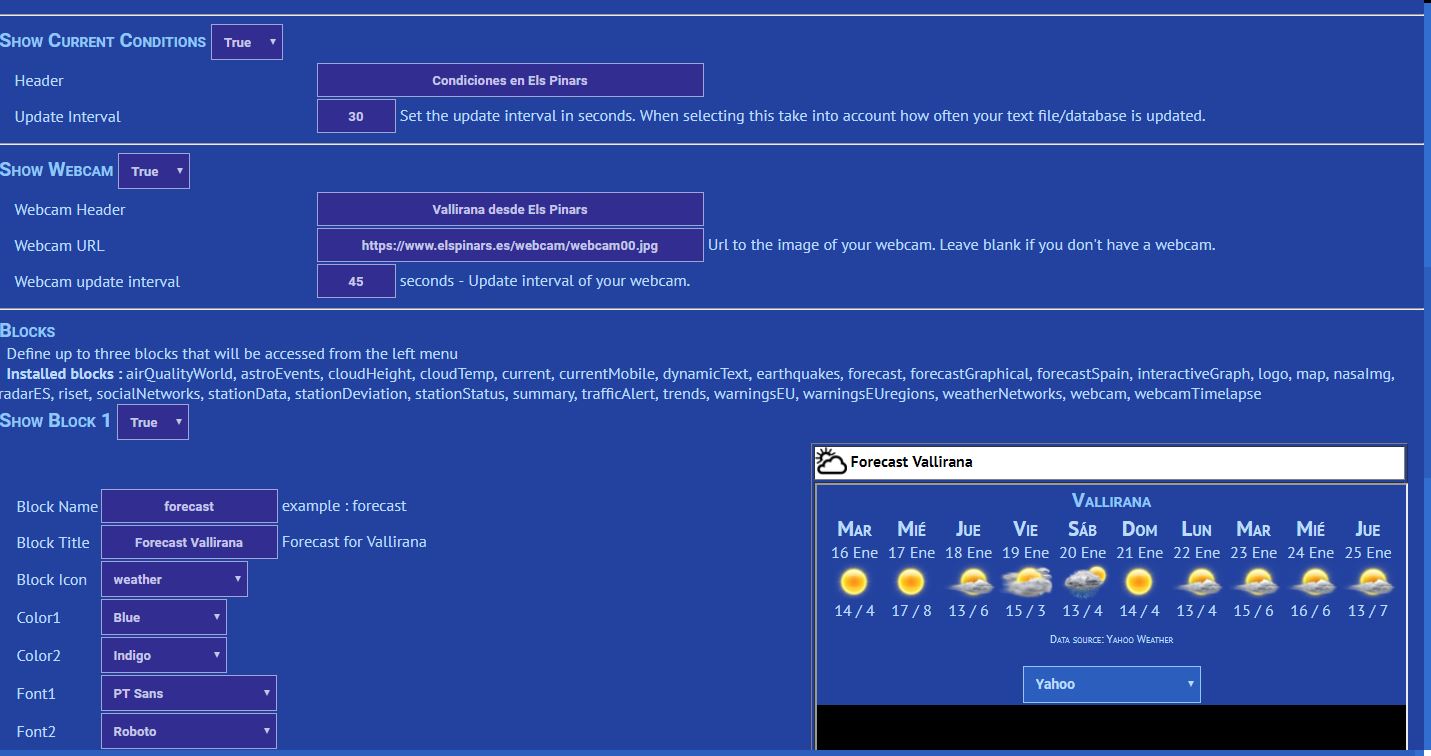
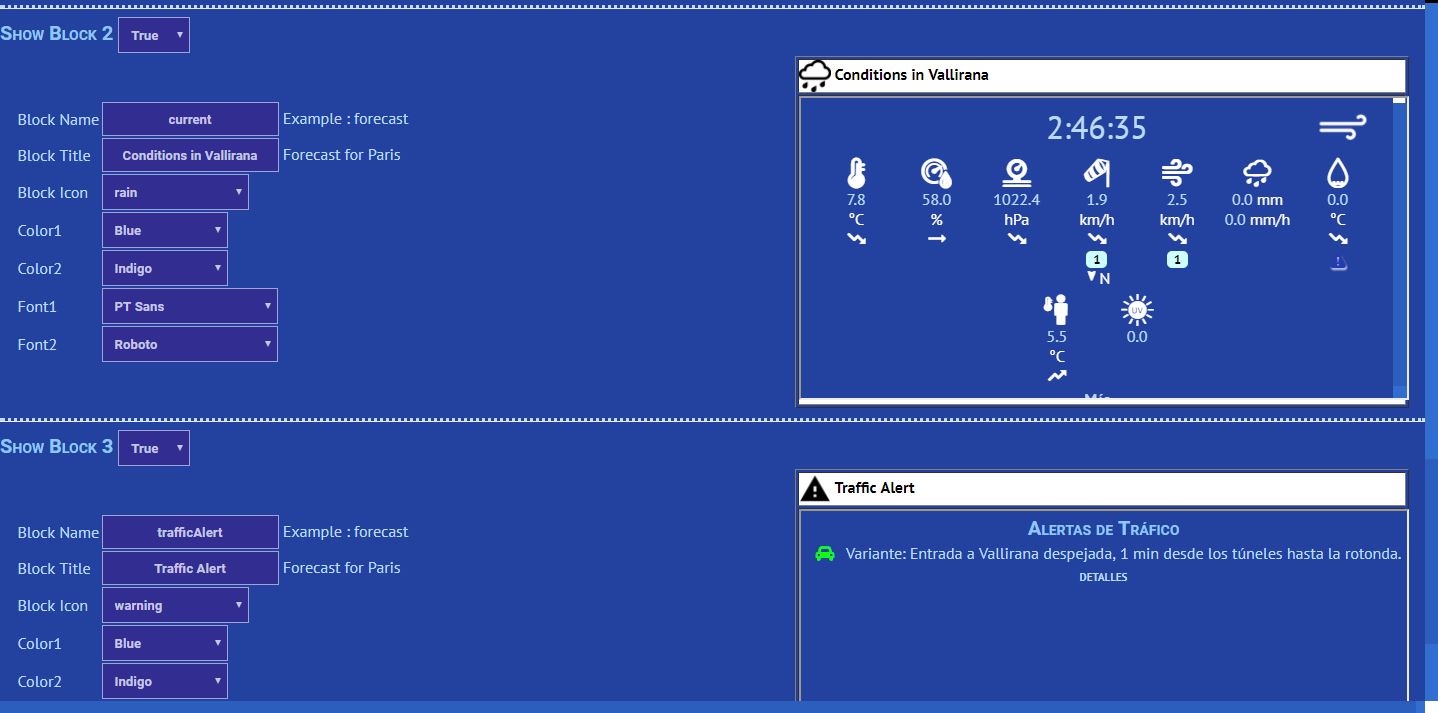
With version 0.4, you can configure up to 3 blocks that will be accessible from the left menu of the app.
Any block already installed on your site can be added but not all may work correctly. Please report if you find blocks that do not work in the app.
First step is obviously to download the version 0.4 of the plugin <--- IMPORTANT!
From there, you can enable/disable left menu options :
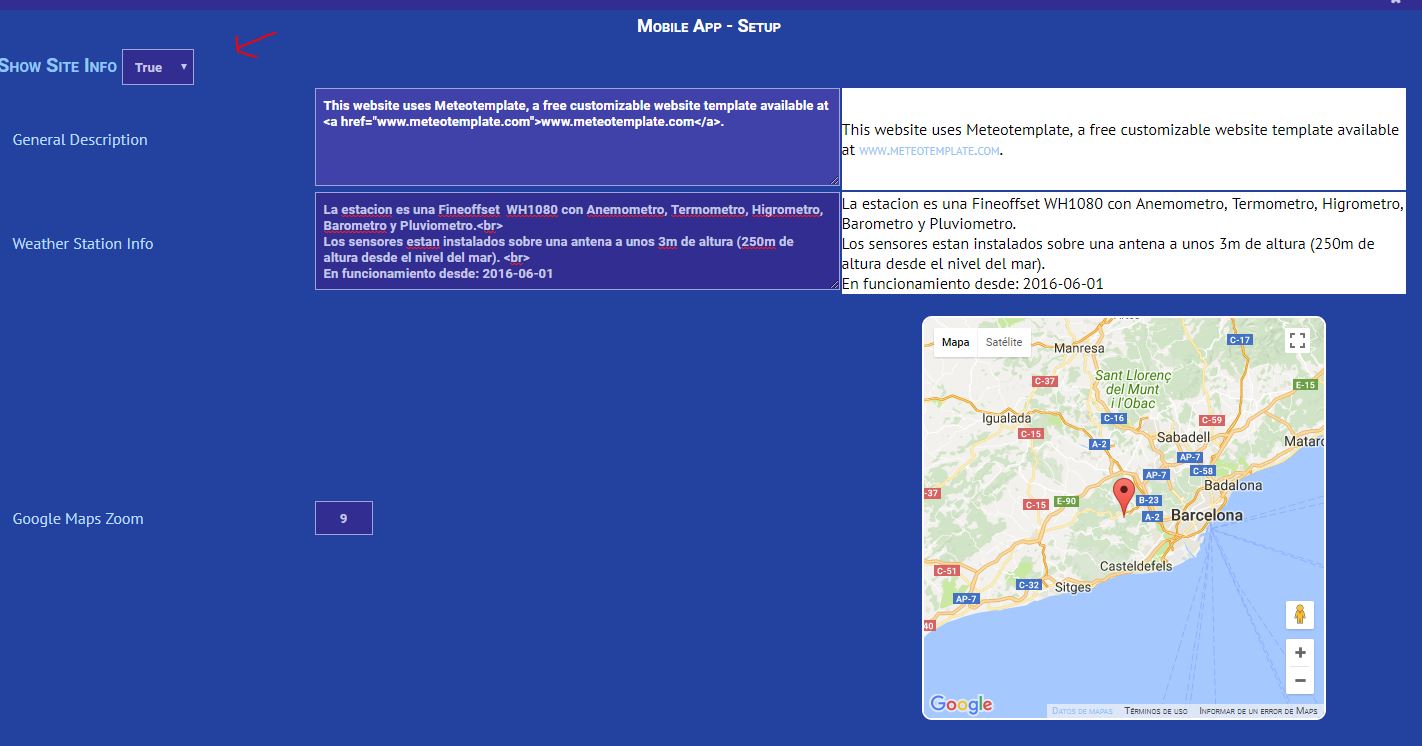
Image
Image
Image
When configuring the blocks, the final resultis shown on the right side.
Note that the Block Name field must match exactly the name of an existing block on your side.
If you want to assign your own icon to a block, just add it to your icons folder and it should appear in the list.

The blocks you configure will appear on the menu on the left :
https://www.elspinars.es/imgs/forum/app0.4-01.JPG

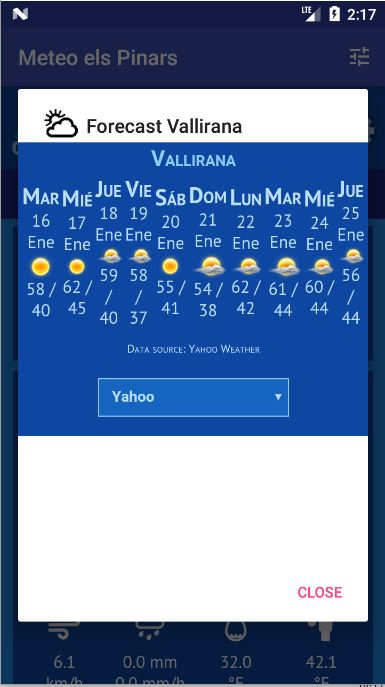
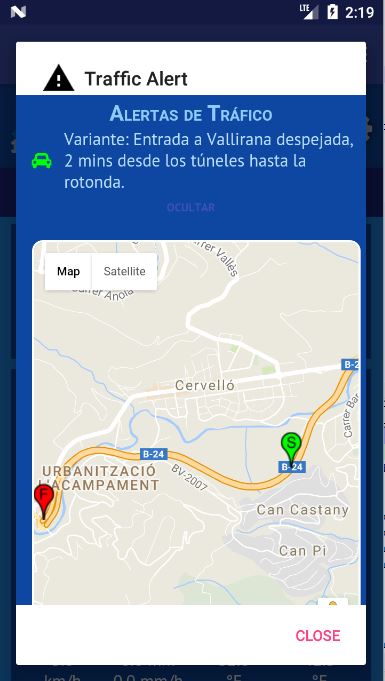
Then you can access each of them individually. The content of the block will load in the corresponding dialog :
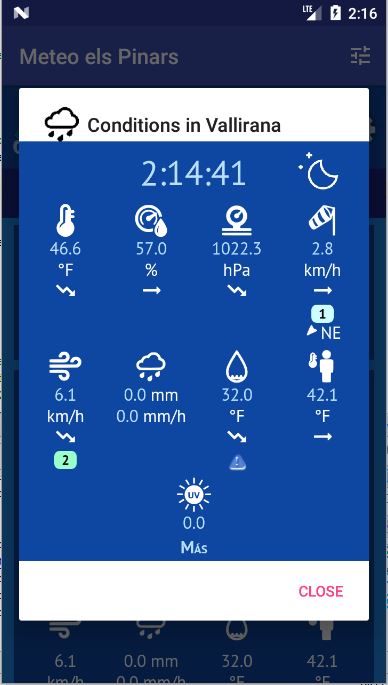
ImageImage
Image

As usual, please report any bug/issue you may face and share your comments.

Cheers,

Pol-Brieuc
Image

User avatar
jay_hoehn
Language Admin
Language Admin
Posts: 135
Joined: Sun Aug 20, 2017 1:45 pm
Location: Las Cruces, NM USA
Station model: Vantage Pro 2 Plus
Software: WeeWx
Contact:

Re: Android App Brainstorming

Post by jay_hoehn » Tue Jan 16, 2018 5:27 pm

Pol-Brieuc,

I added 2 blocks to the app and neither of them seem to work One is stationRecords and the other is areaForecastDiscussion. The only thing that shows on the screen is the spinning icon. Everything else seems to work great.

Jay

User avatar
polbrieuc
Advisor
Advisor
Posts: 98
Joined: Wed Dec 06, 2017 10:58 pm
Location: Vallirana
Station model: WH1080
Software: Cumulus
Contact:

Re: Android App Brainstorming

Post by polbrieuc » Tue Jan 16, 2018 5:52 pm

jay_hoehn wrote: Tue Jan 16, 2018 5:27 pm Pol-Brieuc,

I added 2 blocks to the app and neither of them seem to work One is stationRecords and the other is areaForecastDiscussion. The only thing that shows on the screen is the spinning icon. Everything else seems to work great.

Jay
Hi Jay,

There was a bug that prevented the correct loading of the blocks for those sites who have a path different from "/" (like yours where the path is "/meteo/"
I fixed it and republish the plugin (keeping the same version number, 0.4).
So downloading and installing the plugin again should fix your issue.
I also republished the app (same version number again, 0.4) to fix a small bug that prevented non-secure external links(http) to load in a secure site block (https). So you may want to redownload the app too.
Let me know if it did the trick or if you have any other issue.

Cheers,

Pol-Brieuc

Image

User avatar
jay_hoehn
Language Admin
Language Admin
Posts: 135
Joined: Sun Aug 20, 2017 1:45 pm
Location: Las Cruces, NM USA
Station model: Vantage Pro 2 Plus
Software: WeeWx
Contact:

Re: Android App Brainstorming

Post by jay_hoehn » Tue Jan 16, 2018 6:52 pm

Pol-Brieuc,

That fix didn't solve the issue. I switched to the old customizable mobile page with same results.

Jay

User avatar
polbrieuc
Advisor
Advisor
Posts: 98
Joined: Wed Dec 06, 2017 10:58 pm
Location: Vallirana
Station model: WH1080
Software: Cumulus
Contact:

Re: Android App Brainstorming

Post by polbrieuc » Tue Jan 16, 2018 7:13 pm

jay_hoehn wrote: Tue Jan 16, 2018 6:52 pm Pol-Brieuc,

That fix didn't solve the issue. I switched to the old customizable mobile page with same results.

Jay
Hi Jay,

In your case, you had a second issue which was that your site was registered in the app without the "www" prefix (this cause a JS cross-domain error in the loadBlock.php page).
I changed the url registered for your site and it now works. No action to take on your side for now.

Cheers,

Pol-Brieuc
Image

User avatar
jay_hoehn
Language Admin
Language Admin
Posts: 135
Joined: Sun Aug 20, 2017 1:45 pm
Location: Las Cruces, NM USA
Station model: Vantage Pro 2 Plus
Software: WeeWx
Contact:

Re: Android App Brainstorming

Post by jay_hoehn » Tue Jan 16, 2018 7:35 pm

Pol-Brieuc,

All works good now. I did have to uninstall the app and reinstall to get it to work. Thanks for the work.

Jay

User avatar
Johnny
Developer
Developer
Posts: 313
Joined: Sat Aug 19, 2017 10:16 pm
Location: Watford, Hertfordshire, England
Station model: Davis Vantage Pro2 Plus
Software: Meteobridge
Contact:

Re: Android App Brainstorming

Post by Johnny » Tue Jan 16, 2018 9:18 pm

Hi Pol-Brieuc, updated to version 0.4 and it all works seems to be working great - thank you.

Johnny
Image
Davis Vantage Pro2 Plus: http://www.watfordweather.uk

User avatar
gillesroszak
Forecaster
Forecaster
Posts: 100
Joined: Sun Aug 20, 2017 1:03 pm
Location: Kerbach
Station model: Aercus Weather ranger
Software: WeeWx on Rpi 0W
Contact:

Re: Android App Brainstorming

Post by gillesroszak » Wed Jan 17, 2018 6:21 am

Hi Pol-Brieuc

updated to version 0.4 just now. it seems to working great
Thanks to you
Gilles


http://www.meteokerbach.fr
Aercus Weather Ranger And WeeWx

Image

ON1GL
Observer
Observer
Posts: 33
Joined: Mon Nov 06, 2017 10:37 am
Location: Antwerp
Station model: Davis Vantage Pro 2
Software: Meteotemplate/MeteoBridge
Contact:

Re: Android App Brainstorming

Post by ON1GL » Wed Jan 17, 2018 1:53 pm

Installed the app and php file, is there a way to enter the station url in the app or is this hardcoded ?

regards

Luc

Post Reply