Percipitation total logged to the next day

Post Reply
milesb
Observer
Observer
Posts: 49
Joined: Tue Mar 26, 2019 10:38 pm
Location: Asheville, NC
Station model: Davis Vantage Pro2
Software: Weather Display
Contact:

Percipitation total logged to the next day

Post by milesb » Tue Apr 02, 2019 2:16 am

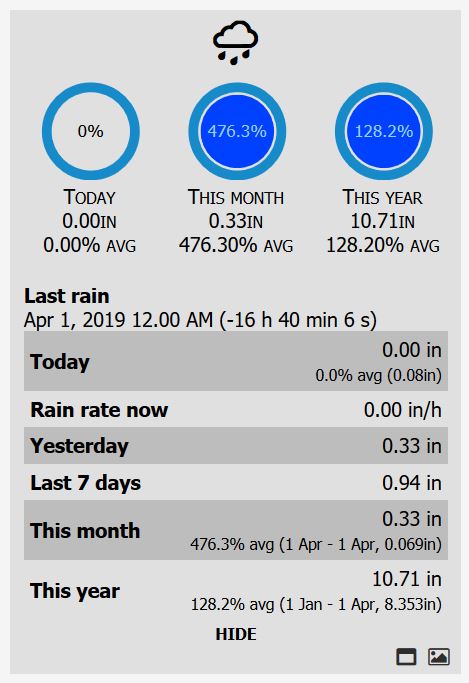
Precipitation that occurred on March 31, is shown as falling on April 1.

On 3/31 my station received .33" of precipitation. Looking at the data by Weather Station > Precipitation is shows that .33" of rain has fallen in April, which is incorrect.

I first noticed this by the odd display in the rain block. During the day on Sunday, my Meteotemplate pages were showing the correct amount of rain during the day. The rain stopped shortly after 6 PM on Sunday, yet the database shows that rain as falling the next day, yet the current conditions shows no precipitation for today, which is correct.

Image

User avatar
Jachym
Site Admin
Site Admin
Posts: 1686
Joined: Fri Aug 18, 2017 10:12 pm
Location: Brno, Czech Republic
Station model: WH1080
Software: Meteobridge
Contact:

Re: Percipitation total logged to the next day

Post by Jachym » Tue Apr 02, 2019 4:17 pm

Try opening the Main setup, then BUlk database editing and then Fix rain

milesb
Observer
Observer
Posts: 49
Joined: Tue Mar 26, 2019 10:38 pm
Location: Asheville, NC
Station model: Davis Vantage Pro2
Software: Weather Display
Contact:

Re: Percipitation total logged to the next day

Post by milesb » Tue Apr 02, 2019 7:01 pm

Easy enough to fix, but why does it attribute the previous days rain to the first record for the next day. I don't want to be a nit picker, but this looks like it would repeat every month with precipitation on the last day of the month, at least where WD is the source.

Below is the last records for 3/31, and first records for 4/1.

2019-03-31 23:45:00 35.4 35.4 35.2 56.3 30.19 3.3 12.0 311.0 0.33 0.00 21.3 28.7
2019-03-31 23:50:00 35.2 35.4 35.2 56.5 30.19 2.1 9.0 309.0 0.33 0.00 21.2 29.2
2019-03-31 23:55:00 35.2 35.2 35.1 56.7 30.20 2.1 9.0 309.0 0.33 0.00 21.3 29.2
2019-04-01 00:00:00 35.1 35.2 35.1 57.0 30.20 2.7 10.0 314.0 0.33 0.00 21.2 28.7

2019-04-01 00:05:00 35.0 35.1 34.9 57.6 30.20 1.8 8.0 306.0 0.00 0.00 21.4 29.2
2019-04-01 00:10:00 34.9 34.9 34.9 57.6 30.21 4.0 11.0 303.0 0.00 0.00 21.2 27.8

The above data was entered into the database by Meteotemplate using data sent from Weather-Display publication function for same.

Based on this I am guessing that any precipitation on the last day of the month, will also show in the first day of the next month.

The below data was imported into the database as it occurred before I setup Meteotemplate, and it enters that last data of the previous day as 23:59
2019-03-21 23:45:00 36.7 36.7 36.7 93.0 29.95 3.5 2.7 292.0 0.16 0.01 34.9 31.6
2019-03-21 23:49:00 36.6 36.6 36.6 93.0 29.95 8.1 4.7 301.0 0.16 0.00 34.7 28.9
2019-03-21 23:55:00 36.5 36.5 36.5 93.0 29.95 8.1 5.5 306.0 0.17 0.01 34.7 28.8
2019-03-21 23:59:00 36.5 36.5 36.5 92.0 29.95 10.4 5.1 46.0 0.17 0.01 34.3 27.5
2019-03-22 00:05:00 36.4 36.4 36.4 92.0 29.95 3.5 2.5 347.0 0.00 0.01 34.3 31.3

2019-03-22 00:10:00 36.4 36.4 36.4 92.0 29.95 3.5 1.9 293.0 0.00 0.01 34.3 31.3
2019-03-22 00:14:00 36.3 36.3 36.3 92.0 29.96 8.1 2.3 305.0 0.00 0.01 34.2 28.6

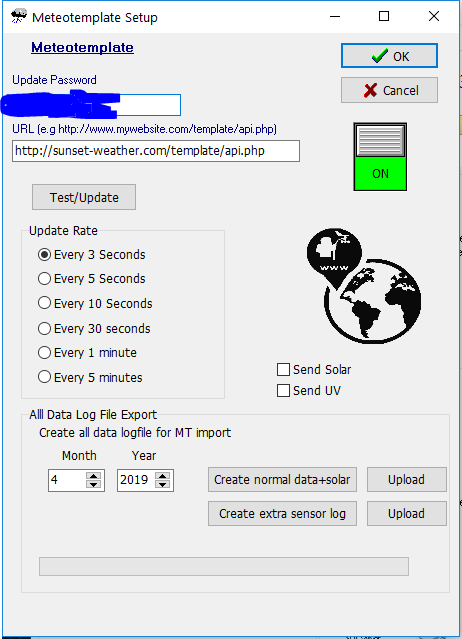
Is this a timing issue with how Meteotemplate receives data from Weather Display?
Image

milesb
Observer
Observer
Posts: 49
Joined: Tue Mar 26, 2019 10:38 pm
Location: Asheville, NC
Station model: Davis Vantage Pro2
Software: Weather Display
Contact:

Re: Percipitation total logged to the next day

Post by milesb » Sat Apr 06, 2019 3:18 pm

My suspicions were right. The first rain for April came on 4/5, when I had 0.20" of rain, ending at 9:35 AM, and there has been no rain since. Not sure why this occurs, but as it looks now I will have to manually edit that database the day following every day there is rainfall, or over 120 times a year.

My rain block now shows that 0.40 inches of rain has fallen in April. It also shows that the last rain was at Apr 6, 2019 12.00 AM.

The screen grabs below are before and after database edits correcting the 2019-04-06 00:00:00 precipitation to 0.00.

Before correcting the 00:00:00 hour database entry
before edit.JPG
before edit.JPG (52.7 KiB) Viewed 21034 times

After correcting the 00:00:00 hour database entry
after edit.JPG
after edit.JPG (53.18 KiB) Viewed 21034 times

milesb
Observer
Observer
Posts: 49
Joined: Tue Mar 26, 2019 10:38 pm
Location: Asheville, NC
Station model: Davis Vantage Pro2
Software: Weather Display
Contact:

Re: Percipitation total logged to the next day

Post by milesb » Sun Apr 07, 2019 1:49 am

Another user has reported the exact problem on the WD Weather-Watch forum.

milesb
Observer
Observer
Posts: 49
Joined: Tue Mar 26, 2019 10:38 pm
Location: Asheville, NC
Station model: Davis Vantage Pro2
Software: Weather Display
Contact:

Re: Percipitation total logged to the next day

Post by milesb » Mon Apr 08, 2019 4:37 pm

Brian has sent me an update to hopefully correct this issue. Will advise if it works after midnight, as I have had some rain today.

milesb
Observer
Observer
Posts: 49
Joined: Tue Mar 26, 2019 10:38 pm
Location: Asheville, NC
Station model: Davis Vantage Pro2
Software: Weather Display
Contact:

Re: Percipitation total logged to the next day

Post by milesb » Tue Apr 09, 2019 2:34 pm

The update Brian made available had no effect on the rain for a day carrying over to the next day's rain total.

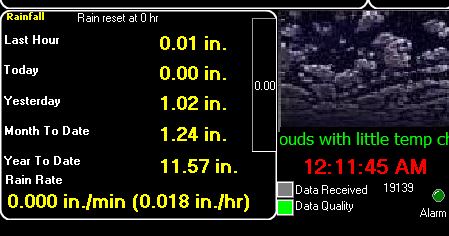
This is what I see on my Weather Display main screen.
Image

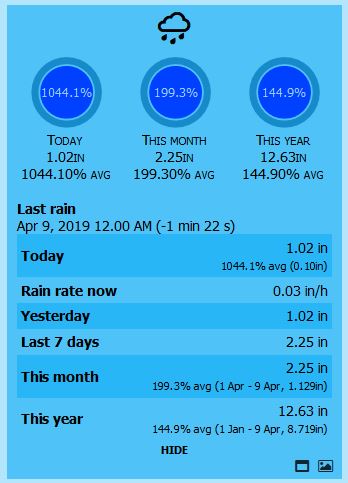
This is what the rain block shows as the same time on MT.
Image

The single entry at 00:00:00 hours in the database that includes the previous days rain is the cause. Editing this single entry corrects everything as far as rain totals.
Image

andyk1
Professional
Professional
Posts: 432
Joined: Tue Feb 27, 2018 10:56 pm
Location: OKLAHOMA, USA
Station model: Ecowitt WS90
Software: Meteobridge/GW2000B
Contact:

Re: Percipitation total logged to the next day

Post by andyk1 » Wed Apr 10, 2019 9:22 am

You are correct that the last entry of the rain total for the previous day carries over to the next day. My guess is the cache being the error carrying over to the next day. The fix to this is as Jachym said in a previous post. He is working on a fix and will possibly be out in the next update.

Andy
Image

milesb
Observer
Observer
Posts: 49
Joined: Tue Mar 26, 2019 10:38 pm
Location: Asheville, NC
Station model: Davis Vantage Pro2
Software: Weather Display
Contact:

Re: Percipitation total logged to the next day

Post by milesb » Thu Apr 25, 2019 6:58 pm

Brian made test changes to WD for me try, but did not solve the problem. Having to edit the database every time it rains is a bit of a nuance.

User avatar
WessexWeather
Forecaster
Forecaster
Posts: 130
Joined: Mon Aug 21, 2017 6:26 pm
Location: Wimborne, East Dorset, UK
Station model: Davis Vantage Vue
Software: Meteobridge
Contact:

Re: Percipitation total logged to the next day

Post by WessexWeather » Tue Apr 30, 2019 12:01 pm

Just stumbled on this thread, and it seems that it's not just WD users that are affected.

I use Meteobridge, and noticed one unusual rainfall measurement this month - looking at the database the previous day's rainfall was carried over. Looking back through all my records this year, this has happened on many occasions - the previous day's entry is recorded at 0:00 or 0:05. There seems to be no pattern to it - some days are OK, others show the error.

Plus, I have two MT installations on my server, one using Meteobridge to update from a Davis station and the other using the Netatmo plugin to update from a Netatmo station. Both are affected in the same way.

I have been using MT for several years now and I fear that my monthly and yearly rainfall records are probably incorrect since I started, and I just don't have tome to check every date in the databases for errors on days that rainfall has been recorded.

[EDIT 2nd July 2019: Since posting here I have discovered that this is a known issue caused by short update intervals and slow servers, where a day's rainfall carries over to the next day, at 00:00 or 00:05. In true Jachym style, he has already provided a fix for this within Control Panel - Bulk Database Editing - scroll to bottom then hit "CHECK AND FIX RAIN". I will now do this at the beginning of each month. Job done!]
Last edited by WessexWeather on Thu May 02, 2019 9:26 am, edited 1 time in total.
Regards,

Simon (WessexWeather)

Image

drparker
Newbie
Newbie
Posts: 4
Joined: Tue Apr 23, 2019 3:45 pm
Station model: WeatherFlow
Software: WD

Re: Percipitation total logged to the next day

Post by drparker » Tue Apr 30, 2019 12:17 pm

why not just delete all entries with a time stamp of 00:00 and 00:05. The impact of losing the first 5 minutes of the days data should be minimal and shouldn't be too time-consuming to do.

milesb
Observer
Observer
Posts: 49
Joined: Tue Mar 26, 2019 10:38 pm
Location: Asheville, NC
Station model: Davis Vantage Pro2
Software: Weather Display
Contact:

Re: Percipitation total logged to the next day

Post by milesb » Tue Apr 30, 2019 2:57 pm

It is not even necessary to delete the 00:00:00 entry in the data base, but merely edit it by setting the rain to 0.00, or if there has not been any rain on the following day, just hit "reset all precipitation".

Jachym has made it very easy to edit the database, however it is still an annoyance, and one must remember to actually do it the day after every rainfall. Not a big deal it you live in the desert, but with 120 - 140 rain events a year, a nuisance.

User avatar
WessexWeather
Forecaster
Forecaster
Posts: 130
Joined: Mon Aug 21, 2017 6:26 pm
Location: Wimborne, East Dorset, UK
Station model: Davis Vantage Vue
Software: Meteobridge
Contact:

Re: Percipitation total logged to the next day

Post by WessexWeather » Tue Apr 30, 2019 4:26 pm

Imagine living in the UK, where it rains most days!
Regards,

Simon (WessexWeather)

Image

drparker
Newbie
Newbie
Posts: 4
Joined: Tue Apr 23, 2019 3:45 pm
Station model: WeatherFlow
Software: WD

Re: Percipitation total logged to the next day

Post by drparker » Tue Apr 30, 2019 10:56 pm

My thought around deletion was for WessexWeather who has years of data. a simple SQL statement could delete all the 00 entries instead of trying to edit them.

User avatar
John B
Forecaster
Forecaster
Posts: 211
Joined: Sun Aug 20, 2017 11:59 pm
Location: Blaxland, N.S.W., Australia
Station model: La Crosse WS2355
Software: Weather Display
Contact:

Re: Precipitation total logged to the next day

Post by John B » Wed May 01, 2019 3:27 am

Jachym wrote: Tue Apr 02, 2019 4:17 pm Try opening the Main setup, then BUlk database editing and then Fix rain
I use Weather Display and this anomaly, due to apparent missing data at the change over date, seems to work quite well.

Select your administrator privileges by clicking on the cogged wheel in your menu bar and then click on the Control Panel option.
Then move down to the Database section and select the Bulk Data Base Editing.
Click on that and then go to the bottom of the page. You will find there an option to "Check and Fix Rain"

If you click on that you should get a message that shows you what has happened. Hopefully that should fix the problem.

Regards,
John
Last edited by John B on Fri May 03, 2019 2:55 am, edited 1 time in total.

User avatar
WessexWeather
Forecaster
Forecaster
Posts: 130
Joined: Mon Aug 21, 2017 6:26 pm
Location: Wimborne, East Dorset, UK
Station model: Davis Vantage Vue
Software: Meteobridge
Contact:

Re: Percipitation total logged to the next day

Post by WessexWeather » Thu May 02, 2019 9:28 am

John B wrote: Wed May 01, 2019 3:27 am
Jachym wrote: Tue Apr 02, 2019 4:17 pm Try opening the Main setup, then BUlk database editing and then Fix rain
Select your administrator privileges by clicking on the cogged wheel in your menu bar and then click on the Control Panel option.
Then move down to the Database section and select the Bulk Data Base Editing.
Click on that and then go to the bottom of the page. You will find there an option to "Check and Fix Rain"

If you click on that you should get a message that shows you what has happened. Hopefully that should fix the problem.
Thanks John, this is really helpful and has solved my problem. I have edited my original post to help others.
Regards,

Simon (WessexWeather)

Image

milesb
Observer
Observer
Posts: 49
Joined: Tue Mar 26, 2019 10:38 pm
Location: Asheville, NC
Station model: Davis Vantage Pro2
Software: Weather Display
Contact:

Re: Percipitation total logged to the next day

Post by milesb » Thu May 02, 2019 6:49 pm

Still doesn't "fix" the problem as it will still be necessary to take some action the day following any precipitation.

User avatar
WessexWeather
Forecaster
Forecaster
Posts: 130
Joined: Mon Aug 21, 2017 6:26 pm
Location: Wimborne, East Dorset, UK
Station model: Davis Vantage Vue
Software: Meteobridge
Contact:

Re: Percipitation total logged to the next day

Post by WessexWeather » Thu May 02, 2019 7:53 pm

milesb wrote: Thu May 02, 2019 6:49 pm Still doesn't "fix" the problem as it will still be necessary to take some action the day following any precipitation.
True, but you could run this on the first of every month, safe in the knowledge that all your previous rainfall data is error free.

Miles, could you possibly edit the title to read “precipitation” rather than “percipitation”? It might be more useful to others in searches
Regards,

Simon (WessexWeather)

Image

milesb
Observer
Observer
Posts: 49
Joined: Tue Mar 26, 2019 10:38 pm
Location: Asheville, NC
Station model: Davis Vantage Pro2
Software: Weather Display
Contact:

Re: Percipitation total logged to the next day

Post by milesb » Fri May 03, 2019 12:44 am

Appears I don't have the permissions to edit the original.

fredericowessel
Newbie
Newbie
Posts: 8
Joined: Tue Jan 09, 2018 3:47 pm
Location: Teutônia/RS - Brasil
Station model: Davis Pro 2 6163
Software: Meteobridge
Contact:

Re: Percipitation total logged to the next day

Post by fredericowessel » Mon May 13, 2019 9:16 pm

I also have many problems with rain data. When I try to use the function "Check and Fix Rain", nothing happen.
What is also strange is, for instance:

3/11/2018

Meteotemplate Yearly Report: 32 mm WRONG
Wunderground: 15 mm CORRECT
Meteotemplate Daily Report: 15 mm CORRECT

I'm thinking about delete all wrong data and insert agains directly in my DB. Would it be a good option?

Post Reply