I can not install blocks

Post Reply
Oscarmr
Observer
Observer
Posts: 42
Joined: Tue Nov 07, 2017 11:46 pm
Station model: Netatmo

I can not install blocks

Post by Oscarmr » Sun Feb 11, 2018 4:06 pm

Hi !

Why does this message appear in my template and I can not update or install new blocks, if I already have version 17.0 installed?

Image

User avatar
Jachym
Site Admin
Site Admin
Posts: 1686
Joined: Fri Aug 18, 2017 10:12 pm
Location: Brno, Czech Republic
Station model: WH1080
Software: Meteobridge
Contact:

Re: I can not install blocks

Post by Jachym » Sun Feb 11, 2018 5:18 pm

It is a general notice, it is displayed for everyone, it does not mean you are using outdated version.

User avatar
Jachym
Site Admin
Site Admin
Posts: 1686
Joined: Fri Aug 18, 2017 10:12 pm
Location: Brno, Czech Republic
Station model: WH1080
Software: Meteobridge
Contact:

Re: I can not install blocks

Post by Jachym » Sun Feb 11, 2018 5:18 pm

I just could not emphasize it more to people, it was in the wiki, Blocks page and people still did it :D This should help.... hopefully :D

Oscarmr
Observer
Observer
Posts: 42
Joined: Tue Nov 07, 2017 11:46 pm
Station model: Netatmo

Re: I can not install blocks

Post by Oscarmr » Sun Feb 11, 2018 5:36 pm

Thanks jachym !

But then why can not I install new blocks? and in the list of installed blocks does not indicate the latest version

Image

User avatar
Jachym
Site Admin
Site Admin
Posts: 1686
Joined: Fri Aug 18, 2017 10:12 pm
Location: Brno, Czech Republic
Station model: WH1080
Software: Meteobridge
Contact:

Re: I can not install blocks

Post by Jachym » Sun Feb 11, 2018 7:50 pm

OK I see, this has nothing to do with that red dialog. This means that there is a problem in the communication between your and my server, this problem affects about 10% of users. However you can install blocks manually like you did in previous versions without any problems, it will work fine.

mrtcjg
Newbie
Newbie
Posts: 5
Joined: Sun Feb 11, 2018 7:52 pm
Location: Londonderry NH 03053
Station model: Davis Vantage Vue 6357
Software: Weather Display
Contact:

Re: I can not install blocks

Post by mrtcjg » Sun Feb 11, 2018 9:02 pm

I am having a hard time understanding installing and uploading blocks to homepage, I have downloaded them, shows them in list but doesnt have versions next to them and when I go to add them to homepage I get spinning icons and says not installed?

User avatar
Dehatter
Professional
Professional
Posts: 350
Joined: Sun Jan 07, 2018 5:11 am
Location: Matthews, NC, USA
Station model: Ecowitt WH80
Software: Ecowitt GW1000
Contact:

Re: I can not install blocks

Post by Dehatter » Sun Feb 11, 2018 9:16 pm

Just to be clear.

You used ftp and copied the block files to the /template/homepage/blocks folder on your server.

Then when you are logged in as an administrator, and go to the block setup tab, the block names are there, but do not have a version number? Do they show the "Create" or "Edit" setting as shown in the attached photo?

Tom
Attachments
ftp.jpg
ftp.jpg (114.24 KiB) Viewed 30236 times
BS.jpg
BS.jpg (68.34 KiB) Viewed 30238 times
Image

mrtcjg
Newbie
Newbie
Posts: 5
Joined: Sun Feb 11, 2018 7:52 pm
Location: Londonderry NH 03053
Station model: Davis Vantage Vue 6357
Software: Weather Display
Contact:

Re: I can not install blocks

Post by mrtcjg » Sun Feb 11, 2018 10:45 pm

no they do not show that
Attachments
Untitled.jpg
Untitled.jpg (319.18 KiB) Viewed 30230 times

mrtcjg
Newbie
Newbie
Posts: 5
Joined: Sun Feb 11, 2018 7:52 pm
Location: Londonderry NH 03053
Station model: Davis Vantage Vue 6357
Software: Weather Display
Contact:

Re: I can not install blocks

Post by mrtcjg » Sun Feb 11, 2018 10:59 pm

Here is the pic showing my filezila , all seems correct
Attachments
111.jpg
111.jpg (440.89 KiB) Viewed 30225 times

BlueBear
Forecaster
Forecaster
Posts: 101
Joined: Sun Aug 20, 2017 1:04 pm
Location: Sanford, Manitoba, Canada
Station model: Davis VP2
Software: WeeWx
Contact:

Re: I can not install blocks

Post by BlueBear » Sun Feb 11, 2018 11:05 pm

You appear to have renamed the uploaded the blocks
ie ../homepage/block/airQualityUS_3.1 should be ../homepage/blocks/airQualityUS without the version number!!

mrtcjg
Newbie
Newbie
Posts: 5
Joined: Sun Feb 11, 2018 7:52 pm
Location: Londonderry NH 03053
Station model: Davis Vantage Vue 6357
Software: Weather Display
Contact:

Re: I can not install blocks

Post by mrtcjg » Sun Feb 11, 2018 11:10 pm

ok weird, I didnt change anything when downloading them and uploading them to the site

mrtcjg
Newbie
Newbie
Posts: 5
Joined: Sun Feb 11, 2018 7:52 pm
Location: Londonderry NH 03053
Station model: Davis Vantage Vue 6357
Software: Weather Display
Contact:

Re: I can not install blocks

Post by mrtcjg » Sun Feb 11, 2018 11:18 pm

Do I have to download them again from the meteotemplate website and rename them uplon download to reflect them without the added version info or do I just go and rename them wherei uploaded them to the "blocks" index?

User avatar
Dehatter
Professional
Professional
Posts: 350
Joined: Sun Jan 07, 2018 5:11 am
Location: Matthews, NC, USA
Station model: Ecowitt WH80
Software: Ecowitt GW1000
Contact:

Re: I can not install blocks

Post by Dehatter » Sun Feb 11, 2018 11:46 pm

When you download the block, it is a zip file and you have to extract the contents. Then upload the extracted folder (it will not have the versions numbers) to your server.

Tom
Image

User avatar
Jachym
Site Admin
Site Admin
Posts: 1686
Joined: Fri Aug 18, 2017 10:12 pm
Location: Brno, Czech Republic
Station model: WH1080
Software: Meteobridge
Contact:

Re: I can not install blocks

Post by Jachym » Mon Feb 12, 2018 4:50 am

This depends on which software you use for extracting it, some create an additional folder, some dont.

You always have to upload just the folder, without version number and the namespaceBlock.php file directly inside it.

User avatar
Dehatter
Professional
Professional
Posts: 350
Joined: Sun Jan 07, 2018 5:11 am
Location: Matthews, NC, USA
Station model: Ecowitt WH80
Software: Ecowitt GW1000
Contact:

Re: I can not install blocks

Post by Dehatter » Mon Feb 12, 2018 6:33 am

I am only familiar with Win10, so my assumption has been pointed out and corrected. I hope I have not confused you mrtcjg, especially If your extraction program is doing this. In Win10, I just double click the zip file, then select copy on the folder inside. I did not realize that other programs would do something different.

Tom.
Image

User avatar
thierry.renault
Observer
Observer
Posts: 18
Joined: Tue Dec 26, 2017 8:49 am
Location: Dijon 21
Station model: OREGON WMR200
Software: personnalisé - Raspberry
Contact:

Re: I can not install blocks

Post by thierry.renault » Thu Feb 22, 2018 9:02 am

Bonjour.
Je rebondis sur ce sujet.
Tout nouveau sur meteotemplate, tout est bien installé grâce à l'aide de Jachym.
J'en suis au stade ou je dois installer les blocs.
Comme Dehater, je ne parviens pas à installer le moindre bloc.
J'ai tenté par la méthode nouvelle et l'ancienne méthode : rien à faire


J'ai vérifié mon FTP qui me dit bien : monadresse/mt/admin/homepage/blocks/currentFR

Un petit conseil pour m'aider à avancer me serait bien utile.
Merci d'avance.

PS : je ne vois pas comment joindre une capture d'écran...

Oscarmr
Observer
Observer
Posts: 42
Joined: Tue Nov 07, 2017 11:46 pm
Station model: Netatmo

Re: I can not install blocks

Post by Oscarmr » Thu Feb 22, 2018 1:08 pm

vous avez essayé d'installer les blocs, en les téléchargeant depuis meteotemplate.com et en les téléchargeant sur votre hosting ?

User avatar
thierry.renault
Observer
Observer
Posts: 18
Joined: Tue Dec 26, 2017 8:49 am
Location: Dijon 21
Station model: OREGON WMR200
Software: personnalisé - Raspberry
Contact:

Re: I can not install blocks

Post by thierry.renault » Thu Feb 22, 2018 4:08 pm

Merci pour la réponse.

1 - J'ai téléchargé les 4 blocks "France" : currentFR - forecastFR - mapsFrance - radarFR sur meteotemplate. en zip
2 - j'ai dézippé les dossiers avec 7_zip File Manager
3 - J'ai installé les 4 dossiers dézippés en FTP avec Filezilla en suivant le chemin
: thierry-renault.fr/mt/admin/homepage/blocks
4 - je suis entré dans mon site et me suis connecté en admin.
5 - je suis allé sur page d'accueil :PANNEAU DE CONTROLE / install /setup blocks puis INSTALLER DE NOUVEAUX BLOCKS
Résultat : RIEN

6 - je suis allé dans mon site en admin : PANNEAU DE CONTROLE /INFOS TEMPLATE/blocks installés
Résultat : RIEN

User avatar
Johnny
Developer
Developer
Posts: 313
Joined: Sat Aug 19, 2017 10:16 pm
Location: Watford, Hertfordshire, England
Station model: Davis Vantage Pro2 Plus
Software: Meteobridge
Contact:

Re: I can not install blocks

Post by Johnny » Fri Feb 23, 2018 9:33 am

Hi Thierry, it sounds as though you are doing everything right, but the blocks are still not showing up as installed.

Just something to check: occasionally when I have unzipped files it places what I've unzipped into a further folder, make sure the folder you are copying to Meteo Template does not contain a further folder within it with an identical name. So in the example below you need to copy the lower/second folder (airQaulityWorld) to MT not the one above it.
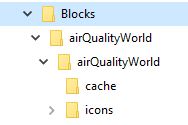
unzipping.JPG
unzipping.JPG (12.08 KiB) Viewed 30122 times

To add an image: Below this text box (when posting) there are two tabs, click on the 'Attachments' tab, then click 'Add Files' then upload your jpg, In Windows you can use the Snipping Tool to grab and part of a screen image and then save it as a .jpg
Image
Davis Vantage Pro2 Plus: http://www.watfordweather.uk

User avatar
thierry.renault
Observer
Observer
Posts: 18
Joined: Tue Dec 26, 2017 8:49 am
Location: Dijon 21
Station model: OREGON WMR200
Software: personnalisé - Raspberry
Contact:

Re: I can not install blocks

Post by thierry.renault » Fri Feb 23, 2018 12:45 pm

ftp.jpg
block1.jpg
block3.jpg
Merci de ta réponse.
Je pense que mes blocks sont bien placés dans mon FTP. (voir photo jointe)
Les blocks ne peuvent pas apparaître ...
J'ai par contre téléchargé des plugins qui eux apparaissent bien.

Est-ce que je dois bien suivre le chemin : thierry-renault.fr/mt/admin/homepage/blocks ???

Merci d'avance de vos conseils.

User avatar
thierry.renault
Observer
Observer
Posts: 18
Joined: Tue Dec 26, 2017 8:49 am
Location: Dijon 21
Station model: OREGON WMR200
Software: personnalisé - Raspberry
Contact:

Re: I can not install blocks

Post by thierry.renault » Fri Feb 23, 2018 4:04 pm

ftp.jpg
ftp.jpg (598.93 KiB) Viewed 30109 times
bloc1.jpg
bloc1.jpg (180.71 KiB) Viewed 30109 times
bloc2.jpg
bloc2.jpg (191.32 KiB) Viewed 30109 times
Oups ! je m'aperçois que mes pièces jointes ne sont pas vues.
Voilà ce qui m'arrive.
Je parviens bien à intégrer les plugins
Je ne parviens pas à intégrer les blocs

Est-ce que le chemin FTP est le bon ?????

Merci d'avance.

User avatar
Jachym
Site Admin
Site Admin
Posts: 1686
Joined: Fri Aug 18, 2017 10:12 pm
Location: Brno, Czech Republic
Station model: WH1080
Software: Meteobridge
Contact:

Re: I can not install blocks

Post by Jachym » Sat Feb 24, 2018 9:59 pm

Hi,
I tried on of the blocks, it should be like this:

http://thierry-renault.fr/mt/homepage/b ... RBlock.php

Either the path is not correct on your server or you need to check permissions.

From the screenshot it looks like you have the homepage folder inside "admin", this is incorrect, it must be in the root, admin is only for admin. Did you move some folders?

User avatar
thierry.renault
Observer
Observer
Posts: 18
Joined: Tue Dec 26, 2017 8:49 am
Location: Dijon 21
Station model: OREGON WMR200
Software: personnalisé - Raspberry
Contact:

Re: I can not install blocks

Post by thierry.renault » Mon Feb 26, 2018 9:59 am

Merci Jachym de ta réponse.
Effectivement homepage était dans admin.
Je n'ai rien changé ...... je ne comprends pas :geek:

Donc, j'ai déplacé homepage directement par FTP à la racine et j'ai fait
http://thierry-renault.fr/mt/indexDesktop.php

Tout va bien. Je vais maintenant configurer tout cela et je vais te tenir informé.

Merci merci....
Très bonne journée à toi. :D :D :D

User avatar
thierry.renault
Observer
Observer
Posts: 18
Joined: Tue Dec 26, 2017 8:49 am
Location: Dijon 21
Station model: OREGON WMR200
Software: personnalisé - Raspberry
Contact:

Re: I can not install blocks

Post by thierry.renault » Tue Feb 27, 2018 11:00 am

Comme convenu je te tiens au courant...
Tout va bien. voir : http://thierry-renault.fr/mt/indexDesktop.php

Je dois encore apprendre à ajouter des plugins et avec mon grand âge ^_^ je ne comprends pas toujours très vite....
c'est encore nébuleux pour moi.

Merci encore et bonne journée.

Post Reply




