Hi Thierry, it sounds as though you are doing everything right, but the blocks are still not showing up as installed.
Just something to check: occasionally when I have unzipped files it places what I've unzipped into a further folder, make sure the folder you are copying to Meteo Template does not contain a further folder within it with an identical name. So in the example below you need to copy the lower/second folder (airQaulityWorld) to MT not the one above it.
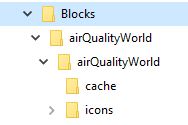
- unzipping.JPG (12.08 KiB) Viewed 30127 times
To add an image: Below this text box (when posting) there are two tabs, click on the 'Attachments' tab, then click 'Add Files' then upload your jpg, In Windows you can use the Snipping Tool to grab and part of a screen image and then save it as a .jpg



 This should help.... hopefully






