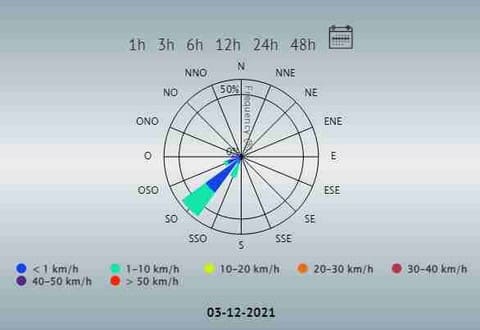
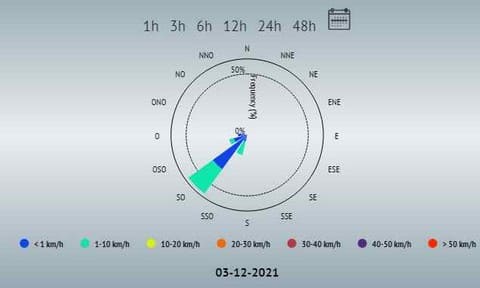
Voila, when I update my home page, the Block Wind rose changes appearance, do you have any idea about this problem.
I prefer the block the first Block.
Thank you
Station météo amateur Lignerolles
OS : Windows 11 Famille
Vantage Vue
Weatherlink 2.0 (WlIP)
Meteotemplate 18.0 Papaya
Can't reproduce on my servers, so not sure what is causing it.
Only changed the X axis precedence ( line 163 gridZIndex: 3 ).
( setting in line 163 'gridZIndex: 4' should draw the axis above the graph )
Thanks Davide
But still the same.
The weird thing is that on the Mobile home page, that doesn't happen.
this also happens on other meteotemplate sites.
Good day and thank you for your research
José Luis
Station météo amateur Lignerolles
OS : Windows 11 Famille
Vantage Vue
Weatherlink 2.0 (WlIP)
Meteotemplate 18.0 Papaya
You could try setting ( in line 163 of file windRoseBlock.php ):
gridZIndex: 4,
This should draw the x axis above the graph ( not very nice ), but this could show if the problem is the color of the axis ( maybe it is drawn in the same color of the background, so it disappears )
Hello,
I also found this curious effect that happens in a completely random way:
In my specific case, if it does not display the X-axis, the legend writings are displayed with the white color that must be;
if it displays the X-axis the color of the legend's characters changes.
mysterious mysteries
Attachments
ScreenShot00918.jpg (30.46 KiB) Viewed 19718 times
ScreenShot00919.jpg (31.78 KiB) Viewed 19718 times
I have installed the windrose block. Is it possible to change the color of the wind speed range texts?.
In automatic mode it gives me a color not visible with the template settings.
Attachments
2022-02-19 12_15_57-MeteoFabro.png (62.31 KiB) Viewed 19496 times
If i have interactiveGraph on homepage the grid lines of windRose disappear. Then if I remove interactiveGraph from homepage, grid lines of windRose reappear. Strange.
Anyway for the windRose legend text to use default color? Light and Dark theme default text color?